Title here
Summary here
Ledgerly stores customer emails, invoice amounts, and a payment gateway API key. Every one of those is worth stealing. An attacker does not need to break into a server to get them. Often, a single unguarded input field is enough. This lesson shows the three-person Ledgerly team how to close the gaps that matter most: unsafe database queries, secrets sitting in source code, database accounts with more power than they need, and dependencies with known flaws.
This lesson closes out the technical content of the Delivery and Operations module. Earlier lessons in this module covered deploying Ledgerly and keeping it running. This lesson adds the last piece: keeping it safe while it runs. The guided project that follows brings deployment, monitoring, and security together into one end-to-end exercise.
By the end of this lesson, you will be able to:
Injection happens when an application builds a command, such as a SQL query, by joining together fixed code and untrusted text from a user. If the untrusted text contains its own code, the database can end up running that code instead of treating it as plain data. SQL injection is the most common form of this problem in web applications.
Ledgerly needs a function that looks up a customer by email address, for a login flow or a search box. Here is a version that builds the query by joining the email straight into the SQL text with an f-string.
import sqlite3

connection = sqlite3.connect(":memory:")
cursor = connection.cursor()
cursor.execute("""
    CREATE TABLE customers (
        id INTEGER PRIMARY KEY,
        name TEXT,
        email TEXT,
        plan TEXT
    )
""")
cursor.executemany(
    "INSERT INTO customers (name, email, plan) VALUES (?, ?, ?)",
    [
        ("Amara Okafor", "[email protected]", "gold"),
        ("Dana Petrov", "[email protected]", "silver"),
        ("Ben Alves", "[email protected]", "bronze"),
    ],
)
connection.commit()

def find_customer_by_email_unsafe(email):
    """Looks up a customer by email. Builds the SQL text with an f-string."""
    query = f"SELECT id, name, email, plan FROM customers WHERE email = '{email}'"
    return cursor.execute(query).fetchall()

# A normal lookup behaves exactly as expected.
print(find_customer_by_email_unsafe("[email protected]"))

# An attacker enters this instead of a real email address, in a login or search form.
attacker_input = "x' OR '1'='1"
print(find_customer_by_email_unsafe(attacker_input))
[(2, 'Dana Petrov', '[email protected]', 'silver')]
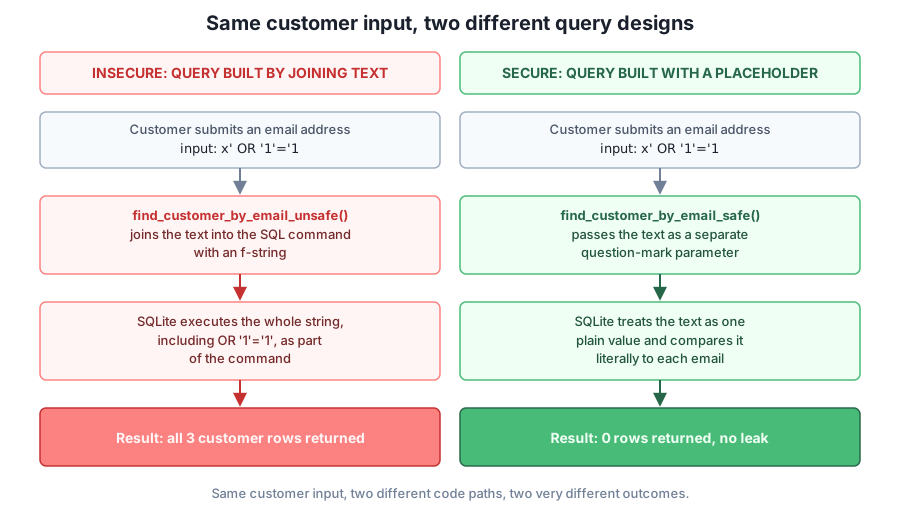
[(1, 'Amara Okafor', '[email protected]', 'gold'), (2, 'Dana Petrov', '[email protected]', 'silver'), (3, 'Ben Alves', '[email protected]', 'bronze')]The first call works the way anyone would expect. The second call is the problem. The attacker’s text closes the quoted string early and adds OR '1'='1', a condition that is always true. The finished query becomes SELECT ... WHERE email = 'x' OR '1'='1', which matches every row in the table. Every customer’s name, email, and plan comes back to whoever typed that one string into a search box.
The fix is a parameterized query. Instead of writing the email value into the SQL text, you write a placeholder, a question mark, and pass the actual value as a separate argument. The database driver keeps the value and the command completely apart, so the value can never change what the command does.
import sqlite3

connection = sqlite3.connect(":memory:")
cursor = connection.cursor()
cursor.execute("""
    CREATE TABLE customers (
        id INTEGER PRIMARY KEY,
        name TEXT,
        email TEXT,
        plan TEXT
    )
""")
cursor.executemany(
    "INSERT INTO customers (name, email, plan) VALUES (?, ?, ?)",
    [
        ("Amara Okafor", "[email protected]", "gold"),
        ("Dana Petrov", "[email protected]", "silver"),
        ("Ben Alves", "[email protected]", "bronze"),
    ],
)
connection.commit()

def find_customer_by_email_safe(email):
    """Looks up a customer by email using a parameterized query."""
    query = "SELECT id, name, email, plan FROM customers WHERE email = ?"
    return cursor.execute(query, (email,)).fetchall()

print(find_customer_by_email_safe("[email protected]"))

attacker_input = "x' OR '1'='1"
print(find_customer_by_email_safe(attacker_input))
[(2, 'Dana Petrov', '[email protected]', 'silver')]
[]The normal lookup still works. The attacker’s input now returns nothing, because SQLite treats the whole string, quotes and all, as one literal value to compare against the email column. No customer has that value as an email, so the query correctly finds no match. This same rule applies to every database Ledgerly might use, and to every language, not just Python. Never build a query by joining text together. Always pass user-supplied values as separate parameters.
Validate before the query, not instead of it
Checking that an email address looks like an email address is still worth doing, because it catches mistakes early and gives a clearer error message. But validation is not a substitute for parameterized queries. An attacker’s text can look exactly like a valid email address and still cause damage if the query is built by joining strings. Parameterized queries close the injection risk regardless of what the input looks like.
A secret is any value that grants access to something, such as an API key, a database password, or an encryption key. Ledgerly’s PaymentGateway class needs an API key to charge customers through its payment provider. Writing that key directly into a Python file is a common mistake, and a dangerous one. Anyone who reads the source code, including every future contributor and anyone who finds the code in a public repository, can read the key too.
The safer pattern is to read the key from an environment variable, a value set outside the program by whoever deploys it. The code never contains the actual key. It only contains the name of the variable to look up.
import os


class PaymentGateway:
    """Talks to Ledgerly's payment provider using an API key read from the environment."""

    def __init__(self):
        api_key = os.environ.get("LEDGERLY_PAYMENT_API_KEY")
        if not api_key:
            raise RuntimeError("LEDGERLY_PAYMENT_API_KEY is not set")
        self._api_key = api_key

    def masked_key(self):
        """Returns a safe-to-print version of the key, for logs and debugging."""
        return f"{self._api_key[:7]}{'*' * (len(self._api_key) - 7)}"


# In a real deployment, this value comes from the hosting platform's secret
# store, never from a file checked into the Ledgerly repository.
os.environ["LEDGERLY_PAYMENT_API_KEY"] = "sk_test_51Hh2example"

gateway = PaymentGateway()
print(gateway.masked_key())sk_test*************Three details matter here. First, PaymentGateway raises an error instead of silently continuing if the key is missing, so a misconfigured deployment fails loudly instead of quietly breaking payments. Second, masked_key() exists so logs and error messages never print the full key by accident. Third, nothing in this file, or in Ledgerly’s repository, ever contains the real key. The real value lives only in the environment of whichever machine runs the code, set through the hosting platform’s configuration screen or a local .env file that is excluded from version control.
The principle of least privilege means every user, service, or database connection should have exactly the access it needs to do its job, and nothing more. Ledgerly’s reporting service, which generates monthly revenue summaries, only ever needs to read customer and invoice data. It never needs to change or delete a row. If that service’s database connection is later misused, by a bug or by an attacker, a read-only connection limits the damage to nothing.
SQLite lets you open a connection in read-only mode by adding ?mode=ro to the file path. The example below seeds a small database, then opens a second connection in read-only mode to represent Ledgerly’s reporting service. That connection can read data, but the database itself refuses any attempt to write.
import os
import sqlite3

db_path = "ledgerly_reporting_demo.db"
if os.path.exists(db_path):
    os.remove(db_path)

# The setup connection has full read-write access, used only once to seed data.
setup_connection = sqlite3.connect(db_path)
setup_connection.execute(
    "CREATE TABLE customers (id INTEGER PRIMARY KEY, name TEXT, plan TEXT)"
)
setup_connection.execute(
    "INSERT INTO customers (name, plan) VALUES ('Amara Okafor', 'gold')"
)
setup_connection.commit()
setup_connection.close()

# Ledgerly's reporting service only ever needs to read customer data.
# Opening its connection in read-only mode enforces that at the database level.
reporting_connection = sqlite3.connect(f"file:{db_path}?mode=ro", uri=True)
rows = reporting_connection.execute("SELECT name, plan FROM customers").fetchall()
print(rows)

try:
    reporting_connection.execute("DELETE FROM customers")
except sqlite3.OperationalError as error:
    print(f"Blocked: {error}")

reporting_connection.close()
os.remove(db_path)
[('Amara Okafor', 'gold')]
Blocked: attempt to write a readonly databaseThe reporting service reads the data it needs and nothing stops that. The moment it tries to delete a row, either through a real bug in its own code or through a value an attacker managed to influence, the database itself rejects the change. A production system such as Postgres or MySQL applies this same idea through database user accounts with restricted permissions, granting SELECT to a reporting user and reserving INSERT, UPDATE, and DELETE for the services that actually need them.
Ledgerly, like almost every real application, depends on libraries it did not write. Each of those libraries can have its own security flaws, discovered after the library was published. A vulnerability in a dependency is just as dangerous as a vulnerability in Ledgerly’s own code, because Ledgerly’s code calls that dependency directly.
Tools such as pip-audit and services such as Dependabot automate the check described below: look up the installed version of a package, and compare it against the earliest version known to be safe. The example checks the version of pip itself, installed in this environment, against a stand-in minimum safe version.
from importlib.metadata import version, PackageNotFoundError

# In a real project, this list comes from a vulnerability database, not
# hand-typed guesses. Tools like pip-audit or Dependabot automate this lookup.
KNOWN_MINIMUM_SAFE_VERSION = {
    "pip": (23, 3),
}


def version_tuple(text):
    """Turns '25.0' into (25, 0) so versions compare as numbers, not text."""
    return tuple(int(part) for part in text.split(".") if part.isdigit())


def check_dependency(package_name):
    try:
        installed_text = version(package_name)
    except PackageNotFoundError:
        return f"{package_name} is not installed"

    installed = version_tuple(installed_text)
    minimum_safe = KNOWN_MINIMUM_SAFE_VERSION.get(package_name)

    if minimum_safe and installed < minimum_safe:
        minimum_text = ".".join(str(part) for part in minimum_safe)
        return f"{package_name} {installed_text} is below the safe minimum {minimum_text} - upgrade it"

    return f"{package_name} {installed_text} meets the safe minimum"


print(check_dependency("pip"))
pip 25.0 meets the safe minimumversion_tuple() matters more than it looks. Comparing version strings directly, such as "25.0" < "23.3", compares them as text, and text comparison gives wrong answers for version numbers. Converting each version to a tuple of integers, (25, 0) versus (23, 3), compares them as the numbers they represent. Ledgerly’s team runs a check like this, through an automated tool rather than a hand-written script, as part of every deployment, so a known vulnerability never reaches production unnoticed.
Ledgerly’s team adds a new function, find_invoices_by_status(status), that builds its query like this: f"SELECT * FROM invoices WHERE status = '{status}'". A teammate says it is fine because status is always one of "draft", "sent", or "paid", chosen from a dropdown menu in the interface. Explain why this reasoning does not make the function safe, and describe the fix.
Hint
A dropdown menu only limits what a well-behaved browser sends. Nothing stops someone from sending a request directly to Ledgerly’s server with any text at all in the status field, bypassing the dropdown entirely. The interface is not a security boundary. The fix is the same one from this lesson: rewrite the query as "SELECT * FROM invoices WHERE status = ?" and pass status as a parameter, so no value, expected or not, can change what the query does.
You find this line inside Ledgerly’s NotificationService: SMTP_PASSWORD = "hunter2fake". Describe the steps to remove this secret from the code safely, including what happens to any copies of the code that already have this line in their history.
Hint
Replace the line with SMTP_PASSWORD = os.environ["LEDGERLY_SMTP_PASSWORD"], then set that environment variable through the hosting platform’s secret configuration, not through a file in the repository. Because the old password already exists in the project’s version history, treat it as exposed: rotate it, meaning generate a new password with the email provider and update the environment variable, rather than assuming removing the line is enough on its own.
Ledgerly is adding a RefundAuditService that only needs to read the refunds table, to generate a monthly report for the finance team. It currently connects using the same database credentials as InvoiceProcessor, which needs to read and write several tables. What change would you make, and why does it matter even if RefundAuditService never contains a bug?
Hint
Give RefundAuditService its own read-only connection or a database account limited to SELECT on the refunds table, instead of reusing InvoiceProcessor’s broader credentials. It matters even without a bug in RefundAuditService itself, because a vulnerability anywhere in the code that uses those credentials, or a stolen credential, only grants read access to one table. Sharing broader credentials means one weakness anywhere grants far more access than the service actually needs.
Security in Ledgerly’s codebase comes down to a small number of consistent habits. Never build a database query by joining text together. Always use a parameterized query, so user input stays data and never becomes part of the command itself, as the live demonstration in this lesson showed. Never write a secret such as an API key directly into source code. Read it from an environment variable, set outside the code by whoever deploys it. Give every database connection only the access its job requires, following the principle of least privilege, so a mistake or a compromise in one part of the system cannot reach data it was never meant to touch. Finally, check dependencies against known vulnerabilities before shipping, because a flaw in a library Ledgerly depends on is just as real as a flaw in Ledgerly’s own code.
None of these habits require exotic tools or deep cryptography knowledge. They require consistency: always parameterize queries, always read secrets from the environment, always grant the minimum access needed, and always check dependency versions before shipping. Skipping any one of them, even once, on a form that looks harmless or a script meant to run “just this once,” is how real breaches happen. A three-person team like Ledgerly’s cannot audit every line of code before every release, but a short list of non-negotiable habits, applied every time, closes most of the gaps that matter.
Bring deployment, monitoring, and the security habits from this lesson together into one end-to-end release of a real Ledgerly feature.
Return to the Delivery & Operations module overview
You can now recognize and fix a SQL injection vulnerability, keep secrets like Ledgerly’s payment API key out of source code, limit database access to what each service actually needs, and check a dependency’s version against known vulnerabilities. The guided project next puts these habits to work alongside everything else this module covered, deploying a Ledgerly feature the way a real team would ship it.
Keep DATATWEETS free. Help fund practical data, AI, and engineering lessons for learners worldwide.