Title here
Summary here
Ledgerly’s three-person team has a feature ready to ship: customers can now search for another customer by name, and the payment gateway that charges cards needs its own configuration. Both pieces of code work on a developer’s laptop. Neither is safe to run in production yet, and neither has gone through the pipeline the team built to catch problems before real customers see them.
This project takes that feature from a messy working directory to a live deploy, using the first three lessons of this module in order. First, you organize the change into clean, logical commits, the way Lesson 1’s version control model describes. Second, you write a CI pipeline in YAML that runs the test suite and a security lint automatically, so a human never has to remember to run either by hand. Third, you find and fix two concrete security problems in the feature’s own code, a SQL injection bug and a hardcoded secret, and you prove each fix works with a real Python test. Fourth, you write a short deployment checklist that reflects Lesson 2’s distinction between continuous delivery and continuous deployment. By the end, you will have shipped one real feature the way a careful team actually ships one.
By the end of this project, you will be able to:
Lesson 1 described Git’s three states: a file is modified once you change it, staged once you mark it with git add to go into the next commit, and committed once that snapshot is saved permanently in the project’s history. The point of staging is control: instead of committing every change you happen to have made, you choose exactly which changes belong together in one commit.
Right now, one Ledgerly developer’s working directory has four separate changes mixed together: the new customer search function, a SQL injection bug inside it, a hardcoded API key in the payment gateway, and an unrelated typo fix in a comment. Committing all four at once would produce one commit that does too many unrelated things, which makes the project’s history harder to read later and harder to revert safely if one piece turns out to be wrong.
Instead, the developer stages and commits each logical change on its own, using git add -p to select only the relevant lines for each commit:
commit 1 (staged and committed first):
fix(customer-search): use a parameterized query to prevent SQL injection

- Replace the string-interpolated SQL in search_customer_by_name with
  a parameterized query bound through sqlite3's placeholder syntax.
- Add a regression test proving a crafted name string can no longer
  return every customer row.

commit 2 (staged and committed second):
fix(payment-gateway): read the API key from an environment variable

- PaymentGateway no longer accepts a hardcoded key as a working default.
- A missing LEDGERLY_PAYMENT_API_KEY now raises a clear config error
  instead of silently continuing with an embedded secret.

commit 3 (staged and committed third):
docs(customer-search): fix a typo in the module docstring
Each commit message follows the same shape: a short summary line naming what changed and why, followed by bullet points with the specific detail. A teammate reading git log later can see three separate, understandable changes, each one small enough to review and, if needed, revert on its own, rather than one large commit that hides three unrelated ideas inside it. This is also what makes Stage 3’s tests possible to review cleanly: the security fix and its test sit together in one commit, not buried inside a larger, unrelated change.
Lesson 2 explained that a CI pipeline should run automatically on every push, so no one has to remember to run tests or a security scan by hand before code reaches production. Ledgerly’s pipeline needs three jobs: run the test suite, run a security lint, and only then, if both pass, offer a deploy step.
name: Ledgerly CI

on:
  pull_request:
    branches: [main]
  push:
    branches: [main]

jobs:
  test:
    runs-on: ubuntu-latest
    steps:
      - uses: actions/checkout@v4
      - uses: actions/setup-python@v5
        with:
          python-version: "3.12"
      - name: Install dependencies
        run: pip install -r requirements.txt
      - name: Run the test suite
        run: pytest --maxfail=1 --disable-warnings

  security-lint:
    runs-on: ubuntu-latest
    needs: test
    steps:
      - uses: actions/checkout@v4
      - uses: actions/setup-python@v5
        with:
          python-version: "3.12"
      - name: Install the security scanner
        run: pip install bandit
      - name: Scan the codebase for common security issues
        run: bandit -r ledgerly/ -ll

  deploy:
    runs-on: ubuntu-latest
    needs: [test, security-lint]
    if: github.ref == 'refs/heads/main' && github.event_name == 'push'
    environment:
      name: production
    steps:
      - uses: actions/checkout@v4
      - name: Deploy to production
        run: ./deploy.sh
The needs keyword is what turns three independent jobs into an ordered gate. security-lint lists test under needs, so it only starts once the test job finishes successfully; if a test fails, the security lint never runs, and neither does the deploy job, because deploy lists both test and security-lint under its own needs. Nothing skips ahead to production while an earlier step is still red.
The environment: production line under the deploy job is what a team configures, on the hosting platform’s side, to require a named reviewer’s manual approval before that job’s steps actually run. That single setting is the difference between the two release styles Lesson 2 described: without it, every push that passes both jobs deploys itself, which is continuous deployment; with it, the pipeline stops and waits for a person to click approve, which is continuous delivery. Stage 4 comes back to that choice directly.
Why security-lint runs after test, not in parallel
Ledgerly’s team could run test and security-lint in parallel instead of in sequence, since neither job depends on the other’s output. They chose sequence anyway, because a security scan takes real compute time, and there is no reason to spend it on a commit that is already known to be broken. If test fails, the pipeline stops early and the team gets a faster, cheaper signal.
The customer search feature has a SQL injection bug: it builds a SQL query by pasting the search text directly into a string, instead of treating it as data. Here is the vulnerable version next to the fix, run against a small in-memory database standing in for Ledgerly’s real one:
import sqlite3


def setup_customers_db():
    connection = sqlite3.connect(":memory:")
    connection.execute("CREATE TABLE customers (id TEXT, name TEXT, email TEXT)")
    connection.executemany(
        "INSERT INTO customers VALUES (?, ?, ?)",
        [
            ("CUST-1", "Priya Shah", "[email protected]"),
            ("CUST-2", "Marcus Webb", "[email protected]"),
            ("CUST-3", "Dana Okafor", "[email protected]"),
        ],
    )
    connection.commit()
    return connection


def search_customer_by_name_unsafe(connection, name_query):
    """The version shipped before the security fix. Do not reuse this."""
    query = f"SELECT id, name FROM customers WHERE name = '{name_query}'"
    return connection.execute(query).fetchall()


def search_customer_by_name_safe(connection, name_query):
    """The fixed version: the search term is a bound parameter, never pasted into SQL text."""
    query = "SELECT id, name FROM customers WHERE name = ?"
    return connection.execute(query, (name_query,)).fetchall()


connection = setup_customers_db()
injection_attempt = "x' OR '1'='1"

unsafe_results = search_customer_by_name_unsafe(connection, injection_attempt)
safe_results = search_customer_by_name_safe(connection, injection_attempt)

print(f"Unsafe search for {injection_attempt!r} returned {len(unsafe_results)} row(s): {unsafe_results}")
print(f"Safe search for {injection_attempt!r} returned {len(safe_results)} row(s): {safe_results}")
Unsafe search for "x' OR '1'='1" returned 3 row(s): [('CUST-1', 'Priya Shah'), ('CUST-2', 'Marcus Webb'), ('CUST-3', 'Dana Okafor')]
Safe search for "x' OR '1'='1" returned 0 row(s): []The unsafe version pastes the attacker’s text straight into the SQL string. Once inserted, the query reads WHERE name = 'x' OR '1'='1', and because '1'='1' is always true, every single customer row comes back, not just one named “x”. No customer named x' OR '1'='1 actually exists; the attacker never needed one, because the pasted text changed the query’s logic, not just its search term. The safe version treats the same text as a plain value bound to a ? placeholder, so it can never change what the query means, and it correctly returns nothing. Here is a real test proving the fix, independent of the demonstration above:
import sqlite3


def setup_customers_db():
    connection = sqlite3.connect(":memory:")
    connection.execute("CREATE TABLE customers (id TEXT, name TEXT, email TEXT)")
    connection.executemany(
        "INSERT INTO customers VALUES (?, ?, ?)",
        [
            ("CUST-1", "Priya Shah", "[email protected]"),
            ("CUST-2", "Marcus Webb", "[email protected]"),
            ("CUST-3", "Dana Okafor", "[email protected]"),
        ],
    )
    connection.commit()
    return connection


def search_customer_by_name_safe(connection, name_query):
    query = "SELECT id, name FROM customers WHERE name = ?"
    return connection.execute(query, (name_query,)).fetchall()


def test_parameterized_query_blocks_the_injection_payload():
    connection = setup_customers_db()
    injection_attempt = "x' OR '1'='1"

    results = search_customer_by_name_safe(connection, injection_attempt)

    assert results == [], "A parameterized query must treat the payload as literal text, not SQL"

    real_match = search_customer_by_name_safe(connection, "Priya Shah")
    assert real_match == [("CUST-1", "Priya Shah")], "A real customer name must still match normally"
    print("All tests passed.")


test_parameterized_query_blocks_the_injection_payload()
All tests passed.The second problem sits in the payment gateway: an earlier version of PaymentGateway had its API key written directly into the source code. That key would then sit in the project’s Git history forever, readable by anyone with access to the repository, and it could not be rotated without editing and redeploying code. The fix reads the key from an environment variable instead, and refuses to start at all if that variable is missing, rather than falling back to an embedded key:
import os


class PaymentGatewayConfigError(Exception):
    """Raised when the payment gateway cannot find the API key it needs."""


class PaymentGateway:
    """A small stand-in for a Stripe-like payment gateway client."""

    def __init__(self, api_key: str | None = None) -> None:
        self._api_key = api_key or os.environ.get("LEDGERLY_PAYMENT_API_KEY")
        if not self._api_key:
            raise PaymentGatewayConfigError(
                "LEDGERLY_PAYMENT_API_KEY is not set. Refusing to start "
                "without a real secret; never hardcode one in source code."
            )

    def charge(self, amount: float, customer_email: str) -> str:
        return (
            f"Charged ${amount:.2f} to {customer_email} using key "
            f"ending in ...{self._api_key[-4:]}"
        )


def test_gateway_requires_env_var_and_never_hardcodes_it():
    os.environ.pop("LEDGERLY_PAYMENT_API_KEY", None)

    try:
        PaymentGateway()
    except PaymentGatewayConfigError as error:
        print(f"Blocked with no secret set: {error}")
    else:
        raise AssertionError("Expected PaymentGatewayConfigError when no key is set")

    os.environ["LEDGERLY_PAYMENT_API_KEY"] = "test-key-not-real-9999"
    gateway = PaymentGateway()
    receipt = gateway.charge(450.00, "[email protected]")
    print(receipt)
    assert receipt == "Charged $450.00 to [email protected] using key ending in ...9999"
    print("All tests passed.")


test_gateway_requires_env_var_and_never_hardcodes_it()
Blocked with no secret set: LEDGERLY_PAYMENT_API_KEY is not set. Refusing to start without a real secret; never hardcode one in source code.
Charged $450.00 to [email protected] using key ending in ...9999
All tests passed.The first assertion proves the gateway never has a working fallback key baked into the code: with no environment variable set, it refuses to run at all, and prints a clear reason why. The second half proves the gateway still works normally once a real key is supplied the right way, through the environment, at deploy time rather than at commit time. Both tests belong in commit 1 and commit 2 from Stage 1, so the CI pipeline from Stage 2 runs them automatically on every push, and a broken fix can never reach the deploy job.
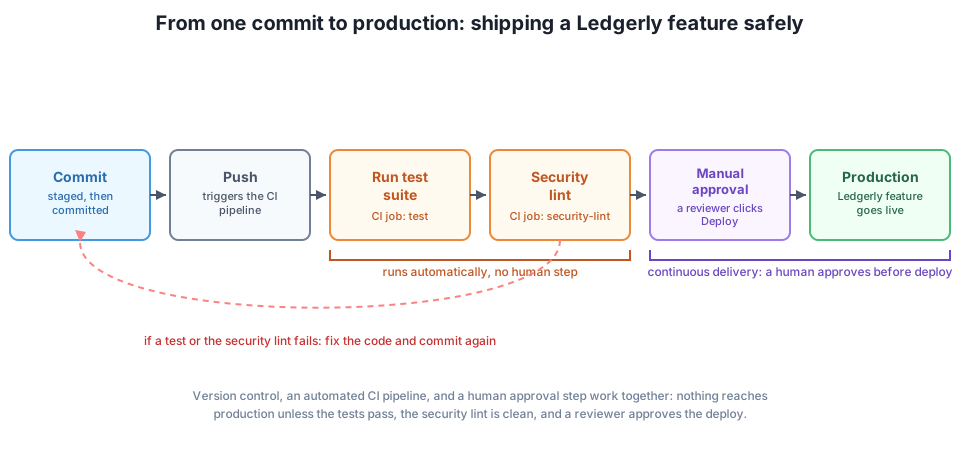
Lesson 2 drew a firm line between continuous delivery, where every change that passes the pipeline is ready to deploy but still needs a person to approve the final step, and continuous deployment, where a passing pipeline deploys to production on its own, with no human step at all. Stage 2’s YAML uses environment: production, which Ledgerly’s team configured to require a named reviewer’s approval, so this feature ships under continuous delivery, not continuous deployment.
That choice shapes the checklist a reviewer works through before clicking approve. It is not a repeat of what CI already checked automatically; it covers the judgment calls a pipeline cannot make on its own.
Before approving the deploy:
test and security-lint jobs both show green on this exact commit, not an older one.LEDGERLY_PAYMENT_API_KEY set, so the gateway does not fail on first request after deploy.At deploy time:
deploy.sh runs, specifically for payment gateway errors and search-related errors.After the deploy:
This checklist is what continuous delivery adds on top of continuous integration: automated jobs answer “does the code work and pass basic security checks,” and the checklist answers “should a human actually let this reach real customers right now.”
A developer has one working directory with three unrelated changes: a fix for a missing input check on invoice amounts, a renamed variable in an unrelated file, and a new log statement for debugging that should not ship. Describe how you would stage and commit these, and write one commit message for the invoice fix, in the style used in Stage 1.
Hint
Stage and commit the invoice fix on its own first, using git add -p to pick only its lines, with a message like fix(invoice): reject negative or zero invoice amounts. Commit the variable rename separately, since it is unrelated. Remove the debugging log statement entirely rather than committing it; a commit history is not the right place for temporary, throwaway code.
Ledgerly’s team wants a fourth CI job, lint, that runs a style checker such as ruff and must pass before deploy runs, in addition to test and security-lint. Write the YAML for the new job and update deploy’s needs list to include it.
Hint
The new job looks like test and security-lint: it checks out the code, sets up Python, installs ruff, and runs ruff check .. The important change is deploy’s needs line, which becomes needs: [test, security-lint, lint], so all three must succeed before the deploy job is even considered.
Ledgerly is considering removing the environment: production line from the deploy job, so that every commit that passes test and security-lint deploys itself immediately, with no reviewer step. Using Lesson 2’s criteria, argue for or against this change for a payment-handling feature like the one in this project.
Hint
Argue against removing it, at least for now. Continuous deployment fits low-risk, well-tested changes where a bug is cheap to detect and revert; a payment gateway touches real money and real customer trust, where the cost of one bad automatic deploy is much higher than the cost of a short manual approval step. Ledgerly could revisit continuous deployment later, once test coverage and monitoring around payments are strong enough to catch a bad change automatically, just as quickly as a human reviewer would.
This guided project shipped one real Ledgerly feature from a messy working directory to a live, approved deploy. Stage 1 organized the change into clean, atomic commits, using Lesson 1’s staged-then-committed model, so each logical change, including each security fix, could be reviewed and reverted on its own. Stage 2 wrote a CI pipeline in YAML where security-lint needs test, and deploy needs both, so nothing reaches production out of order. Stage 3 fixed a real SQL injection bug with a parameterized query and a real hardcoded secret by reading it from an environment variable, proving both fixes with runnable Python tests. Stage 4 closed with a deployment checklist that reflects Lesson 2’s distinction between continuous delivery, where a human still approves the final step, and continuous deployment, where the pipeline deploys on its own.
needs) — a later job, like security-lint or deploy, only runs once the jobs it depends on have passed.A feature is not really done when the code compiles and a test passes on one laptop. It is done when it has moved safely through a team’s real process: organized into a history other people can read, checked automatically by a pipeline that never forgets a step, free of the kind of security bug that turns a small mistake into a serious incident, and released in a way the team has deliberately chosen, not defaulted into. Ledgerly’s three-person team will repeat this exact loop, commit, pipeline, security check, checklist, for every feature they ship from here on, and so will you, on any real engineering team, for the rest of your career.
Bring every module together in one final, guided build of a complete Ledgerly feature.
Review the full Software Engineering Fundamentals course.
You have now taken one real Ledgerly feature through the same loop a careful engineering team uses every day: clean commits, an automated pipeline, a concrete security fix proven by a real test, and a deliberate deployment decision. That loop, not any single tool, is what Module 4 was actually teaching. The capstone project ahead brings every module together, from requirements through design, testing, and now delivery, into one complete Ledgerly feature built end to end.
Keep DATATWEETS free. Help fund practical data, AI, and engineering lessons for learners worldwide.