Title here
Summary here
In Module 2, you gave Ledgerly’s codebase a solid shape: classes with clear boundaries, interfaces that hide their implementation, and designs that follow the SOLID principles. Good structure is not enough on its own. Inside a well-designed class, a single function can still be a mess of cryptic names and tangled logic that nobody on the team wants to touch.
This lesson opens Module 3, “Writing Quality, Tested Code,” where the focus shifts from how classes relate to each other, down to how individual lines of code read. You will take a real Ledgerly function that calculates an invoice total, one that mixes subtotal math, tier discounts, loyalty discounts, tax, and late fees into a single block with names like x, tmp, flag, and r. You will rewrite it step by step into small functions with names that explain themselves.
By the end of this lesson, you will be able to:
A name is meaningful when a reader can guess what a variable holds, or what a function does, without reading its body. A name that requires a comment to explain it is not doing its job.
Here is a real function from Ledgerly’s early codebase. It calculates an invoice total from line items, a customer tier, a loyalty flag, and how many days the invoice is overdue.
def calc(x, tmp, flag, d):
    r = 0
    for i in x:
        r += i["p"] * i["q"]
    if tmp == "gold":
        r = r * 0.85
    elif tmp == "silver":
        r = r * 0.95
    if flag:
        r = r * 0.98
    tx = r * 0.08
    r = r + tx
    if d > 30:
        lf = r * 0.05
        r = r + lf
    return round(r, 2)

items = [{"p": 40, "q": 3}, {"p": 15, "q": 2}]
result = calc(items, "gold", True, 45)
print(result)141.69The function produces a correct number, but every name hides what it means. x could be anything iterable. tmp sounds temporary, not a customer’s plan tier. flag does not say which condition it flags. r changes meaning five times inside one function, first a subtotal, then a discounted amount, then a total with tax.
Renaming each variable, with no change to the logic, turns this into code a new hire can read on the first try.
def calculate_invoice_total(line_items, customer_tier, is_loyalty_member, days_overdue):
    total = 0
    for item in line_items:
        total += item["price"] * item["quantity"]

    if customer_tier == "gold":
        total = total * 0.85
    elif customer_tier == "silver":
        total = total * 0.95

    if is_loyalty_member:
        total = total * 0.98

    tax_amount = total * 0.08
    total = total + tax_amount

    if days_overdue > 30:
        late_fee_amount = total * 0.05
        total = total + late_fee_amount

    return round(total, 2)

line_items = [{"price": 40, "quantity": 3}, {"price": 15, "quantity": 2}]
result = calculate_invoice_total(line_items, "gold", True, 45)
print(result)141.69Both versions return exactly the same number, 141.69. Nothing about the math changed. The second version now answers three questions on sight: what does each parameter hold, what does the function calculate, and what does a “flag” actually mean here. A reader no longer needs to trace values through the whole function to know what total represents at any point.
A useful test for any name: if you feel the urge to add a comment next to it, the name has not finished its job yet. is_loyalty_member needs no comment. flag always will.
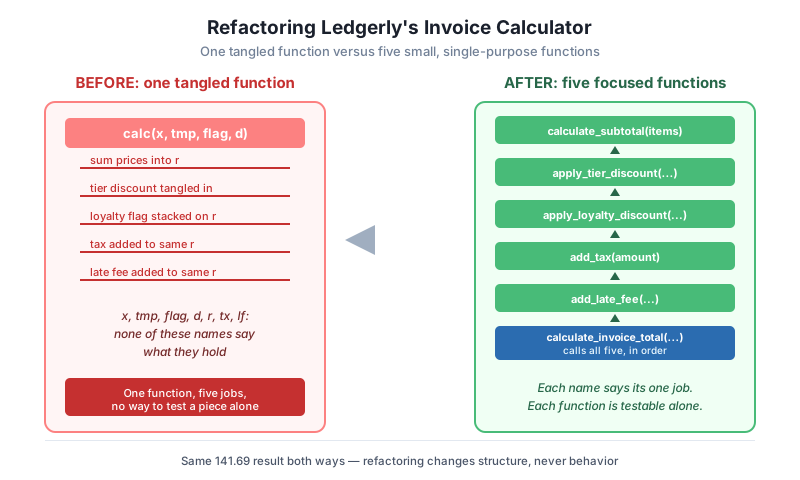
A function is small when it does exactly one job. calculate_invoice_total above is more readable than calc, but it still does five different jobs in one place: summing line items, applying a tier discount, applying a loyalty discount, adding tax, and adding a late fee. Each of those is a separate idea that deserves its own function.
TIER_DISCOUNTS = {"gold": 0.15, "silver": 0.05, "bronze": 0.0}
TAX_RATE = 0.08
LOYALTY_DISCOUNT = 0.02
LATE_FEE_RATE = 0.05
LATE_FEE_THRESHOLD_DAYS = 30


def calculate_subtotal(line_items):
    """Sum price times quantity across every line item."""
    return sum(item["price"] * item["quantity"] for item in line_items)


def apply_tier_discount(subtotal, customer_tier):
    """Reduce the subtotal based on the customer's plan tier."""
    discount_rate = TIER_DISCOUNTS.get(customer_tier, 0.0)
    return subtotal * (1 - discount_rate)


def apply_loyalty_discount(amount, is_loyalty_member):
    """Apply an extra discount for enrolled loyalty members."""
    if is_loyalty_member:
        return amount * (1 - LOYALTY_DISCOUNT)
    return amount


def add_tax(amount):
    """Add sales tax on top of the discounted amount."""
    return amount * (1 + TAX_RATE)


def add_late_fee(amount, days_overdue):
    """Add a late fee only when the invoice is overdue past the threshold."""
    if days_overdue > LATE_FEE_THRESHOLD_DAYS:
        return amount * (1 + LATE_FEE_RATE)
    return amount


def calculate_invoice_total(line_items, customer_tier, is_loyalty_member, days_overdue):
    """Orchestrate every pricing step to produce one final invoice total."""
    subtotal = calculate_subtotal(line_items)
    discounted = apply_tier_discount(subtotal, customer_tier)
    discounted = apply_loyalty_discount(discounted, is_loyalty_member)
    with_tax = add_tax(discounted)
    final_total = add_late_fee(with_tax, days_overdue)
    return round(final_total, 2)


line_items = [{"price": 40, "quantity": 3}, {"price": 15, "quantity": 2}]
result = calculate_invoice_total(line_items, "gold", True, 45)
print(result)141.69The result is identical again, 141.69, because refactoring changes structure without changing behavior. What changed is how easy each piece is to work with. Ledgerly’s team can now test apply_tier_discount alone with a handful of tier values, without building a full invoice first. If the late fee rule changes from a flat 5% to something tiered by how many days overdue, only add_late_fee needs to change. The orchestrator function, calculate_invoice_total, reads almost like a checklist: get the subtotal, apply discounts, add tax, add a late fee if needed.
A practical rule of thumb: if you can describe what a function does using the word “and,” it probably does more than one job and can likely be split further.
Comments are useful for explaining a decision that is not visible in the code itself, such as why a workaround exists or why a particular tax rate applies. They are not a substitute for a clear name or a clear structure. When a function needs a comment on every line to explain what it does, the real fix is usually to rename things or split the function, not to add more comments.
def check(invoices):
    # set counter to zero
    n = 0
    # loop through every invoice
    for inv in invoices:
        # check if the invoice is overdue
        if inv["days_overdue"] > 30:
            # add one to the counter
            n += 1
    # give back the counter
    return n

invoices = [
    {"id": "INV-1", "days_overdue": 45},
    {"id": "INV-2", "days_overdue": 10},
    {"id": "INV-3", "days_overdue": 31},
]
print(check(invoices))2Every comment here restates a line of code that a Python reader already understands. n += 1 does not need “add one to the counter” next to it. The real problem is the function name check says nothing about what is being checked, and the variable n says nothing about what it counts. Fix the names and the logic, and the comments become unnecessary.
def count_severely_overdue_invoices(invoices, overdue_threshold_days=30):
    """Count invoices more than overdue_threshold_days past their due date."""
    return sum(1 for invoice in invoices if invoice["days_overdue"] > overdue_threshold_days)

invoices = [
    {"id": "INV-1", "days_overdue": 45},
    {"id": "INV-2", "days_overdue": 10},
    {"id": "INV-3", "days_overdue": 31},
]
print(count_severely_overdue_invoices(invoices))2The result is still 2. The second version has one docstring, not seven line comments, and the docstring explains something the code alone does not show: what “severely overdue” means by default. That is the kind of comment worth keeping. A comment that explains “why 30 days” or “why this threshold” earns its place. A comment that explains “this line adds one” does not.
What a comment should never do
Never use a comment to excuse code you did not have time to fix, such as # x is actually the customer tier, sorry. If a name needs an apology, rename it. Comments should add information the code cannot express on its own, not patch over a name or a structure that is still confusing.
Formatting is not about personal taste. Consistent spacing, line breaks, and indentation let a reader’s eyes move through code the same way every time, without stopping to re-parse a layout that looks different from the last function they read.
class Invoice:
    def __init__(self,invoice_id,amount_due_cents):
        self.invoice_id=invoice_id; self.amount_due_cents=amount_due_cents
        self.amount_paid_cents=0
    def record_payment(self,amount_cents):
            if amount_cents<=0: raise ValueError("Payment must be positive")
            self.amount_paid_cents+=amount_cents
    def balance(self):
      return self.amount_due_cents-self.amount_paid_cents

invoice = Invoice("INV-2001", 5000)
invoice.record_payment(2000)
print(invoice.balance())3000This code runs correctly and returns 3000, but it is exhausting to read. Two statements share one line separated by a semicolon. Indentation inside record_payment does not match the rest of the class. There are no blank lines separating methods, and spacing around operators is inconsistent from one line to the next.
class Invoice:
    def __init__(self, invoice_id, amount_due_cents):
        self.invoice_id = invoice_id
        self.amount_due_cents = amount_due_cents
        self.amount_paid_cents = 0

    def record_payment(self, amount_cents):
        if amount_cents <= 0:
            raise ValueError("Payment must be positive")
        self.amount_paid_cents += amount_cents

    def balance(self):
        return self.amount_due_cents - self.amount_paid_cents


invoice = Invoice("INV-2001", 5000)
invoice.record_payment(2000)
print(invoice.balance())3000Same result, 3000, with a layout a reader can predict: one statement per line, a blank line between methods, and consistent spacing around every operator. Ledgerly’s team does not enforce this by memory. They run an automated formatter as part of every commit, so nobody has to debate spacing in code review, and every file looks like it was written by the same careful person.
Error handling decides what happens when something goes wrong. Code that fails silently, by returning None or a default value instead of raising an error, hides bugs until they surface somewhere else, far from their real cause.
def record_payment(invoice, amount_cents):
    if amount_cents <= 0:
        return None
    if amount_cents > invoice["balance_cents"]:
        return None
    invoice["balance_cents"] -= amount_cents
    return invoice

invoice = {"invoice_id": "INV-3001", "balance_cents": 4000}
result = record_payment(invoice, 9000)
print(result)
print(invoice)
None
{'invoice_id': 'INV-3001', 'balance_cents': 4000}The payment of 9000 cents exceeds the invoice’s 4000-cent balance, so the function quietly returns None. Nothing tells the caller why. If the caller forgets to check for None, the code that runs next has no idea a payment failed. The invoice itself is unchanged, which is correct, but there is no record of what went wrong or why.
Failing fast means raising an exception the moment something invalid happens, with a message specific enough to explain the real problem.
class PaymentTooLargeError(Exception):
    """Raised when a payment exceeds the invoice's remaining balance."""


def record_payment(invoice, amount_cents):
    if amount_cents <= 0:
        raise ValueError("Payment amount must be positive")
    if amount_cents > invoice["balance_cents"]:
        raise PaymentTooLargeError(
            f"Payment of {amount_cents} exceeds balance of {invoice['balance_cents']}"
        )
    invoice["balance_cents"] -= amount_cents
    return invoice

invoice = {"invoice_id": "INV-3001", "balance_cents": 4000}
try:
    record_payment(invoice, 9000)
except PaymentTooLargeError as error:
    print(f"Blocked: {error}")

print(invoice)
Blocked: Payment of 9000 exceeds balance of 4000{'invoice_id': 'INV-3001', 'balance_cents': 4000}Two specific exceptions replace one silent None. ValueError covers an invalid amount, and the custom PaymentTooLargeError covers a payment that is too large for this particular invoice. Each message states the exact numbers involved, so whoever reads the error, whether a developer or a log file, knows immediately what happened and why, without stepping through the code to reconstruct it.
Ledgerly has a function def proc(a, b, c): return a[b] * c if c > 0 else 0 that looks up an item’s price by its index b in a list a, then multiplies it by a quantity c, returning 0 for an invalid quantity. Rewrite the signature and body with names that make the function’s purpose clear without any comment.
Hint
Something close to def calculate_line_item_cost(prices, item_index, quantity): return prices[item_index] * quantity if quantity > 0 else 0 works well. a becomes prices, b becomes item_index, c becomes quantity, and the function name states exactly what value it returns.
A teammate writes one function, finalize_invoice(invoice_data), that validates the invoice fields, calculates the total using the pricing rules from this lesson, saves the invoice to the database, and sends a confirmation email, all in a single 60-line function. Describe how you would split this into smaller, single-purpose functions, and name each one.
Hint
A reasonable split: validate_invoice_data(invoice_data) for the field checks, the five pricing functions from this lesson plus calculate_invoice_total for the math, save_invoice(invoice) for persistence, and send_invoice_confirmation(invoice) for the email. finalize_invoice then becomes a short orchestrator that calls each one in order, similar to calculate_invoice_total in this lesson.
Ledgerly’s apply_discount_code(invoice, code) function currently returns the invoice unchanged whenever code is not found in the list of valid discount codes, with no error and no log message. Rewrite this so it fails fast instead, and decide what kind of exception to raise.
Hint
Raise a specific exception, such as a custom InvalidDiscountCodeError(f"Unknown discount code: {code}"), the moment an unrecognized code is passed in, instead of quietly returning the invoice as-is. This makes the failure visible immediately at the point where the bad code was used, rather than leaving a caller to wonder later why a discount silently did not apply.
Clean code is not a separate step you do after the real work of writing a program. It is the same code, written so the next reader, often a future version of you, can understand it without extra effort. This lesson took one real Ledgerly function, calc(x, tmp, flag, d), and rewrote it in stages: first with names that say what each value holds, then split into five small functions that each do one job, then with the unnecessary comments removed once the names carried their own meaning, then reformatted for consistency, and finally with silent failures replaced by specific, fail-fast exceptions. Every rewrite produced the exact same numeric result, because clean code changes how a program reads, never what it computes.
None or a default value silently.Ledgerly is a small app run by three developers today, but every function they write now is a function someone has to read, debug, or extend later, possibly a fourth developer who never saw the original design. Clean code is what keeps that later work fast instead of slow. A well-named, well-sized function can be tested on its own, changed with confidence, and understood in seconds instead of minutes. The next lesson builds directly on this discipline by teaching you to write automated tests, which only work well against code that is already broken into small, focused, and predictable pieces like the ones in this lesson.
Learn how to write automated tests for Ledgerly's clean, single-purpose functions, starting with unit tests and assertions.
Return to the Writing Quality, Tested Code module overview
You can now take a tangled function and rewrite it into clean, well-named, single-purpose code, the same skill you applied to Ledgerly’s invoice calculator in this lesson. The next lesson uses these same small functions, calculate_subtotal, apply_tier_discount, and the rest, to show you how to write automated tests that check their behavior stays correct as Ledgerly’s codebase keeps growing.
Keep DATATWEETS free. Help fund practical data, AI, and engineering lessons for learners worldwide.