Title here
Summary here
Lesson 2 showed you how to write unit tests that check whether Ledgerly’s code works correctly, one function at a time. Those tests answer a narrow question: does this specific piece of code return the value it should? Behaviour-driven development, or BDD, asks a different and broader question: does the whole feature behave the way the business actually needs it to behave? This lesson shows you how Ledgerly’s three-person team answers that question together, before a single line of code gets written.
BDD matters most exactly where plain unit tests fall short: at the boundary between what the business wants and what the code does. A unit test can confirm that a function returns 90 for a given input. It cannot confirm that 90 is the number the business actually wanted. BDD closes that gap by writing the expected behavior in a shared, readable format that a product owner, a developer, and a tester can all agree on, and then running that same format as a real, automated check.
By the end of this lesson, you will be able to:
Behaviour-driven development is a way of specifying how software should behave, written in plain language that both technical and non-technical people can read. Instead of starting with code, a BDD scenario starts with a concrete example of a user doing something and getting a specific result.
Unit testing, which Lesson 2 covered, checks small pieces of code in isolation. A unit test for Ledgerly’s PricingEngine might confirm that apply_tier_discount(100, "gold") returns 85. That test is written by a developer, read by a developer, and says nothing about why a gold-tier customer gets 15 percent off. BDD scenarios sit one level higher. They describe a feature the way a customer or product owner would describe it, and only afterward get connected to real code that proves the description is true.
This difference changes who can read and approve the specification. A Ledgerly product owner cannot review assert result == 85 and know whether 85 is correct. The same product owner can read “a customer who applies code WELCOME10 to a $100 invoice should see a total of $90” and immediately say whether that is right. BDD scenarios are written so that the person who understands the business rule can check it directly, without reading source code.
BDD does not replace unit tests
BDD and unit testing solve different problems, and Ledgerly’s team uses both. Unit tests catch bugs inside a single function, like a rounding error in PricingEngine. BDD scenarios catch a different kind of mistake: code that works perfectly but does the wrong thing, because nobody agreed on what “right” meant before it was built.
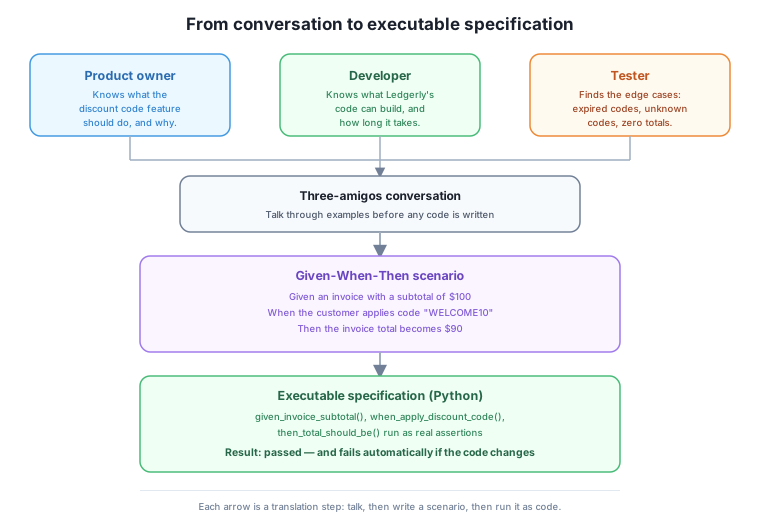
The three amigos are the three people who should be in the room before a new feature is built: someone who represents the business, someone who will write the code, and someone who will try to break it. On Ledgerly’s three-person team, these roles map directly onto the three people themselves, so the “session” is often a fifteen-minute conversation rather than a formal meeting.
Each amigo brings a different question to the table. The business person, call her the product owner, knows what the feature should accomplish and why customers need it. The developer knows what the existing code can support and how much a proposed approach would cost to build. The tester’s job is to imagine what could go wrong: bad input, missing data, and conditions nobody has mentioned yet.
Suppose Ledgerly’s team wants to let a customer apply a discount code to an invoice. Here is roughly how the three-amigos conversation would go.
Product owner: "Customers should be able to type in a discount code
                at checkout and see their invoice total drop."

Developer: "What happens if the code does not exist?"

Product owner: "Show an error and leave the invoice unchanged."

Tester: "What if the invoice subtotal is smaller than the discount?
         Say a customer has a $5 invoice and a code worth 20 percent
         off a much larger order."

Product owner: "Good catch. The discount should never take the total
               below zero. Cap it at the subtotal."

Developer: "Can a customer apply more than one code to the same
            invoice?"

Product owner: "No. One code per invoice, at least for now."
This short exchange already surfaces three rules that were not visible in the original one-sentence request: unknown codes must show an error, discounts cannot push a total negative, and only one code applies per invoice. Finding these rules in a five-minute conversation is far cheaper than finding them after the feature ships.
Once the three amigos agree on a rule, they write it down as a scenario with three parts: Given, When, and Then. Given describes the starting state, before anything happens. When describes the single action being tested. Then describes the result that should follow. This lesson keeps Given-When-Then illustrative and high level; Lesson 4 covers the full Gherkin language, including data tables, scenario outlines, and tags.
Here is the scenario the three amigos would write for the conversation above.
Scenario: Apply a valid discount code to an invoice
  Given an invoice with a subtotal of $100
  When the customer applies discount code "WELCOME10"
  Then the invoice total becomes $90
The rejection rule from the same conversation becomes a second, separate scenario, rather than a note buried inside the first one.
Scenario: Reject an unknown discount code
  Given an invoice with a subtotal of $50
  When the customer applies discount code "EXPIRED2024"
  Then Ledgerly shows an error and the invoice total stays $50
Notice what these scenarios do not mention. They never name a class, a method, or a database table. A product owner with no programming background can read both scenarios and confirm they match what she asked for. That readability is the entire point of the Given-When-Then shape: it is a contract between the business and the code, written in a language both sides understand.
A Given-When-Then scenario only earns the name “executable specification” once it can actually run as code and produce a pass or fail result. The example below builds a small, real Python version of that idea for Ledgerly’s discount-code feature. It is not a full framework like Cucumber or Behave; it is a simple runner that maps each Given, When, and Then line to a real Python function and a real assertion.
class DiscountApplier:
    """Applies a percentage discount code to a Ledgerly invoice subtotal."""

    VALID_CODES = {"WELCOME10": 0.10, "LOYAL20": 0.20}

    def apply(self, subtotal_cents, code):
        if code not in self.VALID_CODES:
            raise ValueError(f"Unknown discount code: {code}")
        rate = self.VALID_CODES[code]
        discount_cents = round(subtotal_cents * rate)
        return subtotal_cents - discount_cents


class ScenarioContext:
    """Holds state that each step reads and writes, like a shared notebook."""

    def __init__(self):
        self.subtotal_cents = None
        self.result_cents = None
        self.error = None


def given_invoice_subtotal(context, amount_cents):
    context.subtotal_cents = amount_cents


def when_apply_discount_code(context, code):
    applier = DiscountApplier()
    try:
        context.result_cents = applier.apply(context.subtotal_cents, code)
    except ValueError as error:
        context.error = str(error)


def then_total_should_be(context, expected_cents):
    assert context.result_cents == expected_cents, (
        f"Expected total {expected_cents}, got {context.result_cents}"
    )


def then_error_should_mention(context, snippet):
    assert context.error is not None, "Expected an error, but none was raised"
    assert snippet in context.error, f"Expected '{snippet}' in error, got '{context.error}'"


def run_scenario(name, steps):
    """Runs a Given-When-Then scenario as ordinary Python calls and reports pass or fail."""
    context = ScenarioContext()
    print(f"Scenario: {name}")
    try:
        for description, step_function, args in steps:
            step_function(context, *args)
            print(f"  {description} ... passed")
        return True
    except AssertionError as error:
        print(f"  FAILED: {error}")
        return False


success_scenario = [
    ("Given an invoice with a subtotal of 10000 cents", given_invoice_subtotal, (10000,)),
    ("When I apply discount code WELCOME10", when_apply_discount_code, ("WELCOME10",)),
    ("Then the total should be 9000 cents", then_total_should_be, (9000,)),
]

rejection_scenario = [
    ("Given an invoice with a subtotal of 5000 cents", given_invoice_subtotal, (5000,)),
    ("When I apply discount code EXPIRED2024", when_apply_discount_code, ("EXPIRED2024",)),
    ("Then the error should mention Unknown discount code", then_error_should_mention, ("Unknown discount code",)),
]

run_scenario("Apply a valid 10 percent discount code", success_scenario)
run_scenario("Reject an unknown discount code", rejection_scenario)
Scenario: Apply a valid 10 percent discount code
Given an invoice with a subtotal of 10000 cents ... passed
When I apply discount code WELCOME10 ... passed
Then the total should be 9000 cents ... passed
Scenario: Reject an unknown discount code
Given an invoice with a subtotal of 5000 cents ... passed
When I apply discount code EXPIRED2024 ... passed
Then the error should mention Unknown discount code ... passedEach step function is small and reads like a sentence: given_invoice_subtotal sets up state, when_apply_discount_code performs the one action being tested, and then_total_should_be checks the result with a real assert. The ScenarioContext object is the only thing steps share, so a Given step can hand data to a When step, and a When step can hand a result to a Then step, without any of them needing to know about each other directly.
This is what “executable specification” means in practice. The English sentences in the scenario list are not comments describing the code; they are labels attached to real function calls that either pass or raise an AssertionError. If a future change to DiscountApplier breaks the 10 percent calculation, this exact scenario fails immediately, and the failure message names the scenario in plain language a product owner can recognize.
Ledgerly’s team wants to add a feature: a customer can cancel a subscription before its next renewal date, and the cancellation takes effect immediately with no further charges. Write a short three-amigos conversation, with lines for the product owner, developer, and tester, that surfaces at least two rules not stated in that one-sentence request.
Hint
Good questions to raise: what happens to a subscription that is already partway through a billing period, does the customer get a partial refund, and can a canceled subscription be reactivated later. The tester should also ask what happens if the customer cancels twice in a row, or cancels a subscription that was already canceled.
Using the cancellation feature from Exercise 1, write one Given-When-Then scenario in the same illustrative style used in this lesson, for the rule “a canceled subscription stops billing immediately.” Keep it at the level of this lesson; do not add data tables or multiple examples.
Hint
A reasonable scenario: “Given an active subscription with a renewal date next month, When the customer cancels the subscription today, Then the subscription status becomes canceled, and no further charge should occur on the renewal date.” Keep every line about behavior a customer would observe, not about which class or method handles it internally.
Add a third scenario to the Python example in this lesson: applying discount code LOYAL20 to an invoice with a subtotal of 20000 cents. Predict the expected total before running it, then check your prediction by adding the scenario to success_scenario-style code and running it.
Hint
LOYAL20 applies a 20 percent discount, so 20000 cents minus 20 percent (4000 cents) should leave a total of 16000 cents. Build a new steps list with given_invoice_subtotal(20000), when_apply_discount_code("LOYAL20"), and then_total_should_be(16000), then pass it to run_scenario() to confirm the result matches your prediction.
Behaviour-driven development describes what a feature should do in plain language that business people, developers, and testers can all read and agree on, before any code exists. Ledgerly’s three-amigos sessions bring the product owner, developer, and tester together early, so rules like “reject unknown discount codes” and “never let a discount push a total negative” surface in conversation instead of after launch. Given-When-Then gives that conversation a consistent, three-part shape: a starting state, one action, and an expected result. The Python example in this lesson showed that shape is not just documentation; it can run as real code, with real assertions, that passes or fails exactly like any other test.
A unit test can be perfect and still test the wrong thing, if nobody checked that “the wrong thing” was actually wrong before the code shipped. BDD closes that gap by putting the product owner in the room early, in a format she can read without learning to program. For a small team like Ledgerly’s, where the same three people wear the product, development, and testing hats across different features, this habit costs almost nothing and prevents the expensive kind of mistake: code that works exactly as written, but not as needed. Lesson 4 goes deeper into the Gherkin language itself, the exact syntax tools use to turn these scenarios into automated test suites.
Learn the full Gherkin syntax, including data tables, scenario outlines, and tags, for writing BDD scenarios that automation tools can run directly.
Return to the Writing Quality, Tested Code module overview
You can now explain what BDD adds beyond plain unit testing, run a three-amigos conversation, write an illustrative Given-When-Then scenario, and connect that scenario to real, runnable Python code. Lesson 4 builds directly on this foundation, teaching the precise Gherkin syntax that turns scenarios like the ones in this lesson into automated test suites tools like Cucumber and Behave can run on their own.
Keep DATATWEETS free. Help fund practical data, AI, and engineering lessons for learners worldwide.