Title here
Summary here
A department ID on its own is not very meaningful — you want the department’s name. In this lesson you combine employees and departments using SQLAlchemy’s join methods, see exactly how an inner join and an outer join differ when a row has no match, and use a table alias to join employees to itself so you can look up each employee’s manager by name.
By the end of this lesson, you will be able to:
.join() and select columns from both tables.outerjoin() and explain how it differs from an inner join.alias() and use it to self-join a tablecase() and cast() to compute a conditional percentage across a joinLet’s connect employees to departments.
Data for this lesson
Continuing with company.db. If you skipped ahead, download the ready-made copy: company.db.
Tables used: employees, departments
An inner join returns only the rows that have a match in both tables. Set up the connection and reflect both tables:
from sqlalchemy import create_engine, MetaData, Table, select

engine = create_engine("sqlite:///company.db")
metadata = MetaData()
employees = Table("employees", metadata, autoload_with=engine)
departments = Table("departments", metadata, autoload_with=engine)
Build the join with .join() and pass the joined result to .select_from():
stmt = select(
    employees.c.name,
    departments.c.name.label("department"),
).select_from(
    employees.join(departments, employees.c.department_id == departments.c.id)
)

with engine.connect() as conn:
    for row in conn.execute(stmt):
        print(row)
Output:
('JOHNSON', 'Operations')
('HARDING', 'Sales')
('TAFT', 'Sales')
('HOOVER', 'Sales')
('LINCOLN', 'Operations')
('GARFIELD', 'Operations')
('POLK', 'Operations')
('GRANT', 'Engineering')
('JACKSON', 'Operations')
('FILLMORE', 'Engineering')
('ADAMS', 'Engineering')
('WASHINGTON', 'Operations')
('MONROE', 'Engineering')
('ROOSEVELT', 'Finance')
employees.join(departments, employees.c.department_id == departments.c.id) describes exactly which columns tie the two tables together — the same condition you would write after ON in raw SQL. Selecting departments.c.name alongside employees.c.name and giving it the label "department" avoids any ambiguity about which table’s name column each value came from.
An inner join drops any employee with no matching department. Right now, every employee in company.db has a department_id, so an inner join and an outer join return the identical 14 rows. To see the two genuinely differ, insert an employee with no department:
from datetime import date
from sqlalchemy import insert

with engine.connect() as conn:
    conn.execute(
        insert(employees).values(
            id=999, name="CONTRACTOR", job="CONSULTANT",
            hiredate=date(2024, 1, 1), salary=1, department_id=None,
        )
    )
    conn.commit()
Now compare the two joins. A left outer join, built with .outerjoin(), keeps every row from the left-hand table (employees) even when there is no match on the right:
stmt = select(
    employees.c.name,
    departments.c.name.label("department"),
).select_from(
    employees.outerjoin(departments, employees.c.department_id == departments.c.id)
).where(employees.c.department_id.is_(None))

with engine.connect() as conn:
    for row in conn.execute(stmt):
        print(row)
Output:
('CONTRACTOR', None)The inner join from earlier would simply omit CONTRACTOR from its results, since there is no departments row to match against. The outer join keeps the row and fills in None for every column that would have come from departments.
Clean up before moving on, so later lessons see the same 14 employees:
with engine.connect() as conn:
    conn.execute(employees.delete().where(employees.c.id == 999))
    conn.commit()
Tip
Reach for an outer join whenever “rows with no match should still appear” is part of the question you are asking — for example, “which departments have zero employees?” needs a join that starts from departments and keeps unmatched rows.
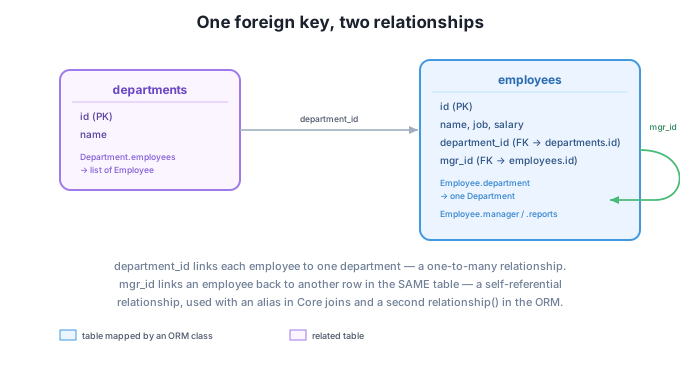
The employees table’s mgr_id column points at another row in the same table. Joining a table to itself only works if SQLAlchemy can tell the two “copies” apart, which is exactly what .alias() is for:
managers = employees.alias("managers")

stmt = select(
    employees.c.name.label("employee"),
    managers.c.name.label("manager"),
).select_from(
    employees.join(managers, employees.c.mgr_id == managers.c.id)
)

with engine.connect() as conn:
    for row in conn.execute(stmt):
        print(row)
Output:
('JOHNSON', 'GARFIELD')
('HARDING', 'JACKSON')
('TAFT', 'HARDING')
('HOOVER', 'HARDING')
('LINCOLN', 'GARFIELD')
('GARFIELD', 'JACKSON')
('POLK', 'GARFIELD')
('GRANT', 'FILLMORE')
('FILLMORE', 'JACKSON')
('ADAMS', 'FILLMORE')
('WASHINGTON', 'GARFIELD')
('MONROE', 'FILLMORE')
('ROOSEVELT', 'JACKSON')
employees.alias("managers") creates a second reference to the exact same table, so the join condition employees.c.mgr_id == managers.c.id can compare “this employee’s manager ID” against “that alias’s ID” without SQLAlchemy confusing the two sides. Notice JACKSON, the CEO, does not appear as an employee in this result — their mgr_id is NULL, so the inner join correctly excludes them, the same way it would exclude an employee with no department.
You can combine a join with a case() expression to compute a conditional statistic. For example, what percentage of each department earns a commission?
from sqlalchemy import func, case, cast, Float

stmt = select(
    departments.c.name,
    (
        func.sum(case((employees.c.commission.is_not(None), 1), else_=0))
        / cast(func.count(employees.c.id), Float) * 100
    ).label("pct_on_commission"),
).select_from(
    employees.join(departments, employees.c.department_id == departments.c.id)
).group_by(departments.c.name)

with engine.connect() as conn:
    for row in conn.execute(stmt):
        print(row.name, round(row.pct_on_commission, 1))
Output:
Engineering 0.0
Finance 0.0
Operations 16.7
Sales 66.7
case((condition, value), else_=default) works like SQL’s CASE WHEN ... THEN ... ELSE ... END — here, it counts 1 for each commissioned employee and 0 otherwise. func.sum(...) totals those, and dividing by cast(func.count(...), Float) — converting the count to a float first — avoids integer division silently truncating the percentage to 0.
Continue using company.db, the employees and departments tables.
Write an inner join query that returns every employee’s name alongside their department’s name, ordered alphabetically by department.
# Your code hereHint
Same join as the first example, adding .order_by(departments.c.name).
Using .outerjoin() starting from departments this time, find any department with zero employees. (There should be none in the current data — the query should simply return an empty result, which is itself useful information.)
# Your code hereHint
departments.outerjoin(employees, departments.c.id == employees.c.department_id), then filter .where(employees.c.id.is_(None)).
Using the managers alias from this lesson, find each employee’s manager and that manager’s department name. You will need to join employees to managers, and managers to departments.
# Your code hereHint
Chain two joins: employees.join(managers, employees.c.mgr_id == managers.c.id).join(departments, managers.c.department_id == departments.c.id).
You joined employees and departments with .join(), then used .outerjoin() to see how unmatched rows are handled differently — kept with NULL fill-ins on an outer join, dropped entirely on an inner join. You used .alias() to join the employees table to itself and look up each employee’s manager, and combined a join with case() and cast() to compute a conditional percentage.
.join(other, condition) — an inner join; keeps only rows matching in both tables..outerjoin(other, condition) — a left outer join; keeps every row from the left table even without a match..alias("name") — creates a second reference to the same table, required for self-joins.case((condition, value), else_=default) — a conditional expression, equivalent to SQL’s CASE WHEN.cast(expr, Float) — converts an expression’s type, useful for avoiding integer division.Almost no interesting question is answerable from a single table — you need to combine data that lives in different places, which is exactly what a relational database is designed for. The self-join pattern in particular shows up constantly in real schemas: employee hierarchies, category trees, and “referred by” relationships all model one table pointing back at itself, and the alias technique here is how you query any of them.
You can now read related data out of your database in every shape you need. In the next lesson you will change that data safely — updating and deleting rows, and wrapping related changes in transactions so a failure partway through never leaves your database inconsistent.
Keep DATATWEETS free. Help fund practical data, AI, and engineering lessons for learners worldwide.
