Title here
Summary here
In the last lesson you learned that the standard deviation measures how far a typical value sits from the mean. But “7.82 miles per gallon away from average” is awkward to reason about, and it is useless the moment you want to compare it to a weight measured in pounds. The z-score fixes both problems with one small idea: instead of measuring distance in the original units, measure it in standard deviations.
A car that gets 39 mpg and a car that weighs 1,300 pounds are described in totally different units, yet a z-score can tell you that one is more unusual for its kind than the other. That single comparison — across scales — is what makes the z-score one of the most reused tools in all of data work.
By the end of this lesson, you will be able to:
You only need pandas and the cars dataset from this module. Let’s begin.
Picture two questions about the same car: Is 46.6 mpg a lot? and Is 2,110 pounds a lot? You cannot answer either one in isolation — “a lot” only means something relative to the rest of the data. Standardization rephrases every value as the same question: how far is this from average, measured in standard deviations?
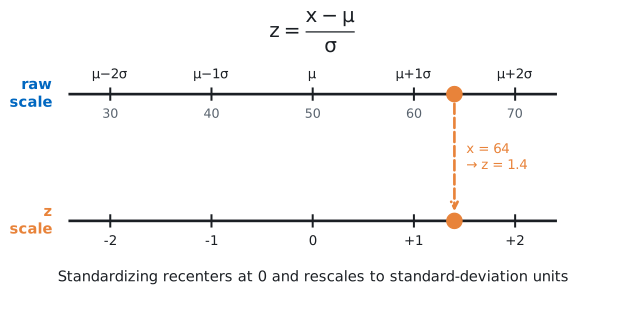
That rephrasing is the z-score. For a value drawn from data with mean and standard deviation , the z-score is:
The numerator is how far the value is from the mean in the original units. Dividing by converts that distance into a count of standard deviations. A z-score of means “two standard deviations above the mean”; a z-score of means “half a standard deviation below it.” The units cancel, which is exactly why z-scores from different columns can be compared directly.
Let’s load the data and pin down the two numbers the formula needs.
import pandas as pd

cars = pd.read_csv("https://datatweets.com/datasets/cars.csv")

mu = cars["mpg"].mean()
sd = cars["mpg"].std()          # ddof=1 (sample standard deviation), the pandas default
print(round(mu, 2), round(sd, 2))
23.51 7.82So fuel economy in this dataset has a mean of 23.51 mpg and a standard deviation of 7.82 mpg. Throughout this lesson we use pandas’ default .std(), which divides by (the sample standard deviation, ddof=1) — keep that consistent so your z-scores stay comparable.
Because pandas operations work on whole columns at once, you can standardize every car in a single expression — subtract the mean, divide by the standard deviation, and pandas applies it row by row.
cars["mpg_z"] = (cars["mpg"] - mu) / sd
print(cars[["name", "mpg", "mpg_z"]].head(5).round(2).to_string(index=False))
name mpg mpg_z
chevrolet chevelle malibu 18.0 -0.71
buick skylark 320 15.0 -1.09
plymouth satellite 18.0 -0.71
amc rebel sst 16.0 -0.96
ford torino 17.0 -0.83Every car now carries a z-score. The first row, a Chevrolet getting 18 mpg, scores : its fuel economy sits about three-quarters of a standard deviation below average. The Buick at 15 mpg is further below, at . None of these early-1970s sedans is fuel-efficient, and the z-scores say so with a sign and a size.
The mean has a z-score of zero
A value exactly equal to the mean standardizes to , because the numerator becomes zero. Standardizing a whole column always produces a new column with a mean of 0 and a standard deviation of 1 — that is the entire point. The shape of the distribution does not change; only its scale and center do.
A z-score packs two pieces of information into one number, and you read them separately.
This is what makes z-scores a natural tool for finding unusual values — values that stand far from the crowd. Sort by the z-score and the extremes rise to the top:
top = cars.sort_values("mpg_z", ascending=False).head(3)
print(top[["name", "mpg", "mpg_z"]].round(2).to_string(index=False))
name mpg mpg_z
mazda glc 46.6 2.95
honda civic 1500 gl 44.6 2.70
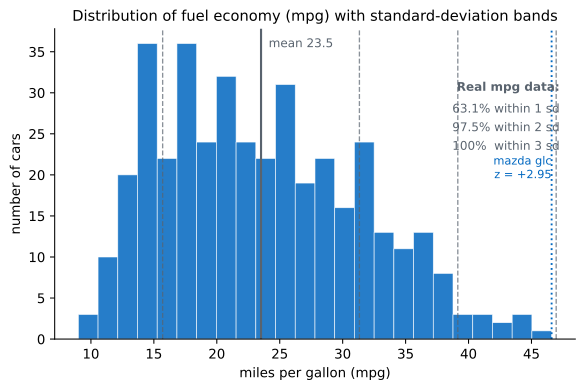
vw rabbit c (diesel) 44.3 2.66The most fuel-efficient car in the dataset is the mazda glc at 46.6 mpg, with a z-score of — almost three standard deviations above average. That is genuinely exceptional: in any bell-shaped distribution, values beyond are very rare. The two runners-up, a Honda and a diesel VW, sit just behind it. The z-score did not just rank these cars; it quantified how extreme they are in a way the raw mpg never could.
The figure below shows where these standard-deviation bands fall across the whole mpg distribution, with the mazda glc marked at the far right.
Here is where the z-score earns its keep. Fuel economy is measured in miles per gallon; weight is measured in pounds. You cannot compare 46.6 mpg to 2,110 pounds directly — the units make it meaningless. But once both are standardized, they live on the same scale, and the comparison becomes obvious.
Standardize weight the same way, then look at the mazda glc on both measures at once.
mu_w = cars["weight"].mean()
sd_w = cars["weight"].std()
cars["weight_z"] = (cars["weight"] - mu_w) / sd_w

car = cars[cars["name"] == "mazda glc"]
print(car[["name", "mpg", "mpg_z", "weight", "weight_z"]].round(2).to_string(index=False))
name mpg mpg_z weight weight_z
mazda glc 46.6 2.95 2110 -1.02Now you can read both standings off one row. The mazda glc is on mpg — extraordinarily fuel-efficient — and on weight — about one standard deviation lighter than average. Comparing the magnitudes, its fuel economy is far more exceptional than its lightness: standard deviations versus . The car is unusually light, but it is extraordinarily economical. Without z-scores you would be stuck comparing “46.6 mpg” to “2,110 pounds” and unable to say which standing is more remarkable.
Why this matters beyond cars
This same trick — putting every feature on a common scale by subtracting the mean and dividing by the standard deviation — is the standardization step run before many machine-learning algorithms (k-nearest neighbors, logistic regression, k-means, and others). Those methods measure distances between rows, and a feature with large raw units would otherwise dominate simply because its numbers are bigger. Standardizing levels the playing field. You will meet it again as StandardScaler, but it is exactly the z-score you just computed.
For data shaped like a bell curve, z-scores follow a famous pattern called the empirical rule, also known as the 68–95–99.7 rule. It says that roughly:
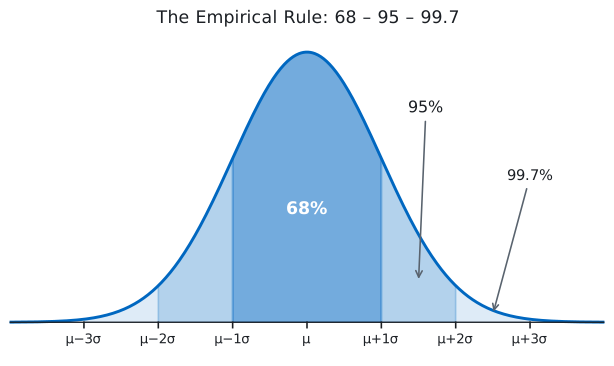
This is a powerful shortcut: if you know a distribution is roughly bell-shaped, a single z-score tells you immediately how common or rare a value is. But the rule is exact only for a perfect bell curve, and real data is rarely perfect. Let’s test it on the actual mpg column.
for k in [1, 2, 3]:
    pct = (cars["mpg_z"].abs() <= k).mean() * 100
    print(k, round(pct, 1))
1 63.1
2 97.5
3 100.0The results are close to the empirical rule but not identical. 63.1% of cars fall within one standard deviation, where the rule predicts about 68%. Within two standard deviations we find 97.5% (rule: ~95%), and within three, 100% (rule: ~99.7%). The fit is good enough to be useful, but the gaps are real — and they tell you something.
The mpg distribution is not a symmetric bell. It is right-skewed: most cars cluster at modest fuel economy, with a long tail of a few very efficient outliers like the mazda glc stretching to the right. That skew is why slightly fewer values land within one standard deviation than the rule predicts, while almost everything fits inside two. The empirical rule is a guide for bell-shaped data, not a law — always check it against your actual distribution before leaning on it.
The empirical rule assumes a bell shape
The 68–95–99.7 figures only hold when the data is approximately normal (symmetric and bell-shaped). For skewed data — incomes, house prices, fuel economy — the percentages drift, as you just saw. Use the rule as a quick sanity check, but compute the real fractions when the answer matters.
Compute z-scores for the horsepower column, then find the car with the highest horsepower z-score. How many standard deviations above the mean is it, and does that match your intuition for the most powerful car in the dataset?
Hint
Build the column with cars["hp_z"] = (cars["horsepower"] - cars["horsepower"].mean()) / cars["horsepower"].std(), then cars.sort_values("hp_z", ascending=False).head(1). The horsepower column has no missing values here, so you can standardize it directly.
Use the mpg_z and weight_z columns to find cars whose fuel economy and weight are both close to average — that is, both z-scores between and . How many cars qualify, and what does it mean for a car to be “average” on both scales at once?
Hint
Filter with a combined condition: cars[(cars["mpg_z"].abs() < 0.25) & (cars["weight_z"].abs() < 0.25)]. Count the result with len(...). These are the unremarkable middle-of-the-pack cars on both measures.
Repeat the empirical-rule check from this lesson, but on weight_z instead of mpg_z. Compute the percentage of cars within 1, 2, and 3 standard deviations and compare them to 68/95/99.7. Is weight closer to or further from a bell shape than mpg?
Hint
Reuse the loop pattern: for k in [1, 2, 3]: print(k, round((cars["weight_z"].abs() <= k).mean() * 100, 1)). Compare each percentage to the empirical-rule target for that band.
You learned to standardize a value into a z-score — the number of standard deviations it sits from the mean, computed as . The sign tells you direction and the magnitude tells you how unusual the value is, which makes z-scores a clean way to flag outliers like the mazda glc at . Because standardization strips away units, z-scores from different columns are directly comparable, letting you weigh a car’s mpg standing against its weight standing on one scale. Finally, you tested the empirical rule against the real mpg data and saw it hold approximately — 63.1% within one standard deviation rather than the textbook 68% — a reminder that the rule assumes a bell shape the data only roughly matches.
Z-scores turn “is this big?” into a question every column can answer the same way, which is why they sit at the heart of outlier detection, A/B test statistics, and the feature scaling that precedes most machine-learning models. Once you can standardize, you can compare anything to anything — and you can tell at a glance whether a value is ordinary or extraordinary for its kind.
Put the whole module together in a hands-on project that profiles the cars dataset end to end.
Return to the Measures of Center & Variability module overview
You now have every measure of center and spread this module set out to teach, and in the z-score you have the tool that ties them together — a single, unit-free way to say how unusual any value is. Next you will bring all of it to bear in a guided project, profiling the cars dataset from its center to its tails and deciding, for yourself, which numbers actually tell the story.