Title here
Summary here
Before you can compare groups, fit a model, or trust an average, you have to know what a single variable actually looks like. The first step is almost always the same: count how often each value appears. That simple act of counting turns a long, unreadable column into a frequency distribution — a compact summary of where the data piles up and where it thins out.
In this lesson you will build frequency tables from the penguins dataset, scale them into relative and percentage frequencies, stack them into cumulative frequencies, then learn the trick that makes all of this work for continuous numbers: grouping values into classes. Along the way you will see how quartiles and percentiles describe the same shape from a different angle.
By the end of this lesson, you will be able to:
value_counts()pd.cut() and read the resultquantile() and describe()You only need a little Python and pandas. Let’s begin.
A frequency distribution lists each distinct value a variable takes and how many times it occurs — its frequency. For a categorical variable, pandas builds this in one call with value_counts().
Load the data and count the species:
import pandas as pd

penguins = pd.read_csv("https://datatweets.com/datasets/penguins.csv")
print(penguins["species"].value_counts())
species
Adelie 152
Gentoo 124
Chinstrap 68
Name: count, dtype: int64Three numbers now tell you the whole shape of the species column across all 344 rows: Adelie is the most common species, Gentoo is close behind, and Chinstrap is the smallest group. That is a frequency distribution — nothing more than an organized count.
By default value_counts() sorts by frequency, largest first, which is what you usually want for ranking. But sometimes you want the categories in their natural order — alphabetical, or low-to-high. For that, sort by the index instead:
print(penguins["species"].value_counts().sort_index())species
Adelie 152
Chinstrap 68
Gentoo 124
Name: count, dtype: int64Same three counts, different order. sort_index() arranges the labels alphabetically (Adelie, Chinstrap, Gentoo); the default arranges them by size. Pick whichever makes your table easier to read — and be deliberate, because the order changes the story a reader sees first.
Raw counts answer “how many?” but not “what share?” A relative frequency is the proportion of the total each value represents — the count divided by the number of observations. Pass normalize=True to get it directly:
print(penguins["species"].value_counts(normalize=True).round(3))species
Adelie 0.442
Gentoo 0.360
Chinstrap 0.198
Name: proportion, dtype: float64Each relative frequency falls between 0 and 1, and together they sum to 1. Adelie penguins make up a proportion of of the dataset.
A percentage frequency is just the relative frequency times 100 — usually the friendliest form for a report:
print((penguins["species"].value_counts(normalize=True) * 100).round(1))species
Adelie 44.2
Gentoo 36.0
Chinstrap 19.8
Name: proportion, dtype: float64Now the table reads in plain language: 44.2% Adelie, 36.0% Gentoo, 19.8% Chinstrap. Percentages let you compare distributions even when the totals differ — a group that is 44% of 344 penguins and a group that is 44% of 10,000 are directly comparable, while the raw counts are not.
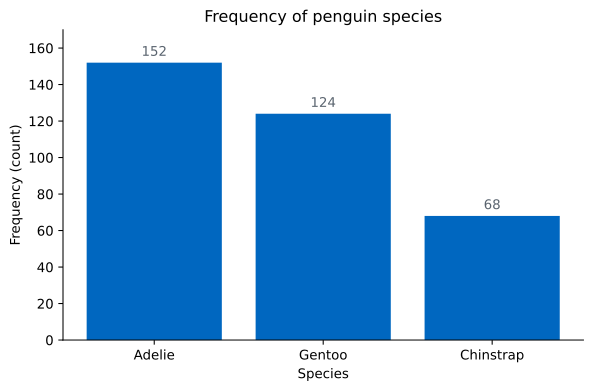
Counts, proportions, percentages
These three tables describe the same distribution. A frequency is a count, a relative frequency is that count divided by the total (0 to 1), and a percentage frequency is the relative frequency times 100. Use counts to report sample sizes, proportions for math, and percentages for human readers.
A cumulative frequency answers a running question: how many observations fall at or below each category, once the categories are placed in order. You build it by sorting the table and taking a running total with cumsum().
Let’s switch to the island column, which has a meaningful left-to-right reading once sorted:
counts = penguins["island"].value_counts().sort_index()
print(counts)
print(counts.cumsum())
island
Biscoe 168
Dream 124
Torgersen 52
Name: count, dtype: int64
island
Biscoe 168
Dream 292
Torgersen 344
Name: count, dtype: int64Read the second table as a running tally: 168 penguins live on Biscoe; 292 live on Biscoe or Dream; and all 344 live on one of the three islands. The final cumulative value always equals the total number of observations.
The cumulative relative frequency does the same thing with proportions, so the last value is always 1:
print((counts.cumsum() / counts.sum()).round(3))island
Biscoe 0.488
Dream 0.849
Torgersen 1.000
Name: count, dtype: float64By the time you reach Dream, 84.9% of the penguins are accounted for. Cumulative tables shine when you want to answer “what fraction is below this threshold?” — exactly the question percentiles will answer later for numbers.
value_counts() works beautifully for categories, but try it on body_mass_g and you would get a row for nearly every distinct gram value — useless. Continuous variables need to be grouped first: you slice the range into a set of intervals, called classes or bins, and count how many values fall in each one.
The body masses run from a minimum of 2700 g to a maximum of 6300 g, a range of 3600 g. If you want six equal-width classes, each class spans grams — that 600 is the class width. Define the class boundaries from 2700 up to 6300 in steps of 600, then let pd.cut() assign each penguin to a class:
bins = [2700, 3300, 3900, 4500, 5100, 5700, 6300]
grouped = pd.cut(penguins["body_mass_g"], bins=bins, include_lowest=True)
print(grouped.value_counts().sort_index())
body_mass_g
(2699.999, 3300.0] 40
(3300.0, 3900.0] 114
(3900.0, 4500.0] 73
(4500.0, 5100.0] 60
(5100.0, 5700.0] 43
(5700.0, 6300.0] 12
Name: count, dtype: int64This is a grouped frequency distribution. Each interval is written as (low, high], meaning the lower boundary is excluded and the upper boundary included — so a 3900 g penguin lands in the (3300, 3900] class, not the next one. The include_lowest=True flag pulls the very lightest penguin (2700 g) into the first class even though its left edge is open.
A few things to notice. The counts sum to 342, not 344, because two penguins have a missing body_mass_g and pd.cut() quietly drops them. And the distribution is clearly lopsided: the heaviest pile sits in the (3300, 3900] class, then the counts taper off toward the heavy end — a right-skewed shape.
Every class has a lower and upper boundary and a midpoint — the value halfway between them, which often stands in for the whole class in later calculations. For our 600 g classes the midpoints are evenly spaced:
mids = [(bins[i] + bins[i + 1]) / 2 for i in range(len(bins) - 1)]
print(mids)
[3000.0, 3600.0, 4200.0, 4800.0, 5400.0, 6000.0]So the (3300, 3900] class is summarized by its midpoint of 3600 g. Plotting the counts against these classes gives a bar chart that behaves like a histogram — the visual form of a grouped frequency distribution:
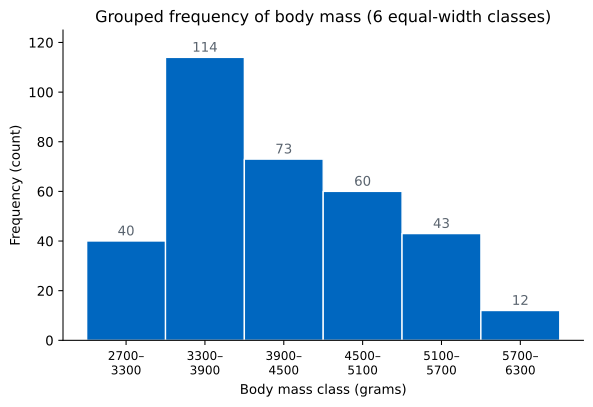
The number of classes is a choice, and it changes what you see. Use too few and you blur real structure; use too many and random noise looks like signal. Compare three classes against our six:
bins3 = [2700, 3900, 5100, 6300]
print(pd.cut(penguins["body_mass_g"], bins=bins3, include_lowest=True)
      .value_counts().sort_index())
body_mass_g
(2699.999, 3900.0] 154
(3900.0, 5100.0] 133
(5100.0, 6300.0] 55
Name: count, dtype: int64With only three wide classes (width 1200), the distribution looks almost like a smooth slide from light to heavy, and the prominent peak you saw with six classes has vanished into the first bar. Now swing the other way with twelve narrow classes:
bins12 = list(range(2700, 6301, 300))
print(pd.cut(penguins["body_mass_g"], bins=bins12, include_lowest=True)
      .value_counts().sort_index())
body_mass_g
(2699.999, 3000.0] 11
(3000.0, 3300.0] 29
(3300.0, 3600.0] 57
(3600.0, 3900.0] 57
(3900.0, 4200.0] 39
(4200.0, 4500.0] 34
(4500.0, 4800.0] 34
(4800.0, 5100.0] 26
(5100.0, 5400.0] 21
(5400.0, 5700.0] 22
(5700.0, 6000.0] 10
(6000.0, 6300.0] 2
Name: count, dtype: int64Twelve classes (width 300) reveal a twin peak around 3300–3900 g that the coarser views hid — but the table is also choppier and harder to read at a glance. There is no single correct number; you adjust the bins until the picture is faithful without being noisy. A common rule of thumb is to start near the square root of the sample size, then tune by eye.
Bin count changes the story
The same column can look smooth, bimodal, or skewed depending on how many classes you cut it into. Always try a few bin counts before you draw a conclusion about a distribution’s shape — and report the bin width you used so others can reproduce it.
A grouped table shows shape one class at a time. Percentiles describe that shape with single cut points. The -th percentile is the value below which roughly of the data falls — the numeric cousin of the cumulative relative frequencies you built earlier.
The most-used percentiles are the quartiles, which split the data into four equal parts: the first quartile (25th percentile), the second (the median, 50th percentile), and the third (75th percentile). Compute all three with quantile():
print(penguins["body_mass_g"].quantile([0.25, 0.50, 0.75]))0.25 3550.0
0.50 4050.0
0.75 4750.0
Name: body_mass_g, dtype: float64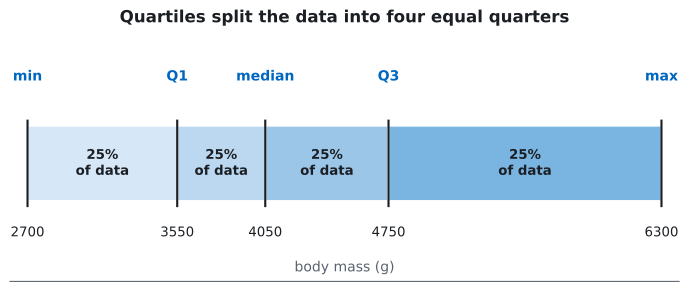
Read this directly: a quarter of penguins weigh under 3550 g, half weigh under 4050 g (the median), and three-quarters weigh under 4750 g. The middle half of the data sits between and ; the width of that band, g, is the interquartile range (IQR), a robust measure of spread you will use heavily in the next lesson.
describe() rolls the count, mean, standard deviation, minimum, the three quartiles, and the maximum into one table — a five-number summary plus the mean and standard deviation:
print(penguins["body_mass_g"].describe())count 342.000000
mean 4201.754386
std 801.954536
min 2700.000000
25% 3550.000000
50% 4050.000000
75% 4750.000000
max 6300.000000
Name: body_mass_g, dtype: float64Notice the gap between the mean (4201.8 g) and the median (4050 g): the mean sits above the median, which is the fingerprint of the right skew you spotted in the grouped table. When a distribution leans right, its longer tail of heavy values drags the mean upward while the median stays put. The frequency table, the histogram, and these quartiles are three views of one truth — and reading them together is what makes a summary trustworthy.
Build a table for the island column that shows, side by side, the percentage frequency and the cumulative relative frequency, with islands sorted alphabetically. Which island pushes the cumulative total past 50%?
Hint
Start from counts = penguins["island"].value_counts().sort_index(). The percentage frequency is (counts / counts.sum() * 100).round(1), and the cumulative relative frequency is (counts.cumsum() / counts.sum()).round(3). Compare each running total to 0.5.
Build a grouped frequency distribution for flipper_length_mm using five equal-width classes spanning 170 mm to 235 mm (class width 13 mm). Which class holds the most penguins, and how does changing to ten classes change that picture?
Hint
Create the boundaries with import numpy as np; bins = np.linspace(170, 235, 6) for five classes, then pd.cut(penguins["flipper_length_mm"], bins=bins, include_lowest=True).value_counts().sort_index(). For ten classes use np.linspace(170, 235, 11).
Use quantile([0.25, 0.5, 0.75]) and describe() on bill_length_mm to find its three quartiles and IQR. Is the mean above or below the median, and what does that tell you about the variable’s skew?
Hint
Call penguins["bill_length_mm"].quantile([0.25, 0.5, 0.75]) for the quartiles and subtract from for the IQR. Then compare the mean and 50% rows from describe(): a mean above the median signals a right-skewed tail.
You learned to turn a raw column into a frequency distribution and to express it three ways — as counts, relative frequencies, and percentage frequencies — choosing the form that fits your audience. You stacked counts into cumulative and cumulative-relative frequencies to answer “how much falls below here?”, and you sorted tables by count or by index to control the story they tell. For continuous data you used pd.cut() to build grouped distributions, defining class width, boundaries, and midpoints, and watched the number of bins reshape what you saw. Finally, percentiles and quartiles from quantile() and describe() gave you single-number cut points that summarize the same shape.
Every exploratory analysis begins by asking what one variable looks like, and a frequency distribution is the fastest honest answer. The choices you make here — how many bins, whether to show counts or percentages, where the quartiles fall — quietly shape every conclusion that follows. Analysts who can read a distribution at a glance catch skew, outliers, and data-entry errors before they poison a model, while those who skip straight to the mean keep getting fooled by the same long tails.
Turn these frequency tables into histograms, bar charts, and box plots that make a distribution's shape obvious at a glance.
Return to the Statistics Fundamentals module overview
You can now compress any column into a distribution and read its shape from a table — counts, proportions, cumulative totals, and quartiles. Next you will give that shape a picture, learning which chart reveals which feature of a distribution so a single glance tells you what a column of numbers is really doing.