Title here
Summary here
A single number rarely tells the whole story. A mean of 4201.8 grams sounds tidy, but it hides whether the penguins cluster tightly around that figure or sprawl across a wide range, whether they form one neat hump or two separate groups, and whether a few unusually heavy birds are quietly dragging the average up. To see all of that, you have to look at the data — and the chart you choose decides what you are able to see.
In this lesson you will pick the right chart for each kind of variable, build histograms from the penguins dataset in Python, and learn to read a distribution’s shape the way an analyst does: at a glance, before computing anything.
By the end of this lesson, you will be able to:
You only need a little Python, pandas, and matplotlib. Let’s begin.
The first decision is not how to draw a chart but which chart the data allows. That choice follows directly from the variable type you met in Lesson 2.
A categorical variable sorts each penguin into a group — its species or its island. There is no “in between” Adelie and Gentoo, so the natural summary is a count of how many fall in each group, drawn as a bar chart: one bar per category, its height the count.
A continuous variable — body_mass_g, flipper_length_mm — can take any value across a range, so counting each exact value is useless (almost every penguin has a unique mass). Instead we slice the range into intervals and count how many land in each, drawn as a histogram.
Load the data and look at a categorical variable first:
import pandas as pd

penguins = pd.read_csv("https://datatweets.com/datasets/penguins.csv")
print(penguins["species"].value_counts())
species
Adelie 152
Gentoo 124
Chinstrap 68
Name: count, dtype: int64Three categories, three counts. A bar chart turns those counts into something you can read instantly:
import matplotlib.pyplot as plt

counts = penguins["species"].value_counts()
counts.plot(kind="bar")
plt.show()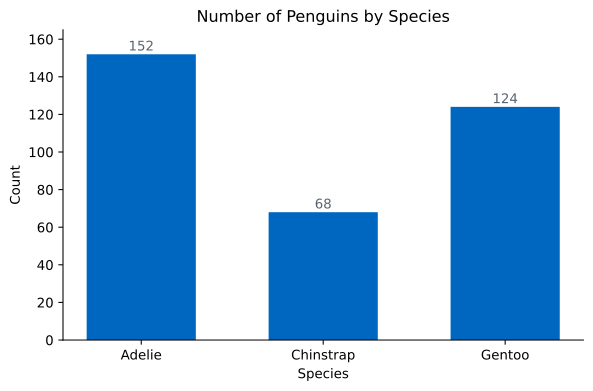
What you should see: the bars are separated by gaps, signalling that these are distinct groups with no order between them. You read a bar chart by comparing heights — Adelie has more than twice as many birds as Chinstrap.
Bars touch in a histogram, but not in a bar chart
A bar chart shows categories, so its bars stand apart with gaps. A histogram shows a continuous range sliced into intervals, so its bars sit flush against each other — the touching bars are a visual reminder that the axis is a number line, not a set of labels.
For a continuous variable, a histogram answers the question a bar chart cannot: where do the values pile up? It divides the range into equal-width intervals called bins and draws a bar for each, with height equal to how many observations fall inside.
Here is the distribution of body mass across all 344 penguins:
penguins["body_mass_g"].plot(kind="hist", bins=15)
plt.show()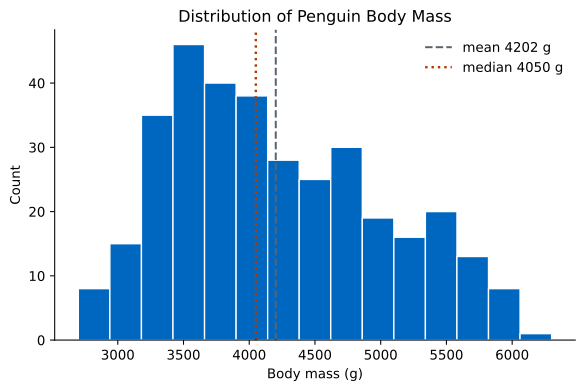
What you should see: most penguins sit in the 3000–4500 g range, with a tail of heavier birds stretching to the right. The tallest bars are on the left side of the chart, and the bars get shorter as you move right. That asymmetry is the first piece of shape we will name in a moment.
A histogram is not a fixed fact about the data — it depends on a choice you make: how wide the bins are. Use too few bins and you blur real structure into a single lump; use too many and random noise looks like signal. The same body-mass data tells two different stories at two bin counts:
fig, axes = plt.subplots(1, 2)
penguins["body_mass_g"].plot(kind="hist", bins=5, ax=axes[0])
penguins["body_mass_g"].plot(kind="hist", bins=30, ax=axes[1])
plt.show()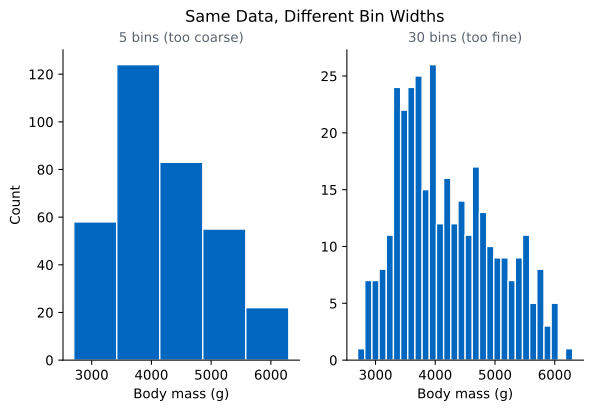
What you should see: neither extreme is wrong, but neither is helpful. The five-bin version hides the rightward trail; the thirty-bin version invents bumps that are just the luck of which gram each bird weighed. A good rule of thumb is to try a few bin counts and pick the one where the overall shape is clear but you are not chasing single-bar wiggles. The 15-bin chart above strikes that balance.
There is no single correct bin count
Because bin width is a choice, always look at a histogram with at least two bin settings before describing its shape. A feature that survives across bin widths is real; one that appears at only one setting is probably noise.
Once you can draw a histogram, the skill that matters is reading it. Three questions describe almost any distribution’s shape: is it symmetric or skewed, how many peaks does it have, and are there outliers?
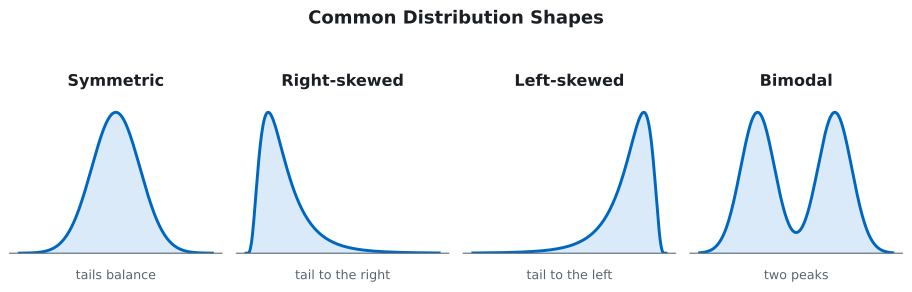
A distribution is symmetric when its left and right halves are roughly mirror images. It is skewed when one tail is longer than the other. The direction is named for the long tail: a right-skewed (or positively skewed) distribution has a tail stretching to the right toward large values; a left-skewed one trails off to the left.
Body mass is right-skewed. Most penguins are light-to-average, but a smaller number of heavy birds pull a long tail to the right. We can confirm this without a chart by comparing the mean to the median:
print(round(penguins["body_mass_g"].mean(), 1))
print(penguins["body_mass_g"].median())
4201.8
4050.0The mean (4201.8 g) sits above the median (4050.0 g), and that gap is the signature of right skew. The median is the middle value, unmoved by how extreme the tail gets. The mean, by contrast, is the balance point, so a handful of very heavy penguins tug it upward. This is the rule worth memorizing:
That is why a “typical” value reported as a mean can mislead on skewed data — the average penguin mass of 4202 g is heavier than more than half the penguins.
Modality counts the peaks in a distribution. A unimodal distribution has one peak; a bimodal one has two distinct humps, usually because two different groups are mixed together. Body mass above is unimodal — one main peak.
Flipper length tells a different story. Recall the species means:
print(penguins.groupby("species")["flipper_length_mm"].mean().round(1))species
Adelie 190.0
Chinstrap 195.8
Gentoo 217.2Adelie and Chinstrap have similar, short flippers (around 190–196 mm), but Gentoo flippers are much longer (217 mm). When you pour all three species into one histogram, those two clusters refuse to blend:
penguins["flipper_length_mm"].plot(kind="hist", bins=20)
plt.show()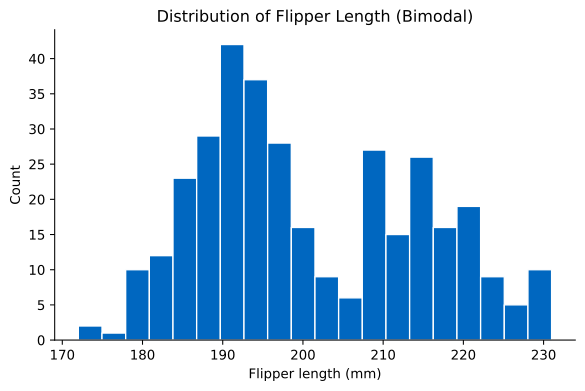
What you should see: two separate humps with a dip in between. That dip is the tell. A bimodal shape almost always means a hidden grouping variable, and here it is species: the Gentoo cluster sits apart from the Adelie–Chinstrap cluster. A single mean or median for flipper length (the overall mean is 200.9 mm) would describe no actual penguin — it lands in the empty valley between the two groups.
An outlier is a value that sits far from the bulk of the data. On a histogram it shows up as one or more short, isolated bars separated from the main body by a gap of empty bins. Outliers are not automatically errors — a genuinely huge penguin is still a penguin — but they deserve a second look, because they can swing a mean, distort a chart’s scale, and signal either a real extreme or a data-entry mistake. Whenever you see an isolated bar far from the crowd, investigate it before you trust any average computed alongside it.
Draw a bar chart of how many penguins were observed on each island. Which island has the most penguins, and which has the fewest? Explain why a histogram would be the wrong choice for this variable.
Hint
Count with penguins["island"].value_counts(), then add .plot(kind="bar"). island is categorical (Biscoe, Dream, Torgersen) with no numeric order, so its summary is a count per group, not a binned range.
Without drawing a chart, decide whether bill_length_mm is roughly symmetric or skewed by comparing its mean and median. Then make a histogram to check your answer. Does the picture match the numbers?
Hint
Compare penguins["bill_length_mm"].mean() with penguins["bill_length_mm"].median(). When they sit very close together, the distribution is close to symmetric; a large gap points to skew in the direction of the larger value.
Make a histogram of bill_depth_mm with bins=20. Describe its modality. Then group by species to see which species explains any separate peak you find.
Hint
Use penguins["bill_depth_mm"].plot(kind="hist", bins=20), then penguins.groupby("species")["bill_depth_mm"].mean().round(1). Gentoo bills are notably shallower (~15 mm) than Adelie and Chinstrap (~18 mm), so watch for two clusters.
You learned to let the variable type choose the chart: bar charts count categories, while histograms slice a continuous range into bins and count what lands in each. Because bin width is a choice, the same data can look smooth or jagged, so you always check a histogram at more than one setting. Most importantly, you can now read a distribution’s shape — its symmetry or skew, its modality, and its outliers — and tie that shape back to the mean and median: a right tail pulls the mean above the median, and a bimodal shape warns you that a single average is describing no one.
Before you fit a model or report an average, you look at the distribution — and the shape decides what you are allowed to say. Skew tells you whether the mean or median is the honest summary; bimodality tells you a single number is hiding a group you should split out; an outlier tells you to investigate before you trust anything computed alongside it. Reading a histogram in five seconds is one of the most reused skills in all of data work.
Put two or more groups side by side and learn the charts that reveal how distributions differ.
Return to the Statistics Fundamentals module overview
You can now turn a column of numbers into a shape and read that shape out loud — symmetric or skewed, one peak or two, with or without stragglers. Next you will set distributions next to each other and learn the charts that make differences between groups jump off the page.