Title here
Summary here
Basic for loops are straightforward, but Python gives you tools like enumerate, zip, the else clause, and comprehensions that make iteration cleaner. Once your data lives in pandas, this guide also measures why looping row by row is usually the wrong move.

You learned for item in items: early on, and it works. But Python’s for loop has a deeper toolkit: enumerate() hands you the index without a manual counter, zip() lets you walk two sequences side by side, the else clause cleanly handles “nothing matched,” and comprehensions replace an entire loop with one expression. The same idea — describe the result you want instead of the steps to get there — is also why efficient pandas code almost never loops over rows by hand.
Here’s where it gets confusing: these all look like syntax sugar, so it’s easy to reach for the wrong one, or to not notice .iterrows() is catastrophically slow until a DataFrame gets big enough to hurt. This guide covers the language-level patterns first, then finishes with the question every pandas user eventually asks: what do you use instead of looping over rows one at a time? If you’re still getting comfortable with basic loops, our Python Basics course covers the fundamentals first; and if you’re already doing per-group math in pandas, grouping data with groupby often answers the question without looping at all.
Every “advanced” for-loop technique does one of three things to the basic for item in items: pattern:
enumerate() adds the index, zip() adds a second (or third) sequence, so you get more information per iteration without extra bookkeeping.break, continue, and the loop’s else clause change what happens at the edges, not what happens in the middle.[expression for item in iterable]) and lets Python handle the iteration. Inside pandas, a vectorized operation takes this one step further: it states the result for every row at once, computed in C, with no per-row Python bytecode at all.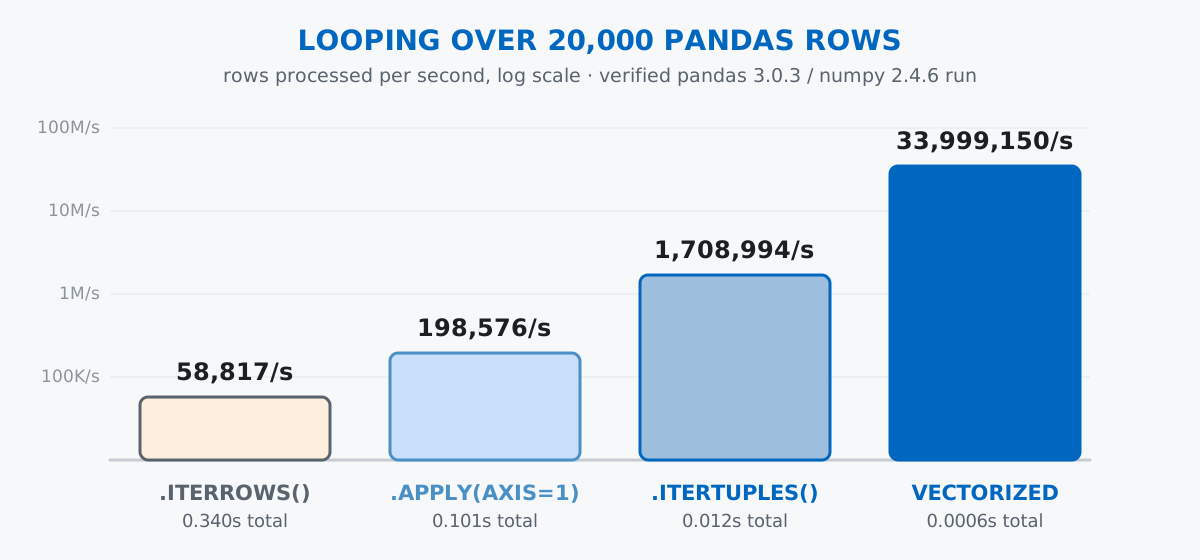
The rest of this guide walks through each category in order, then spends real time on “replace” inside pandas, where the performance gap is largest: looping over a DataFrame with .iterrows() runs roughly 580 times slower than the same calculation as one vectorized expression, verified later in this post.
enumerate(): Stop Counting ManuallyThe manual way to track an index:
fruits = ["apple", "banana", "cherry", "date"]

index = 0
for fruit in fruits:
    print(f"{index}: {fruit}")
    index += 1
0: apple
1: banana
2: cherry
3: dateThis works but it’s verbose, and you have to remember to increment index every iteration. enumerate() does it automatically:
for index, fruit in enumerate(fruits):
    print(f"{index}: {fruit}")
0: apple
1: banana
2: cherry
3: dateSame output, cleaner code. enumerate() returns pairs of (index, item), so you unpack them directly in the loop header — the “enrich” category from the mental model above, at its simplest.
Need indices that start at 1 instead of 0? Pass a start argument:
for rank, fruit in enumerate(fruits, start=1):
    print(f"#{rank}: {fruit}")
#1: apple
#2: banana
#3: cherry
#4: dateThis is cleaner than index + 1 everywhere. Reach for enumerate() only when you use the index for something — updating a list in place, comparing neighbors, formatting output. Otherwise, plain for fruit in fruits: says what you mean more clearly.
zip(): Iterate Over Multiple Sequences in ParallelWhen you have two lists and need corresponding pairs, zip() is your tool:
names = ["Alice", "Bob", "Charlie"]
scores = [85, 92, 78]

for name, score in zip(names, scores):
    print(f"{name}: {score}")
Alice: 85
Bob: 92
Charlie: 78zip() pairs up elements from both lists, stopping when the shorter one runs out. You can zip more than two sequences:
cities = ["New York", "London", "Tokyo"]
temps = [22, 15, 28]
units = ["C", "C", "C"]

for city, temp, unit in zip(cities, temps, units):
    print(f"{city}: {temp}°{unit}")
New York: 22°C
London: 15°C
Tokyo: 28°Czip()Pair up keys and values to create a dictionary in one line:
keys = ["name", "age", "city"]
values = ["Alice", 30, "Seattle"]

person = dict(zip(keys, values))
print(person)
{'name': 'Alice', 'age': 30, 'city': 'Seattle'}This pattern comes up when parsing data from APIs or CSV rows.
By default, zip() stops at the shortest sequence:
a = [1, 2, 3]
b = ["x", "y"]

print(list(zip(a, b)))
[(1, 'x'), (2, 'y')]The 3 is silently dropped. If you want every element and need to fill in missing values, use itertools.zip_longest():
from itertools import zip_longest

print(list(zip_longest(a, b, fillvalue="?")))
[(1, 'x'), (2, 'y'), (3, '?')]else Clause: Run Code Only If the Loop Never BreaksPython’s for loop supports an else block — part of the “control” category. It runs whenever the loop finishes without hitting break, which includes finishing normally and not running at all:
numbers = [1, 3, 5, 7, 9]

for n in numbers:
    if n % 2 == 0:
        print(f"Found an even number: {n}")
        break
else:
    print("No even numbers found")
No even numbers foundThe else block ran because the loop never hit break. Change the list to include an even number:
numbers = [1, 3, 5, 8, 9]

for n in numbers:
    if n % 2 == 0:
        print(f"Found an even number: {n}")
        break
else:
    print("No even numbers found")
Found an even number: 8Now else doesn’t run — the break skipped it.
The else clause shines when searching for something:
def find_user(users, target_id):
    for user in users:
        if user["id"] == target_id:
            print(f"Found: {user['name']}")
            break
    else:
        print("User not found")
The else makes the “not found” case explicit and avoids a separate flag variable to track whether the loop matched anything.
A list comprehension builds a list in one expression — the “replace” category:
numbers = [1, 2, 3, 4, 5]

# Loop version
squares = []
for n in numbers:
    squares.append(n ** 2)

print(squares)
[1, 4, 9, 16, 25]# Comprehension version
squares = [n ** 2 for n in numbers]
print(squares)[1, 4, 9, 16, 25]Same result, one line. The pattern is [expression for item in iterable].
Add a condition to filter elements:
evens = [n for n in numbers if n % 2 == 0]
print(evens)
[2, 4]Only elements that pass the if condition make it into the list. A ternary expression transforms differently based on a condition instead:
labels = ["even" if n % 2 == 0 else "odd" for n in numbers]
print(labels)
['odd', 'even', 'odd', 'even', 'odd']The ternary (value_if_true if condition else value_if_false) goes before the for.
Comprehensions can replace nested loops too. The loop version of flattening a grid:
grid = [[1, 2, 3], [4, 5, 6], [7, 8, 9]]

flat = []
for row in grid:
    for cell in row:
        flat.append(cell)

print(flat)
[1, 2, 3, 4, 5, 6, 7, 8, 9]And the comprehension version, which mirrors the nested loop’s order — outer loop first, inner loop second:
flat = [cell for row in grid for cell in row]
print(flat)
[1, 2, 3, 4, 5, 6, 7, 8, 9]Use a comprehension when:
Use a regular loop when:
Comprehensions are for clarity, not cleverness. If it’s hard to read, it’s too complex. The Python documentation on list comprehensions has more examples if you want to go further.
The same syntax works for dictionaries and sets:
# Dictionary comprehension
squares_dict = {n: n ** 2 for n in range(1, 6)}
print(squares_dict)
{1: 1, 2: 4, 3: 9, 4: 16, 5: 25}# Set comprehension
unique_lengths = {len(word) for word in ["apple", "banana", "pear", "kiwi"]}
print(unique_lengths){4, 5, 6}Same filtering and transformation rules apply.
By default, looping over a dictionary gives you its keys:
scores = {"Alice": 85, "Bob": 92, "Charlie": 78}

for name in scores:
    print(name)
Alice
Bob
CharlieFor key-value pairs, use .items(); for just the values, .values():
for name, score in scores.items():
    print(f"{name}: {score}")
Alice: 85
Bob: 92
Charlie: 78range(), break, and continuerange(stop) is common, but range(start, stop, step) gives you more control — including counting backwards:
for i in range(10, 0, -1):
    print(i, end=" ")
10 9 8 7 6 5 4 3 2 1break exits the loop immediately; continue skips the rest of the current iteration:
for i in range(10):
    if i % 2 == 0:
        continue
    if i == 7:
        break
    print(i, end=" ")
1 3 5Even numbers are skipped by continue, then the loop stops entirely once it reaches 7. Both keywords only affect the innermost loop they’re in.
Everything above applies to plain Python lists and dicts. Once your data lives in a pandas DataFrame, the calculus changes: pandas stores each column as a contiguous block of memory, and it can compute an operation across an entire column in one C-level pass — a manual Python for loop can’t touch that, no matter how cleanly it’s written.
Imagine a small courier company that charges a delivery fee based on distance, package weight, and whether the customer paid for priority handling. Generate 20,000 synthetic deliveries with a fixed seed so your numbers match mine exactly:
import numpy as np
import pandas as pd

rng = np.random.default_rng(42)
n = 20_000

deliveries = pd.DataFrame({
    "distance_km": rng.uniform(0.5, 18, size=n).round(2),
    "weight_kg": rng.uniform(0.2, 15, size=n).round(2),
    "priority": rng.choice([True, False], size=n, p=[0.15, 0.85]),
})

deliveries.head()
distance_km weight_kg priority
0 14.04 11.16 False
1 8.18 14.94 True
2 15.53 0.81 True
3 12.70 3.82 True
4 2.15 9.05 FalseThis is a seeded synthetic dataset — there’s no real courier behind it, and there doesn’t need to be one, since the point here is measuring loop performance, not analyzing real delivery patterns. (The numbers in this post come from pandas 3.0.3 and numpy 2.4.6; exact seconds will differ on your machine, but the relative order — vectorized fastest, then .itertuples(), then .apply(), then .iterrows() last — holds across machines and pandas versions.)
The fee rule: a €2.50 base plus €0.60 per kilometer and €0.15 per kilogram, a 20% surcharge if the package is over 8kg, and a flat €1.50 add-on for priority handling. time_it() runs each method 3 times and keeps the fastest, which is the standard way to cancel out one-off system noise:
import time

BASE_FEE = 2.50
RATE_PER_KM = 0.60
RATE_PER_KG = 0.15
HEAVY_SURCHARGE = 1.20
HEAVY_THRESHOLD = 8.0
PRIORITY_SURCHARGE = 1.50

def fee_for_row(distance_km, weight_kg, priority):
    fee = BASE_FEE + distance_km * RATE_PER_KM + weight_kg * RATE_PER_KG
    if weight_kg > HEAVY_THRESHOLD:
        fee *= HEAVY_SURCHARGE
    if priority:
        fee += PRIORITY_SURCHARGE
    return fee

def time_it(fn, repeats=3):
    best = None
    for _ in range(repeats):
        start = time.perf_counter()
        result = fn()
        elapsed = time.perf_counter() - start
        best = elapsed if best is None else min(best, elapsed)
return best, result.iterrows(): The Slow, Obvious Way.iterrows() looks like the natural translation of a regular Python loop — for each row, do something:
def run_iterrows():
    return [fee_for_row(row["distance_km"], row["weight_kg"], row["priority"])
            for _, row in deliveries.iterrows()]

iterrows_elapsed, fees_iterrows = time_it(run_iterrows)
print(f"iterrows: {len(deliveries)} rows in {iterrows_elapsed:.3f}s "
      f"({len(deliveries) / iterrows_elapsed:,.0f} rows/sec)")
iterrows: 20000 rows in 0.340s (58,817 rows/sec)That’s the slowest option of the four in this post, by a wide margin. .iterrows() has to rebuild a pandas.Series object for every single row, which carries real overhead multiplied by 20,000.
.itertuples(): Same Idea, Much Faster.itertuples() returns lightweight namedtuples instead of Series, which is dramatically cheaper to construct:
def run_itertuples():
    return [fee_for_row(row.distance_km, row.weight_kg, row.priority)
            for row in deliveries.itertuples()]

itertuples_elapsed, fees_itertuples = time_it(run_itertuples)
print(f"itertuples: {len(deliveries)} rows in {itertuples_elapsed:.3f}s "
      f"({len(deliveries) / itertuples_elapsed:,.0f} rows/sec)")
itertuples: 20000 rows in 0.012s (1,708,994 rows/sec)About 29 times faster than .iterrows() on the same 20,000 rows, for the same row-by-row logic — just by switching which iteration method you call. If you must loop row by row in pandas, this is the one to reach for, not .iterrows().
.apply(axis=1): A Middle Ground That Looks Faster Than It Is.apply() with axis=1 calls your function once per row and lets pandas handle the bookkeeping:
def run_apply():
    return deliveries.apply(
        lambda row: fee_for_row(row["distance_km"], row["weight_kg"], row["priority"]), axis=1
    )

apply_elapsed, fees_apply = time_it(run_apply)
print(f"apply: {len(deliveries)} rows in {apply_elapsed:.3f}s "
      f"({len(deliveries) / apply_elapsed:,.0f} rows/sec)")
apply: 20000 rows in 0.101s (198,576 rows/sec)Faster than .iterrows(), but slower than .itertuples() — and much slower than the vectorized version below. .apply(axis=1) still runs your Python function once per row; it’s just hidden inside pandas’ own loop instead of yours.
The fastest option skips row-by-row logic entirely and operates on whole columns at once:
def run_vectorized():
    fee = BASE_FEE + deliveries["distance_km"] * RATE_PER_KM + deliveries["weight_kg"] * RATE_PER_KG
    fee = fee.where(deliveries["weight_kg"] <= HEAVY_THRESHOLD, fee * HEAVY_SURCHARGE)
    fee = fee.where(~deliveries["priority"], fee + PRIORITY_SURCHARGE)
    return fee

vectorized_elapsed, fee = time_it(run_vectorized)
print(f"vectorized: {len(deliveries)} rows in {vectorized_elapsed:.4f}s "
      f"({len(deliveries) / vectorized_elapsed:,.0f} rows/sec)")
print(f"speedup vs iterrows: {iterrows_elapsed / vectorized_elapsed:.1f}x")
vectorized: 20000 rows in 0.0006s (33,999,150 rows/sec)
speedup vs iterrows: 578.0xSeries.where(condition, other) keeps the original value where condition is True and swaps in other where it’s False — read it as “keep this, unless.” All four methods here produce identical fees for every row — 578.0x faster than .iterrows(), 19.9x faster than .itertuples(), 171.2x faster than .apply(); see the pandas guide to iteration for the library’s own take on when (rarely) a loop is still the right call.
The else clause runs even if the loop body never executes at all — it’s not only about break. An empty iterable never hits break, so else still fires:
empty = []
for item in empty:
    print("never runs")
else:
    print("else still runs on an empty iterable")
else still runs on an empty iterableIf your else block assumes the loop processed at least one item, check for that separately.
.iterrows() quietly changes your dtypes. Because each row becomes a single pandas.Series, and a Series can only have one dtype, mixed-type rows get upcast — usually to float64:
small = pd.DataFrame({"package_count": [3, 1, 5], "distance_km": [4.5, 12.0, 2.25]})
print(small.dtypes)

for _, row in small.iterrows():
    print(row["package_count"], type(row["package_count"]).__name__)
package_count int64
distance_km float64
dtype: object
3.0 float64
1.0 float64
5.0 float64package_count is an integer column, but every value comes back as a float64 inside the loop. .itertuples() doesn’t have this problem, since it hands back a namedtuple that preserves each column’s own type.
.apply(axis=1) is not vectorized, no matter how it looks. It reads like a one-liner and lives on the same DataFrame object as genuinely vectorized methods, but the timing above shows it’s 171 times slower than the vectorized version on this dataset — because it’s still a Python function call per row underneath.
Python’s for loop has three moves beyond the basics: enrich what each pass gives you (enumerate, zip), control how it ends (break, continue, else), or replace it entirely by describing the result you want (comprehensions, and — inside pandas — vectorized operations). For DataFrames specifically:
.iterrows() → avoid it; it’s the slowest option here, by roughly 580 times.itertuples() → the right choice when you genuinely need row-by-row logic.apply(axis=1) → convenient, but still a per-row Python call — measure before trusting itIf you want to go deeper on the pandas side — aggregating instead of looping, reshaping data, and cleaning it before either — the Apply, Map, and Transform lesson in our free Python for Data Analytics course picks up exactly where this post leaves off.
 Python
Build an AI Chatbot in Python: A Command-Line LLM Client
A from-scratch walkthrough of the pattern behind every LLM chatbot: one function that sends a message plus conversation history to a chat-completion API, a persona set by a system prompt, and a loop that keeps the conversation going.
Read tutorial
Python
Build an AI Chatbot in Python: A Command-Line LLM Client
A from-scratch walkthrough of the pattern behind every LLM chatbot: one function that sends a message plus conversation history to a chat-completion API, a persona set by a system prompt, and a loop that keeps the conversation going.
Read tutorial
 Software Engineering
The Single Responsibility Principle: One Class, One Reason to Change
The Single Responsibility Principle says a class should have only one reason to change. See it in action: take a Python AuthService that also owns its logging, find why that's a problem, and refactor it into clean, focused classes.
Read tutorial
Software Engineering
The Single Responsibility Principle: One Class, One Reason to Change
The Single Responsibility Principle says a class should have only one reason to change. See it in action: take a Python AuthService that also owns its logging, find why that's a problem, and refactor it into clean, focused classes.
Read tutorial