Title here
Summary here
Airflow's moving parts — scheduler, metadata database, web UI — usually mean a multi-container setup. This guide runs all of it in one lightweight Docker container instead, then writes a real three-task DAG, triggers it, and reads its actual logs.

Some jobs have to run on a schedule and respect an order — send the report only after the numbers are ready, back something up only after it’s actually written. Cron handles the schedule part fine. It has no idea whether the earlier step succeeded, so the moment step three depends on step one, you’re writing your own bookkeeping to track that by hand. Orchestrating scheduled, dependent tasks — and remembering exactly what happened each time — is the one job Apache Airflow exists to do.
Airflow itself isn’t one program, though; it’s a scheduler, a metadata database, and a web UI that all need to agree on where things live. That’s where people quietly back off the idea, because setting all of that up directly, on top of whatever Python you already have installed, is more commitment than “I just want to see what a DAG looks like.” Docker sidesteps that: pull one image, run one container, and all of it starts up already wired together. (If you’ve already used Docker to run Jupyter reproducibly, the pattern here will feel familiar — pull an image, mount a folder, run a container — what’s different is what’s running inside it.) This guide builds the mental model first, then runs a real container, writes a real DAG, and triggers a real run end to end.
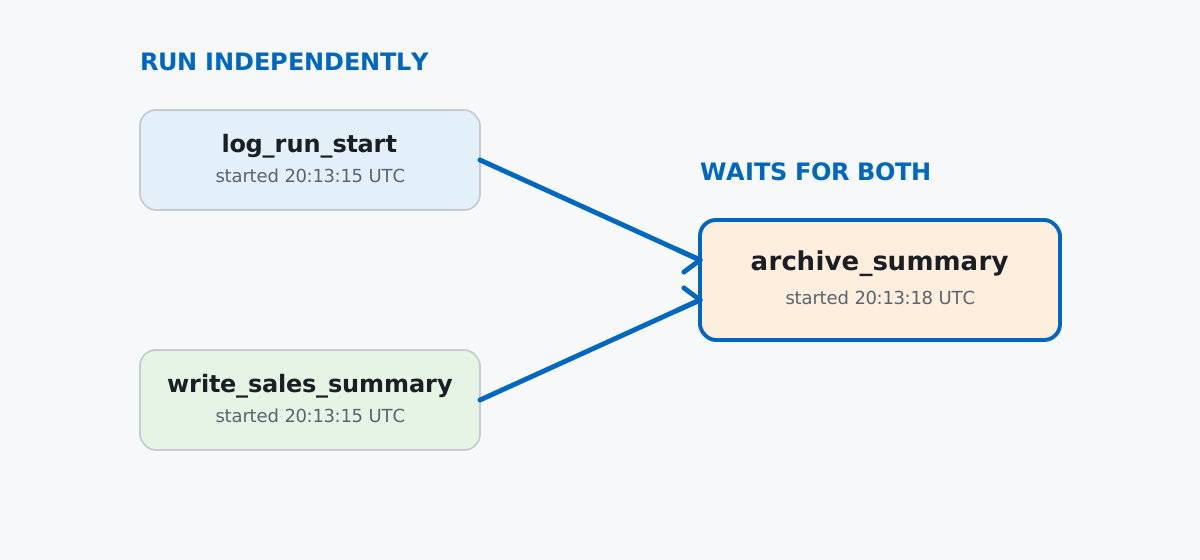
Keep that model in mind for the rest of this post: everything below is one DAG, three tasks, and a scheduler deciding when each one is allowed to run.
The realistic production setup runs a webserver, a scheduler, a triggerer, and a database as separate containers — that’s what docker-compose examples in Airflow’s own repo set up, and it’s the right shape for real workloads. It’s also several gigabytes and more moving parts than a first look needs. Airflow ships a lighter path built for exactly this: the standalone command, which runs the scheduler, the API server, and a dag-processor inside one container and defaults to a local SQLite file as its metadata database — no separate Postgres or Redis container required.
To keep the image itself small, use the slim build instead of the default one — it skips the provider packages (cloud hooks, database connectors) that a first DAG doesn’t need:
docker pull apache/airflow:slim-latestslim-latest: Pulling from apache/airflow
...
4f4fb700ef54: Pull complete
Digest: sha256:4928926c6faf2b3f62ec223f5df905075493574b9853718b133a2cd8b54acc91
Status: Downloaded newer image for apache/airflow:slim-latest
docker.io/apache/airflow:slim-latestdocker images apache/airflow:slim-latestIMAGE ID DISK USAGE CONTENT SIZE EXTRA
apache/airflow:slim-latest bb2f8807edb3 815MB 0B815MB — noticeably smaller than the ~3GB+ full image, and light enough to pull without worrying about disk space on a laptop. Now run it, mounting a dags folder so Airflow picks up code from the host, and a reports folder the DAG itself will write into later:
mkdir -p dags reports
docker run -d --name airflow-standalone-demo \
  -p 8081:8080 \
  -v "$(pwd)/dags":/opt/airflow/dags \
  -v "$(pwd)/reports":/opt/airflow/reports \
apache/airflow:slim-latest standalone658d1214d328ba465d3d8c820b8a690a3ee32137a9823af01c0b437f61efdfd2Give it a few seconds, then read the log — it prints something you need only once, on this very first run:
docker logs airflow-standalone-demo...
2026-07-12T20:03:01.879733Z [warning ] SimpleAuthManager is active but the deployment shape looks
like production (non-sqlite backend, non-local API host, or a distributed executor). SimpleAuthManager
stores passwords in plaintext at /opt/airflow/simple_auth_manager_passwords.json.generated and prints
generated passwords to stdout/logs on first init. Use a real auth manager (e.g. FAB or Keycloak) for
production deployments. [airflow.api_fastapi.auth.managers.simple.simple_auth_manager]
Simple auth manager | Password for user 'admin': Rfapb9kXzmgMGbrN
...
standalone | Airflow is ready
standalone | Airflow Standalone is for development purposes only. Do not use this in production!That password is generated fresh on first boot and is different every time you start a brand-new container — copy it from your own log, not this one. AIRFLOW_HOME inside the image is /opt/airflow, and it runs as a non-root user (airflow, uid 50000), which is why the mounted dags and reports folders need to be writable by more than just your own host user.
docker ps tells you the container is running; it doesn’t tell you Airflow itself finished starting. A plain health check against the API server does:
curl -s -o /dev/null -w "%{http_code}\n" http://127.0.0.1:8081/api/v2/monitor/health200And the credentials from the startup log are real — trading them for an access token proves the whole auth chain, not just that a port is open:
curl -s -X POST http://127.0.0.1:8081/auth/token \
  -H "Content-Type: application/json" \
-d '{"username":"admin","password":"Rfapb9kXzmgMGbrN"}'{"access_token":"eyJhbGciOiJIUzUxMiIsImtpZCI6Im5vdC11c2VkIiwidHlwIjoiSldUIn0.eyJzdWIiOiJhZG1pbiIs..."}A 200 and a real JWT back means the API server, its auth layer, and the metadata database it reads users from are all up and talking to each other.
Imagine a small coffee kiosk that closes out its day with three steps: log that the close-out started, write a tiny sales summary, then archive that summary once it exists. The first two don’t depend on each other; the third can’t start until both are done. That’s the DAG from the diagram above, written with Airflow’s TaskFlow API — plain Python functions decorated into tasks:
# dags/kiosk_daily_report.py
from __future__ import annotations

import datetime
import pendulum
from airflow.sdk import dag, task

REPORT_PATH = "/opt/airflow/reports/summary.txt"
ARCHIVE_PATH = "/opt/airflow/reports/archive.log"


@dag(
    dag_id="kiosk_daily_report",
    schedule=None,
    start_date=pendulum.datetime(2026, 7, 1, tz="UTC"),
    catchup=False,
    tags=["kiosk", "demo"],
)
def kiosk_daily_report():
    @task
    def log_run_start():
        now = datetime.datetime.now(datetime.timezone.utc).isoformat()
        print(f"kiosk_daily_report run started at {now}")
        return now

    @task
    def write_sales_summary():
        with open(REPORT_PATH, "w") as f:
            f.write("cups_sold=132\n")
            f.write("revenue_eur=418.50\n")
        return REPORT_PATH

    @task
    def archive_summary(started_at: str, report_path: str):
        with open(report_path) as f:
            summary = f.read()
        with open(ARCHIVE_PATH, "a") as f:
            f.write(f"[{started_at}] archived {report_path}\n{summary}\n")

    started_at = log_run_start()
    report_path = write_sales_summary()
    archive_summary(started_at, report_path)


kiosk_daily_report()
The dependency chain is just ordinary Python: archive_summary is called with the return values of the other two tasks, so Airflow wires up “wait for both” automatically — you never call .set_upstream() or draw an arrow by hand. (The Airflow DAGs documentation covers the full authoring API if you want to go beyond three tasks.) Save that file into the mounted dags/ folder on the host, and within a few seconds airflow dags list shows it, registered but not yet enabled to run automatically:
docker exec airflow-standalone-demo airflow dags listdag_id | fileloc | owners | is_paused | bundle_name | bundle_version
===================+=========================================+=========+===========+=============+===============
kiosk_daily_report | /opt/airflow/dags/kiosk_daily_report.py | airflow | True | dags-folder | Nonedocker exec airflow-standalone-demo airflow tasks list kiosk_daily_reportarchive_summary
log_run_start
write_sales_summaryAll three tasks are there, and is_paused | True is Airflow’s default for any brand-new DAG — it’s registered, but the scheduler won’t create automatic runs for it until you say otherwise.
Airflow will accept a manual trigger even on a paused DAG — it just won’t run it. Trigger it while it’s still paused:
docker exec airflow-standalone-demo airflow dags trigger kiosk_daily_reportconf | dag_id | dag_run_id | ... | state | ...
=====+====================+==========================================+=====+========+=====
{} | kiosk_daily_report | manual__2026-07-12T20:11:55.961593+00:00 | ... | queued | ...Check on it a minute later and it’s still sitting there:
docker exec airflow-standalone-demo airflow dags list-runs kiosk_daily_reportdag_id | run_id | state | ...
===================+===========================================+========+=====
kiosk_daily_report | manual__2026-07-12T20:11:55.961593+00:00 | queued | ...A queued run on a paused DAG stays queued — the scheduler only picks up work for DAGs that are actually enabled. Unpause it and the same run starts moving within seconds:
docker exec airflow-standalone-demo airflow dags unpause kiosk_daily_report
docker exec airflow-standalone-demo airflow dags list-runs kiosk_daily_report
dag_id | run_id | state | start_date | end_date
===================+===========================================+=========+===================================+=================================
kiosk_daily_report | manual__2026-07-12T20:11:55.961593+00:00 | success | 2026-07-12T20:13:14.980752+00:00 | 2026-07-12T20:13:19.894354+00:00Five seconds start to finish, and every task inside it reports its own state the same way:
docker exec airflow-standalone-demo airflow tasks states-for-dag-run \
  kiosk_daily_report "manual__2026-07-12T20:11:55.961593+00:00"
dag_id | task_id | state | start_date | end_date
===================+=====================+=========+===================================+=================================
kiosk_daily_report | log_run_start | success | 2026-07-12T20:13:15.207296+00:00 | 2026-07-12T20:13:17.940029+00:00
kiosk_daily_report | write_sales_summary | success | 2026-07-12T20:13:15.207585+00:00 | 2026-07-12T20:13:17.935026+00:00
kiosk_daily_report | archive_summary | success | 2026-07-12T20:13:18.936980+00:00 | 2026-07-12T20:13:19.011231+00:00Read the start times: log_run_start and write_sales_summary both start at 20:13:15, at the same time — no dependency between them. archive_summary doesn’t start until 20:13:18, after both of the others have already finished. That’s the dependency chain from the diagram, proven by real timestamps instead of just asserted.
Every task writes a real log file under /opt/airflow/logs, keyed by DAG, run, and task:
docker exec airflow-standalone-demo cat \
  "/opt/airflow/logs/dag_id=kiosk_daily_report/run_id=manual__2026-07-12T20:11:55.961593+00:00/task_id=log_run_start/attempt=1.log"
{"timestamp":"2026-07-12T20:13:17.916971Z","level":"info","event":"kiosk_daily_report run started at 2026-07-12T20:13:17.916874+00:00","logger":"task.stdout"}
{"timestamp":"2026-07-12T20:13:17.916946Z","level":"info","event":"Done. Returned value was: 2026-07-12T20:13:17.916874+00:00", ...}Airflow 3’s task logs are structured JSON lines rather than the plain-text banners older Airflow tutorials show — worth knowing if you’re following along from an older guide and the log format looks unfamiliar. The event field on the task.stdout line is exactly what the task’s print() call wrote. And the two files the DAG actually produced are sitting on the host, in the reports/ folder you mounted, because that’s the whole point of a volume mount — no docker cp needed:
cat reports/summary.txt reports/archive.logcups_sold=132
revenue_eur=418.50
[2026-07-12T20:13:17.916874+00:00] archived /opt/airflow/reports/summary.txt
cups_sold=132
revenue_eur=418.50Everything above ran in one container with one SQLite file as its whole memory — fine for learning, and exactly what standalone mode is for. A production setup changes three things. First, the executor: instead of the single in-container executor standalone wires up, a real deployment uses CeleryExecutor or KubernetesExecutor to actually spread tasks across multiple machines. Second, the database: SQLite gets replaced with Postgres or MySQL, because more than one process needs to read and write it at once. Third, the pieces split into separate containers — scheduler, API server, triggerer, and one or more workers — each restartable and scalable independently, which is exactly the shape of Airflow’s own official docker-compose.yaml. Airflow tells you this itself, unprompted, in the very warning this post’s startup log already showed: SimpleAuthManager is active but the deployment shape looks like production... Use a real auth manager (e.g. FAB or Keycloak) for production deployments. Standalone mode is built to say “you’re not set up for production” the moment your setup starts looking like one.
A new DAG file can take minutes to appear, not seconds. Airflow’s dag-processor only rescans the dags/ folder for entirely new files on an interval — five minutes by default. Editing an existing DAG file gets picked up much faster, but dropping in a brand-new file and immediately running airflow dags list expecting to see it is a common false alarm. Give it a few minutes before assuming the volume mount is broken.
A broken DAG fails silently — until you go looking for it. Introduce a real bug (forgetting an import, in this case) and nothing in docker logs shouts about it:
@dag(dag_id="broken_report", schedule=None, start_date=pendulum.datetime(2026, 7, 1))
def broken_report():
    ...
docker exec airflow-standalone-demo airflow dags list-import-errorsbundle_name | filepath | error
============+==================+=========================================================
dags-folder | broken_report.py | NameError: name 'pendulum' is not definedpendulum was never imported in that file. The DAG simply never shows up in airflow dags list — no crash, no obvious error in the container logs, just a DAG that quietly isn’t there. airflow dags list-import-errors (or the “Import Errors” tab in the web UI) is the only place that failure surfaces.
SQLite serializes writes, no matter which executor picks it up. airflow info on this container reported executor | LocalExecutor — not the older SequentialExecutor some tutorials mention — but the database underneath is still sqlite:////opt/airflow/airflow.db, and SQLite only allows one writer at a time. Two tasks that are logically independent, like log_run_start and write_sales_summary above, still end up serialized through that single database file in practice. Fine for a three-task demo; not what you want from a real pipeline with dozens of parallel tasks.
Removing the container removes anything you didn’t mount. This post mounted dags/ and reports/, so the DAG’s own output — summary.txt and archive.log — survived cleanup without a single docker cp. The metadata database and every task log lived only inside the container’s own writable layer, at /opt/airflow/airflow.db and /opt/airflow/logs, and neither was mounted. Remove the container (as this post’s own cleanup does) and that run history is gone for good, not archived anywhere. If you want run history and logs to survive a rebuild, mount those paths too.
A DAG is the to-do list; the scheduler decides when each item on it is allowed to run; the metadata database is Airflow’s memory of what already happened:
airflow standalone → scheduler, API server, and dag-processor in one container, SQLite as the database — right for learning, not for productiondags/ folder → how your code gets into the container, with a real (sometimes multi-minute) discovery delay for brand-new filesairflow dags trigger + airflow dags unpause → a manual run needs the DAG unpaused before the scheduler will actually execute itairflow dags list-import-errors → the one place a broken DAG’s failure actually surfacesIf you want the deployment side of this — building the container image itself, and the pipeline that would ship a DAG like this one safely — the CI/CD and DevOps lesson in our free Software Engineering Fundamentals course picks up exactly where this post’s container leaves off.
 Python
Build an AI Chatbot in Python: A Command-Line LLM Client
A from-scratch walkthrough of the pattern behind every LLM chatbot: one function that sends a message plus conversation history to a chat-completion API, a persona set by a system prompt, and a loop that keeps the conversation going.
Read tutorial
Python
Build an AI Chatbot in Python: A Command-Line LLM Client
A from-scratch walkthrough of the pattern behind every LLM chatbot: one function that sends a message plus conversation history to a chat-completion API, a persona set by a system prompt, and a loop that keeps the conversation going.
Read tutorial
 Software Engineering
The Single Responsibility Principle: One Class, One Reason to Change
The Single Responsibility Principle says a class should have only one reason to change. See it in action: take a Python AuthService that also owns its logging, find why that's a problem, and refactor it into clean, focused classes.
Read tutorial
Software Engineering
The Single Responsibility Principle: One Class, One Reason to Change
The Single Responsibility Principle says a class should have only one reason to change. See it in action: take a Python AuthService that also owns its logging, find why that's a problem, and refactor it into clean, focused classes.
Read tutorial