Title here
Summary here
Real text data breaks in ways numeric data doesn't. This guide walks through cleaning a genuinely messy app-review dataset in pandas — missing and blank text fields, encoding artifacts, stray HTML, inconsistent casing and whitespace, and near-duplicate reviews — until it's ready to hand to a tokenizer.

Your NLP project doesn’t start with clean sentences. It starts with a CSV export, an API dump, or a folder of user-submitted text that’s never been near a tokenizer. Before you can ask “what is this document about,” you have to answer a much less glamorous question: is this DataFrame even usable? A review with no text attached, the same complaint typed twice with different punctuation, a stray <br> left over from a web form — none of that shows up in a tidy demo dataset, but all of it shows up the first time you point a real pipeline at real text.
This is the step most NLP write-ups skip, because it’s unglamorous and dataset-specific in a way tokenization isn’t — there’s no single function that fixes “messy text,” only a sequence of small, deliberate decisions. Our guide to NLP preprocessing in Python picks up right where this post ends: it assumes you already have a clean, one-document-per-row DataFrame and shows you how to tokenize, normalize, and vectorize it. This post is what happens before that, and it’s a different job from our general pandas data-cleaning guide, too — that post fixes numeric and categorical columns (missing names, inconsistent dates), while every problem here lives inside a single free-text column that a real person typed by hand.
Numeric data mostly breaks by being wrong — a negative age, an impossible date. Text data breaks by being right in ten different disguises: “Great app!!” and “great app” and " Great app " all mean the same thing to a person, but they’re three different strings to a computer. Cleaning text is as much about teaching your code to recognize sameness as it is about fixing errors. Four ideas carry the rest of this post:
NaN. An empty string, a string of only spaces, and a placeholder like "N/A" are all “nothing” — but only one of those trips .isna().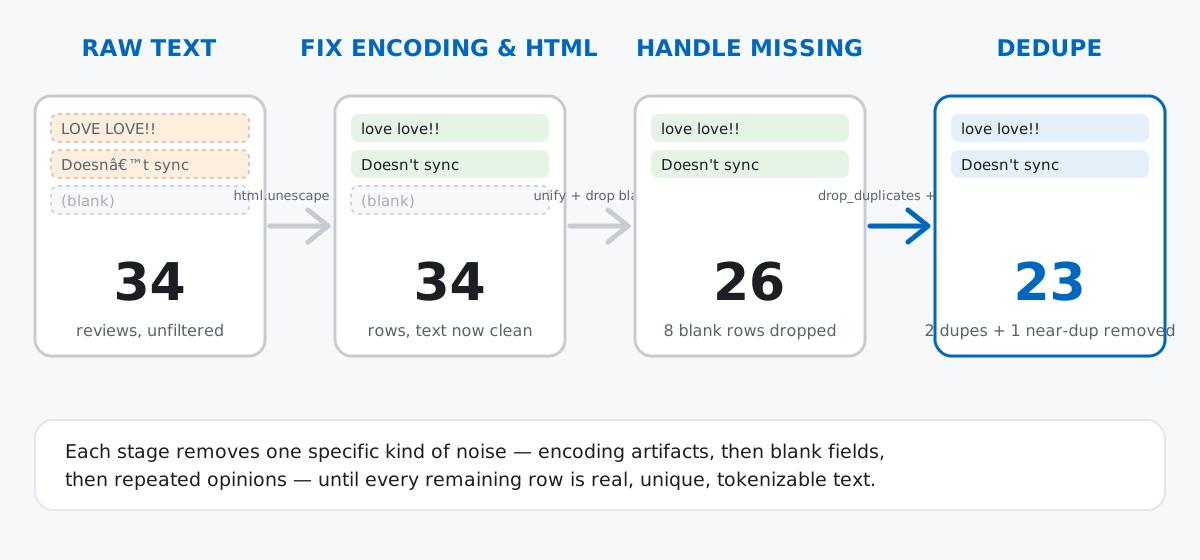
Imagine Loopnote, a small habit-tracking app, pulling user feedback together from three channels — App Store reviews, Google Play reviews, and a short in-app “how’s it going?” prompt — plus whatever support emails happen to mention the product. Nobody standardized the export format across those channels, so the feedback_text column looks exactly like real, hand-typed user text: some of it is shouted in capital letters, some of it never made it past a blank text box, and a few rows still carry the HTML and mis-decoded punctuation an old export script left behind.
This is an original, hand-written dataset — 34 rows, planted on purpose with the kinds of problems a real text export actually has, the same well-precedented approach our guide to Python data-cleaning libraries used for its vendor sign-up data. Every reader who pastes this block gets the identical 34 rows, no download required.
import re
import html
import difflib
import pandas as pd

reviews = pd.DataFrame([
    {"review_id": 1, "source": "App Store", "rating": 5, "feedback_text": "Loopnote finally got me to stick with a daily journaling habit. Highly recommend!"},
    {"review_id": 2, "source": "Google Play", "rating": 1, "feedback_text": "Crashes every time I try to add a new habit on my Pixel 7."},
    {"review_id": 3, "source": "Google Play", "rating": 2, "feedback_text": "  App is okay but notifications never fire on time.   "},
    {"review_id": 4, "source": "Email", "rating": 3, "feedback_text": "Its fine i guess. wish there were more themes"},
    {"review_id": 5, "source": "In-App Widget", "rating": 5, "feedback_text": "LOVE LOVE LOVE THIS APP!!! CHANGED MY MORNING ROUTINE COMPLETELY"},
    {"review_id": 6, "source": "App Store", "rating": 5, "feedback_text": "Best habit app I've tried. The streak view keeps me honest."},
    {"review_id": 7, "source": "Email", "rating": 2, "feedback_text": "Customer support never got back to me about my billing question."},
    {"review_id": 8, "source": "Google Play", "rating": 4, "feedback_text": "Widget on the home screen is a nice touch, checks habits off fast."},
    {"review_id": 9, "source": "App Store", "rating": 3, "feedback_text": "Good app & easy to use, but the "premium" upsell is annoying."},
    {"review_id": 10, "source": "In-App Widget", "rating": 5, "feedback_text": "Great for building habits.<br>Just wish it synced with my smartwatch.<br/>"},
    {"review_id": 11, "source": "Google Play", "rating": 4, "feedback_text": "  great app!!  Love the reminders.   "},
    {"review_id": 12, "source": "App Store", "rating": 1, "feedback_text": "Doesn’t sync properly with Apple Health."},
    {"review_id": 13, "source": "Email", "rating": 5, "feedback_text": "The dark theme looks great — much easier on the eyes at night."},
    {"review_id": 14, "source": "App Store", "rating": 4, "feedback_text": None},
    {"review_id": 15, "source": "Google Play", "rating": 3, "feedback_text": ""},
    {"review_id": 16, "source": "In-App Widget", "rating": 5, "feedback_text": "   "},
    {"review_id": 17, "source": "Email", "rating": 3, "feedback_text": "N/A"},
    {"review_id": 18, "source": "App Store", "rating": 5, "feedback_text": "Best habit app I've tried, the streak view keeps me really honest."},
    {"review_id": 19, "source": "Google Play", "rating": 2, "feedback_text": "Reminders\tare\tinconsistent\ton\tAndroid\t14."},
    {"review_id": 20, "source": "App Store", "rating": 3, "feedback_text": "prettyÂ\xa0good overall, could use more widgets"},
    {"review_id": 21, "source": "In-App Widget", "rating": 4, "feedback_text": "Signed up for premium and it's honestly worth it."},
    {"review_id": 22, "source": "Google Play", "rating": 1, "feedback_text": "Lost three weeks of streak data after the last update. Not happy."},
    {"review_id": 23, "source": "App Store", "rating": 4, "feedback_text": None},
    {"review_id": 24, "source": "App Store", "rating": 2, "feedback_text": ""},
    {"review_id": 25, "source": "Google Play", "rating": 5, "feedback_text": "   "},
    {"review_id": 26, "source": "In-App Widget", "rating": 3, "feedback_text": "N/A"},
    {"review_id": 27, "source": "App Store", "rating": 4, "feedback_text": "Great app!! love the reminders."},
    {"review_id": 28, "source": "Email", "rating": 5, "feedback_text": "Customer support never got back to me about my billing question."},
    {"review_id": 29, "source": "In-App Widget", "rating": 2, "feedback_text": "The     spacing     between     habits     is     broken     on     iPad."},
    {"review_id": 30, "source": "Email", "rating": 4, "feedback_text": "Switched from a paper planner and honestly Loopnote is easier to stick with."},
    {"review_id": 31, "source": "App Store", "rating": 3, "feedback_text": "It's decent, but the free tier feels pretty limited now."},
    {"review_id": 32, "source": "In-App Widget", "rating": 1, "feedback_text": "Ads before every streak check-in. Ruins the whole experience."},
    {"review_id": 33, "source": "App Store", "rating": 4, "feedback_text": "Solid update this month, the calendar heat map is a nice addition."},
    {"review_id": 34, "source": "Email", "rating": 3, "feedback_text": "Good idea, rough execution — sync breaks constantly."},
])
reviews.shape
(34, 4)Four columns, thirty-four rows. (The outputs in this post come from pandas 3.0 — the same approach works on pandas 2.x.)
.info() and Blank-Looking Text.info() is always the first move — dtypes and null counts, before you’ve formed any opinions about the data:
reviews.info()<class 'pandas.DataFrame'>
RangeIndex: 34 entries, 0 to 33
Data columns (total 4 columns):
# Column Non-Null Count Dtype
--- ------ -------------- -----
0 review_id 34 non-null int64
1 source 34 non-null str
2 rating 34 non-null int64
3 feedback_text 32 non-null str
dtypes: int64(2), str(2)
memory usage: 1.2 KBTwo of the thirty-four feedback_text values are true NaN. Hold onto that number — it’s about to look too small.
blank_mask = reviews["feedback_text"].fillna("__NAN__").str.strip().isin(["", "N/A"])
blank_mask.sum()6.isna() only catches an actual null. Text has more ways to say “nothing” than a database column does: an empty string a user left in the box, three spaces they typed by accident, or a literal "N/A" someone put into an optional field. None of those trip .isna(), but all six of these rows are just as empty as the two real nulls:
    review_id         source feedback_text
14         15    Google Play
15         16  In-App Widget
16         17          Email           N/A
23         24      App Store
24         25    Google Play
25         26  In-App Widget           N/A
Combined with the two real nulls, that’s eight blank-in-some-way rows out of thirty-four — nearly a quarter of the dataset. A plain .isna().sum() alone would have missed three-quarters of them.
Casing is inconsistent too, and not just in a “some sentences start with a capital letter” way:
reviews[reviews["review_id"].isin([2, 5, 7])][["review_id", "feedback_text"]] review_id feedback_text
1 2 Crashes every time I try to add a new habit on my Pixel 7.
4 5 LOVE LOVE LOVE THIS APP!!! CHANGED MY MORNING ROUTINE COMPLETELY
6 7 Customer support never got back to me about my billing question.Row 5 is entirely uppercase, row 2 and row 7 are ordinary sentence case, and elsewhere in the dataset there’s lowercase-only text too. A vectorizer that treats "Great" and "GREAT" and "great" as three different words will fragment your vocabulary for no good reason — that’s the case for normalizing, coming up next.
A quick scan for HTML remnants and encoding artifacts turns up more problems than casing alone:
has_html = reviews["feedback_text"].str.contains(r"<[^>]+>|&\w+;", regex=True, na=False)
has_mojibake = reviews["feedback_text"].str.contains(r"[Ââ]€|Â\xa0", regex=True, na=False)
print("html-ish rows:", has_html.sum())
print("mojibake-ish rows:", has_mojibake.sum())
html-ish rows: 2
mojibake-ish rows: 4The HTML rows are straightforward — an escaped ampersand, a couple of stray <br> tags:
   review_id                                                                feedback_text
8          9  Good app & easy to use, but the "premium" upsell is annoying.
9         10   Great for building habits.<br>Just wish it synced with my smartwatch.<br/>
The mojibake rows are a different, sneakier problem — garbled text left behind when a file that was actually UTF-8 gets read as if it were Windows-1252 (a common mismatch in older CMS exports and Windows-authored CSVs). A right single quote turns into ’, an em dash turns into —, a stray non-breaking space turns into  followed by an invisible character:
    review_id                                                     feedback_text
11         12                        Doesn’t sync properly with Apple Health.
12         13  The dark theme looks great — much easier on the eyes at night.
19         20                      pretty good overall, could use more widgets
33         34            Good idea, rough execution — sync breaks constantly.
Both problems are fixable with the re module and the standard-library html module rather than anything exotic — html.unescape() turns & back into &, and re-encoding as cp1252 then decoding as utf-8 reverses exactly the mismatch that produced the mojibake in the first place:
def fix_mojibake(text):
    if pd.isna(text):
        return text
    try:
        return text.encode("cp1252").decode("utf-8")
    except (UnicodeDecodeError, UnicodeEncodeError):
        return text

def strip_html(text):
    if pd.isna(text):
        return text
    text = html.unescape(text)
    text = re.sub(r"<[^>]+>", " ", text)
    return text

reviews["feedback_clean"] = reviews["feedback_text"].apply(fix_mojibake).apply(strip_html)
reviews[reviews["review_id"].isin([9, 10, 12, 13, 20, 34])][["review_id", "feedback_text", "feedback_clean"]]
review_id feedback_text feedback_clean
8 9 Good app & easy to use, but the "premium" upsell is annoying. Good app & easy to use, but the "premium" upsell is annoying.
9 10 Great for building habits.<br>Just wish it synced with my smartwatch.<br/> Great for building habits. Just wish it synced with my smartwatch.
11 12 Doesn’t sync properly with Apple Health. Doesn’t sync properly with Apple Health.
12 13 The dark theme looks great — much easier on the eyes at night. The dark theme looks great — much easier on the eyes at night.
19 20 pretty good overall, could use more widgets pretty good overall, could use more widgets
33 34 Good idea, rough execution — sync breaks constantly. Good idea, rough execution — sync breaks constantly.Doesn’t becomes Doesn't, "premium" becomes real quote marks, and the <br> tags disappear — the try/except in fix_mojibake matters because running the cp1252/utf-8 round trip on text that isn’t garbled would raise a UnicodeDecodeError, and this function has to run safely across rows that never had the problem in the first place.
Whitespace is the next source of noise — leading and trailing spaces, doubled-up spaces, even stray tab characters from a copy-paste:
def collapse_whitespace(text):
    if pd.isna(text):
        return text
    return re.sub(r"\s+", " ", text).strip()

reviews["feedback_clean"] = reviews["feedback_clean"].apply(collapse_whitespace)
reviews[reviews["review_id"].isin([3, 11, 19, 29])][["review_id", "feedback_text", "feedback_clean"]]
review_id feedback_text feedback_clean
2 3 App is okay but notifications never fire on time. App is okay but notifications never fire on time.
10 11 great app!! Love the reminders. great app!! Love the reminders.
18 19 Reminders\tare\tinconsistent\ton\tAndroid\t14. Reminders are inconsistent on Android 14.
28 29 The spacing between habits is broken on iPad. The spacing between habits is broken on iPad.\s+ matches any run of whitespace — spaces, tabs, newlines — and collapses it to a single space, then .strip() removes what’s left at the ends. Notice feedback_clean still has its original casing and punctuation intact; we are not lowercasing or stripping punctuation from the column we’re keeping, only tidying its whitespace. That restraint is deliberate, and it’s worth a second, disposable column to see why:
def normalize_for_comparison(text):
    if pd.isna(text) or text == "":
        return text
    text = text.lower()
    text = re.sub(r"[^\w\s]", "", text)
    text = re.sub(r"\s+", " ", text).strip()
    return text

reviews["feedback_normalized"] = reviews["feedback_clean"].apply(normalize_for_comparison)
reviews[reviews["review_id"].isin([11, 27])][["review_id", "feedback_clean", "feedback_normalized"]]
review_id feedback_clean feedback_normalized
10 11 great app!! Love the reminders. great app love the reminders
26 27 Great app!! love the reminders. great app love the remindersfeedback_normalized lowercases everything and strips punctuation, which is exactly what you want for comparing two strings but exactly what you don’t want for the text you’ll actually tokenize later — more on that in the gotchas below. Keep feedback_clean as the column you ship, and treat feedback_normalized as scratch space for the deduplication work in the next two sections.
With the noise cleaned up, it’s time to act on the eight blank-in-some-way rows from earlier. Unify all four flavors — NaN, empty string, whitespace-only, and the literal "N/A" placeholder — into a single mask:
reviews["feedback_clean_stripped"] = reviews["feedback_clean"].fillna("")
is_missing = (
    reviews["feedback_text"].isna()
    | (reviews["feedback_clean_stripped"].str.strip() == "")
    | (reviews["feedback_clean_stripped"].str.strip().str.upper() == "N/A")
)
is_missing.sum()8A row with no text is useless to a tokenizer — there’s no linguistic content to normalize, stem, or vectorize, unlike a numeric column where a missing value can often be filled with a mean or a category label. Dropping is the right call here, but not before checking whether it costs you something you didn’t expect:
reviews.loc[is_missing, "source"].value_counts()source
App Store 3
Google Play 2
In-App Widget 2
Email 1
Name: count, dtype: int64reviews["source"].value_counts()source
App Store 12
Google Play 8
Email 7
In-App Widget 7
Name: count, dtype: int64As a share of each channel, that’s App Store 3/12 (25.0%), Google Play 2/8 (25.0%), In-App Widget 2/7 (28.6%), and Email 1/7 (14.3%) missing or blank. Email reviewers are noticeably less likely to leave the text blank than the other three channels — not dramatic in a 34-row toy dataset, but the kind of gap that would quietly skew a real one if a whole channel’s tone got underrepresented after dropping. Having checked, drop the eight rows:
clean = reviews.loc[~is_missing].copy()
len(reviews), len(clean)
(34, 26)Duplicate text hides at three different strictness levels, and each one needs a looser comparison than the last. Start strict, with pandas’ own .duplicated() on the cleaned text:
clean["feedback_clean"].duplicated(keep=False).sum()2Only one pair matches exactly. But two reviews can express the same complaint without being byte-for-byte identical — casing, punctuation, and whitespace differences all defeat a raw string comparison. Comparing on feedback_normalized instead catches more:
norm_dup_mask = clean["feedback_normalized"].duplicated(keep=False)
norm_dup_mask.sum()4clean.loc[norm_dup_mask, ["review_id", "feedback_clean", "feedback_normalized"]].sort_values("feedback_normalized") review_id feedback_clean feedback_normalized
6 7 Customer support never got back to me about my billing question. customer support never got back to me about my billing question
27 28 Customer support never got back to me about my billing question. customer support never got back to me about my billing question
10 11 great app!! Love the reminders. great app love the reminders
26 27 Great app!! love the reminders. great app love the remindersFour rows now, two pairs: the exact “Customer support…” repeat the strict check already found, plus a second pair — " great app!! Love the reminders. " and "Great app!! love the reminders." — that only matches once whitespace and casing stop counting. drop_duplicates on that same column keeps the first occurrence of each pair and removes the rest:
before = len(clean)
clean = clean.drop_duplicates(subset="feedback_normalized", keep="first")
before, len(clean)
(26, 24)That still isn’t the full picture. Some near-duplicates differ by more than casing and whitespace — a whole extra word can sneak in. feedback_normalized strips punctuation and case but leaves word choice untouched, so a straightforward similarity ratio from the standard library’s difflib.SequenceMatcher can compare every remaining pair and flag the ones that are almost, but not quite, the same sentence:
texts = clean[["review_id", "feedback_normalized"]].reset_index(drop=True)
near_pairs = []
for i in range(len(texts)):
    for j in range(i + 1, len(texts)):
        a = texts.loc[i, "feedback_normalized"]
        b = texts.loc[j, "feedback_normalized"]
        ratio = difflib.SequenceMatcher(None, a, b).ratio()
        if ratio >= 0.85:
            near_pairs.append((texts.loc[i, "review_id"], texts.loc[j, "review_id"], round(ratio, 3)))

pd.DataFrame(near_pairs, columns=["review_id_a", "review_id_b", "similarity"])
review_id_a review_id_b similarity
0 6 18 0.941clean.loc[clean["review_id"].isin([6, 18]), ["review_id", "feedback_clean"]] review_id feedback_clean
5 6 Best habit app I've tried. The streak view keeps me honest.
17 18 Best habit app I've tried, the streak view keeps me really honest.Review 18 is review 6 restated with one extra word (“really”) and a comma instead of a period — a 94.1% similarity score, high enough to treat as the same opinion submitted twice, not two independent reviewers who happened to phrase things almost identically. Drop the longer restatement and keep the original:
clean = clean[clean["review_id"] != 18].copy()
len(clean)23Rename the working column back to something a downstream pipeline expects, and the dataset is done:
final = clean[["review_id", "source", "rating", "feedback_clean"]].rename(
    columns={"feedback_clean": "feedback_text"}
).reset_index(drop=True)
final.info()
<class 'pandas.DataFrame'>
RangeIndex: 23 entries, 0 to 22
Data columns (total 4 columns):
# Column Non-Null Count Dtype
--- ------ -------------- -----
0 review_id 23 non-null int64
1 source 23 non-null str
2 rating 23 non-null int64
3 feedback_text 23 non-null str
dtypes: int64(2), str(2)
memory usage: 868.0 bytesThirty-four raw rows became twenty-three clean ones: eight dropped for missing or blank text, two more collapsed as normalized duplicates, one more collapsed as a near-duplicate. Every remaining feedback_text value is non-null, has consistent whitespace, and has no leftover HTML or encoding artifacts — but it still has its original casing and punctuation, which is exactly the shape tokenization expects to start from: real sentences, not pre-mangled ones.
Stripping punctuation from the text you keep can erase meaning you haven’t decided to lose yet. feedback_normalized intentionally strips punctuation and case for comparison — but running the same regex on feedback_clean would be a mistake:
row6_clean = reviews.loc[reviews["review_id"] == 6, "feedback_clean"].iloc[0]
too_aggressive = re.sub(r"[^\w\s]", "", row6_clean)
print("feedback_clean:  ", row6_clean)
print("over-stripped:   ", too_aggressive)
feedback_clean: Best habit app I've tried. The streak view keeps me honest.
over-stripped: Best habit app Ive tried The streak view keeps me honestI've becomes Ive, and the sentence boundary between “tried” and “The” disappears along with the period. Both are recoverable right now, before you’ve decided what your tokenizer needs — they aren’t recoverable once you’ve overwritten the column that keeps them.
Lowercasing too early throws away signal you haven’t decided to discard. Review 5 is written entirely in capital letters — plausibly a genuine signal of strong sentiment, not noise:
row5_clean = reviews.loc[reviews["review_id"] == 5, "feedback_clean"].iloc[0]
print("feedback_clean:  ", row5_clean)
print("lowercased:      ", row5_clean.lower())
feedback_clean: LOVE LOVE LOVE THIS APP!!! CHANGED MY MORNING ROUTINE COMPLETELY
lowercased: love love love this app!!! changed my morning routine completelyLowercase once, in place, and you can never again tell this review apart from one written in ordinary case. That’s exactly why the earlier normalization step only lowercases inside the throwaway feedback_normalized column — the decision to discard casing belongs to whatever model consumes the text next, not to the cleaning step.
Exact-duplicate checks miss near-duplicates, and can flag the wrong rows as duplicates in the first place. Before this post dropped the blank rows, a naive .duplicated() on the raw column found ten “duplicate” rows — but eight of those were just different blank and placeholder entries colliding with each other, not real repeated opinions, and the genuine "great app!! Love the reminders." repeat wasn’t in that list at all, because casing and whitespace still differed. Always resolve missing values before you dedupe, and always dedupe on normalized text, not raw text, if you want the second and third instance of the same opinion to actually match.
Dropping rows with missing text without checking whether that biases the dataset is easy to do by accident. The bias check earlier in this post found a real, if modest, gap — Email reviewers left blank feedback at 14.3%, versus 25–29% for the other three channels. Skip that check and you’d silently under-weight three channels’ worth of tone and vocabulary relative to Email’s, and you’d have no way to know it happened.
Every decision in this post followed the same shape: recognize that two things are the same before deciding what to do about them.
html.unescape() and a cp1252/utf-8 round trip, so later steps compare real characters, not garbled ones.NaN, empty string, whitespace-only, placeholder text — before deciding to drop, and check which subgroups you’re dropping from.Once your text is clean and consistent, the natural next step is turning it into something a model can use — our guide to NLP preprocessing in Python picks up exactly here, with tokenization, stopword removal, and TF-IDF vectorization. For the fuller course context — string operations, missing data, and duplicate handling as a connected sequence with exercises — the Pandas Data Analysis module in our free Python for Data Analytics course covers this material in depth.
 Python
Build an AI Chatbot in Python: A Command-Line LLM Client
A from-scratch walkthrough of the pattern behind every LLM chatbot: one function that sends a message plus conversation history to a chat-completion API, a persona set by a system prompt, and a loop that keeps the conversation going.
Read tutorial
Python
Build an AI Chatbot in Python: A Command-Line LLM Client
A from-scratch walkthrough of the pattern behind every LLM chatbot: one function that sends a message plus conversation history to a chat-completion API, a persona set by a system prompt, and a loop that keeps the conversation going.
Read tutorial
 Software Engineering
The Single Responsibility Principle: One Class, One Reason to Change
The Single Responsibility Principle says a class should have only one reason to change. See it in action: take a Python AuthService that also owns its logging, find why that's a problem, and refactor it into clean, focused classes.
Read tutorial
Software Engineering
The Single Responsibility Principle: One Class, One Reason to Change
The Single Responsibility Principle says a class should have only one reason to change. See it in action: take a Python AuthService that also owns its logging, find why that's a problem, and refactor it into clean, focused classes.
Read tutorial