Title here
Summary here
Once you can connect, the real questions start: fetchone, fetchall, or fetchmany? UPDATE and DELETE safely, not just INSERT? This guide builds the connection-cursor-query mental model, then works through psycopg2 credentials, fetch strategies, and parameterized writes on a small tool-library database you can reproduce yourself, plus a look at SQLAlchemy as an alternative way in.

You’ve got PostgreSQL running somewhere — your laptop, a container, a managed database in the cloud — and a Python script that needs to talk to it. The question that matters isn’t which library to import; it’s how to connect without a password sitting in your source code, and how to get answers back out.
This is the part most Postgres tutorials skip on the way to something flashier, and it’s where bad habits take root: hardcoded passwords, .fetchall() on a table with ten million rows, UPDATE statements built with an f-string because “it’s just a script.” This post covers connecting for real, reading results the right way, and writing safe UPDATE/DELETE queries — the groundwork our post on loading CSV data into PostgreSQL assumes you already have. If SQLite is more your speed for now, pandas and SQLite covers the lighter-weight, single-file version of the same ideas.
Three ideas carry this whole post:
psycopg2.connect(...) dials the number — nothing is asked or answered yet, the line is just open.cursor.execute().SELECT — and the server answers with rows you fetch. Some sentences give instructions — INSERT, UPDATE, DELETE — and the server answers only with how many rows it acted on.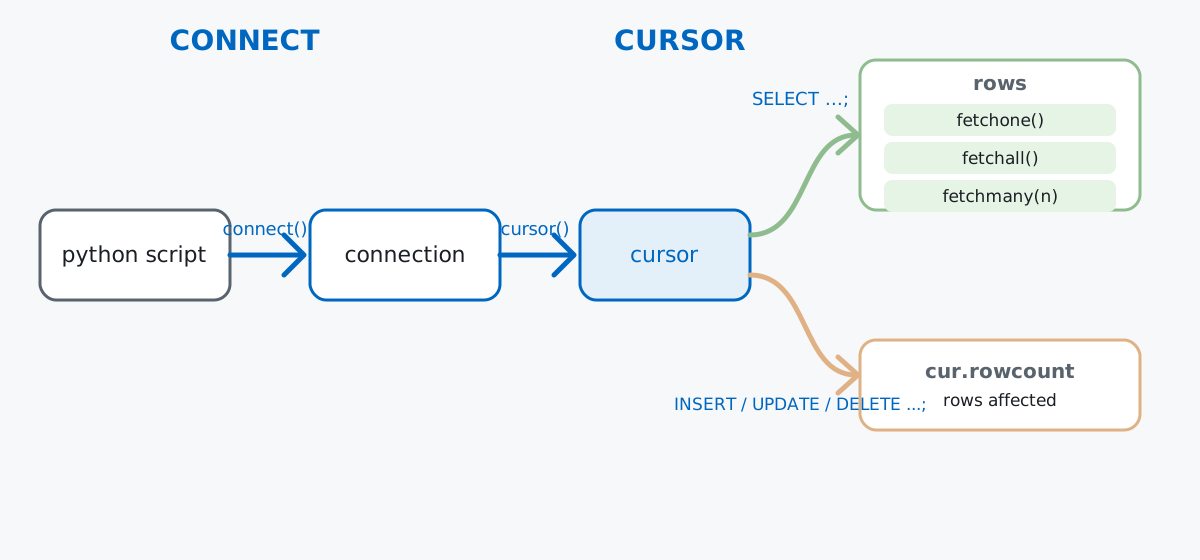
Keep that split in mind: it explains why SELECT needs a fetch* call and UPDATE doesn’t, why cursor.rowcount matters for writes but not reads, and why closing the connection ends every cursor using it.
Imagine a neighborhood tool library — a small nonprofit lending out power tools, garden equipment, and ladders to local members instead of everyone buying their own. Two tables capture the operation: tools is the catalog, loans is the record of who has what. (No local Postgres yet? Our macOS installation guide covers getting one running.) Everything below runs against a real, local toollib database — nothing downloaded, every number in this post from an actual run.
psycopg2.connect(): Environment Variables, Not Hardcoded Passwordspsycopg2 is the most widely used PostgreSQL driver for Python, and psycopg2.connect() takes credentials as a connection string ("dbname=toollib user=postgres host=127.0.0.1 port=5432") or as keyword arguments — either way, it’s tempting to paste a password straight in. Don’t: commit that file, and the password lives in your repository’s history forever. Read credentials from environment variables instead, with os.environ.get() supplying safe defaults for the non-secret parts:
import os
import psycopg2

conn_params = {
    "host": os.environ.get("TOOLLIB_DB_HOST", "127.0.0.1"),
    "port": os.environ.get("TOOLLIB_DB_PORT", "5432"),
    "dbname": os.environ.get("TOOLLIB_DB_NAME", "toollib"),
    "user": os.environ.get("TOOLLIB_DB_USER", "postgres"),
    "password": os.environ.get("TOOLLIB_DB_PASSWORD"),
}

with psycopg2.connect(**conn_params) as conn:
    with conn.cursor() as cur:
        cur.execute("SELECT version();")
        print(cur.fetchone()[0].split(",")[0])
PostgreSQL 14.16 (Homebrew) on aarch64-apple-darwin24.2.0Nothing secret sits in the source file — TOOLLIB_DB_PASSWORD is set once in your shell or your deployment platform’s secrets manager. password=None works here since this local server needs none; a production server would reject the connection with a clear authentication error instead — loud, not a silently leaked credential. See psycopg2’s official documentation for the rest of connect()’s arguments.
with psycopg2.connect(...) as conn: is a context manager: it commits on a clean exit, rolls back on an exception. Wrapping conn.cursor() in its own with closes the cursor as soon as you’re done — both patterns recur in every example below.
tools is the catalog; loans tracks who has what and whether it’s come back. daily_fee_cents is a plain integer — cents, not euros — to avoid the rounding drift that floats bring to money:
with psycopg2.connect(**conn_params) as conn:
    with conn.cursor() as cur:
        cur.execute("DROP TABLE IF EXISTS loans;")
        cur.execute("DROP TABLE IF EXISTS tools;")
        cur.execute("""
            CREATE TABLE tools (
                id SERIAL PRIMARY KEY,
                name TEXT NOT NULL,
                category TEXT NOT NULL,
                condition TEXT NOT NULL,
                daily_fee_cents INTEGER NOT NULL
            );
        """)
        cur.execute("""
            CREATE TABLE loans (
                id SERIAL PRIMARY KEY,
                tool_id INTEGER NOT NULL REFERENCES tools(id),
                borrower_name TEXT NOT NULL,
                borrowed_on DATE NOT NULL,
                returned_on DATE
            );
        """)
    conn.commit()

    tools = [
        ("Cordless Drill", "Power Tools", "good", 500),
        ("Circular Saw", "Power Tools", "good", 700),
        ("Hedge Trimmer", "Garden", "fair", 400),
        ("Ladder 3m", "Access", "good", 300),
        ("Wheelbarrow", "Garden", "worn", 250),
        ("Socket Set", "Hand Tools", "good", 200),
    ]
    with conn.cursor() as cur:
        cur.executemany(
            "INSERT INTO tools (name, category, condition, daily_fee_cents) VALUES (%s, %s, %s, %s)",
            tools,
        )
    conn.commit()

    loans = [
        (1, "Priya", "2026-06-01", "2026-06-03"),
        (2, "Tomas", "2026-06-02", None),
        (1, "Farid", "2026-06-05", "2026-06-06"),
        (4, "Anke", "2026-06-06", None),
        (6, "Priya", "2026-06-08", "2026-06-10"),
        (3, "Tomas", "2026-06-09", None),
        (2, "Anke", "2026-06-15", "2026-06-16"),
        (5, "Sofia", "2026-06-18", None),
    ]
    with conn.cursor() as cur:
        cur.executemany(
            "INSERT INTO loans (tool_id, borrower_name, borrowed_on, returned_on) VALUES (%s, %s, %s, %s)",
            loans,
        )
    conn.commit()

    with conn.cursor() as cur:
        cur.execute("SELECT count(*) FROM tools;")
        print("tools:", cur.fetchone()[0])
        cur.execute("SELECT count(*) FROM loans;")
        print("loans:", cur.fetchone()[0])
tools: 6
loans: 8executemany runs the same parameterized INSERT once per tuple, and a returned_on of None becomes a real SQL NULL, meaning “still checked out.” The %s placeholders aren’t string formatting — psycopg2 sends the statement and the values separately, which also keeps them injection-safe (more in the gotchas section).
fetchone(), fetchall(), and fetchmany()Running a SELECT doesn’t hand you rows directly — it tells the cursor what the answer will be, and you choose how much to pull into Python. .fetchone() gets exactly one row: right for a lookup with one answer, like a tool by name:
with psycopg2.connect(**conn_params) as conn:
    with conn.cursor() as cur:
        cur.execute(
            "SELECT name, category, daily_fee_cents FROM tools WHERE name = %s;",
            ("Circular Saw",),
        )
        row = cur.fetchone()
        print(row)
('Circular Saw', 'Power Tools', 700).fetchall() gets every remaining row as a list — right when the result set is small enough to hold in memory:
with psycopg2.connect(**conn_params) as conn:
    with conn.cursor() as cur:
        cur.execute(
            "SELECT name, category, daily_fee_cents FROM tools ORDER BY daily_fee_cents DESC;"
        )
        rows = cur.fetchall()
        for r in rows:
            print(r)
('Circular Saw', 'Power Tools', 700)
('Cordless Drill', 'Power Tools', 500)
('Hedge Trimmer', 'Garden', 400)
('Ladder 3m', 'Access', 300)
('Wheelbarrow', 'Garden', 250)
('Socket Set', 'Hand Tools', 200)Six rows pulled into a list in one call — fine since the catalog is tiny. .fetchmany(n) is the middle option: pull n rows at a time and loop, right for a result set too large to comfortably hold in memory at once:
with psycopg2.connect(**conn_params) as conn:
    with conn.cursor() as cur:
        cur.execute("SELECT name, category, daily_fee_cents FROM tools ORDER BY id;")
        while True:
            batch = cur.fetchmany(4)
            if not batch:
                break
            print(f"batch of {len(batch)}:")
            for r in batch:
                print(" ", r)
batch of 4:
('Cordless Drill', 'Power Tools', 500)
('Circular Saw', 'Power Tools', 700)
('Hedge Trimmer', 'Garden', 400)
('Ladder 3m', 'Access', 300)
batch of 2:
('Wheelbarrow', 'Garden', 250)
('Socket Set', 'Hand Tools', 200)Two batches, four rows then the last two, because six doesn’t divide evenly by four — fetchmany hands back an empty list once nothing remains, the loop’s exit signal. See psycopg2’s cursor documentation for the full behavior of all three methods.
UPDATETomas returns the Circular Saw. The UPDATE uses the same %s placeholder style as every SELECT so far — never build the WHERE clause by formatting a value into the string yourself — and a join confirms it worked:
with psycopg2.connect(**conn_params) as conn:
    with conn.cursor() as cur:
        cur.execute(
            "UPDATE loans SET returned_on = %s "
            "WHERE tool_id = %s AND borrower_name = %s AND returned_on IS NULL;",
            ("2026-06-20", 2, "Tomas"),
        )
        print("rows updated:", cur.rowcount)
    conn.commit()

    with conn.cursor() as cur:
        cur.execute("""
            SELECT t.name, l.borrower_name, l.borrowed_on, l.returned_on
            FROM loans AS l
            JOIN tools AS t ON t.id = l.tool_id
            WHERE l.returned_on IS NULL
            ORDER BY l.borrowed_on;
        """)
        for r in cur.fetchall():
            print(r)
rows updated: 1
('Ladder 3m', 'Anke', datetime.date(2026, 6, 6), None)
('Hedge Trimmer', 'Tomas', datetime.date(2026, 6, 9), None)
('Wheelbarrow', 'Sofia', datetime.date(2026, 6, 18), None)cur.rowcount tells you exactly how many rows a write touched — one, matching Tomas’s loan. Worth checking in real code: an UPDATE matching zero rows usually means the WHERE clause didn’t find what you expected. Tomas is off the “still out” list now, leaving three, and psycopg2 hands back a real datetime.date for each DATE column, not a string.
The Wheelbarrow is worn out and getting retired, currently checked out to Sofia. loans.tool_id has a foreign key pointing at tools.id, so the loan has to go first or PostgreSQL refuses the delete:
with psycopg2.connect(**conn_params) as conn:
    with conn.cursor() as cur:
        cur.execute(
            "SELECT count(*) FROM loans WHERE tool_id = %s AND returned_on IS NULL;", (5,)
        )
        open_loans = cur.fetchone()[0]
        print("open loans for tool 5:", open_loans)

        cur.execute("DELETE FROM loans WHERE tool_id = %s AND returned_on IS NULL;", (5,))
        print("loans deleted:", cur.rowcount)

        cur.execute("DELETE FROM tools WHERE id = %s;", (5,))
        print("tools deleted:", cur.rowcount)
    conn.commit()

    with conn.cursor() as cur:
        cur.execute("SELECT count(*) FROM tools;")
        print("tools remaining:", cur.fetchone()[0])
open loans for tool 5: 1
loans deleted: 1
tools deleted: 1
tools remaining: 5Same %s placeholders, same .rowcount check. Delete in the other order — tools before loans — and PostgreSQL raises a ForeignKeyViolation instead of silently orphaning the loan row, a safety net SQLite only gives you with PRAGMA foreign_keys = ON turned on explicitly.
create_engine() and text()psycopg2 is a driver — it speaks Postgres’s wire protocol and nothing else. SQLAlchemy’s Core layer sits one level up: create_engine() manages a pool of connections, and text() wraps a raw SQL string so you’re still writing plain SQL through a different connection object:
from sqlalchemy import create_engine, text

engine = create_engine(
    f"postgresql+psycopg2://{conn_params['user']}@{conn_params['host']}:{conn_params['port']}/{conn_params['dbname']}"
)
with engine.connect() as sa_conn:
    result = sa_conn.execute(
        text("SELECT name, category, daily_fee_cents FROM tools WHERE category = :cat ORDER BY name"),
        {"cat": "Power Tools"},
    )
    for row in result:
        print(row)
('Circular Saw', 'Power Tools', 700)
('Cordless Drill', 'Power Tools', 500)The placeholder changed from %s to a named :cat — SQLAlchemy’s own syntax, just as safe against injection. Writes look almost identical, except engine.begin() wraps the block in a transaction that commits on success:
with engine.begin() as sa_conn:
    result = sa_conn.execute(
        text("UPDATE tools SET condition = :cond WHERE name = :name"),
        {"cond": "worn", "name": "Ladder 3m"},
    )
    print("sqlalchemy rows updated:", result.rowcount)
sqlalchemy rows updated: 1So which one? psycopg2 alone is leaner for a single script talking to one database. SQLAlchemy’s pooling pays off in a long-running application handling many concurrent requests, and its URL scheme makes swapping databases later touch less code — portability a script rarely needs.
(Outputs in this post are from psycopg2 2.9.12 and SQLAlchemy 2.0.51 against PostgreSQL 14.)
Nothing is saved until you call commit(). Every psycopg2 connection opens inside a transaction, and a write that’s never committed simply vanishes when the connection closes — no error, no warning:
conn_a = psycopg2.connect(**conn_params)
conn_a.autocommit = False
with conn_a.cursor() as cur:
    cur.execute(
        "INSERT INTO tools (name, category, condition, daily_fee_cents) VALUES (%s, %s, %s, %s);",
        ("Bench Grinder", "Power Tools", "good", 450),
    )
# no conn_a.commit() here on purpose
conn_a.close()

conn_b = psycopg2.connect(**conn_params)
with conn_b.cursor() as cur:
    cur.execute("SELECT count(*) FROM tools WHERE name = %s;", ("Bench Grinder",))
    print("visible from a second connection:", cur.fetchone()[0])
conn_b.close()
visible from a second connection: 0The Bench Grinder insert genuinely ran — no exception, no complaint — then quietly disappeared. with psycopg2.connect(...) as conn:, used everywhere above, avoids this entirely: the context manager commits for you when the block exits cleanly.
Connections you never close pile up on the server. Skip the with block or an explicit .close(), and a connection sits there, eligible for garbage collection eventually but on no schedule you control:
def active_connections():
    with psycopg2.connect(**conn_params) as c, c.cursor() as cur:
        cur.execute("SELECT count(*) FROM pg_stat_activity WHERE datname = %s;", (conn_params["dbname"],))
        return cur.fetchone()[0]

print("connections before:", active_connections())

leaked = [psycopg2.connect(**conn_params) for _ in range(5)]  # opened, never closed
print("connections after opening 5 without closing:", active_connections())

for c in leaked:
    c.close()
print("connections after explicitly closing them:", active_connections())
connections before: 2
connections after opening 5 without closing: 7
connections after explicitly closing them: 2pg_stat_activity is Postgres’s view of who’s connected right now; the baseline of 2 is this check’s own connection plus one winding down from earlier work. Five unclosed connections show up as five extra rows immediately, and PostgreSQL has a hard max_connections limit — a web app leaking one connection per request eventually hits that ceiling and starts refusing legitimate connections too.
An f-string-built query is the same injection risk whether it’s a SELECT or a write — and a write is worse. A SELECT built this way leaks rows you shouldn’t see; an UPDATE or DELETE built this way can silently change or destroy rows you never meant to touch:
with psycopg2.connect(**conn_params) as conn:
    # Pretend this string came from a web form: "set this tool's condition to damaged"
    malicious_name = "nonexistent' OR '1'='1"

    with conn.cursor() as cur:
        unsafe_sql = f"UPDATE tools SET condition = 'damaged' WHERE name = '{malicious_name}'"
        cur.execute(unsafe_sql)
        print("unsafe f-string UPDATE rows affected:", cur.rowcount)
    conn.rollback()  # undo the damage before showing the safe version

    with conn.cursor() as cur:
        cur.execute(
            "UPDATE tools SET condition = %s WHERE name = %s;",
            ("damaged", malicious_name),
        )
        print("safe parameterized UPDATE rows affected:", cur.rowcount)
    conn.commit()

    with conn.cursor() as cur:
        cur.execute("SELECT count(*) FROM tools WHERE condition = 'damaged';")
        print("tools now marked damaged:", cur.fetchone()[0])
unsafe f-string UPDATE rows affected: 5
safe parameterized UPDATE rows affected: 0
tools now marked damaged: 0The f-string version marked all five remaining tools as damaged: OR '1'='1' turned the WHERE clause into something always true, because the text of the malicious name closed the quote early and injected a new condition into the SQL itself. Rolling back undid it here, but a live script wouldn’t get that chance. The parameterized version treats the whole string as one literal value, matches nothing, and correctly touches zero rows.
.fetchall() on a huge result set loads all of it into memory at once. Irrelevant for six tools, but a query returning millions of rows can exhaust your process’s memory before you’ve done anything with the data. .fetchmany() in a loop processes it in bounded chunks instead:
with psycopg2.connect(**conn_params) as conn:
    with conn.cursor() as cur:
        cur.execute("SELECT id FROM loans ORDER BY id;")
        total = 0
        while True:
            batch = cur.fetchmany(3)
            if not batch:
                break
            total += len(batch)
        print("total rows streamed in batches of 3:", total)
total rows streamed in batches of 3: 7Seven rows streamed through in batches of three, never holding more than three in memory — the same technique scales to a result set of any size, where .fetchall() on the same query wouldn’t.
Everything in this post is one conversation over one phone line:
psycopg2.connect() → opens the connection, credentials read from environment variables, never hardcodedcursor.execute() → speaks one sentence: a question (SELECT) or an instruction (INSERT/UPDATE/DELETE).fetchone() / .fetchall() / .fetchmany() → how you listen for the answer, sized to how much you actually need in memory at onceconn.commit() → makes an instruction stick; nothing is saved without it%s placeholders → the only safe way to put a value you didn’t write yourself into a querycreate_engine() / text() → the same conversation through a connection-pooling, database-portable layer, worth it once an application (not a script) is doing the talkingIf you want to go further with PostgreSQL specifically — data types, prepared statements, and the full guided tour of connecting and querying — the Introduction to PostgreSQL lesson in our free SQL & Databases course picks up exactly where this post leaves off, and once you’re comfortable connecting and querying, our loading CSV data into PostgreSQL guide shows how to load data at scale efficiently once a handful of INSERT statements aren’t enough anymore.
 Python
Build an AI Chatbot in Python: A Command-Line LLM Client
A from-scratch walkthrough of the pattern behind every LLM chatbot: one function that sends a message plus conversation history to a chat-completion API, a persona set by a system prompt, and a loop that keeps the conversation going.
Read tutorial
Python
Build an AI Chatbot in Python: A Command-Line LLM Client
A from-scratch walkthrough of the pattern behind every LLM chatbot: one function that sends a message plus conversation history to a chat-completion API, a persona set by a system prompt, and a loop that keeps the conversation going.
Read tutorial
 Software Engineering
The Single Responsibility Principle: One Class, One Reason to Change
The Single Responsibility Principle says a class should have only one reason to change. See it in action: take a Python AuthService that also owns its logging, find why that's a problem, and refactor it into clean, focused classes.
Read tutorial
Software Engineering
The Single Responsibility Principle: One Class, One Reason to Change
The Single Responsibility Principle says a class should have only one reason to change. See it in action: take a Python AuthService that also owns its logging, find why that's a problem, and refactor it into clean, focused classes.
Read tutorial