Title here
Summary here
Before a local model controls Python tools, measure whether it chooses the right one. Create a small labeled test set, establish a visible baseline, calculate useful metrics, and connect the same evaluator to Ollama.

A local language model may run on your computer, but local execution does not prove that its decisions are correct. If you give the model three Python tools, it can choose the wrong tool, request a tool call when it should ask a question, or avoid a tool that the request needs.
This tutorial builds a small evaluation harness for that decision. The scenario is a fictional support inbox. Each message should route to one of three tools or to no_tool. We will create a labeled dataset, run a simple keyword baseline, measure its errors, and prepare the same evaluator for an Ollama model.
The goal is not to build another agent loop. The safe Python agent loop tutorial covers execution limits and validation after the model proposes a tool call. Here, we test an earlier question: did the router propose the right action?
You need Python 3.10 or later. You should know how to run a Python file and read a small table. A DataFrame is a pandas table with named columns. We use pandas to calculate results and Matplotlib to produce a chart.
Create a virtual environment, activate it, and install the two required packages:
python -m venv .venv
source .venv/bin/activate
python -m pip install pandas matplotlib
The executed build used Python 3.13.2, pandas 3.0.3, and Matplotlib 3.11.0. You can also download the 15 synthetic routing cases. They were written for this lesson, contain no real customer data, and are released under CC0 1.0.
Ollama is optional. The dataset, baseline, metrics, and chart work without a model. If you want to test a local model later, install Ollama, pull a model that supports tool calling, and install its Python package:
ollama pull your-tool-capable-model
python -m pip install ollama
Model names and capabilities change. Check the model page before downloading it. Ollama’s current Python client requires the Ollama service to be installed and running, then accepts chat messages through chat(...). Its current chat API also supports function tools. See the official Python client and Ollama chat API for the current request format.
A tool-using assistant has at least two different responsibilities:
track_delivery.This lesson evaluates routing without executing any support action. That separation is useful because a correct final sentence can hide a wrong action. It is also safer: evaluation messages can test unusual wording without changing an address or opening a billing case.
The router can return one of four labels:
track_delivery for one delivery-status request;update_address for one clear address change;open_billing_case for one billing problem; andno_tool when no action is needed or the request is too broad or ambiguous.The last label is called an abstention. To abstain means to decline to choose an action. Abstention is correct for “Thank you” and also for a request that combines two actions. A production assistant could answer directly or ask a clarifying question after it predicts no_tool.
An evaluator needs two columns: the expected label chosen by a human reviewer and the predicted label returned by the router. It compares them row by row. A single successful demonstration is not enough to judge quality.
Start with examples that you can review by eye. The complete CSV has 15 rows. These five show its range:
case_id  request                                                       expected_tool
R01      The dashboard says my parcel arrived, but nothing is here.    track_delivery
R04      Please change the delivery street for order A19.              update_address
R07      I was billed twice for the same purchase.                      open_billing_case
R10      What time does the help desk close?                            no_tool
R13      My package is late and I also need a different address.        no_tool
R13 contains words associated with two tools. We label it no_tool because silently choosing only one action would leave half the request unresolved. This is a policy choice, not a universal fact. Write your policy down before judging a model.
Load the dataset and inspect its label balance:
import pandas as pd

cases = pd.read_csv("support_tool_routing_cases.csv")
print(cases.groupby("expected_tool").size())
expected_tool
no_tool 6
open_billing_case 3
track_delivery 3
update_address 3
dtype: int64There are three clear examples for every actionable route and six abstention examples. The dataset is intentionally small for teaching. It is not enough to certify a production system. Real evaluation data should cover more wording, spelling variation, supported languages, adversarial requests, and the distribution seen in your application.
Keep test messages free of names, account numbers, addresses, and secrets. Synthetic data is useful for the first pass. Carefully governed, de-identified production examples can be added later if your privacy rules allow it.
A baseline is a simple method used as a reference point. A model should add enough value to justify its extra memory, latency, and complexity. Our baseline looks for small groups of words:
def baseline_router(text: str) -> str:
    lower = text.lower()
    matches = []

    if any(word in lower for word in ("parcel", "shipment", "package")):
        matches.append("track_delivery")
    if any(word in lower for word in ("address", "street", "flat", "office")):
        matches.append("update_address")
    if any(word in lower for word in ("billed", "amount", "payment", "charge")):
        matches.append("open_billing_case")

    return matches[0] if len(matches) == 1 else "no_tool"
This is ordinary Python, not an LLM. Its rule is visible: return one route only when exactly one keyword group matches. Zero or multiple groups produce no_tool.
Now apply it to each request. The correct column records whether prediction and expectation match:
cases["predicted_tool"] = cases["request"].map(baseline_router)
cases["correct"] = cases["predicted_tool"] == cases["expected_tool"]

accuracy = cases["correct"].mean()
print(f"cases={len(cases)} correct={cases['correct'].sum()} accuracy={accuracy:.3f}")
The executed build printed:
cases=15 correct=14 accuracy=0.933Accuracy is the fraction of all predictions that are correct. Here, 14 divided by 15 is about 0.933, or 93.3%. That looks strong, but one number cannot show which route failed.
Group rows by their expected label. Per-route accuracy answers a more useful question: “When this label was expected, how often did the router choose it?” The explicit route_order keeps the table in the same order as our label list.
route_order = [
    "track_delivery",
    "update_address",
    "open_billing_case",
    "no_tool",
]

summary = (
    cases.groupby("expected_tool")["correct"]
    .agg(correct="sum", cases="size", accuracy="mean")
    .reindex(route_order)
    .reset_index()
)
print(summary.to_string(index=False))
The real output was:
     expected_tool  correct  cases  accuracy
     track_delivery        3      3      1.00
      update_address        3      3      1.00
open_billing_case        3      3      1.00
             no_tool        5      6      0.83
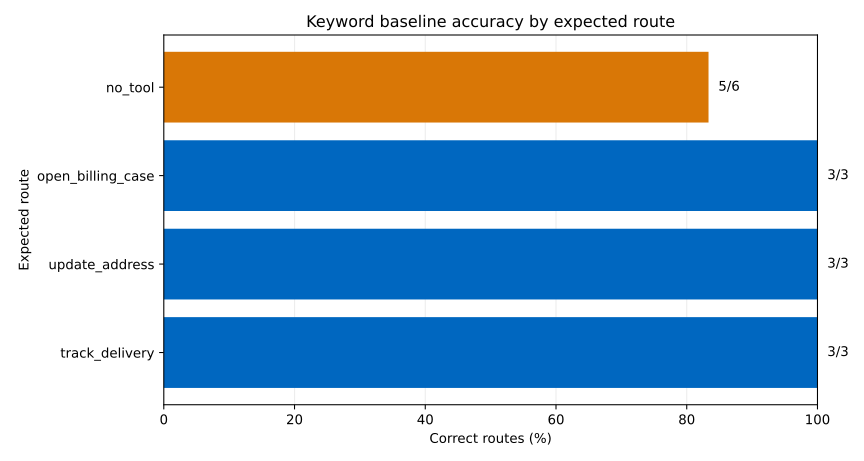
The keyword router finds every clear request for all three actionable routes. It misses one abstention case. The chart shows the same result, with each count printed beside its bar.
Next, print only mistakes. This is often more useful than adding another metric:
mistakes = cases.loc[
    ~cases["correct"],
    ["case_id", "expected_tool", "predicted_tool"],
]
print(mistakes.to_string(index=False))
case_id expected_tool predicted_tool
R14 no_tool open_billing_caseR14 contains charge, so the baseline opens a billing case. The expected route is no_tool because “cancel everything and refund every charge” is broad, destructive, and missing specific items. A safer assistant should ask what the user wants to cancel and which charge they dispute. Read each failed request, decide whether its expected label matches your policy, then improve either the case label or router. Do not change labels only to make the score rise.
Once the evaluator works, replace only the prediction function. Keep the dataset, expected labels, comparison code, and reports unchanged. Ollama’s Python client can receive Python functions as tools and return requested tool calls from a compatible model.
First, define functions with narrow names and clear docstrings. Their bodies raise an error because this evaluation must inspect requested calls without executing them:
def track_delivery(reference: str) -> str:
    """Check the current status of one delivery."""
    raise RuntimeError("Evaluation must not execute tools")

def update_address(order_id: str, new_address: str) -> str:
    """Propose a delivery-address change for one order."""
    raise RuntimeError("Evaluation must not execute tools")

def open_billing_case(reason: str) -> str:
    """Open a review case for one unexpected billing problem."""
    raise RuntimeError("Evaluation must not execute tools")
Then ask the model to request at most one tool call. The adapter reads the requested function name without calling the function and converts Ollama’s response into the same string labels as the baseline:
from ollama import chat

TOOLS = [track_delivery, update_address, open_billing_case]

def ollama_router(text: str, model: str) -> str:
    response = chat(
        model=model,
        messages=[{
            "role": "user",
            "content": (
                "Choose one tool only when the request clearly needs one. "
                "Choose no tool for general questions, unclear requests, or "
                f"requests needing several actions. Request: {text}"
            ),
        }],
        tools=TOOLS,
        options={"temperature": 0},
    )
    calls = response.message.tool_calls or []
    return calls[0].function.name if len(calls) == 1 else "no_tool"
Run it with a model installed on your own machine:
cases["predicted_tool"] = cases["request"].map(
    lambda text: ollama_router(text, model="your-tool-capable-model")
)
This local build did not have Ollama installed, so no model score is reported here. That is important: a scripted prediction is not model evidence. When you run the adapter, record the exact model tag, Ollama version, prompt, sampling options, dataset version, hardware, and date. Local model output can vary across versions and runs, even with a low temperature.
You execute tools during evaluation. Stop after reading the proposed name. A routing benchmark should not change data, send messages, or create tickets. Use functions that raise if called, as shown above.
Every case clearly points to a tool. Add no_tool examples, combined requests, vague language, greetings, and unsupported actions. Otherwise, the evaluator rewards a router that always requests a tool call.
Overall accuracy hides a weak route. Print per-route results and the full mistake table. A rare, high-impact action may need a stricter acceptance target than common read-only actions.
The model returns no tool calls. Confirm that the selected model supports tool calling and that Ollama is running. Inspect response.message before changing the evaluator. Some failures come from model capability or an outdated client, not from pandas.
The model requests two tool calls. Decide the policy before testing. This tutorial maps multiple calls to no_tool, because the assistant should ask how to proceed. Your application may support parallel read-only calls, but that requires a different expected label and test design.
Results change between runs. Set a low temperature, keep the full prompt constant, and repeat each case several times. Report both correctness and consistency. Do not select only the best run.
Labels are treated as unquestionable truth. Ask a second reviewer to inspect unclear cases. If reviewers disagree, rewrite the request, refine the policy, or record that ambiguity instead of forcing a misleading label.
Tool routing should be measured before tool execution. The reusable process is:
The durable mental model is case, expectation, prediction, comparison. Once a model passes a routing test that reflects your risk, connect its proposed calls to a separate validated runtime. The function-calling tutorial explains that request-and-result exchange, while the safe-loop tutorial adds execution boundaries.
 Python
Build an AI Chatbot in Python: A Command-Line LLM Client
A from-scratch walkthrough of the pattern behind every LLM chatbot: one function that sends a message plus conversation history to a chat-completion API, a persona set by a system prompt, and a loop that keeps the conversation going.
Read tutorial
Python
Build an AI Chatbot in Python: A Command-Line LLM Client
A from-scratch walkthrough of the pattern behind every LLM chatbot: one function that sends a message plus conversation history to a chat-completion API, a persona set by a system prompt, and a loop that keeps the conversation going.
Read tutorial
 Software Engineering
The Single Responsibility Principle: One Class, One Reason to Change
The Single Responsibility Principle says a class should have only one reason to change. See it in action: take a Python AuthService that also owns its logging, find why that's a problem, and refactor it into clean, focused classes.
Read tutorial
Software Engineering
The Single Responsibility Principle: One Class, One Reason to Change
The Single Responsibility Principle says a class should have only one reason to change. See it in action: take a Python AuthService that also owns its logging, find why that's a problem, and refactor it into clean, focused classes.
Read tutorial