Title here
Summary here
Most demo APIs skip authentication entirely. This post picks up where that leaves off: building api_key requests against Last.fm's music API, parsing nested artist bios, tags, and top-track lists, reading its documented error responses, and making one genuinely live, key-free call to MusicBrainz.

Every API you can call without signing up for anything — a weather forecast, a joke of the day, a currency conversion — quietly skips a step that almost every useful API adds back in: proving who you are before it answers. If you haven’t made a request with Python’s requests library yet, our post on calling web APIs in Python covers the mechanics first — GET requests, query parameters, reading a JSON response, checking a status code. Read that one first if any of those terms are new to you.
This post picks up exactly where that one stopped: what changes once an API needs an api_key on every request, and what a genuinely nested JSON response looks like once you’re past flat, single-level data. We’ll build that mental model, then work through it hands-on with Last.fm’s music API — artist bios, tags, and top-track lists — plus one section that makes a real, live, key-free call to a second API, MusicBrainz, so you see both sides: an authenticated request you can’t run without your own key yet, and one you can run right now.
An API key isn’t a password to a private account you log into. It’s closer to a name tag: a string the server checks on every single request so it knows which application is asking, how much that application is allowed to do, and whose access to throttle if something goes wrong. Three ideas carry the rest of this post:
api_key parameter on every call, because there’s no server-side session remembering who you are between calls.api_key, method, and format sit right alongside artist in the same params dictionary you’d already use for a no-auth API. Nothing about sending the request changes.data["temperature"]. An artist’s Last.fm profile nests four or five levels deep — artist → stats → listeners, artist → tags → tag → [ ] → name — and guessing at the shape from the code, instead of reading the docs first, is how a KeyError becomes the default outcome.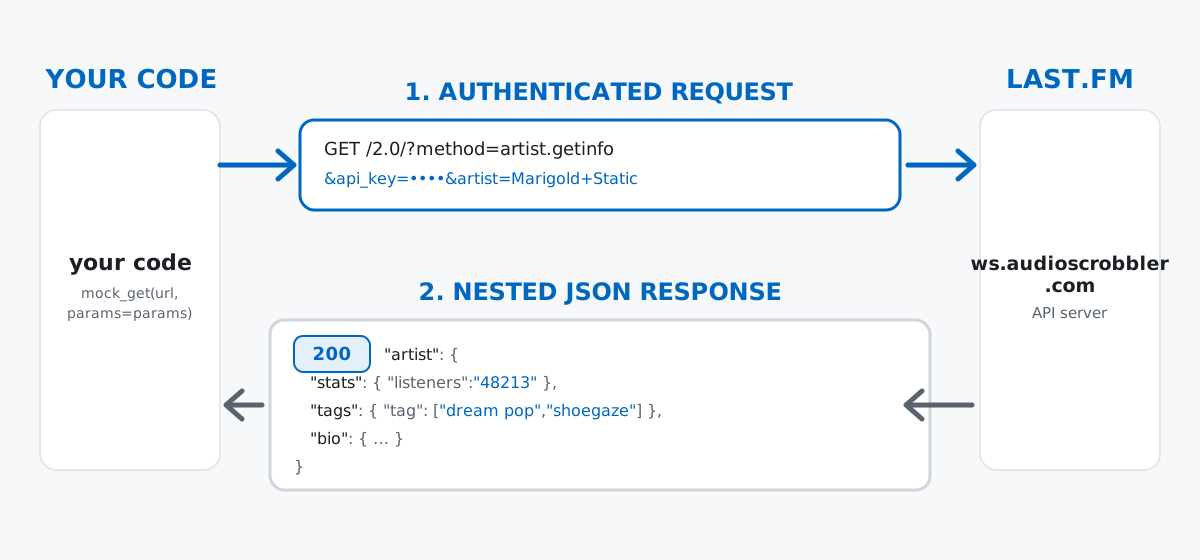
Keep that third point in mind especially — it’s the part that trips people up first, more than the authentication itself.
Last.fm’s API is free to use: create an account, request a key at their API account page, and you get one back immediately — no billing details, no waiting period, just a key tied to your account and a documented rate limit. This sandbox has no way to register one, though, so nothing Last.fm-related in this post is a live network call.
Instead, every request shape and response shape shown below was verified against Last.fm’s own published documentation — the exact parameters each method requires, and the exact rules the API uses to convert its native XML format into JSON. Those conversion rules matter more than they sound like they would: attributes become plain string values, a repeated element becomes a list, and a text node that also carries an attribute (like an image URL tagged with its size) gets tucked under a #text key instead of being the value directly. A small local mock_get() function stands in for the network call, built to match those documented shapes exactly, so every parsing line in this post runs against real, doc-accurate structure — it just isn’t Last.fm’s live servers underneath it. Every mock response is called out clearly as illustrative wherever it appears.
(Every output below comes from requests 2.34.2 on Python 3.11 — nothing here depends on a specific requests version.)
method and api_keyA Last.fm request adds exactly two things to the pattern you’d already know from a no-auth API: a method parameter naming which operation you want, and an api_key proving who’s asking. Both go in the same params dict as everything else:
import requests

BASE_URL = "https://ws.audioscrobbler.com/2.0/"

def build_request(method, api_key, **extra_params):
    params = {"method": method, "api_key": api_key, "format": "json"}
    params.update(extra_params)
    return params

api_key = "YOUR_LASTFM_API_KEY"
params = build_request("artist.getinfo", api_key, artist="Marigold Static")

# PreparedRequest assembles the final URL without sending anything --
# useful for checking exactly what a request will look like before you spend it.
prepared = requests.models.PreparedRequest()
prepared.prepare_url(BASE_URL, params)
print(prepared.url)https://ws.audioscrobbler.com/2.0/?method=artist.getinfo&api_key=YOUR_LASTFM_API_KEY&format=json&artist=Marigold+StaticNotice method, api_key, and format sit in the URL exactly like artist does — there’s no separate “auth step” in the code, just three more keys in a dict you were already building. requests.models.PreparedRequest is a handy trick on its own: it builds the exact URL requests.get(BASE_URL, params=params) would send, without actually sending it, which is useful for sanity-checking a request before you burn a real call against a rate-limited API.
stats, tags, and Related ArtistsTo exercise the rest of this post without a real key, the calls below go through a small local mock_get() function instead of requests.get() — same call signature, same .status_code / .json() / .raise_for_status() surface as a real Response, but its payloads are hand-built to match Last.fm’s documented artist.getInfo shape exactly. Everything after that swap is real, executed Python; only the HTTP layer underneath it is standing in for a live call.
def lastfm_call(get_func, method, api_key, **extra_params):
    params = build_request(method, api_key, **extra_params)
    return get_func(BASE_URL, params=params, timeout=10)

response = lastfm_call(mock_get, "artist.getinfo", VALID_KEY, artist="Marigold Static")
print(response.status_code)

data = response.json()["artist"]
print("name:", data["name"])
print("mbid:", repr(data["mbid"]))
print("listeners:", data["stats"]["listeners"], type(data["stats"]["listeners"]))
tags = [tag["name"] for tag in data["tags"]["tag"]]
print("tags:", tags)
200
name: Marigold Static
mbid: ''
listeners: 48213 <class 'str'>
tags: ['dream pop', 'shoegaze']Two details worth clocking here. mbid — the artist’s MusicBrainz identifier — came back as an empty string, not a missing field; Last.fm doesn’t always have that cross-reference on file, and an empty string is technically still “present,” which matters later when you’re deciding whether a field is safe to trust. And listeners printed as a str, "48213", not an int — a documented consequence of the XML-to-JSON conversion, and something to remember before you try to do arithmetic on it.
tags["tag"] and a similar-artists list both follow the same pattern — an object wrapping a list, because Last.fm always nests a repeated element one level under its plural name rather than returning a bare array:
similar_names = [a["name"] for a in data["similar"]["artist"]]
print("similar artists:", similar_names)
print("bio summary:", repr(data["bio"]["summary"]))
similar artists: ['Low Tide Radio', 'Paper Weather']
bio summary: ''similar → artist → [ ] is the related-artist graph: each entry is itself a small artist object, so data["similar"]["artist"][0]["name"] would go one level deeper again if you wanted more than the name. The empty bio.summary is a preview of a gotcha further down — don’t assume it.
artist.getTopTracksA track list follows the same “wrap the repeated element” rule, plus one more wrinkle: each track carries an XML attribute (its chart rank) alongside its own child elements, and Last.fm’s conversion rules put attributes-alongside-children under an @attr key so they don’t collide with a real field of the same name:
tt_response = lastfm_call(mock_get, "artist.gettoptracks", VALID_KEY, artist="Marigold Static")
tracks = tt_response.json()["toptracks"]["track"]
for track in tracks:
    rank = track["@attr"]["rank"]
    print(f"{rank}. {track['name']} -- {track['playcount']} plays, {track['listeners']} listeners")
1. Undertow -- 51203 plays, 9120 listeners
2. Slow Weather -- 38556 plays, 7304 listenerstoptracks["track"] is a plain Python list at this point, so everything you already know about iterating lists of dicts applies — sorted(tracks, key=...), a list comprehension, dropping it straight into a table. The @attr wrapper is the only surprise, and it only shows up on elements that mix attributes with child data; plain fields like name and playcount never get it.
Last.fm’s error codes are documented up front — a numbered list, from “invalid method” to “rate limit exceeded” — and the JSON shape for any of them is the same two fields: error (the numeric code) and message. Where it gets less predictable is the HTTP status code that comes back alongside that body. An invalid key gets a 403:
bad_response = lastfm_call(mock_get, "artist.getinfo", "wrong-key-123", artist="Marigold Static")
print(bad_response.status_code)
print(bad_response.json())

try:
    bad_response.raise_for_status()
except requests.exceptions.HTTPError as e:
    print(f"HTTPError: {e}")
403
{'error': 10, 'message': 'Invalid API key - You must be granted a valid key by last.fm'}
HTTPError: 403 Client Error for url: https://ws.audioscrobbler.com/2.0/?method=artist.getinfo&api_key=wrong-key-123&format=json&artist=Marigold+StaticBut a valid key with an unrecognized method comes back as a plain 200, with the same error/message shape sitting in a body that otherwise looks like success:
weird_response = lastfm_call(mock_get, "artist.doesnotexist", VALID_KEY, artist="Marigold Static")
print(weird_response.status_code)
print(weird_response.json())
200
{'error': 3, 'message': 'Invalid Method - No method with that name in this package'}That’s a sharper trap than the one in our API mechanics post: there, checking status_code before trusting the body was the whole fix. Here, status_code alone isn’t reliable — some Last.fm errors surface at the HTTP layer, others hide inside a 200. The only response you can actually trust is one where you’ve checked the body for an "error" key, regardless of what the status code said:
def safe_artist_lookup(get_func, api_key, artist_name):
    r = lastfm_call(get_func, "artist.getinfo", api_key, artist=artist_name)
    body = r.json()
    if "error" in body:
        return None, f"Last.fm error {body['error']}: {body['message']}"
    return body["artist"], None

result, err = safe_artist_lookup(mock_get, VALID_KEY, "A Band That Does Not Exist")
print("result:", result)
print("error:", err)
result: None
error: Last.fm error 6: The artist you supplied could not be foundEverything so far has been illustrative, because there’s no key to call Last.fm with. To end on something you can genuinely run right now, MusicBrainz — an open, community-maintained music encyclopedia at musicbrainz.org — offers a REST API that needs no API key at all for basic lookups like this one. Its own documentation asks for exactly two things in return: a real, identifying User-Agent header on every request, and no more than roughly one request per second per application. Both are easy to honor for a one-off lookup:
MB_BASE = "https://musicbrainz.org/ws/2/"
MB_HEADERS = {"User-Agent": "DataTweetsBlogTutorial/1.0 (https://datatweets.com)"}

search_resp = requests.get(
    MB_BASE + "artist",
    params={"query": "artist:Fleetwood Mac", "fmt": "json", "limit": 3},
    headers=MB_HEADERS,
    timeout=10,
)
print(search_resp.status_code)
top_match = search_resp.json()["artists"][0]
print("name:", top_match["name"])
print("id:", top_match["id"])
print("score:", top_match["score"])
200
name: Fleetwood Mac
id: bd13909f-1c29-4c27-a874-d4aaf27c5b1a
score: 100That request went out for real, over the network, to musicbrainz.org, while this post was being written — bd13909f-1c29-4c27-a874-d4aaf27c5b1a is Fleetwood Mac’s actual MusicBrainz ID. A score of 100 means the search matched exactly. Wait a second to respect the rate limit, then look the artist up again by that ID for a richer record, including genre tags:
import time
time.sleep(1)

mbid = top_match["id"]
lookup_resp = requests.get(
    MB_BASE + f"artist/{mbid}",
    params={"fmt": "json", "inc": "tags"},
    headers=MB_HEADERS,
    timeout=10,
)
print(lookup_resp.status_code)
lookup_data = lookup_resp.json()
print("life-span:", lookup_data["life-span"])
top_tags = sorted(lookup_data.get("tags", []), key=lambda t: -t["count"])
print("top tags:", [(t["name"], t["count"]) for t in top_tags[:5]])
200
life-span: {'begin': '1967-07', 'end': '2022', 'ended': True}
top tags: [('rock', 17), ('soft rock', 13), ('blues rock', 11), ('pop rock', 10), ('blues', 6)]That’s genuine, community-tagged, community-voted genre data, and MusicBrainz’s core dataset is released under CC0, effectively public domain — so unlike the mock Last.fm responses above, everything in this section is both real and freely reusable. In a full project you’d use exactly this pattern to fill the gap from earlier: whenever Last.fm hands you an empty mbid, a query-based MusicBrainz lookup is how you’d go find the real one.
A hardcoded key in a script is a key you’ve already leaked. The moment api_key = "abc123realkey" gets committed, it lives in your git history forever, even if you delete it in the next commit — and a public repo means it’s leaked the second it’s pushed. Read it from an environment variable instead, the same way our API mechanics post covers for any authenticated API: api_key = os.environ["LASTFM_API_KEY"], never a literal string.
Numbers in the JSON body are strings, not numbers, until you cast them. data["stats"]["listeners"] is "48213" — a str. Add two of them together without casting and you get string concatenation, not arithmetic:
listeners_raw = data["stats"]["listeners"]
print(listeners_raw + listeners_raw)
print(int(listeners_raw) + int(listeners_raw))
4821348213
96426The first line silently “worked” — no exception, just the wrong answer — which is exactly the kind of bug that survives code review.
Rate limits are enforced differently by every API, and “it worked once” proves nothing. Last.fm has a documented per-key rate limit and its own error code (29, “Rate Limit Exceded”) for going over it; MusicBrainz asks for roughly one request per second and returns a 503 if you ignore that. A loop that hits either API in a tight for loop with no delay will eventually get throttled or blocked — time.sleep(1) between MusicBrainz calls, as shown above, is the minimum courtesy, not an optional nicety.
A nested field can be present-but-empty, or missing outright, and those are different bugs. bio.summary for a real artist can simply be "" — present, just empty, so data["bio"]["summary"] or "no bio available" handles it safely. But some fields are absent entirely for artists with too little data, like similar for a very obscure act:
sparse_data = lastfm_call(mock_get, "artist.getinfo", VALID_KEY, artist="Paper Weather").json()["artist"]
print("has 'similar' key:", "similar" in sparse_data)
try:
    sparse_data["similar"]["artist"]
except KeyError as e:
    print(f"KeyError: {e}")
safe_similar = [a["name"] for a in sparse_data.get("similar", {}).get("artist", [])]
print("safe_similar:", safe_similar)
has 'similar' key: False
KeyError: 'similar'
safe_similar: [].get("similar", {}).get("artist", []) fails safe with an empty list either way — present-but-empty and missing-entirely both end up handled, without a branch for each case.
The whole shift from a no-auth API to an authenticated one comes down to a short list:
api_key and method are just more params — no separate auth step, no special client object required.status_code alone isn’t always trustworthy — some APIs, Last.fm included, bury real errors inside an otherwise-200 body..get() with a default beats direct indexing the moment a field can be legitimately absent, not just empty.If working with nested dictionaries still feels unfamiliar, the Python Dictionaries lesson in our free Python for Data Analytics course covers key-value data structures from the ground up. And if you want to see this same “read your key from an environment variable, verify against a mock when you can’t call the real thing live” pattern applied to a different kind of authenticated API, our post on building an AI chatbot in Python walks through the same approach against a chat-completion API.
 Python
Build an AI Chatbot in Python: A Command-Line LLM Client
A from-scratch walkthrough of the pattern behind every LLM chatbot: one function that sends a message plus conversation history to a chat-completion API, a persona set by a system prompt, and a loop that keeps the conversation going.
Read tutorial
Python
Build an AI Chatbot in Python: A Command-Line LLM Client
A from-scratch walkthrough of the pattern behind every LLM chatbot: one function that sends a message plus conversation history to a chat-completion API, a persona set by a system prompt, and a loop that keeps the conversation going.
Read tutorial
 Software Engineering
The Single Responsibility Principle: One Class, One Reason to Change
The Single Responsibility Principle says a class should have only one reason to change. See it in action: take a Python AuthService that also owns its logging, find why that's a problem, and refactor it into clean, focused classes.
Read tutorial
Software Engineering
The Single Responsibility Principle: One Class, One Reason to Change
The Single Responsibility Principle says a class should have only one reason to change. See it in action: take a Python AuthService that also owns its logging, find why that's a problem, and refactor it into clean, focused classes.
Read tutorial