Title here
Summary here
SQL courses teach recognition, not production -- which is why finishing one still leaves you frozen at a real database. This guide lays out the four-stage practice order that actually builds writing skill, demonstrated with real, verified queries against a small database you can regenerate yourself.

Most people who “learn SQL” go through the same motion: finish a course, pass its quizzes, feel briefly competent, then sit down at a real database a few weeks later and freeze. The syntax was never the hard part — SELECT, WHERE, and JOIN are short words. What’s missing is that a course built out of video and multiple-choice questions trains you to recognize correct SQL, not to produce it under uncertainty, and those turn out to be different skills that don’t transfer to each other the way most people assume.
The fastest route past that gap isn’t a longer course — it’s a fixed practice order plus one real-ish database you keep coming back to. Spend real time, writing your own queries rather than reading someone else’s, on four stages in this order: filtering and sorting a single table, joining two or three tables together, collapsing rows with GROUP BY and aggregates, and only then window functions. Each stage is a genuine precondition for the next one, so skipping ahead doesn’t save time — it just means you hit the same confusion later with more moving parts to blame it on. If you want the mechanics of each stage spelled out on their own terms, our post on six core SQL skills covers WHERE, JOIN, GROUP BY, and window functions directly; this one is about the order you practice them in and the habits that make them stick.
Order matters more here than it does in, say, picking up a general-purpose language, because each SQL stage is a precondition for the next, not just a harder version of it:
GROUP BY is really asking “collapse this joined result down by these columns” — start here instead and you’re debugging two unfamiliar ideas in the same query.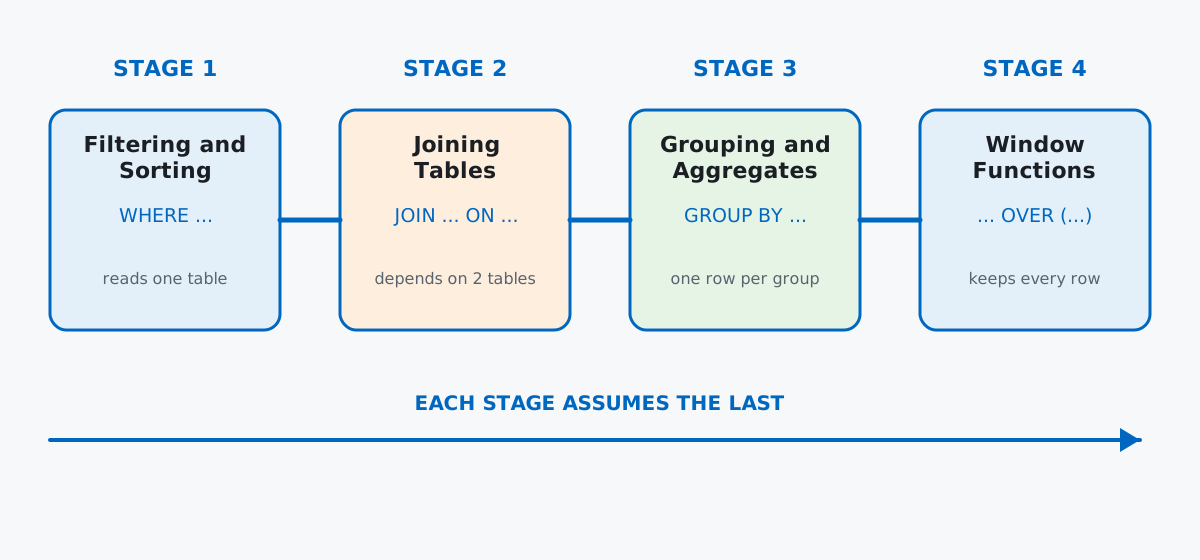
The actual bar for “done” at each stage isn’t “I understand what JOIN does” — it’s “I can write one from a blank cursor in under a minute without checking a cheat sheet.” Recognition doesn’t get you there; typing does.
Rather than a toy example with three rows, here’s a small database with enough real structure to make every stage below meaningful: a study group logging their own SQL practice sessions across the same four stages this post is about. It happens to need exactly the shape of data — a topics table, a members table, and a sessions log that joins to both — that makes filtering, joining, grouping, and window functions each genuinely necessary rather than contrived.
import sqlite3
import random

con = sqlite3.connect(":memory:")
con.execute("PRAGMA foreign_keys = ON;")
cur = con.cursor()

cur.executescript("""
CREATE TABLE topics (
    id INTEGER PRIMARY KEY,
    name TEXT NOT NULL,
    stage_order INTEGER NOT NULL
);

CREATE TABLE members (
    id INTEGER PRIMARY KEY,
    name TEXT NOT NULL,
    city TEXT NOT NULL,
    started_on TEXT NOT NULL
);

CREATE TABLE practice_sessions (
    id INTEGER PRIMARY KEY,
    member_id INTEGER NOT NULL REFERENCES members(id),
    topic_id INTEGER NOT NULL REFERENCES topics(id),
    session_date TEXT NOT NULL,
    exercises_solved INTEGER NOT NULL,
    minutes_spent INTEGER NOT NULL,
    notes TEXT
);

INSERT INTO topics (id, name, stage_order) VALUES
    (1, 'Filtering and Sorting',   1),
    (2, 'Joining Tables',          2),
    (3, 'Grouping and Aggregates', 3),
    (4, 'Window Functions',        4);

INSERT INTO members (id, name, city, started_on) VALUES
    (1, 'Nora',   'Vienna',  '2026-02-03'),
    (2, 'Iker',   'Porto',   '2026-02-10'),
    (3, 'Petra',  'Krakow',  '2026-02-14'),
    (4, 'Sanja',  'Zagreb',  '2026-02-20'),
    (5, 'Timo',   'Tallinn', '2026-03-01'),
    (6, 'Wiktor', 'Krakow',  '2026-03-05'),
    (7, 'Elin',   'Vienna',  '2026-03-18'),
    (8, 'Bruno',  'Porto',   '2026-04-02');
""")
con.commit()
Four topics that match the four stages above, and eight members who joined the study group at different points. The sessions themselves come from a seeded random generator, so your numbers will match mine exactly — including each member logging a different, realistic number of sessions instead of a suspiciously even split:
rng = random.Random(42)
member_ids = list(range(1, 9))
topic_ids = [1, 2, 3, 4]
topic_weights = [0.40, 0.28, 0.20, 0.12]
note_choices = [None, None, None, 'review', 'stuck on syntax', 'felt easy']

rows = []
session_id = 1
for member_id in member_ids:
    n_sessions = rng.randint(8, 30)
    for _ in range(n_sessions):
        topic_id = rng.choices(topic_ids, weights=topic_weights, k=1)[0]
        month = rng.choice([2, 3, 4, 5])
        day = rng.randint(1, 28)
        session_date = f"2026-{month:02d}-{day:02d}"
        exercises_solved = rng.randint(1, 12)
        minutes_spent = rng.randint(10, 90)
        notes = rng.choice(note_choices)
        rows.append((session_id, member_id, topic_id, session_date, exercises_solved, minutes_spent, notes))
        session_id += 1

cur.executemany(
    "INSERT INTO practice_sessions "
    "(id, member_id, topic_id, session_date, exercises_solved, minutes_spent, notes) "
    "VALUES (?, ?, ?, ?, ?, ?, ?)",
    rows,
)
con.commit()

cur.execute("SELECT count(*) FROM practice_sessions")
cur.fetchall()[(162,)]162 logged sessions across eight members, weighted so earlier-stage topics get practiced more than later ones — which, unsurprisingly, matches how real study groups behave. Data: an original synthetic dataset built for this post (Python’s sqlite3 module, no server or install required — the whole point of an in-memory database here is that you can copy this code into a plain Python file and run it with zero setup). (Verified against Python 3.13’s bundled SQLite 3.50.2; the queries below work unchanged on any recent SQLite version.)
The first stage is done when you can write a WHERE/ORDER BY query straight from the question, no hesitation. Which sessions actually made progress — at least 8 exercises solved — and which was the most recent?
cur.execute("""
SELECT session_date, exercises_solved, minutes_spent
FROM practice_sessions
WHERE exercises_solved >= 8
ORDER BY session_date DESC
LIMIT 5
""")
cur.fetchall()
[('2026-05-26', 11, 41), ('2026-05-26', 12, 31), ('2026-05-22', 9, 81),
('2026-05-20', 12, 29), ('2026-05-20', 12, 74)]Seventy of the 162 sessions clear that >= 8 bar. This is the stage people rush through fastest because it looks trivial next to a JOIN — which is exactly the trap. If you’re still translating “at least 8” into >= in your head instead of typing it automatically, more filtering practice pays off far more than jumping ahead to joins early, because everything after this stage assumes filtering is no longer a conscious step.
Joining is done when you stop thinking “which table has the column I need” as a separate step from writing the query. What has Nora actually practiced most recently, by topic name rather than a bare topic_id number?
cur.execute("""
SELECT ps.session_date, t.name AS topic, ps.exercises_solved
FROM practice_sessions AS ps
JOIN topics AS t ON t.id = ps.topic_id
JOIN members AS m ON m.id = ps.member_id
WHERE m.name = 'Nora'
ORDER BY ps.session_date DESC
LIMIT 5
""")
cur.fetchall()
[('2026-05-18', 'Grouping and Aggregates', 2), ('2026-05-08', 'Filtering and Sorting', 8),
('2026-05-05', 'Window Functions', 5), ('2026-04-28', 'Filtering and Sorting', 6),
('2026-04-27', 'Filtering and Sorting', 5)]Two joins in one query, and neither practice_sessions row on its own tells you what topic or member it belongs to — that information only exists once the tables are connected. The habit worth building here specifically: before writing a single SELECT, say out loud which column links which pair of tables. Skip that step while you’re still learning and you’ll spend more time guessing at the ON clause than the query itself is worth.
Grouping is done when “one row per group” stops requiring conscious translation from the question. Which of the four topics is actually getting practiced, and for how long per sitting?
cur.execute("""
SELECT
    t.name AS topic,
    COUNT(*) AS sessions,
    SUM(ps.exercises_solved) AS total_exercises,
    ROUND(AVG(ps.minutes_spent), 1) AS avg_minutes
FROM practice_sessions AS ps
JOIN topics AS t ON t.id = ps.topic_id
GROUP BY t.id
ORDER BY t.stage_order
""")
cur.fetchall()
[('Filtering and Sorting', 69, 478, 54.2), ('Joining Tables', 42, 246, 43.9),
('Grouping and Aggregates', 25, 156, 51.1), ('Window Functions', 26, 185, 53.5)]The pattern here mirrors the point of this whole post: 69 sessions on filtering versus 25 on grouping, a roughly three-to-one drop-off from the first stage to the third. Real learners spend the most time on the stage that feels safest and thin out as things get harder — which is fine as long as the order is right, and a problem the moment someone tries to reach for GROUP BY before filtering is automatic.
Window functions are the graduation test: can you attach a per-row answer computed across a group, without collapsing anything? Rank every member by total exercises solved, ties included:
cur.execute("""
WITH totals AS (
    SELECT m.name, SUM(ps.exercises_solved) AS total_exercises
    FROM practice_sessions AS ps
    JOIN members AS m ON m.id = ps.member_id
    GROUP BY m.id
)
SELECT name, total_exercises, RANK() OVER (ORDER BY total_exercises DESC) AS leaderboard_rank
FROM totals
ORDER BY leaderboard_rank, name
""")
cur.fetchall()
[('Nora', 194, 1), ('Wiktor', 183, 2), ('Timo', 174, 3), ('Elin', 129, 4),
('Petra', 128, 5), ('Iker', 107, 6), ('Bruno', 88, 7), ('Sanja', 62, 8)]The WITH totals AS (...) block is a common table expression (CTE) — it names the grouped subquery so the outer SELECT can just call it totals, which reads far more clearly than nesting the whole GROUP BY inline. That habit of building the piece you need first, checking it makes sense on its own, and only then wrapping a window function or filter around it is worth more than memorizing the window-function syntax itself.
The other shape window functions unlock: a running total, so a member can see their own cumulative practice building up over time instead of one final number:
cur.execute("""
SELECT session_date, exercises_solved,
       SUM(exercises_solved) OVER (ORDER BY session_date, id) AS running_total
FROM practice_sessions
WHERE member_id = 1
ORDER BY session_date, id
LIMIT 8
""")
cur.fetchall()
[('2026-02-05', 11, 11), ('2026-02-13', 7, 18), ('2026-02-19', 7, 25), ('2026-02-20', 11, 36),
('2026-02-20', 6, 42), ('2026-02-22', 12, 54), ('2026-02-25', 3, 57), ('2026-02-28', 11, 68)]Same SUM, same table, but the combine step now attaches a running total to every original row instead of collapsing them into one number — the entire reason GROUP BY alone couldn’t have produced this column.
A window function’s own alias can’t be filtered on in the same query. This is the single most common wall people hit the moment they reach stage four, and it looks like it should obviously work — filter the leaderboard down to the top three:
try:
    cur.execute("""
    SELECT m.name, SUM(ps.exercises_solved) AS total_exercises,
           RANK() OVER (ORDER BY SUM(ps.exercises_solved) DESC) AS leaderboard_rank
    FROM practice_sessions AS ps
    JOIN members AS m ON m.id = ps.member_id
    GROUP BY m.id
    HAVING leaderboard_rank <= 3
    """)
    cur.fetchall()
except sqlite3.OperationalError as e:
    print(f"sqlite3.OperationalError: {e}")
sqlite3.OperationalError: misuse of aliased window function leaderboard_rankWindow functions run after WHERE, GROUP BY, and HAVING are already resolved, so leaderboard_rank doesn’t exist yet at the point HAVING tries to use it — no engine allows this, it’s not a SQLite quirk. The fix is the same CTE-or-subquery habit from checkpoint four: compute the rank first, then filter the result in an outer query.
cur.execute("""
SELECT name, total_exercises, leaderboard_rank
FROM (
    SELECT m.name, SUM(ps.exercises_solved) AS total_exercises,
           RANK() OVER (ORDER BY SUM(ps.exercises_solved) DESC) AS leaderboard_rank
    FROM practice_sessions AS ps
    JOIN members AS m ON m.id = ps.member_id
    GROUP BY m.id
)
WHERE leaderboard_rank <= 3
""")
cur.fetchall()
[('Nora', 194, 1), ('Wiktor', 183, 2), ('Timo', 174, 3)]Getting the ORDER BY direction wrong inside a window function fails silently — no error, just a wrong answer. Swap DESC for ASC in the same ranking query and SQLite runs it without complaint:
cur.execute("""
SELECT m.name, SUM(ps.exercises_solved) AS total_exercises,
       RANK() OVER (ORDER BY SUM(ps.exercises_solved) ASC) AS wrong_rank
FROM practice_sessions AS ps
JOIN members AS m ON m.id = ps.member_id
GROUP BY m.id
ORDER BY wrong_rank
LIMIT 3
""")
cur.fetchall()
[('Sanja', 62, 1), ('Bruno', 88, 2), ('Iker', 107, 3)]Sanja, the member who solved the fewest exercises, now sits at rank 1 — a believable-looking leaderboard that’s exactly backwards. This is why skipping straight to window functions before grouping is automatic bites hardest: nothing crashes, so there’s no obvious signal something’s wrong, only a query that quietly means the opposite of what you meant. Get in the habit of sanity-checking a new window function against one row you already know the answer to before trusting it on the rest.
COUNT(*) and COUNT(column) answer different questions the moment a column has NULLs. notes is optional — most sessions were never annotated:
cur.execute("SELECT COUNT(*), COUNT(notes) FROM practice_sessions")
cur.fetchall()
[(162, 79)]COUNT(*) counts every row, full stop; COUNT(notes) only counts rows where notes isn’t NULL — 79 sessions got a note, 83 didn’t. Reach for COUNT(*) when the question is “how many rows,” and COUNT(some_column) only when you specifically want “how many rows have a value there.” Mixing the two up doesn’t error either, and a report built on the wrong one just quietly undercounts.
Sitting down with a database console and deliberately breaking each of the three queries above — on purpose, before moving on — teaches more in twenty minutes than reading about them ever will.
Twenty minutes a day spent typing real queries against a database like this one — not watching someone else type them — beats a weekend course every time, because the four-stage order means each session’s confusion is about exactly one new idea instead of three at once. Once filtering, joins, and grouping all feel automatic, the Window Functions lessons in our free SQL & Databases course go considerably deeper than checkpoint four above — frames, LAG/LEAD, and the ranking family beyond RANK() — and the Getting Started with SQL module is the right place to begin if filtering and sorting still aren’t automatic yet.
 Python
Build an AI Chatbot in Python: A Command-Line LLM Client
A from-scratch walkthrough of the pattern behind every LLM chatbot: one function that sends a message plus conversation history to a chat-completion API, a persona set by a system prompt, and a loop that keeps the conversation going.
Read tutorial
Python
Build an AI Chatbot in Python: A Command-Line LLM Client
A from-scratch walkthrough of the pattern behind every LLM chatbot: one function that sends a message plus conversation history to a chat-completion API, a persona set by a system prompt, and a loop that keeps the conversation going.
Read tutorial
 Software Engineering
The Single Responsibility Principle: One Class, One Reason to Change
The Single Responsibility Principle says a class should have only one reason to change. See it in action: take a Python AuthService that also owns its logging, find why that's a problem, and refactor it into clean, focused classes.
Read tutorial
Software Engineering
The Single Responsibility Principle: One Class, One Reason to Change
The Single Responsibility Principle says a class should have only one reason to change. See it in action: take a Python AuthService that also owns its logging, find why that's a problem, and refactor it into clean, focused classes.
Read tutorial