Title here
Summary here
Turn a small CSV validation program into an installable command. Learn how source code, package metadata, bundled rules, and a console entry point work together.

A useful data script often starts as one file. You run python checker.py parcels.csv, find bad rows, and move on. The difficulty begins when a teammate wants to use it. They need the right file, must run it from the right folder, and may not know which Python command starts it.
In this tutorial, we will turn a small CSV quality checker into an installable Python package. Installation creates a parcelcheck command that works from any directory while its environment is active. The package also carries a JSON file that describes its required columns.
The main lesson is not about publishing to an online package index. It is about making a local tool predictable: code has a clear home, metadata describes how to build it, data files travel with it, and users get one stable command.
You need Python 3.10 or newer and a terminal. You should know how to run a Python file, but you do not need packaging experience. The checker uses only Python’s standard library. Matplotlib is needed only to reproduce the chart in this article.
Start in an empty folder and create an isolated environment:
mkdir parcelcheck-project
cd parcelcheck-project
python3 -m venv .venv
source .venv/bin/activate
python -m pip install --upgrade pip "setuptools>=77"
On Windows PowerShell, activate with .venv\Scripts\Activate.ps1. If virtual environments are new to you, read the DataTweets virtual environment guide first.
The published example was tested with Python 3.13.2. Its chart was generated with Matplotlib 3.11.0.
Download the synthetic parcel events CSV for the final test. It has eight fictional parcel records and four deliberate quality problems. The dataset was created for this lesson and is released under the CC0 1.0 public-domain dedication.
It helps to separate four terms that are sometimes mixed together.
checks.py.parcelcheck/.pip list and does not have to match the import name.Our distribution is named parcelcheck-demo, the import package is parcelcheck, and the terminal command is also parcelcheck. Keeping names similar helps readers, but each name has a different job.
The project uses this structure:
parcelcheck-project/
├── pyproject.toml
└── src/
    └── parcelcheck/
        ├── __init__.py
        ├── __main__.py
        ├── checks.py
        ├── cli.py
        └── rules.json
The src/ folder is called a src layout. Project configuration stays at the top level, while importable code stays under src/. This prevents a test from accidentally importing the working copy just because the terminal is in the project folder. The Python Packaging User Guide explains this trade-off in more detail.
Create pyproject.toml at the project root. TOML is a configuration format with named sections. The [build-system] section chooses the tool that turns source files into an installable distribution. The [project] section holds standardized project metadata.
[build-system]
requires = ["setuptools>=77"]
build-backend = "setuptools.build_meta"

[project]
name = "parcelcheck-demo"
version = "0.1.0"
description = "A small CSV quality checker"
requires-python = ">=3.10"
license = "MIT"
dependencies = []

[project.scripts]
parcelcheck = "parcelcheck.cli:main"

[tool.setuptools.package-data]
parcelcheck = ["rules.json"]
There are no runtime dependencies because csv, datetime, argparse, and the other imports come with Python. Do not list standard-library modules in dependencies.
The line under [project.scripts] means: create a command named parcelcheck, import main from parcelcheck.cli, and call it. An installer creates the small platform-specific launcher. The entry-point specification defines this mapping, while the setuptools entry-point guide shows how installers make console commands from it.
The last section includes rules.json inside the built package. Python files are discovered automatically in this layout, but a JSON resource needs an explicit package-data rule.
Create src/parcelcheck/__init__.py with a version string:
"""Check a parcel event CSV against a small set of quality rules."""

__version__ = "0.1.0"
Next, create src/parcelcheck/rules.json. This separate resource makes the required input schema easy to inspect and change without embedding configuration in a function.
{
  "required_columns": [
    "shipment_id",
    "dispatched_at",
    "delivered_at",
    "distance_km"
  ]
}
Now create src/parcelcheck/checks.py. First, load the resource through Python’s import system. The return annotation list[str] tells readers and development tools that the function returns a list of strings:
from importlib.resources import files
import json


def load_required_columns() -> list[str]:
    resource = files("parcelcheck").joinpath("rules.json")
    return json.loads(resource.read_text(encoding="utf-8"))["required_columns"]
This is safer than open("rules.json"). A relative open call searches the current working directory, which belongs to the user who launched the command. importlib.resources searches inside the installed package instead. Python’s official resource documentation also supports packages loaded from places that are not ordinary directories.
Add the CSV inspection function below those imports. It checks the header before reading the rows. Then it looks for a missing delivery time, a delivery before dispatch, an invalid distance, and a repeated ID.
import csv
from datetime import datetime
from pathlib import Path


def inspect_csv(path: Path) -> dict:
    with path.open(newline="", encoding="utf-8") as handle:
        reader = csv.DictReader(handle)
        required = load_required_columns()
        missing = [name for name in required if name not in (reader.fieldnames or [])]
        if missing:
            raise ValueError(f"missing columns: {', '.join(missing)}")
        rows = list(reader)

    issues = []
    seen_ids = set()
    for row_number, row in enumerate(rows, start=2):
        shipment_id = row["shipment_id"]
        if shipment_id in seen_ids:
            issues.append({"row": row_number, "rule": "duplicate shipment_id"})
        seen_ids.add(shipment_id)

        if not row["delivered_at"]:
            issues.append({"row": row_number, "rule": "missing delivered_at"})
        else:
            dispatched = datetime.fromisoformat(row["dispatched_at"])
            delivered = datetime.fromisoformat(row["delivered_at"])
            if delivered < dispatched:
                issues.append({"row": row_number, "rule": "negative delivery duration"})

        try:
            distance = float(row["distance_km"])
            if distance < 0:
                raise ValueError
        except ValueError:
            issues.append({"row": row_number, "rule": "invalid distance_km"})

    rules = sorted({item["rule"] for item in issues})
    counts = {rule: sum(item["rule"] == rule for item in issues) for rule in rules}
    return {
        "rows_checked": len(rows),
        "issue_count": len(issues),
        "counts": counts,
        "issues": issues,
    }
CSV row 1 is the header, so enumerate(..., start=2) reports row numbers that match a spreadsheet or text editor. This small choice makes error messages easier to act on.
Validation and terminal behavior belong in separate modules. This lets another Python program import inspect_csv() without pretending to be a terminal user.
Create src/parcelcheck/cli.py. argparse defines the accepted arguments and generates help text. The main() function returns 1 when issues exist, giving a shell or continuous integration system a machine-readable failure signal.
import argparse
import json
from pathlib import Path

from .checks import inspect_csv


def build_parser():
    parser = argparse.ArgumentParser(description="Check parcel event CSV data.")
    parser.add_argument("csv_path", type=Path, help="CSV file to inspect")
    parser.add_argument("--format", choices=["text", "json"], default="text")
    parser.add_argument("--max-issues", type=int, default=20)
    return parser


def main() -> int:
    arguments = build_parser().parse_args()
    try:
        report = inspect_csv(arguments.csv_path)
    except (OSError, ValueError) as error:
        build_parser().error(str(error))

    if arguments.format == "json":
        print(json.dumps(report, indent=2))
    else:
        print(f"Checked {report['rows_checked']} rows; found {report['issue_count']} issues.")
        for issue in report["issues"][: arguments.max_issues]:
            print(f"row {issue['row']}: {issue['rule']}")
    return 1 if report["issue_count"] else 0
The entry-point function takes no parameters because the generated launcher calls it directly. Inside the function, argparse reads the command-line arguments from sys.argv. The -> int annotation records that main() returns an integer exit code.
Add one optional convenience file, src/parcelcheck/__main__.py:
from .cli import main

raise SystemExit(main())
This supports python -m parcelcheck during development. SystemExit converts the returned integer into the process exit code. The installed parcelcheck command still comes from [project.scripts].
From the project root, install the working project in editable mode:
python -m pip install --editable .Editable installation means imports refer to files under your src/ directory. You can edit Python code and rerun the command without reinstalling. Metadata changes, including a changed command name or new package-data settings, usually require another install.
Confirm that the generated command exists:
parcelcheck --helpThe tested command begins with this help text:
usage: parcelcheck [-h] [--format {text,json}] [--max-issues MAX_ISSUES]
                   csv_path

Check parcel event CSV data.

positional arguments:
  csv_path              CSV file to inspect
Copy the downloaded CSV into another folder, move there, and run the command. Changing folders proves that neither Python imports nor rules.json depend on the project root.
parcelcheck parcel_events.csv --format textChecked 8 rows; found 4 issues.
row 4: missing delivered_at
row 5: negative delivery duration
row 6: invalid distance_km
row 7: duplicate shipment_idThe process exits with status 1 because the checker found problems. That does not mean the program crashed. The command completed the check and deliberately reported that the data failed its rules. Immediately after running it, echo $? on macOS or Linux prints 1.
JSON output gives another program a stable structure to read:
parcelcheck parcel_events.csv --format json{
"rows_checked": 8,
"issue_count": 4,
"counts": {
"duplicate shipment_id": 1,
"invalid distance_km": 1,
"missing delivered_at": 1,
"negative delivery duration": 1
}
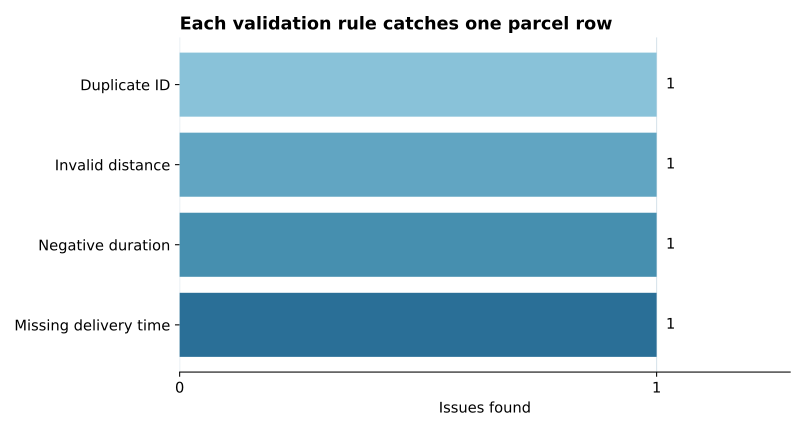
}The complete output also includes an issues list with each row number. The summary is enough to see that every rule caught exactly one record.
For a non-editable local installation, use python -m pip install .. Installers build the project and copy its package into the environment. The official packaging tutorial covers building a wheel and source archive when you are ready to distribute files beyond one environment.
parcelcheck: command not found
Make sure the environment used for installation is active. Run python -m pip show parcelcheck-demo. Using python -m pip keeps the installer tied to the same Python interpreter you intend to use.
No module named parcelcheck before installation
This is expected with a src layout. The importable directory is under src/, not the project root. Install the project in editable mode before running tests or the command.
The command still uses old metadata
Run python -m pip install --editable . again after changing pyproject.toml. Editable mode follows Python source edits, but installers create entry-point launchers from metadata during installation.
rules.json is missing after a normal install
Check [tool.setuptools.package-data], rebuild, and reinstall. Also access the resource with importlib.resources; do not form a path from the current directory.
The checker reports an error for a malformed date
Our beginner example validates four focused conditions. main() catches the resulting ValueError, so argparse prints an error and exits instead of showing a Python traceback. A production version should catch that exception closer to datetime.fromisoformat() and report an invalid timestamp rule tied to the affected row. Add that behavior with a test before accepting uncontrolled input.
A library dependency works locally but is absent after install
List runtime third-party libraries in [project].dependencies. Do not rely on packages that happen to exist in your development environment. Tools used only for testing or formatting should not become runtime requirements.
An installable command is a connection between a project definition and ordinary Python code. pyproject.toml names the build backend, distribution metadata, package data, and console entry point. The src layout keeps importable code separate from project files. The entry point maps parcelcheck to parcelcheck.cli:main, while importlib.resources finds bundled rules after installation.
Keep business logic independent from terminal parsing, return meaningful exit codes, and test the command from outside the project folder. Those habits make a small data script easier for both people and automation to use.
As a next step, add unit tests for inspect_csv(), then build a wheel and install it into a fresh environment. If you want a tool that manages environments, lockfiles, and builds together, compare this standards-based foundation with Python project management using uv.
 Python
Build an AI Chatbot in Python: A Command-Line LLM Client
A from-scratch walkthrough of the pattern behind every LLM chatbot: one function that sends a message plus conversation history to a chat-completion API, a persona set by a system prompt, and a loop that keeps the conversation going.
Read tutorial
Python
Build an AI Chatbot in Python: A Command-Line LLM Client
A from-scratch walkthrough of the pattern behind every LLM chatbot: one function that sends a message plus conversation history to a chat-completion API, a persona set by a system prompt, and a loop that keeps the conversation going.
Read tutorial
 Software Engineering
The Single Responsibility Principle: One Class, One Reason to Change
The Single Responsibility Principle says a class should have only one reason to change. See it in action: take a Python AuthService that also owns its logging, find why that's a problem, and refactor it into clean, focused classes.
Read tutorial
Software Engineering
The Single Responsibility Principle: One Class, One Reason to Change
The Single Responsibility Principle says a class should have only one reason to change. See it in action: take a Python AuthService that also owns its logging, find why that's a problem, and refactor it into clean, focused classes.
Read tutorial