Title here
Summary here
Build a small SQLite state store for a Python agent, stop it after a tool result but before its next checkpoint, then open a new connection and complete the same run without repeating the tool operation.

An agent classifies an urgent maintenance ticket, looks up the correct runbook, and then its Python process stops. If every useful fact lived in a dictionary, the next process has no safe place to continue. It may restart the whole task, repeat a tool call, or tell the user that the run failed even though some work already happened.
This lesson fixes that failure mode with one local SQLite file. We will deliberately stop a deterministic ticket-triage agent after it saves a tool result but before it saves the next checkpoint. A new database connection will then continue the same run. The example needs no API key, so the persistence behavior remains small and reproducible.
To persist AI agent state, store each run’s status, next action, context, and version in SQLite. After each safe step, update the checkpoint and append its event in one transaction. On restart, load the incomplete row and continue from next_action; a unique idempotency key lets a repeated tool request reuse its saved result instead of running the same operation twice.
This tutorial focuses on persistence. For allowlists, argument checks, approvals, and step budgets around model-proposed actions, read Build a Safe AI Agent Loop in Python.
You need Python 3.12 or later and basic knowledge of functions, dictionaries, and SQL tables. Python includes the sqlite3 module, so the state store needs no separate database package. Matplotlib creates the event timeline.
Create and activate a virtual environment on macOS or Linux, then install Matplotlib:
python -m venv .venv
source .venv/bin/activate
python -m pip install matplotlib
On Windows PowerShell, activate with .venv\Scripts\Activate.ps1 instead. The executed lesson used Python 3.13.2, SQLite 3.50.2, and Matplotlib 3.11.0.
Download the six synthetic facilities tickets and save the file as facility_tickets.csv to follow the same example. The dataset was created for this lesson and is released under CC0 1.0. Its tickets, locations, outage times, and runbook codes are fictional.
Here are three of its small, inspectable rows:
ticket_id  area           issue                                   outage_minutes  safety_impact  expected_priority
T101       packing        label printer pauses between jobs       8               no             normal
T104       cold storage   temperature sensor stopped reporting    18              yes            urgent
T105       dispatch       route board refresh is delayed          47              no             urgent
The teaching rule marks a ticket urgent when it has a safety impact or its outage has lasted at least 45 minutes. The complete build checks all six expected priorities before it starts the persistence demonstration.
A checkpoint is a saved description of where a run can safely continue. It is not the whole conversation transcript. Our checkpoint contains only the current status, the next action, the useful context, and a version number.
The SQLite file holds three kinds of records:
agent_runs    one current checkpoint per run
agent_events  an ordered explanation of what happened
tool_effects  one saved result per idempotency key
agent_runs answers, “Where should this run continue?” agent_events answers, “How did it reach that point?” tool_effects answers, “Has this operation already happened?” Keeping these questions separate makes recovery easier to inspect.
An idempotency key is a stable identifier for one intended operation. Repeating a request with the same key should return the first result instead of running the operation again. For this run, the runbook lookup uses run-T104:lookup_runbook every time the workflow reaches that action.
The important failure window is between saving a tool result and saving the next checkpoint:
load checkpoint -> call tool -> save result -> save new checkpoint
                                       X process stops here
The old checkpoint still points to the tool. Recovery must try that action again. The stable key lets the runtime recognize the saved result and move forward without calling the tool function a second time.
SQLite transactions are atomic, which means every write inside one transaction succeeds as a unit or is rolled back as a unit. SQLite documents this behavior even when a transaction is interrupted by a program or operating-system crash. See the official SQLite transaction overview and transaction reference.
Start with three tables. context_json stores the changing Python dictionary as JSON text. The (run_id, sequence) primary key gives every event a stable order. The primary key on idempotency_key prevents two saved effects with the same identity.
CREATE TABLE agent_runs (
    run_id TEXT PRIMARY KEY,
    ticket_id TEXT NOT NULL,
    status TEXT NOT NULL,
    next_action TEXT,
    context_json TEXT NOT NULL,
    version INTEGER NOT NULL
);

CREATE TABLE agent_events (
    run_id TEXT NOT NULL,
    sequence INTEGER NOT NULL,
    session TEXT NOT NULL,
    event_type TEXT NOT NULL,
    action TEXT NOT NULL,
    detail TEXT NOT NULL,
    created_at_utc TEXT NOT NULL,
    PRIMARY KEY (run_id, sequence),
    FOREIGN KEY (run_id) REFERENCES agent_runs(run_id)
);

CREATE TABLE tool_effects (
    idempotency_key TEXT PRIMARY KEY,
    tool_name TEXT NOT NULL,
    result_json TEXT NOT NULL
);
Open the database with explicit transaction control and named rows. autocommit=False follows the current recommendation in Python’s sqlite3 transaction documentation. row_factory lets us use row["status"] instead of remembering tuple positions.
import sqlite3

def connect(database_path):
    connection = sqlite3.connect(database_path, autocommit=False)
    connection.row_factory = sqlite3.Row
    connection.execute("PRAGMA foreign_keys = ON")
    return connection
Keep each connection inside one process or worker. After the simulated stop, our example closes the first connection and creates another one to represent a restarted worker. Loading the state through that new connection proves that the checkpoint came from the database, not from an old Python object.
The next function updates the current state and writes its matching event inside one with connection: block. The connection context manager commits when the block succeeds and rolls back when the block raises an exception.
import json

def save_checkpoint(connection, state, session, completed_action):
    expected_version = state["version"]
    new_version = expected_version + 1

    with connection:
        cursor = connection.execute(
            """
            UPDATE agent_runs
            SET status = ?, next_action = ?, context_json = ?, version = ?
            WHERE run_id = ? AND version = ?
            """,
            (
                state["status"],
                state["next_action"],
                json.dumps(state["context"], sort_keys=True),
                new_version,
                state["run_id"],
                expected_version,
            ),
        )
        if cursor.rowcount != 1:
            raise RuntimeError("state changed in another worker")

        record_event(
            connection,
            session=session,
            event_type="checkpoint_saved",
            action=completed_action,
            detail=f"version {new_version}",
        )

    state["version"] = new_version
The WHERE clause includes the version the worker originally loaded. If another worker saved version 2 first, an update expecting version 1 changes zero rows and stops. This pattern is called optimistic concurrency control: proceed normally, but reject a write when the stored version shows that the data changed.
Do not update the state and event in separate commits. A stop between those commits could produce a new checkpoint with no matching event, or an event that describes a state that was never saved.
The question-mark placeholders also matter. Pass values separately from SQL text. Do not join ticket text, tool output, or identifiers into a SQL string.
The demonstration tool reads a fictional runbook. Although this lookup has no external side effect, its saved result lets us verify that recovery does not call the function again. A remote API needs the same stable key and saved-result pattern, plus idempotency support in the remote system.
Before calling the function, query tool_effects by key. If a row exists, return its JSON result and record tool_reused. Otherwise, call the function, save its result, and record tool_executed.
def execute_once(connection, session, tool_name, key, function, *arguments):
    with connection:
        saved = connection.execute(
            "SELECT result_json FROM tool_effects WHERE idempotency_key = ?",
            (key,),
        ).fetchone()

        if saved is not None:
            record_event(
                connection, session, "tool_reused", tool_name, key
            )
            return json.loads(saved["result_json"]), True

        result = function(*arguments)
        connection.execute(
            """
            INSERT INTO tool_effects
                (idempotency_key, tool_name, result_json)
            VALUES (?, ?, ?)
            ON CONFLICT(idempotency_key) DO NOTHING
            """,
            (key, tool_name, json.dumps(result, sort_keys=True)),
        )
        record_event(
            connection, session, "tool_executed", tool_name, key
        )

    return result, False
SQLite’s ON CONFLICT documentation explains how a uniqueness conflict can update a row or do nothing. The primary key provides the uniqueness rule in this table.
The function is a fast local lookup in this lesson, so the transaction stays short. Do not place a slow model or network call inside this exact transaction. For remote work, record the local intent, make the call outside the transaction with the same idempotency key, then save its confirmed result in another short transaction.
This local example has one writer. With several workers, another worker could insert the key after your first SELECT. Handle that conflict, then read and return the winning row. SQLite permits many simultaneous readers but only one writer at a time. A busy timeout and a short retry policy may also be needed.
Most importantly, a local SQLite row cannot make an unrelated remote API atomic. If a payment, message, or database change happens in another system, send the same idempotency key to that system when it supports one. Another option is a transactional outbox, where your transaction stores a pending command and a separate worker delivers it. Never claim “exactly once” only because the local checkpoint is atomic.
The agent has four actions: classify the ticket, look up guidance, draft a reply, and finish. Ordinary Python selects the next action so the recovery logic is easy to test. A language model could later propose an action, but the durable state rules should remain in code.
The first session saves the classification checkpoint. It then calls the runbook function, saves the result, and raises SimulatedCrash before updating next_action:
state = load_state(connection)
run_next_action(connection, state, "session-1")

try:
    run_next_action(
        connection,
        state,
        "session-1",
        crash_after_tool=True,
    )
except SimulatedCrash:
    connection.close()
At this point, the database still says next_action=lookup_runbook. It also contains the first lookup result. A second connection represents the restarted worker, loads that durable checkpoint, and runs until the status becomes completed:
connection = connect(database_path)
state = load_state(connection)

with connection:
    record_event(
        connection,
        "session-2",
        "run_resumed",
        "resume",
        "loaded durable state",
    )

while state["status"] != "completed":
    run_next_action(connection, state, "session-2")
The repeated lookup has the same key. execute_once() returns the saved result, writes a tool_reused event, and allows the next checkpoint to advance to draft_reply.
Here is the complete executed output:
tested Python: 3.13.2 | SQLite: 3.50.2
tickets checked: 6 | priority rules matched: 6
before restart: status=running next_action=lookup_runbook version=1 tool_effect_rows=1
after restart: status=completed next_action=none version=4
lookup_runbook: attempts=2 executions=1 saved_results_reused=1
durable events: 9 across 2 sessions
final reply: Priority: urgent. Next step: Check the gateway heartbeat, then ask a technician to inspect the sensor.
Read the middle three lines together. Before the simulated restart, the run had reached only version 1, so it still pointed to the lookup. After recovery, it reached version 4 and completed. The workflow reached the lookup action twice but called the lookup function only once; the second attempt reused the saved result.
The exported nine-event recovery trace is a second CC0 artifact. It comes directly from agent_events, ordered by sequence.
The key events are small enough to read as one table:
seq  session    event               action
1    session-1  run_started         start
2    session-1  checkpoint_saved    classify_priority
3    session-1  tool_executed       lookup_runbook
4    session-2  run_resumed         resume
5    session-2  tool_reused         lookup_runbook
6    session-2  checkpoint_saved    lookup_runbook
7    session-2  tool_executed       draft_reply
8    session-2  checkpoint_saved    draft_reply
9    session-2  checkpoint_saved    finish
There is no checkpoint after event 3 in session 1. That missing state update is the intended failure. Session 2 loads the old checkpoint, reuses the saved result at event 5, and saves the next valid checkpoint at event 6.
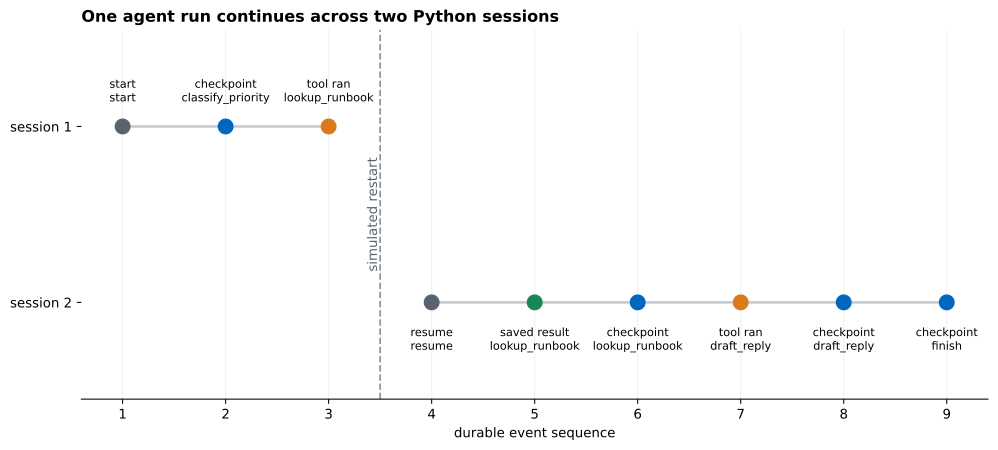
The dashed line marks the simulated restart boundary between two sessions. The build uses a new database connection as a stand-in for a restarted Python process. The event sequence does not reset because it belongs to the durable run, not to one session. That distinction is useful when a worker restarts many times.
In a real trace, avoid storing full prompts, private ticket text, access tokens, or unrestricted tool results. Keep the fields needed for recovery and debugging, protect the database file, and set a retention period.
Only conversation messages are saved. A message list may not say which action is safe to repeat. Store an explicit status, next action, structured context, and version.
The checkpoint is saved before the tool finishes. A restart may skip work that never happened. Save the next checkpoint only after you have a confirmed result. If the tool runs remotely, use the remote system’s operation status and idempotency support.
A new key is generated on every retry. The remote system sees each attempt as a new operation. Derive the key from the run and logical action, save it before delivery, and reuse it until that action reaches a terminal result.
The state and event use separate transactions. A crash can leave them disagreeing. Put the checkpoint update and its event insert inside the same database transaction.
Two workers resume the same version. Use the version in the UPDATE condition and check rowcount. For remote effects, claim work before delivery or use a queue with a clear lease and retry policy.
The database reports database is locked. Keep write transactions short. Do not call a slow model or network service while holding a SQLite transaction open. Commit local intent, perform the slow operation outside the transaction, then save its result in another short transaction.
SQLite is used as a shared high-write service. SQLite is a good fit for one machine, local tools, small worker groups, and prototypes that need durable state without a server. Move to a client-server database or managed workflow system when many machines need concurrent writes, centralized operations, or built-in scheduling.
A simulated rule is mistaken for an intelligent agent. The fixed priority rule exists to make persistence testable. A model can replace uncertain classification later, but its output still needs validation, bounded actions, durable checkpoints, and recovery tests.
An agent can resume safely when its progress has a durable, explicit shape. The current checkpoint says where to continue. The event log explains the route. The saved-result table recognizes a repeated operation.
In this build, session 1 stopped after saving a tool result but before saving the next checkpoint. Session 2 loaded version 1, reused the result, and completed at version 4. The nine-event trace proves which work ran and which work was recovered.
Use the same boundary when you connect a model: let the model suggest uncertain work, but let Python own state transitions, versions, transactions, idempotency keys, and stop conditions. Start with SQLite when one local database matches the workload. When the system grows beyond that boundary, keep the same state model and move its storage and delivery pieces to services designed for the new level of concurrency.
 Python
Build an AI Chatbot in Python: A Command-Line LLM Client
A from-scratch walkthrough of the pattern behind every LLM chatbot: one function that sends a message plus conversation history to a chat-completion API, a persona set by a system prompt, and a loop that keeps the conversation going.
Read tutorial
Python
Build an AI Chatbot in Python: A Command-Line LLM Client
A from-scratch walkthrough of the pattern behind every LLM chatbot: one function that sends a message plus conversation history to a chat-completion API, a persona set by a system prompt, and a loop that keeps the conversation going.
Read tutorial
 Software Engineering
The Single Responsibility Principle: One Class, One Reason to Change
The Single Responsibility Principle says a class should have only one reason to change. See it in action: take a Python AuthService that also owns its logging, find why that's a problem, and refactor it into clean, focused classes.
Read tutorial
Software Engineering
The Single Responsibility Principle: One Class, One Reason to Change
The Single Responsibility Principle says a class should have only one reason to change. See it in action: take a Python AuthService that also owns its logging, find why that's a problem, and refactor it into clean, focused classes.
Read tutorial