Title here
Summary here
Audit repeated observations that differ only in delivery metadata, measure their overlap across a row-wise train-test split, and keep each observation group on one side of the evaluation boundary.

Suppose a file contains three uploads of the same inspection. Each upload has a different upload ID, so the rows are not identical. If copies land on both sides of a train-test split, the model is tested on observations it has already seen.
To prevent duplicate data leakage, first define the columns or stable ID that identify one real observation. Audit whether those groups cross the split, then use GroupShuffleSplit so every copy of a group goes entirely into training or testing. If the copies are redundant retry records, remove them before splitting instead.
This tutorial makes the problem measurable with a fictional print-inspection dataset. A deliberately simple classifier scores 0.956 after a row-wise split but 0.711 after a group-aware split. The group-aware evaluation is more trustworthy because none of its test inspections appear in training.
You need Python 3.11 or later and basic knowledge of tables, variables, and functions. You should also know that a classifier predicts a category. Here, category 1 means that a print inspection needs review for a possible reprint. If training and testing are new ideas, start with How to Build Your First Machine Learning Model.
Create a virtual environment, activate it, and install the four packages used in the executed lesson:
python -m venv .venv
source .venv/bin/activate
python -m pip install numpy pandas scikit-learn matplotlib
On Windows PowerShell, activate the environment with .venv\Scripts\Activate.ps1. The published run used Python 3.13.2, NumPy 2.5.1, pandas 3.0.3, scikit-learn 1.9.0, and Matplotlib 3.11.0.
Download print_inspection_uploads.csv and save it beside your Python file or notebook. This original synthetic dataset was generated with NumPy seed 20260722 and is released under CC0-1.0. Synthetic means that code created the rows. All IDs, timestamps, measurements, and labels are fictional and do not describe a real print process.
A table row is not always an independent observation. An observation is the real event or item that one row describes. One observation can produce several rows because of upload retries, repeated exports, or several measurements from the same person or device.
This lesson has three levels:
1 real inspection -> 3 upload rows -> 1 prediction targetThe upload_id changes on every delivery. The inspection_group stays the same because all three rows describe the same inspection. That makes inspection_group the unit that must not cross the evaluation boundary.
Data leakage occurs when information crosses a boundary that should keep training and evaluation separate. Duplicate leakage occurs when a test row repeats an observation from the training data. A model can then recognize that observation instead of learning a rule that works for unseen inspections.
The general rule is:
split rows only when rows are independent
split groups when several rows belong to one observation
This is separate from preprocessing leakage. The scikit-learn data-leakage guidance also explains why transforms must be fitted on training data only. A pipeline protects fitted preprocessing, but it cannot infer which rows belong together. You must supply that grouping rule.
Load the CSV and inspect its size, columns, and first four rows. This small preview shows which fields describe delivery and which describe the inspection itself:
import pandas as pd

data = pd.read_csv("print_inspection_uploads.csv")

print("shape:", data.shape)
print(data.columns.tolist())
print(data.head(4).to_string(index=False))
shape: (1080, 8)
['upload_id', 'received_at', 'inspection_group', 'ink_coverage_pct', 'edge_blur_px', 'alignment_offset_mm', 'paper_moisture_pct', 'needs_reprint']
upload_id received_at inspection_group ink_coverage_pct edge_blur_px alignment_offset_mm paper_moisture_pct needs_reprint
UPLOAD-3-0246 2026-06-01 08:06:05+00:00 PRINT-0246 68.6 2.96 0.19 7.58 0
UPLOAD-1-0212 2026-06-01 08:03:31+00:00 PRINT-0212 72.3 1.25 -1.39 4.20 1
UPLOAD-2-0341 2026-06-01 08:06:40+00:00 PRINT-0341 60.6 0.89 1.06 6.76 0
UPLOAD-2-0087 2026-06-01 08:02:26+00:00 PRINT-0087 83.2 0.96 -0.83 6.14 0There are 1,080 upload rows. The four numeric features describe coverage, blur, alignment, and moisture. needs_reprint is the target that the model will predict.
A full-row duplicate check is a poor audit here because upload_id and received_at change. Run that check, then compare it with a check based on the stable inspection group:
full_row_duplicates = data.duplicated().sum()
repeated_group_rows = data.duplicated(
    subset="inspection_group",
    keep=False,
).sum()

print("full-row duplicates:", full_row_duplicates)
print("rows in repeated groups:", repeated_group_rows)
print("unique groups:", data["inspection_group"].nunique())
full-row duplicates: 0
rows in repeated groups: 1080
unique groups: 360The first count says no complete rows match. The second says every row belongs to a repeated inspection group. The 1,080 rows represent only 360 independent inspections.
keep=False matters because it marks every member of each repeated group. With the default keep="first", the first delivery would be marked False and only the later two would be marked True. The pandas DataFrame.duplicated reference documents both subset and keep.
Before treating rows as copies, verify that their labels agree. The next check counts the number of distinct targets inside each inspection group:
target_counts = data.groupby("inspection_group")["needs_reprint"].nunique()

print("groups with conflicting targets:", target_counts.gt(1).sum())
print(data.groupby("inspection_group").size().value_counts().to_string())
groups with conflicting targets: 0
3 360Every inspection has three uploads and one consistent target. If a real group had conflicting labels, do not choose one silently. Investigate how the target was created and decide which record is authoritative.
For a wider set of checks on IDs, types, ranges, and categories, see Build a Data Quality Report in pandas Before You Analyze.
We will first reproduce the unsafe approach. train_test_split sees 1,080 separate rows, so it can place uploads from one inspection in both sets. stratify keeps the target proportion similar, but it does not keep groups together:
import numpy as np
from sklearn.model_selection import train_test_split

row_train, row_test = train_test_split(
    np.arange(len(data)),
    test_size=0.25,
    random_state=42,
    stratify=data["needs_reprint"],
)

train_groups = set(data.loc[row_train, "inspection_group"])
test_groups = set(data.loc[row_test, "inspection_group"])
overlap_groups = train_groups & test_groups
seen_test_rows = data.loc[row_test, "inspection_group"].isin(overlap_groups)

print("overlapping inspection groups:", len(overlap_groups))
print("test rows with a group in training:", seen_test_rows.sum())
print("share of test rows already represented:", f"{seen_test_rows.mean():.1%}")
overlapping inspection groups: 202
test rows with a group in training: 246
share of test rows already represented: 91.1%This is the key audit. Of the 270 test rows, 246 belong to an inspection group that also appears in training. A normal row count would not reveal this overlap.
Now fit a one-nearest-neighbor classifier. A nearest-neighbor model predicts from the most similar training row. We use one neighbor because it makes exact-copy leakage easy to see, not because it is the best model for print inspection.
Scale the features inside a pipeline so values measured in different units can be compared. Then fit only on the row-wise training part:
from sklearn.metrics import accuracy_score
from sklearn.neighbors import KNeighborsClassifier
from sklearn.pipeline import make_pipeline
from sklearn.preprocessing import StandardScaler

feature_columns = [
    "ink_coverage_pct",
    "edge_blur_px",
    "alignment_offset_mm",
    "paper_moisture_pct",
]

row_model = make_pipeline(
    StandardScaler(),
    KNeighborsClassifier(n_neighbors=1),
)
row_model.fit(data.loc[row_train, feature_columns], data.loc[row_train, "needs_reprint"])
row_prediction = row_model.predict(data.loc[row_test, feature_columns])

print("row-wise accuracy:", round(accuracy_score(
    data.loc[row_test, "needs_reprint"],
    row_prediction,
), 3))
row-wise accuracy: 0.956Accuracy is the share of correct predictions. The score looks strong, but 91.1% of test rows have a repeated inspection in training. This result mostly answers “Can the model recognize another upload of a known inspection?” It does not cleanly answer “Can the model classify a new inspection?”
Use GroupShuffleSplit when repeated rows must remain available but each group must stay intact. Its groups argument is used only to create indices; inspection_group is not included in the model features:
from sklearn.model_selection import GroupShuffleSplit

group_splitter = GroupShuffleSplit(
    n_splits=1,
    test_size=0.25,
    random_state=42,
)
group_train, group_test = next(group_splitter.split(
    data[feature_columns],
    data["needs_reprint"],
    groups=data["inspection_group"],
))

group_train_ids = set(data.loc[group_train, "inspection_group"])
group_test_ids = set(data.loc[group_test, "inspection_group"])

print("train rows and groups:", len(group_train), len(group_train_ids))
print("test rows and groups:", len(group_test), len(group_test_ids))
print("overlapping groups:", len(group_train_ids & group_test_ids))
train rows and groups: 810 270
test rows and groups: 270 90
overlapping groups: 0All three uploads from each of 270 inspections go to training. All uploads from the other 90 inspections go to testing. The scikit-learn GroupShuffleSplit documentation notes an important detail: test_size refers to the proportion of groups, not rows. Group sizes vary in many real datasets, so the final row share may not be exactly 25%.
Fit a fresh copy of the same pipeline on the group-aware indices. Keeping the model recipe unchanged isolates the effect of the split:
group_model = make_pipeline(
    StandardScaler(),
    KNeighborsClassifier(n_neighbors=1),
)
group_model.fit(
    data.loc[group_train, feature_columns],
    data.loc[group_train, "needs_reprint"],
)
group_prediction = group_model.predict(data.loc[group_test, feature_columns])

print("group-aware accuracy:", round(accuracy_score(
    data.loc[group_test, "needs_reprint"],
    group_prediction,
), 3))
group-aware accuracy: 0.711Accuracy falls from 0.956 to 0.711, a drop of 0.245, or 24.5 percentage points. At the same time, the group overlap falls from 202 to zero. The group-aware evaluation is stricter because every test inspection is new to the model. Do not interpret the difference as a universal correction factor. It is evidence about this controlled dataset, model, and split.
The following chart was generated by the executed build from the same two result records:
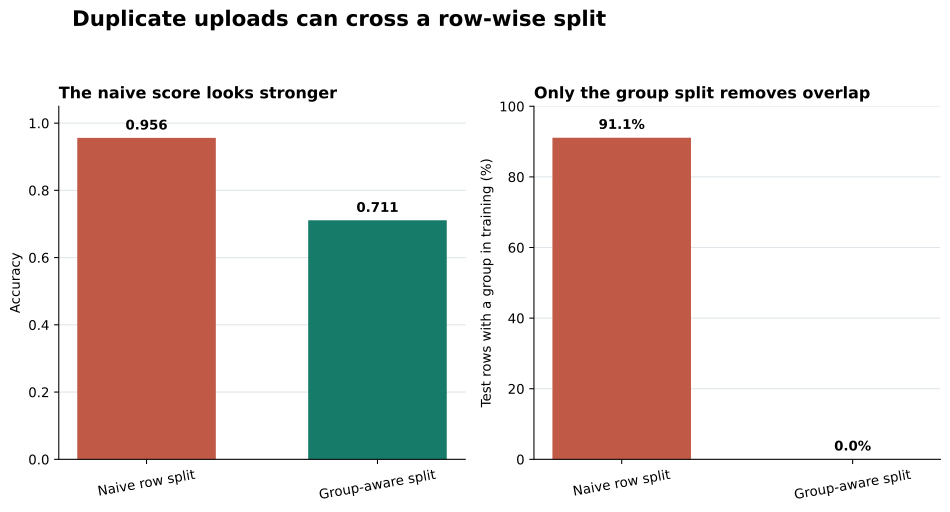
Read the panels together. The left panel alone could make the naive split look better. The right panel explains why that score is not a fair test of new inspection groups. You can download the executed split_comparison.csv to inspect the row counts, group counts, overlap, class share, and accuracy.
The right action depends on why repeated rows exist.
In this synthetic file, the three rows are delivery retries with identical inspection measurements and targets. They add no new information, so keeping one upload per inspection is a reasonable alternative. Sort first so keep="first" has an explicit meaning, then remove the retries:
one_per_inspection = (
    data.sort_values("received_at")
    .drop_duplicates(subset="inspection_group", keep="first")
    .reset_index(drop=True)
)

print("rows before:", len(data))
print("rows after:", len(one_per_inspection))
print("groups after:", one_per_inspection["inspection_group"].nunique())
rows before: 1080
rows after: 360
groups after: 360Pandas drop_duplicates ignores the DataFrame index and uses the chosen subset to decide which rows match. In a real retry log, you might keep the latest successful delivery instead of the earliest. Write that rule down before deleting anything.
Do not deduplicate when repeated rows contain legitimate new information. Examples include several visits from one patient, many transactions from one customer, or several images of one physical object. Keep those rows, but group by the real entity or event so related records do not cross the split. For time-dependent predictions, you may also need a time boundary inside each entity; a random group split does not reproduce every production setting.
upload_id is unique, so grouping by it does nothing. Choose the ID for the real observation: inspection_group in this lesson. If no stable ID exists, work with the data owner to define a key from fields that should identify the same event. Do not guess from convenient columns without checking collisions and missing values.
.duplicated() with every columnChanging delivery metadata can make repeated observations look unique. Use subset with the stable entity key or carefully reviewed observation fields. Preserve the raw columns for investigation.
Cleaning the training and test tables separately cannot repair a group already placed in both. Deduplicate the complete raw table before splitting, or create group-aware indices from the complete group column.
The target may help audit whether repeated rows agree, but it must not appear in feature_columns. That would give the model the answer directly. Keep identifiers, delivery timestamps, and targets separate from predictive inputs.
GroupShuffleSplit also stratifies the targetIt keeps groups intact, but it does not promise equal class proportions. This run has 60.4% positive test rows in the row split and 65.6% in the group split. Inspect class counts after splitting. For repeated evaluation, use a group-aware cross-validation strategy that matches your class and domain constraints.
Removing leakage makes evaluation more honest; it does not make the remaining pipeline good. Check suitable metrics, class balance, errors, and variation across several group splits. A real print-review system would also need representative data and operational validation.
The splitter returns integer positions. This tutorial has a default RangeIndex, so .loc and .iloc address the same rows. If your DataFrame uses custom labels, use .iloc[group_train] and .iloc[group_test], or reset the index before splitting.
Duplicate leakage is a boundary problem. The model should be evaluated on new real-world units, not merely on different row numbers.
Use this pre-split checklist:
duplicated(..., keep=False) to inspect every repeated group.For the synthetic upload file, a row-wise split put 202 inspection groups on both sides and exposed 91.1% of test rows to a matching training group. The group-aware split reduced both counts to zero. That zero-overlap assertion is the durable result: for the chosen group key, it confirms that the test set contains only unseen inspection groups, even when the score is less impressive.
 Python
Build an AI Chatbot in Python: A Command-Line LLM Client
A from-scratch walkthrough of the pattern behind every LLM chatbot: one function that sends a message plus conversation history to a chat-completion API, a persona set by a system prompt, and a loop that keeps the conversation going.
Read tutorial
Python
Build an AI Chatbot in Python: A Command-Line LLM Client
A from-scratch walkthrough of the pattern behind every LLM chatbot: one function that sends a message plus conversation history to a chat-completion API, a persona set by a system prompt, and a loop that keeps the conversation going.
Read tutorial
 Software Engineering
The Single Responsibility Principle: One Class, One Reason to Change
The Single Responsibility Principle says a class should have only one reason to change. See it in action: take a Python AuthService that also owns its logging, find why that's a problem, and refactor it into clean, focused classes.
Read tutorial
Software Engineering
The Single Responsibility Principle: One Class, One Reason to Change
The Single Responsibility Principle says a class should have only one reason to change. See it in action: take a Python AuthService that also owns its logging, find why that's a problem, and refactor it into clean, focused classes.
Read tutorial