Title here
Summary here
Real ETL jobs never get handed one clean file. This guide builds a PySpark pipeline that reads CSV and JSON trip logs from two city bike systems, forces them into one schema, cleans out duplicates and bad rows, and writes Parquet in a way that survives a rerun.

Every PySpark tutorial starts the same way: a DataFrame already sitting there, clean and complete, waiting for select and groupBy. (PySpark for Beginners is guilty of exactly that, and deliberately so — it’s teaching the API, not the plumbing.) Real jobs don’t get that DataFrame handed to them. They get a folder of CSV exports from one system, a stream of JSON from another, half of it with a typo in a numeric column, and a cron job that’s going to run this same script again tomorrow whether or not today’s run half-finished. That gap — from “I know the DataFrame API” to “I can point this at real files and trust the output” — is what an ETL job actually closes.
Closing it takes three moves. Read each source with a schema you wrote down yourself, not one Spark guessed from a sample of rows — a guess will silently turn a numbers column into text the moment it meets a stray “NA”. Standardize every source into one shared shape with select, then stack them with unionByName. Then write the result as partitioned Parquet using spark.sql.sources.partitionOverwriteMode = "dynamic", so re-running the job for one partition replaces only that partition instead of quietly deleting every other city’s data on the way out.
Every stage in this pipeline hands the next one something specific, and the whole job is only as reliable as those handoffs:
Lose any one of those and the “pipeline” is just three scripts that happen to run in sequence. Keep them, and you get a job you can rerun at 3 a.m. after a failure without thinking too hard about what state it left things in.
To make this concrete, imagine two city bike-share operators feeding one shared analytics warehouse. Rotterdam’s system exports a CSV once a day. Vienna’s exports newline-delimited JSON. Neither uses the same column names, and neither uses the same units for trip duration. Generate both with a fixed seed so your files match mine exactly:
import csv
import json
import random
from datetime import datetime, timedelta

rng = random.Random(42)

# --- Rotterdam: CSV export ---
start_stations = ["Centraal", "Blaak", "Kralingen", "Delfshaven"]
end_stations = ["Centraal", "Blaak", "Kralingen", "Delfshaven", "Zuidplein"]
base_time = datetime(2026, 6, 1, 7, 0, 0)

rotterdam_rows = []
for i in range(24):
    start = base_time + timedelta(minutes=rng.randint(0, 600))
    duration = rng.randint(4, 38)
    end = start + timedelta(minutes=duration)
    duration_field = str(duration)
    if i == 10:
        duration_field = "NA"  # the export system's placeholder for a missing reading
    rotterdam_rows.append({
        "trip_id": f"ROT-{1000 + i}",
        "start_time": start.strftime("%Y-%m-%d %H:%M:%S"),
        "end_time": end.strftime("%Y-%m-%d %H:%M:%S"),
        "duration_min": duration_field,
        "start_station": rng.choice(start_stations),
        "end_station": rng.choice(end_stations),
    })
rotterdam_rows.append(dict(rotterdam_rows[5]))  # the export job resent one row verbatim

with open("data/raw/rotterdam_trips.csv", "w", newline="") as f:
    writer = csv.DictWriter(f, fieldnames=list(rotterdam_rows[0].keys()))
    writer.writeheader()
    writer.writerows(rotterdam_rows)

# --- Vienna: newline-delimited JSON export ---
origins = ["Karlsplatz", "Praterstern", "Westbahnhof", "Stephansplatz"]
destinations = ["Karlsplatz", "Praterstern", "Westbahnhof", "Stephansplatz", "Donauinsel"]
base_time_v = datetime(2026, 6, 1, 6, 30, 0)

vienna_rows = []
for i in range(20):
    started = base_time_v + timedelta(minutes=rng.randint(0, 620))
    duration_sec = rng.randint(180, 2100)
    ended = started + timedelta(seconds=duration_sec)
    destination = rng.choice(destinations)
    if i == 7:
        destination = None  # the bike was never docked; the app logs no destination
    vienna_rows.append({
        "id": f"VIE-{2000 + i}",
        "started_at": started.strftime("%Y-%m-%dT%H:%M:%S"),
        "ended_at": ended.strftime("%Y-%m-%dT%H:%M:%S"),
        "duration_sec": duration_sec,
        "origin": rng.choice(origins),
        "destination": destination,
    })

with open("data/raw/vienna_trips.json", "w") as f:
    for row in vienna_rows:
        f.write(json.dumps(row) + "\n")

print("rotterdam rows written:", len(rotterdam_rows))
print("vienna rows written:", len(vienna_rows))
rotterdam rows written: 25
vienna rows written: 20Both files are hand-built for this post rather than pulled from a public dataset — a fixed seed generates them the same way on your machine as mine, and the messiness (that stray "NA", the resent row, the missing destination) is placed deliberately so every cleaning step below has something real to catch. (Outputs in this post come from PySpark 4.2.0 on Java 24; PySpark 4.x needs Java 17 or newer to start a local SparkSession at all — see the gotchas below if getOrCreate() throws a JAVA_GATEWAY_EXITED error.)
inferSchema Actually Does With a Placeholder Like “NA”The reflex move is to let Spark guess the types:
from pyspark.sql import SparkSession

spark = SparkSession.builder.appName("bike-etl").master("local[*]").getOrCreate()

naive = spark.read.csv("data/raw/rotterdam_trips.csv", header=True, inferSchema=True)
naive.printSchema()
root
|-- trip_id: string (nullable = true)
|-- start_time: timestamp (nullable = true)
|-- end_time: timestamp (nullable = true)
|-- duration_min: string (nullable = true)
|-- start_station: string (nullable = true)
|-- end_station: string (nullable = true)duration_min should be numeric. It’s string, because Spark scans the file, hits the literal text "NA" in row 10, and concludes the whole column has to be treated as text — every other row’s clean integer along with it. Nothing errors. The column just quietly stops being a number, and any arithmetic on it downstream fails or silently coerces later. Writing the schema yourself instead removes the guess entirely:
from pyspark.sql.types import StructType, StructField, StringType, DoubleType

rotterdam_schema = StructType([
    StructField("trip_id", StringType(), False),
    StructField("start_time", StringType(), False),
    StructField("end_time", StringType(), False),
    StructField("duration_min", DoubleType(), True),
    StructField("start_station", StringType(), True),
    StructField("end_station", StringType(), True),
])

rotterdam_raw = spark.read.csv(
    "data/raw/rotterdam_trips.csv", header=True, schema=rotterdam_schema
)
rotterdam_raw.printSchema()
rotterdam_raw.show(5, truncate=False)
root
|-- trip_id: string (nullable = true)
|-- start_time: string (nullable = true)
|-- end_time: string (nullable = true)
|-- duration_min: double (nullable = true)
|-- start_station: string (nullable = true)
|-- end_station: string (nullable = true)
+--------+-------------------+-------------------+------------+-------------+-----------+
|trip_id |start_time |end_time |duration_min|start_station|end_station|
+--------+-------------------+-------------------+------------+-------------+-----------+
|ROT-1000|2026-06-01 08:54:00|2026-06-01 08:59:00|5.0 |Kralingen |Blaak |
|ROT-1001|2026-06-01 10:48:00|2026-06-01 11:00:00|12.0 |Centraal |Zuidplein |
|ROT-1002|2026-06-01 08:29:00|2026-06-01 09:00:00|31.0 |Centraal |Centraal |
|ROT-1003|2026-06-01 08:35:00|2026-06-01 08:52:00|17.0 |Blaak |Zuidplein |
|ROT-1004|2026-06-01 07:27:00|2026-06-01 07:43:00|16.0 |Delfshaven |Blaak |
+--------+-------------------+-------------------+------------+-------------+-----------+
only showing top 5 rowsduration_min is double this time. The "NA" row doesn’t disappear — it becomes a proper NULL that the transform stage can find and handle on purpose, instead of a type problem nobody notices until a groupBy further downstream throws something confusing.
Vienna’s export uses id instead of trip_id, ISO-8601 timestamps instead of space-separated ones, and reports duration in seconds:
from pyspark.sql.types import IntegerType

vienna_schema = StructType([
    StructField("id", StringType(), False),
    StructField("started_at", StringType(), False),
    StructField("ended_at", StringType(), False),
    StructField("duration_sec", IntegerType(), True),
    StructField("origin", StringType(), True),
    StructField("destination", StringType(), True),
])

vienna_raw = spark.read.json("data/raw/vienna_trips.json", schema=vienna_schema)
vienna_raw.show(5, truncate=False)
+--------+-------------------+-------------------+------------+-------------+-------------+
|id |started_at |ended_at |duration_sec|origin |destination |
+--------+-------------------+-------------------+------------+-------------+-------------+
|VIE-2000|2026-06-01T13:18:00|2026-06-01T13:33:21|921 |Praterstern |Praterstern |
|VIE-2001|2026-06-01T15:11:00|2026-06-01T15:30:50|1190 |Karlsplatz |Karlsplatz |
|VIE-2002|2026-06-01T08:22:00|2026-06-01T08:30:13|493 |Stephansplatz|Praterstern |
|VIE-2003|2026-06-01T16:40:00|2026-06-01T16:45:10|310 |Stephansplatz|Stephansplatz|
|VIE-2004|2026-06-01T16:40:00|2026-06-01T16:58:58|1138 |Westbahnhof |Donauinsel |
+--------+-------------------+-------------------+------------+-------------+-------------+
only showing top 5 rowsJSON already carries typed values, so there’s no “NA”-style trap here — but notice this schema still had to be written down. Passing no schema at all to spark.read.json means Spark infers one from a scan of the file, which is exactly the same silent-guess problem as the CSV case, just with a different-looking failure mode: a field that’s null in every sampled row can get inferred as the wrong type entirely.
Now fold each source into one shared shape — same column names, same units, same types — and stack them:
from pyspark.sql import functions as F

rotterdam_std = rotterdam_raw.select(
    F.lit("rotterdam").alias("city"),
    F.col("trip_id"),
    F.to_timestamp("start_time", "yyyy-MM-dd HH:mm:ss").alias("start_ts"),
    F.to_timestamp("end_time", "yyyy-MM-dd HH:mm:ss").alias("end_ts"),
    F.col("duration_min"),
    F.col("start_station"),
    F.col("end_station"),
)

vienna_std = vienna_raw.select(
    F.lit("vienna").alias("city"),
    F.col("id").alias("trip_id"),
    F.to_timestamp("started_at", "yyyy-MM-dd'T'HH:mm:ss").alias("start_ts"),
    F.to_timestamp("ended_at", "yyyy-MM-dd'T'HH:mm:ss").alias("end_ts"),
    (F.col("duration_sec") / 60.0).alias("duration_min"),
    F.col("origin").alias("start_station"),
    F.col("destination").alias("end_station"),
)

trips = rotterdam_std.unionByName(vienna_std)
print("union row count:", trips.count())
union row count: 45unionByName matches columns by name rather than position, so it won’t silently swap two columns just because Rotterdam’s select and Vienna’s select list their fields in a different order — it would instead raise an error if a name were missing on either side, which is exactly the failure you want here, loud and early.
The union has two known problems baked in on purpose: Rotterdam’s resent row, and the "NA" reading that’s now a clean NULL.
before = trips.count()
deduped = trips.dropDuplicates(["city", "trip_id"])
print("rows before dedupe:", before, "after dedupe:", deduped.count())

missing_duration = deduped.filter(F.col("duration_min").isNull())
print("rows with missing duration_min:", missing_duration.count())
missing_duration.show(truncate=False)

clean = deduped.filter(F.col("duration_min").isNotNull() & (F.col("duration_min") > 0))
print("clean row count:", clean.count())
rows before dedupe: 45 after dedupe: 44
rows with missing duration_min: 1
+---------+--------+-------------------+-------------------+------------+-------------+-----------+
|city |trip_id |start_ts |end_ts |duration_min|start_station|end_station|
+---------+--------+-------------------+-------------------+------------+-------------+-----------+
|rotterdam|ROT-1010|2026-06-01 09:07:00|2026-06-01 09:35:00|NULL |Centraal |Zuidplein |
+---------+--------+-------------------+-------------------+------------+-------------+-----------+
clean row count: 43dropDuplicates(["city", "trip_id"]) scopes the duplicate key to trip_id within a city, which matters the moment two source systems happen to reuse the same ID scheme — keying on trip_id alone would risk merging two unrelated trips from different cities into “duplicates.” The one row with a NULL duration is exactly the row that carried the "NA" placeholder, caught cleanly instead of silently skewing an average further down the pipeline. Vienna’s undocked bike (a NULL end_station) is a real, valid trip — just an unusual one — so it stays in clean rather than getting filtered out; whether a NULL counts as “bad” or as “an edge case worth keeping” is a decision every transform stage has to make explicitly, not by accident.
Write the clean DataFrame partitioned by city, so each city’s data lives in its own subdirectory:
warehouse_path = "warehouse/trips"
clean.write.mode("overwrite").partitionBy("city").parquet(warehouse_path)

import os
print("partitions:", sorted(p for p in os.listdir(warehouse_path) if p.startswith("city=")))
print("total rows:", spark.read.parquet(warehouse_path).count())
partitions: ['city=rotterdam', 'city=vienna']
total rows: 43Now suppose tomorrow’s run only has fresh Rotterdam data to reprocess — Vienna’s source hasn’t changed, so the job only touches rotterdam_std. Writing just that DataFrame with the same mode("overwrite") looks safe. It isn’t:
rotterdam_only = clean.filter(F.col("city") == "rotterdam")
rotterdam_only.write.mode("overwrite").partitionBy("city").parquet(warehouse_path)

print("partitions:", sorted(p for p in os.listdir(warehouse_path) if p.startswith("city=")))
print("total rows:", spark.read.parquet(warehouse_path).count())
partitions: ['city=rotterdam']
total rows: 23Vienna’s partition is gone. Spark’s default overwrite behavior deletes the entire output path before writing, not just the partitions the current write actually contains — “overwrite” means “replace everything here,” not “replace what I’m giving you.” The fix is one config flag, set once per session before any writes:
spark.conf.set("spark.sql.sources.partitionOverwriteMode", "dynamic")

clean.write.mode("overwrite").partitionBy("city").parquet(warehouse_path)  # rebuild both
rotterdam_only.write.mode("overwrite").partitionBy("city").parquet(warehouse_path)

print("partitions:", sorted(p for p in os.listdir(warehouse_path) if p.startswith("city=")))
print("total rows:", spark.read.parquet(warehouse_path).count())
partitions: ['city=rotterdam', 'city=vienna']
total rows: 43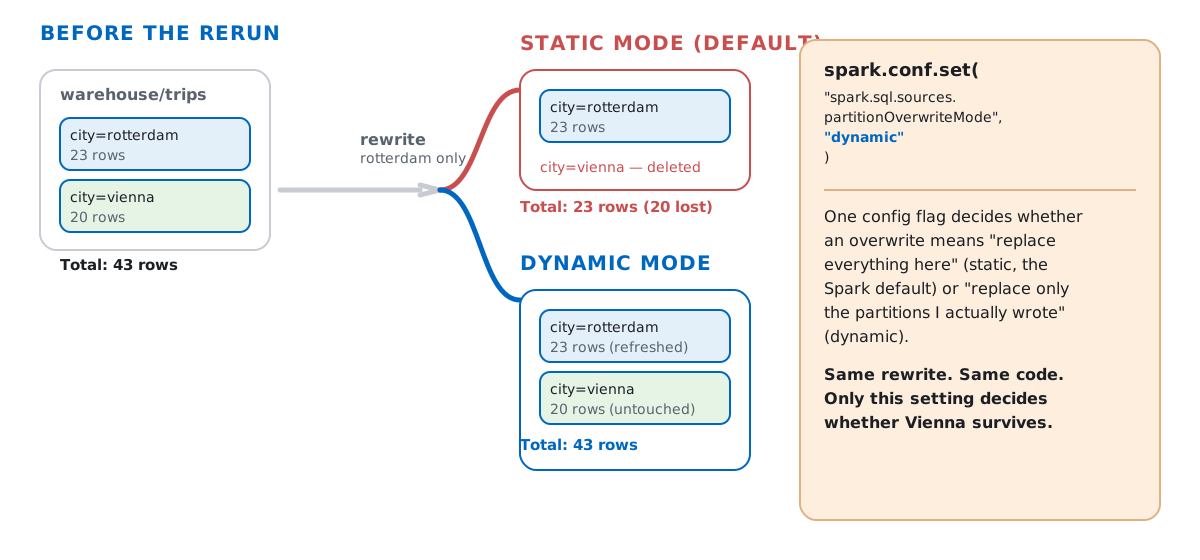
With dynamic mode, the write only replaces the partitions it actually produced — city=rotterdam gets overwritten, city=vienna is left untouched. That’s the real meaning of “idempotent” for a load stage: running the same write twice, or running it for a subset of the data, leaves the warehouse in the same state it would reach from a single correct run — never doubled, never missing something you didn’t mean to touch. Running the full clean write twice back to back confirms the row count never creeps up:
clean.write.mode("overwrite").partitionBy("city").parquet(warehouse_path)
first = spark.read.parquet(warehouse_path).count()
clean.write.mode("overwrite").partitionBy("city").parquet(warehouse_path)
second = spark.read.parquet(warehouse_path).count()
print("run 1:", first, "| run 2:", second)
run 1: 43 | run 2: 43(The full Parquet data source guide documents partitionOverwriteMode and the rest of Spark’s partition-discovery behavior in more depth than fits here.)
Once each stage works on its own, the shape of the whole job is three functions and a call at the bottom — the same structure you’d want whether this ran locally or via spark-submit on a cluster:
def extract(spark):
    rotterdam = spark.read.csv("data/raw/rotterdam_trips.csv", header=True, schema=rotterdam_schema)
    vienna = spark.read.json("data/raw/vienna_trips.json", schema=vienna_schema)
    return rotterdam, vienna

def transform(rotterdam_raw, vienna_raw):
    combined = standardize(rotterdam_raw, vienna_raw)  # the two `select` calls above, unioned
    deduped = combined.dropDuplicates(["city", "trip_id"])
    return deduped.filter(F.col("duration_min").isNotNull() & (F.col("duration_min") > 0))

def load(clean_df, path):
    clean_df.write.mode("overwrite").partitionBy("city").parquet(path)

if __name__ == "__main__":
    spark = SparkSession.builder.appName("bike-etl").getOrCreate()
    spark.conf.set("spark.sql.sources.partitionOverwriteMode", "dynamic")
    rotterdam_raw, vienna_raw = extract(spark)
    clean_df = transform(rotterdam_raw, vienna_raw)
    load(clean_df, "warehouse/trips")
    spark.stop()
Nothing here is specific to local[*] mode — swap spark-submit bike_etl.py for a cluster and the only thing that changes is how many machines extract, transform, and load actually run across.
PySpark 4.x needs Java 17 or newer, not Java 11 — a plain pip install pyspark in a fresh environment can hand you a version that fails to even start a SparkSession, with java.lang.UnsupportedClassVersionError or JAVA_GATEWAY_EXITED depending on how the mismatch surfaces. Check java -version before debugging anything else.
A schema doesn’t just type a column — it decides how junk data gets handled. With inferSchema=True, one "NA" turned an entire numeric column into text, silently. With an explicit DoubleType schema, the same "NA" became a proper NULL that later code can find with .isNull() on purpose.
A mismatched timestamp format string doesn’t quietly return null anymore. In older Spark folklore, a bad format string for to_timestamp just gave you a silent NULL. Under Spark’s ANSI SQL mode — the default since Spark 4 — it raises instead:
one_row = spark.createDataFrame([("2026-06-01 08:54:00",)], ["start_time"])
try:
    one_row.select(F.to_timestamp("start_time", "yyyy-MM-dd'T'HH:mm:ss")).show()
except Exception as e:
    print("to_timestamp raised:", type(e).__name__)

one_row.select(
    F.try_to_timestamp("start_time", F.lit("yyyy-MM-dd'T'HH:mm:ss")).alias("mismatched_format")
).show(truncate=False)
to_timestamp raised: DateTimeException
+-----------------+
|mismatched_format|
+-----------------+
|NULL |
+-----------------+If you actually want the old tolerant behavior — null instead of a crash — reach for try_to_timestamp explicitly rather than relying on a default that no longer works that way.
Partitioned writes on a local machine fragment into more files than the data needs. Six input partitions means six Parquet files per output partition even for a table this small:
clean.repartition(6).write.mode("overwrite").partitionBy("city").parquet(warehouse_path)
print("files:", len([f for f in os.listdir(f"{warehouse_path}/city=rotterdam") if f.endswith(".parquet")]))

clean.coalesce(1).write.mode("overwrite").partitionBy("city").parquet(warehouse_path)
print("files:", len([f for f in os.listdir(f"{warehouse_path}/city=rotterdam") if f.endswith(".parquet")]))
files: 6
files: 1coalesce before the final write reduces the number of output files without a full shuffle — worth doing any time the upstream partition count was set for processing speed rather than for how the output should actually look on disk.
Once extract, transform, and load each keep their contract — a fixed schema in, validated rows through, and partitions scoped correctly out — the job stops being three scripts glued together and starts being something you can point at a cron schedule. The Building ETL Pipelines module in our free PySpark for Data Engineering course picks up from here, walking through schema design, writing results, and idempotent jobs in more depth, then a guided project that runs a full quarterly ETL end to end.
 Python
Build an AI Chatbot in Python: A Command-Line LLM Client
A from-scratch walkthrough of the pattern behind every LLM chatbot: one function that sends a message plus conversation history to a chat-completion API, a persona set by a system prompt, and a loop that keeps the conversation going.
Read tutorial
Python
Build an AI Chatbot in Python: A Command-Line LLM Client
A from-scratch walkthrough of the pattern behind every LLM chatbot: one function that sends a message plus conversation history to a chat-completion API, a persona set by a system prompt, and a loop that keeps the conversation going.
Read tutorial
 Software Engineering
The Single Responsibility Principle: One Class, One Reason to Change
The Single Responsibility Principle says a class should have only one reason to change. See it in action: take a Python AuthService that also owns its logging, find why that's a problem, and refactor it into clean, focused classes.
Read tutorial
Software Engineering
The Single Responsibility Principle: One Class, One Reason to Change
The Single Responsibility Principle says a class should have only one reason to change. See it in action: take a Python AuthService that also owns its logging, find why that's a problem, and refactor it into clean, focused classes.
Read tutorial