Title here
Summary here
Dictionaries aren't just key-value pairs — they're how you join, count, and group data without a library. This tutorial uses a real craft beer dataset (2,410 beers, 558 breweries) to build a lookup table that joins two CSV files, then counts, groups, and summarizes with nothing but built-in Python.

Most real datasets don’t arrive as one tidy table — they arrive as several related files that only make sense together. A beers.csv file that names a brewery only by an ID number. A breweries.csv file that has the actual names. Somewhere, something has to connect the two. In Pandas or SQL, that something is called a join. In plain Python, it’s a dictionary.
This is where a lot of people who “know dictionaries” get stuck: they can create one, read a key, loop over .items() — but they’ve never used a dictionary as a bridge between two datasets. For the mechanics of .get(), .setdefault(), and safe reads and writes from the ground up, our Python dictionaries guide covers that in depth on a small bookshop example, and our data structures overview compares dictionaries with lists, tuples, and sets side by side. This post assumes you’ve got the basics and puts them to work on a real, messy, 2,410-row dataset of craft beers.
A lookup table is any dictionary you build for one purpose: given a key you already have, hand back a value you don’t. That’s it — no loops, no scanning.
{key: value} pairs — usually with a dictionary comprehension over its rows.lookup[key] finds the match directly; you never scan the second dataset row by row..get() with a fallback when a key might be missing, so an unmatched record doesn’t crash your script.merge() does, done with one dictionary.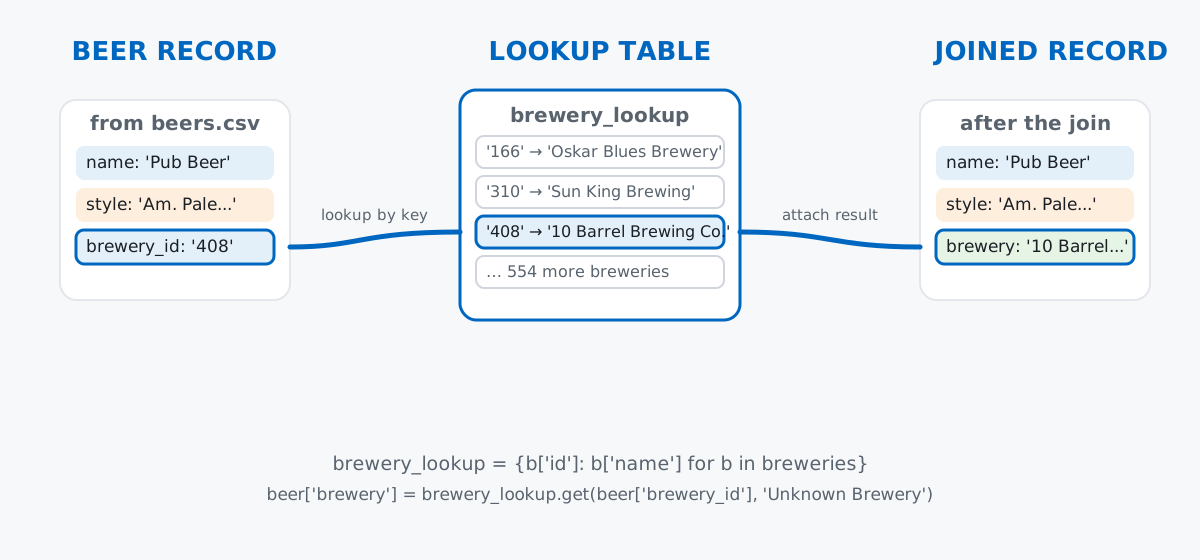
Keep this model in mind through the rest of the post: almost every pattern below — counting, grouping, nested summaries — is a variation on “build a dictionary once, then use it.”
Data: the Craft Beers Dataset compiled by Jean-Nicholas Hould (MIT license), via github.com/nickhould/craft-beers-dataset, vendored at /datasets/blog/python-dictionaries-craft-beer/. It’s two small CSV files — beers.csv (2,410 rows) and breweries.csv (558 rows) — fetched straight from this site so you can reproduce every number below without a separate download:
import csv
import urllib.request

BASE = "https://datatweets.com/datasets/blog/python-dictionaries-craft-beer"

with urllib.request.urlopen(f"{BASE}/beers.csv") as resp:
    beers = list(csv.DictReader(line.decode("utf-8") for line in resp))
with urllib.request.urlopen(f"{BASE}/breweries.csv") as resp:
    breweries = list(csv.DictReader(line.decode("utf-8") for line in resp))

print(f"{len(beers)} beers, {len(breweries)} breweries")
print(beers[0])
2410 beers, 558 breweries
{'': '0', 'abv': '0.05', 'ibu': '', 'id': '1436', 'name': 'Pub Beer', 'style': 'American Pale Lager', 'brewery_id': '408', 'ounces': '12.0'}csv.DictReader hands you each row already as a dictionary, keyed by the header row — no manual parsing needed. Two things to notice right away: the blank '' key is the file’s own leftover row-index column (harmless — we’ll just ignore it), and ibu came back as an empty string for this beer, not a number. Every value from csv.DictReader is a string, so the numeric columns need cleanup before we can do math on them:
for b in beers:
    b["abv"] = float(b["abv"]) if b["abv"] else None
    b["ibu"] = int(float(b["ibu"])) if b["ibu"] else None
    b["ounces"] = float(b["ounces"]) if b["ounces"] else None

print(beers[0])
{'': '0', 'abv': 0.05, 'ibu': None, 'id': '1436', 'name': 'Pub Beer', 'style': 'American Pale Lager', 'brewery_id': '408', 'ounces': 12.0}Missing IBU becomes None instead of '' — an honest gap we’ll have to handle later, not paper over. abv is stored as a fraction (0.05, not 5), a detail worth remembering before you print one.
Everything from the dictionaries basics still applies — it’s just operating on a row that came from a file instead of one you typed in:
first = beers[0]
print(first["name"])
print(first["abv"])
print(first.get("ibu"))
print(first.get("ibu", "not measured"))
Pub Beer
0.05
None
None.get("ibu") and .get("ibu", "not measured") both return None here — not because the key is missing, but because the value itself is None. .get() protects you from a missing key, not a missing value. Suppose a lab test later confirms this beer’s bitterness at 40 IBU — updating and adding a key use the same [] assignment:
first["ibu"] = 40
first["notes"] = "lab-confirmed IBU"
print(first)

removed = first.pop("notes", None)
print(removed)
print(first)
{'': '0', 'abv': 0.05, 'ibu': 40, 'id': '1436', 'name': 'Pub Beer', 'style': 'American Pale Lager', 'brewery_id': '408', 'ounces': 12.0, 'notes': 'lab-confirmed IBU'}
lab-confirmed IBU
{'': '0', 'abv': 0.05, 'ibu': 40, 'id': '1436', 'name': 'Pub Beer', 'style': 'American Pale Lager', 'brewery_id': '408', 'ounces': 12.0}ibu existed already, so the assignment overwrote it; notes didn’t, so it was added. .pop() removed notes and handed back its value — the record is back to its original shape.
Here’s the pattern from the mental model, for real. beers.csv only knows a brewery by its numeric brewery_id. The actual name lives in breweries.csv, keyed by id. A dictionary comprehension turns the second file into a lookup table in one line:
brewery_lookup = {b["id"]: b["name"].strip() for b in breweries}
print(len(brewery_lookup))
print(brewery_lookup["408"])
558
10 Barrel Brewing CompanyNow every beer can find its brewery in one step, with .get() guarding against an ID that doesn’t match anything:
for b in beers:
    b["brewery"] = brewery_lookup.get(b["brewery_id"], "Unknown Brewery")

print(beers[0]["name"], "-", beers[0]["brewery"])
unmatched = sum(1 for b in beers if b["brewery"] == "Unknown Brewery")
print("beers with no matching brewery:", unmatched)
Pub Beer - 10 Barrel Brewing Company
beers with no matching brewery: 0Zero unmatched beers — this dataset’s IDs line up cleanly, which won’t always be true of real data, which is exactly why the .get() fallback is there instead of a bare [] lookup. The csv module documents everything else it can do: dialects, custom delimiters, writing files.
With every beer joined to a brewery name, the classic dictionary job is counting. How many beers of each style are in the dataset?
style_counts = {}
for b in beers:
    style = b["style"]
    if not style:
        continue
    style_counts[style] = style_counts.get(style, 0) + 1

top5 = sorted(style_counts.items(), key=lambda kv: kv[1], reverse=True)[:5]
for style, count in top5:
    print(f"{style:35s} {count}")
print("total distinct styles:", len(style_counts))
American IPA 424
American Pale Ale (APA) 245
American Amber / Red Ale 133
American Blonde Ale 108
American Double / Imperial IPA 105
total distinct styles: 99The .get(style, 0) pattern initializes an unseen style at zero before adding one — no if style in style_counts check required. collections.Counter is the built-in shortcut for exactly this:
from collections import Counter

style_counter = Counter(b["style"] for b in beers if b["style"])
print(style_counter.most_common(5))
[('American IPA', 424), ('American Pale Ale (APA)', 245), ('American Amber / Red Ale', 133), ('American Blonde Ale', 108), ('American Double / Imperial IPA', 105)]American IPA alone accounts for 424 of 2,410 beers — this dataset skews heavily toward hoppy American styles.
Dictionaries of lists group related rows together. Which breweries brew the most beers in this dataset?
from collections import defaultdict

by_brewery = defaultdict(list)
for b in beers:
    by_brewery[b["brewery"]].append(b["name"])

top_breweries = sorted(by_brewery.items(), key=lambda kv: len(kv[1]), reverse=True)[:5]
for brewery, names in top_breweries:
    print(f"{brewery:30s} {len(names)} beers")
Brewery Vivant 62 beers
Oskar Blues Brewery 46 beers
Sun King Brewing Company 38 beers
Cigar City Brewing Company 25 beers
Sixpoint Craft Ales 24 beersdefaultdict(list) creates an empty list the first time a brewery name is seen, so .append() always has something to append to — the same convenience .get() gave you for counting.
A dictionary’s values can be anything, including other dictionaries. Let’s build a per-style summary of average ABV and IBU — and this is where the missing IBU values from earlier become unavoidable:
style_stats = {}
for b in beers:
    style = b["style"]
    if not style:
        continue
    if style not in style_stats:
        style_stats[style] = {"count": 0, "abv_total": 0.0, "abv_n": 0, "ibu_total": 0, "ibu_n": 0}
    stats = style_stats[style]
    stats["count"] += 1
    if b["abv"] is not None:
        stats["abv_total"] += b["abv"]
        stats["abv_n"] += 1
    if b["ibu"] is not None:
        stats["ibu_total"] += b["ibu"]
        stats["ibu_n"] += 1

for style, stats in style_stats.items():
    stats["avg_abv"] = round(stats["abv_total"] / stats["abv_n"] * 100, 1) if stats["abv_n"] else None
    stats["avg_ibu"] = round(stats["ibu_total"] / stats["ibu_n"], 1) if stats["ibu_n"] else None

top5_by_count = sorted(style_stats.items(), key=lambda kv: kv[1]["count"], reverse=True)[:5]
print(f"{'Style':35s} {'Count':>5s} {'AvgABV%':>8s} {'AvgIBU':>7s} {'IBUKnown':>9s}")
for style, s in top5_by_count:
    print(f"{style:35s} {s['count']:5d} {s['avg_abv']:8.1f} {s['avg_ibu']:7.1f} {s['ibu_n']:9d}/{s['count']}")
Style Count AvgABV% AvgIBU IBUKnown
American IPA 424 6.5 67.6 301/424
American Pale Ale (APA) 245 5.5 44.9 153/245
American Amber / Red Ale 133 5.7 36.3 77/133
American Blonde Ale 108 5.0 21.0 61/108
American Double / Imperial IPA 105 8.7 93.3 75/105Each key in style_stats maps to its own dictionary — that’s nesting. Chain brackets to reach two levels deep: style_stats["American IPA"]["avg_ibu"]. Notice the IBUKnown column: only 301 of 424 American IPAs have a recorded bitterness value. Dividing by ibu_n — the count of beers that actually had an IBU — rather than the full style count is what keeps the average honest instead of silently dragging it toward zero.
Just as list comprehensions build lists, dictionary comprehensions build dictionaries in one line. Let’s create a name-to-ABV lookup:
abv_lookup = {b["name"]: round(b["abv"] * 100, 1) for b in beers if b["abv"] is not None}
print(len(abv_lookup), "of", len(beers))
2245 of 2410Only 2,245 entries came out, not 2,410. Beer names in this dataset aren’t unique — 82 names appear more than once — and a dictionary comprehension keeps only the last value it sees for a repeated key, silently overwriting the earlier ones:
matches = [b for b in beers if b["name"] == "Vanilla Porter"]
print("Vanilla Porter appears", len(matches), "times, abv values:", [round(m["abv"] * 100, 1) for m in matches])
print("abv_lookup kept:", abv_lookup["Vanilla Porter"])
Vanilla Porter appears 2 times, abv values: [7.0, 4.7]
abv_lookup kept: 4.7Two different breweries each made a “Vanilla Porter,” at 7.0% and 4.7% ABV — the comprehension kept whichever it processed last, silently discarding the first. That’s not a bug; it’s rule one of dictionaries (one value per key) showing up somewhere easy to miss. Need every match instead? Group into a list, the same defaultdict(list) pattern from grouping by brewery.
Filtering in the same expression finds strong beers in one line:
strong = {name: abv for name, abv in abv_lookup.items() if abv > 9.0}
print(len(strong), "beers above 9% ABV")
print(sorted(strong.items(), key=lambda kv: kv[1], reverse=True)[:3])
82 beers above 9% ABV
[('Lee Hill Series Vol. 5 - Belgian Style Quadrupel Ale', 12.8), ('London Balling', 12.5), ('Csar', 12.0)]max() with a key function finds the strongest beer directly, no sorting the whole dataset required:
has_abv = [b for b in beers if b["abv"] is not None]
strongest = max(has_abv, key=lambda b: b["abv"])
print(f"{strongest['name']} ({strongest['brewery']}) - {strongest['abv']*100:.1f}% ABV, {strongest['style']}")
Lee Hill Series Vol. 5 - Belgian Style Quadrupel Ale (Upslope Brewing Company) - 12.8% ABV, Quadrupel (Quad)Most bitter has to filter out the missing IBUs first — max() would happily compare None against a number and crash:
has_ibu = [b for b in beers if b["ibu"] is not None]
most_bitter = max(has_ibu, key=lambda b: b["ibu"])
print(f"{most_bitter['name']} ({most_bitter['style']}) - {most_bitter['ibu']} IBU")
Bitter Bitch Imperial IPA (American Double / Imperial IPA) - 138 IBUA naive average crashes the moment one value is None. Averaging every American IPA’s IBU without filtering first raises a TypeError, because Python won’t add a number to None:
ipa_ibus = [b["ibu"] for b in beers if b["style"] == "American IPA"]
none_count = sum(1 for v in ipa_ibus if v is None)
print(f"{none_count} of {len(ipa_ibus)} American IPA records have no IBU")

try:
    bad_avg = sum(ipa_ibus) / len(ipa_ibus)
except TypeError as e:
    print(f"TypeError: {e}")

clean_ibus = [v for v in ipa_ibus if v is not None]
print(f"{sum(clean_ibus) / len(clean_ibus):.1f}")
123 of 424 American IPA records have no IBU
TypeError: unsupported operand type(s) for +: 'int' and 'NoneType'
67.6Filtering None out before summing is the fix — and 67.6 matches the nested-dictionary table earlier, computed a different way, a good sign it’s right.
Duplicate keys in a comprehension don’t warn you — they just overwrite. The Vanilla Porter collision above is the general case: any dictionary comprehension built from data with repeated keys keeps only the last match. If your source data might have duplicates and you need all of them, build a list per key instead of a single value.
ABV is stored as a fraction, not a percentage — multiply before you print it. Printing beer["abv"] directly gives you 0.072, not 7.2:
sample = beers[500]
print(sample["name"], sample["abv"])
print(f"{sample['abv'] * 100:.1f}%")
Native Amber 0.063
6.3%Forget the * 100 in a report and every number in it is off by a factor of a hundred — a mistake that’s easy to make once and never notice, because the code still runs without error.
A dictionary is a lookup table waiting to happen: build one from a dataset’s rows, then use it to join, count, or group without ever scanning the whole thing twice.
{row["id"]: row["value"] for row in data} → build a lookup table in one line.get(key, default) → look something up safely when a key (or match) might not exist.get(key, 0) in a loop, or Counter → count occurrencesdefaultdict(list) → group related items without an existence check{key: {inner_key: value}}) → per-group summaries with more than one number eachIf you want the dictionary fundamentals this post assumes — .setdefault(), safe reads, the mutable-default-argument trap — in more depth, the Python Dictionaries and Advanced Dictionaries and Frequency Tables lessons in our free Python for Data Analytics course cover exactly that, with more hands-on exercises than fit in a single post.
 Python
Build an AI Chatbot in Python: A Command-Line LLM Client
A from-scratch walkthrough of the pattern behind every LLM chatbot: one function that sends a message plus conversation history to a chat-completion API, a persona set by a system prompt, and a loop that keeps the conversation going.
Read tutorial
Python
Build an AI Chatbot in Python: A Command-Line LLM Client
A from-scratch walkthrough of the pattern behind every LLM chatbot: one function that sends a message plus conversation history to a chat-completion API, a persona set by a system prompt, and a loop that keeps the conversation going.
Read tutorial
 Software Engineering
The Single Responsibility Principle: One Class, One Reason to Change
The Single Responsibility Principle says a class should have only one reason to change. See it in action: take a Python AuthService that also owns its logging, find why that's a problem, and refactor it into clean, focused classes.
Read tutorial
Software Engineering
The Single Responsibility Principle: One Class, One Reason to Change
The Single Responsibility Principle says a class should have only one reason to change. See it in action: take a Python AuthService that also owns its logging, find why that's a problem, and refactor it into clean, focused classes.
Read tutorial