Title here
Summary here
This guide covers where a docstring has to go to count as one, Google/NumPy/reST argument styles, turning docstring examples into real tests with doctest, and generating browsable docs from the standard library's pydoc — all on a small weather-utilities module you can run yourself.

Six months from now, someone opens a function you wrote, and that someone is you. The comment above the function (if there is one) explains something that’s obvious from the code; the thing you actually need to know — what this argument expects, what comes back, what happens if you pass it garbage — isn’t written down anywhere help() can find it.
That’s what a docstring is for. Put a triple-quoted string as the very first statement inside a function, class, or module, and Python stores it on that object’s __doc__ attribute automatically — no comment marker, no separate file, nothing to keep in sync by hand. That one string is what powers help() in a REPL, the tooltip your editor shows when you hover a function call, and — as you’ll see below — an entire browsable doc page generated for free from code you already wrote.
It’s easy to think of a docstring as “a comment that goes at the top of a function,” which undersells it. The same string does three separate jobs, for three separate audiences, and none of them require you to write anything beyond the string itself:
help(some_function) and most editor tooltips read __doc__ directly and show it to whoever’s calling your code, right when they need it.pydoc to Sphinx — walk your modules and turn every docstring into a formatted page, with zero extra markup from you.>>> example lines inside a docstring, the standard library’s doctest module can run them for real and fail loudly if the output no longer matches.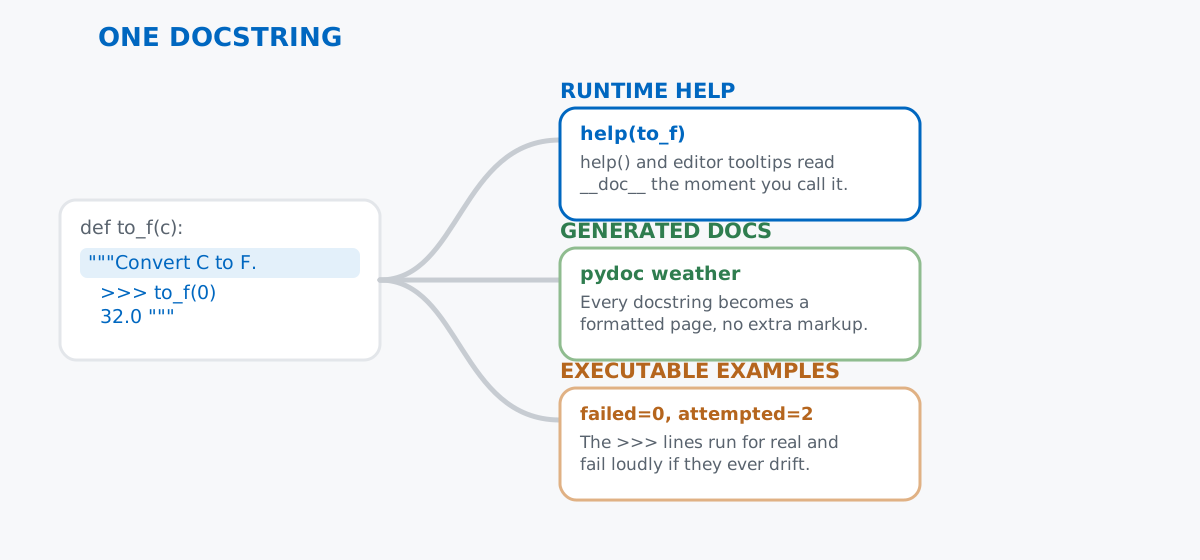
Write the string once, in the shape this post walks through, and all three come along for free. Get the shape wrong — put it in the wrong place, skip the sections a reader needs — and none of the three work right, which is why the next section starts with placement before anything about style.
A small module beats an abstract example here, so save this as weather.py. It logs and interprets weather-station readings — nothing about the domain matters, it just needs functions worth documenting:
"""Small utilities for logging and interpreting weather-station readings."""

import math


def celsius_to_fahrenheit(celsius):
    """Convert a Celsius temperature to Fahrenheit.

    >>> celsius_to_fahrenheit(0)
    32.0
    >>> celsius_to_fahrenheit(100)
    212.0
    """
    return celsius * 9 / 5 + 32
Two docstrings are already in that snippet: the module docstring at the very top of the file, and the function docstring inside celsius_to_fahrenheit. Both follow the same rule — the triple-quoted string has to be the first statement in whatever it’s documenting, before any other code. Check it with .__doc__:
print(celsius_to_fahrenheit.__doc__)Convert a Celsius temperature to Fahrenheit.
>>> celsius_to_fahrenheit(0)
32.0
>>> celsius_to_fahrenheit(100)
212.0That “first statement” rule isn’t a style preference — it’s a hard cutoff Python enforces. Move the string one line later and it’s just a string literal that gets evaluated and thrown away:
def not_first_statement():
x = 1
"""This string is not the first statement, so it is not a docstring."""
return x
print(repr(not_first_statement.__doc__))Nonex = 1 runs first, so by the time Python reaches the string, the function’s docstring slot is already unfilled — None, permanently. No error, no warning. If help() ever comes back empty for a function that clearly has a comment-looking string in it, this is usually why.
A one-line summary is fine for something as self-explanatory as a unit conversion. Most functions need more: what each argument means, what type comes back, what can go wrong. The convention most Python code reaches for today is Google style — a summary line, then labeled sections:
def dew_point_approx(temp_c, humidity_pct):
"""Approximate the dew point using the Magnus formula.
Args:
temp_c: Air temperature in degrees Celsius.
humidity_pct: Relative humidity as a percentage (0-100).
Returns:
The approximate dew point in degrees Celsius, rounded to one
decimal place.
Raises:
ValueError: If humidity_pct is not between 0 and 100.
"""
if not 0 < humidity_pct <= 100:
raise ValueError(f"humidity_pct must be between 0 and 100, got {humidity_pct}")
a, b = 17.62, 243.12
gamma = (a * temp_c) / (b + temp_c) + math.log(humidity_pct / 100)
dew_point = (b * gamma) / (a - gamma)
return round(dew_point, 1)help() renders those sections back with the indentation preserved, which is exactly what makes them scannable instead of a wall of prose:
help(dew_point_approx)Help on function dew_point_approx in module __main__:
dew_point_approx(temp_c, humidity_pct)
Approximate the dew point using the Magnus formula.
Args:
temp_c: Air temperature in degrees Celsius.
humidity_pct: Relative humidity as a percentage (0-100).
Returns:
The approximate dew point in degrees Celsius, rounded to one
decimal place.
Raises:
ValueError: If humidity_pct is not between 0 and 100.And the function itself works as documented — a muggy 20°C, 65% afternoon condenses noticeably closer to air temperature than a dry one, and an out-of-range humidity raises exactly the exception the Raises section promised:
print(dew_point_approx(20, 65))
print(dew_point_approx(28, 40))
try:
dew_point_approx(20, 140)
except ValueError as exc:
print(f"ValueError: {exc}")13.2
13.1
ValueError: humidity_pct must be between 0 and 100, got 140Google style isn’t the only option, and none of them is more “correct” than the others — pick one per project and stay consistent, since a codebase mixing all three is harder to scan than one with slightly less detail. NumPy style favors underlined section headers and puts the type on its own line, which reads well in code with a lot of array shapes and dtypes:
def dew_point_approx(temp_c, humidity_pct):
"""
Approximate the dew point using the Magnus formula.
Parameters
----------
temp_c : float
Air temperature in degrees Celsius.
humidity_pct : float
Relative humidity as a percentage (0-100).
Returns
-------
float
The approximate dew point in degrees Celsius, rounded to one
decimal place.
Raises
------
ValueError
If humidity_pct is not between 0 and 100.
"""reStructuredText (reST) style, the one Sphinx’s autodoc was built around, uses inline :param:/:returns: field markers instead of section blocks:
def dew_point_approx(temp_c, humidity_pct):
"""Approximate the dew point using the Magnus formula.
:param temp_c: Air temperature in degrees Celsius.
:param humidity_pct: Relative humidity as a percentage (0-100).
:type humidity_pct: float
:returns: The approximate dew point in degrees Celsius, rounded to
one decimal place.
:raises ValueError: If humidity_pct is not between 0 and 100.
"""Whichever style you pick, the underlying conventions — imperative-mood summary line (“Convert”, not “Converts” or “This converts”), a blank line separating the summary from the details, no blank line right before the closing """ on a one-liner — come from PEP 257, the actual language-level docstring spec. It doesn’t mandate Google, NumPy, or reST; those are community conventions built on top of what PEP 257 leaves open.
The >>> lines already sitting in celsius_to_fahrenheit’s docstring aren’t just formatting — they’re real doctest syntax, and doctest will actually execute them and compare the output:
python -m doctest weather.pyRunning that against the file above prints nothing at all, which for doctest means every example passed. Ask it to say so explicitly instead:
import doctest
import weather
results = doctest.testmod(weather, verbose=False)
print(results)TestResults(failed=0, attempted=2)Two examples attempted, zero failed — and if anyone edits dew_point_approx in a way that changes what celsius_to_fahrenheit returns for 0 or 100, this same command catches it. That’s a meaningfully different guarantee than a comment showing sample output: comments don’t run.
It does mean the expected output has to match exactly, and that turns into a real trap with floats. This docstring, saved as doctest_float_gotcha.py, looks reasonable and is wrong:
def third():
"""
>>> 10 / 3
3.3333333333333333
"""
return 10 / 3python -m doctest doctest_float_gotcha.py -vTrying:
10 / 3
Expecting:
3.3333333333333333
**********************************************************************
File ".../doctest_float_gotcha.py", line 3, in doctest_float_gotcha.third
Failed example:
10 / 3
Expected:
3.3333333333333333
Got:
3.3333333333333335
1 item had no tests:
doctest_float_gotcha
**********************************************************************
1 item had failures:
1 of 1 in doctest_float_gotcha.third
1 test in 2 items.
0 passed and 1 failed.
***Test Failed*** 1 failure.Python’s actual repr() of 10 / 3 ends in a 5, not a 3 — sixteen significant digits of binary floating point, not the digit a person would type from memory. The fix isn’t to give up on doctesting float-returning code; it’s to round in the example itself, the same way dew_point_approx already does in real code: >>> round(10 / 3, 4) followed by 3.3333 passes cleanly, because now the expected value is exactly what the rounded call returns.
Classes take the same treatment, usually with an Attributes section describing the instance state instead of Args:
class WeatherStation:
"""Track temperature and humidity readings for one sensor location.
Attributes:
name: A short label for the station, e.g. "Rooftop".
readings: A list of (temp_c, humidity_pct) tuples recorded so far.
"""
def __init__(self, name):
"""Initialize an empty station with the given name."""
self.name = name
self.readings = []
def log(self, temp_c, humidity_pct):
"""Record one reading and return its dew point."""
self.readings.append((temp_c, humidity_pct))
return dew_point_approx(temp_c, humidity_pct)inspect.getdoc() is the cleaner way to pull a docstring back out programmatically — unlike raw .__doc__, it also finds an inherited docstring on a parent class if a subclass doesn’t define its own:
import inspect
print(inspect.getdoc(WeatherStation))Track temperature and humidity readings for one sensor location.
Attributes:
name: A short label for the station, e.g. "Rooftop".
readings: A list of (temp_c, humidity_pct) tuples recorded so far.And the class works the way its docstring says it does:
station = WeatherStation("Rooftop")
print(station.log(20, 65))
print(station.log(15, 80))
print(station.readings)13.2
11.6
[(20, 65), (15, 80)]This is the part that surprises people who’ve only used docstrings for help(): the standard library ships a documentation generator, and it needs nothing beyond the docstrings already in weather.py.
python -m pydoc weatherHelp on module weather:
NAME
weather - Small utilities for logging and interpreting weather-station readings.
CLASSES
builtins.object
WeatherStation
class WeatherStation(builtins.object)
| WeatherStation(name)
|
| Track temperature and humidity readings for one sensor location.
|
| Attributes:
| name: A short label for the station, e.g. "Rooftop".
| readings: A list of (temp_c, humidity_pct) tuples recorded so far.
|
| Methods defined here:
|
| __init__(self, name)
| Initialize an empty station with the given name.
|
| log(self, temp_c, humidity_pct)
| Record one reading and return its dew point.
|
| ----------------------------------------------------------------------
| Data descriptors defined here:
|
| __dict__
| dictionary for instance variables
|
| __weakref__
| list of weak references to the object
FUNCTIONS
celsius_to_fahrenheit(celsius)
Convert a Celsius temperature to Fahrenheit.

>>> celsius_to_fahrenheit(0)
32.0
>>> celsius_to_fahrenheit(100)
212.0
dew_point_approx(temp_c, humidity_pct)
Approximate the dew point using the Magnus formula.
...python -m pydoc -w weather goes one step further and writes weather.html — an actual browsable page with the same content, linked and formatted — to the current directory. Bigger projects reach for Sphinx or mkdocs with a docstring plugin because they add cross-linking, search, and theming across dozens of modules, but the underlying source of truth in every one of those tools is still the same thing: the docstrings you already wrote for help().
There’s a second way a docstring goes missing that has nothing to do with placement. Run Python with the -OO flag — an optimization flag some deployment setups pass to strip out extra bytecode — and every docstring in the program disappears at import time, not just for one function:
python -OO -c "from weather import celsius_to_fahrenheit; print(celsius_to_fahrenheit.__doc__)"NoneThe same call without -OO prints the full docstring back. This almost never matters — help() in a normal development REPL and doc generators both run without -OO — but it matters a lot if any of your own code reads .__doc__ at runtime for something other than documentation (a CLI that builds its --help text from a function’s docstring, say). If that ever silently returns None in production, check whether the deployment is running optimized.
Docstrings you can’t reasonably strip out, since they’re literal code, are comments — but a # comment is invisible to help(), pydoc, and doctest alike. If something needs to reach a caller, it belongs in the docstring; if it’s a note to whoever edits this function next, a comment is still the right tool.
A docstring earns its place by being the one artifact that help(), a generated doc page, and a real executable test can all read without you writing anything twice. Start with the placement rule and a one-line summary, add Args/Returns once a function has more than one moving part, and reach for doctest on the examples you’d want to know had broken. If you want the deeper mechanics of writing the functions you’re now documenting — default arguments, *args/**kwargs, and debugging a function that isn’t returning what you expect — the Python Functions lesson in our free Python for Data Analytics course covers that ground, and our post on packaging a Python tool with pyproject.toml picks up right where good docstrings stop being optional — once someone else installs your code, your docstrings are the only documentation they’re going to read.
 Python
Build an AI Chatbot in Python: A Command-Line LLM Client
A from-scratch walkthrough of the pattern behind every LLM chatbot: one function that sends a message plus conversation history to a chat-completion API, a persona set by a system prompt, and a loop that keeps the conversation going.
Read tutorial
Python
Build an AI Chatbot in Python: A Command-Line LLM Client
A from-scratch walkthrough of the pattern behind every LLM chatbot: one function that sends a message plus conversation history to a chat-completion API, a persona set by a system prompt, and a loop that keeps the conversation going.
Read tutorial
 Software Engineering
The Single Responsibility Principle: One Class, One Reason to Change
The Single Responsibility Principle says a class should have only one reason to change. See it in action: take a Python AuthService that also owns its logging, find why that's a problem, and refactor it into clean, focused classes.
Read tutorial
Software Engineering
The Single Responsibility Principle: One Class, One Reason to Change
The Single Responsibility Principle says a class should have only one reason to change. See it in action: take a Python AuthService that also owns its logging, find why that's a problem, and refactor it into clean, focused classes.
Read tutorial