Title here
Summary here
Three bookstores export sales in three different CSV shapes. This guide builds a small Python ETL pipeline that normalizes all three, rejects bad rows with a clear reason attached, and stays safe to run twice without duplicating a single order.

“Extract, transform, load” gets thrown around as if it’s one thing, but writing a script that reads a CSV and inserts it into a database isn’t what makes something a pipeline. What makes it a pipeline is what happens the second time it runs — after a cron job retries, after someone reruns it by hand because they weren’t sure it worked, after a source file shows up with one column renamed. If you’ve set up Apache Airflow in Docker to schedule and retry tasks, this post is about what should actually be running inside one of those tasks — Airflow decides when something runs; this is about making sure it’s still correct the third time it does.
A data pipeline, stripped down, is three functions chained together. extract() turns each raw source into one common shape, whatever format it originally arrived in. transform() validates and cleans those common records, rejecting anything that doesn’t meet the rules instead of crashing on it. load() writes the survivors somewhere durable — and the part people skip is making that write idempotent, so running the whole pipeline twice on the same input leaves the same data behind, not double of it.
Every stage in this pipeline has exactly one job and a clear boundary with the next:
OrderRef versus order_id, or that Harborview prices its books with a euro sign glued to the front.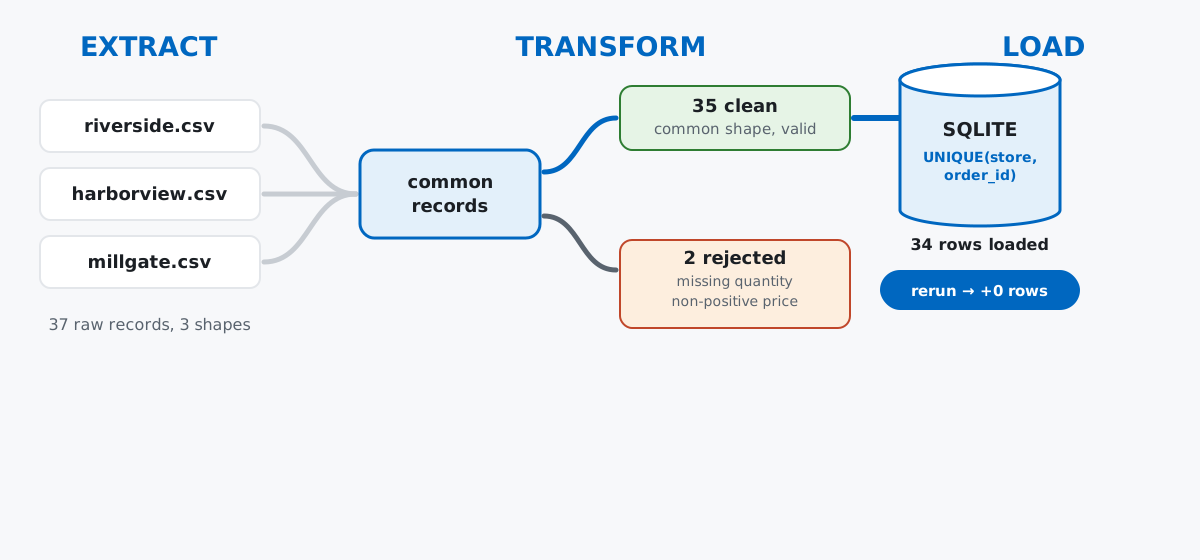
The two guarantees worth building in from the start are fail-soft transforms (one bad row never takes down the other 999) and idempotent loads (the destination looks the same whether the pipeline ran once or five times). Everything below builds toward both.
Say you run data for a small co-op of three independent bookstores, and each one’s point-of-sale software exports its own daily sales file. None of them agree on column names, date formats, or how they write a price. Rather than pointing at someone else’s dataset, here’s a fixed-seed generator that recreates all three exactly as shown below — run it once and you’ll have the same “raw” files this post works from.
import csv
from pathlib import Path
import numpy as np

rng = np.random.default_rng(42)
titles = [
    "Pride and Prejudice", "Moby-Dick", "Dracula", "Frankenstein",
    "The Odyssey", "Little Women", "Great Expectations", "Jane Eyre",
    "The Time Machine", "Wuthering Heights",
]

raw_dir = Path("raw")
raw_dir.mkdir(exist_ok=True)

# Riverside: clean ISO dates, plain numbers.
riverside_rows = [{
    "order_id": f"RV-{1000+i}",
    "order_date": f"2026-06-{(i % 28) + 1:02d}",
    "item": rng.choice(titles),
    "qty": int(rng.integers(1, 4)),
    "unit_price": round(float(rng.uniform(8, 24)), 2),
} for i in range(14)]
with open(raw_dir / "riverside.csv", "w", newline="") as f:
    w = csv.DictWriter(f, fieldnames=["order_id", "order_date", "item", "qty", "unit_price"])
    w.writeheader(); w.writerows(riverside_rows)

# Harborview: UK-style dates, euro-prefixed prices, one blank quantity.
harborview_rows = []
for i in range(12):
    qty = int(rng.integers(1, 4))
    harborview_rows.append({
        "OrderRef": f"HV-{2000+i}",
        "Date": f"{(i % 28) + 1:02d}/06/2026",
        "Product": rng.choice(titles),
        "Units": "" if i == 5 else qty,
        "Price": f"€{round(float(rng.uniform(8, 24)), 2)}",
    })
with open(raw_dir / "harborview.csv", "w", newline="") as f:
    w = csv.DictWriter(f, fieldnames=["OrderRef", "Date", "Product", "Units", "Price"])
    w.writeheader(); w.writerows(harborview_rows)

# Millgate: "D Mon YYYY" dates, one refund (negative price), one accidental re-export.
millgate_rows = []
for i in range(10):
    price = round(float(rng.uniform(8, 24)), 2)
    if i == 7:
        price = -price
    millgate_rows.append({
        "id": f"MG-{3000+i}",
        "dt": f"{(i % 28) + 1} Jun 2026",
        "book": rng.choice(titles),
        "quantity": int(rng.integers(1, 4)),
        "price": price,
    })
millgate_rows.append(dict(millgate_rows[0]))  # the accidental duplicate
with open(raw_dir / "millgate.csv", "w", newline="") as f:
    w = csv.DictWriter(f, fieldnames=["id", "dt", "book", "quantity", "price"])
    w.writeheader(); w.writerows(millgate_rows)

for name in ["riverside.csv", "harborview.csv", "millgate.csv"]:
    lines = (raw_dir / name).read_text().splitlines()
    print(f"--- {name} ---")
    print(lines[0])
    print(lines[1])
--- riverside.csv ---
order_id,order_date,item,qty,unit_price
RV-1000,2026-06-01,Pride and Prejudice,3,15.02
--- harborview.csv ---
OrderRef,Date,Product,Units,Price
HV-2000,01/06/2026,Moby-Dick,2,€18.93
--- millgate.csv ---
id,dt,book,quantity,price
MG-3000,1 Jun 2026,Jane Eyre,2,20.59Three files, three schemas, and Millgate already has both of the problems real exports tend to have: a refund recorded as a negative price, and a row that got written twice. That’s on purpose — a synthetic dataset is the right call here because the point of this post is the pipeline’s behavior around specific messy cases, and generating them lets every reader hit the exact same ones.
Each source gets its own small extractor. The only thing they’re required to agree on is the shape of what they hand back: store, order_id, date_raw, title, qty_raw, price_raw — nothing parsed or validated yet, just relabeled into a common vocabulary.
def extract_riverside(path):
    with open(path, newline="") as f:
        for row in csv.DictReader(f):
            yield {
                "store": "riverside", "order_id": row["order_id"],
                "date_raw": row["order_date"], "title": row["item"],
                "qty_raw": row["qty"], "price_raw": row["unit_price"],
            }

def extract_harborview(path):
    with open(path, newline="") as f:
        for row in csv.DictReader(f):
            yield {
                "store": "harborview", "order_id": row["OrderRef"],
                "date_raw": row["Date"], "title": row["Product"],
                "qty_raw": row["Units"], "price_raw": row["Price"].lstrip("€"),
            }

def extract_millgate(path):
    with open(path, newline="") as f:
        for row in csv.DictReader(f):
            yield {
                "store": "millgate", "order_id": row["id"],
                "date_raw": row["dt"], "title": row["book"],
                "qty_raw": row["quantity"], "price_raw": row["price"],
            }

EXTRACTORS = {
    "riverside": extract_riverside,
    "harborview": extract_harborview,
    "millgate": extract_millgate,
}

raw_records = []
for store, extractor in EXTRACTORS.items():
    raw_records.extend(extractor(raw_dir / f"{store}.csv"))

print("extracted", len(raw_records), "raw records from", len(EXTRACTORS), "sources")
extracted 37 raw records from 3 sources37 is just 14 + 12 + 11 — every row from every file, untouched. extract doesn’t judge the data; it only relabels it. That separation matters: if a validation rule changes later, you edit transform, not three separate parsers.
This is where a row earns its place in the clean dataset, or doesn’t — and if it doesn’t, the reason goes on record instead of vanishing.
import datetime as dt

DATE_FORMATS = {
    "riverside": "%Y-%m-%d",
    "harborview": "%d/%m/%Y",
    "millgate": "%d %b %Y",
}

def transform(records):
    clean, rejected = [], []
    for rec in records:
        reasons = []

        try:
            date = dt.datetime.strptime(rec["date_raw"], DATE_FORMATS[rec["store"]]).date()
        except ValueError:
            date = None
            reasons.append("unparseable date")

        qty_raw = str(rec["qty_raw"]).strip()
        if not qty_raw:
            reasons.append("missing quantity")
            qty = None
        else:
            qty = int(qty_raw)
            if qty <= 0:
                reasons.append("non-positive quantity")

        price = float(rec["price_raw"])
        if price <= 0:
            reasons.append(f"non-positive price ({price})")

        if reasons:
            rejected.append({**rec, "reasons": reasons})
            continue

        clean.append({
            "store": rec["store"], "order_id": rec["order_id"],
            "order_date": date.isoformat(), "title": rec["title"],
            "qty": qty, "unit_price": price, "revenue": round(qty * price, 2),
        })
    return clean, rejected

clean_records, rejected_records = transform(raw_records)
print("clean:", len(clean_records), "rejected:", len(rejected_records))
for r in rejected_records:
    print(r["store"], r["order_id"], r["reasons"])
clean: 35 rejected: 2
harborview HV-2005 ['missing quantity']
millgate MG-3007 ['non-positive price (-16.95)']Two rows didn’t make it, and you know exactly why each one failed instead of guessing later why a total looks 40 euros short. Notice that Millgate’s duplicate row (MG-3000 twice) sailed straight through transform — both copies are individually valid records, so nothing here catches it. Deduplication isn’t a transform concern; it’s load’s job, next.
The table gets a UNIQUE(store, order_id) constraint, and every insert uses INSERT OR IGNORE. A row that’s already there is silently skipped instead of duplicated — which is exactly what should happen when the same file gets processed twice.
import sqlite3

def load(records, db_path):
    conn = sqlite3.connect(db_path)
    conn.execute("""
        CREATE TABLE IF NOT EXISTS orders (
            store TEXT NOT NULL, order_id TEXT NOT NULL, order_date TEXT NOT NULL,
            title TEXT NOT NULL, qty INTEGER NOT NULL, unit_price REAL NOT NULL,
            revenue REAL NOT NULL, UNIQUE(store, order_id)
        )
    """)
    inserted = 0
    for r in records:
        cur = conn.execute(
            """INSERT OR IGNORE INTO orders
               (store, order_id, order_date, title, qty, unit_price, revenue)
               VALUES (:store, :order_id, :order_date, :title, :qty, :unit_price, :revenue)""",
            r,
        )
        inserted += cur.rowcount
    conn.commit()
    return conn, inserted

conn, inserted = load(clean_records, "bookshop.db")
total = conn.execute("SELECT COUNT(*) FROM orders").fetchone()[0]
print("first run  — inserted:", inserted, "| total rows:", total)

# Simulate the pipeline running again on the same files — a cron retry,
# or someone re-running it by hand because they weren't sure it worked.
conn2, inserted2 = load(clean_records, "bookshop.db")
total2 = conn2.execute("SELECT COUNT(*) FROM orders").fetchone()[0]
print("second run — inserted:", inserted2, "| total rows:", total2)
first run — inserted: 34 | total rows: 34
second run — inserted: 0 | total rows: 3434, not 35 — the unique constraint quietly folded Millgate’s duplicate MG-3000 into a single row on the very first run, on top of rejecting nothing extra. The second run is the real test: same 35 clean records go in, zero new rows come out. That’s what “safe to rerun” actually looks like from the outside — nothing visibly happens, which is the correct outcome, not a bug.
With the data landed, the report is a couple of GROUP BY queries — the payoff for having a clean, deduplicated table to query in the first place.
report = conn.execute("""
    SELECT store, COUNT(*) AS orders, ROUND(SUM(revenue), 2) AS revenue
    FROM orders GROUP BY store ORDER BY revenue DESC
""").fetchall()
for row in report:
    print(row)
('riverside', 14, 545.34)
('harborview', 11, 403.44)
('millgate', 9, 304.6)Riverside sold the most and Millgate the least — unsurprising given the raw row counts, but now it’s a number you can trust, because you know a duplicate can’t have inflated it and a bad row can’t have been silently averaged in. (Pipeline verified against pandas 3.0.3 and NumPy 2.5.1; nothing here is version-sensitive.)
Skip the unique constraint and reruns duplicate everything. Load the same 35 clean records into a plain table with no UNIQUE and no INSERT OR IGNORE, twice:
def load_naive(records, db_path):
    conn = sqlite3.connect(db_path)
    conn.execute("""CREATE TABLE IF NOT EXISTS orders_naive
                     (store TEXT, order_id TEXT, order_date TEXT,
                      title TEXT, qty INTEGER, unit_price REAL, revenue REAL)""")
    for r in records:
        conn.execute(
            """INSERT INTO orders_naive VALUES
               (:store, :order_id, :order_date, :title, :qty, :unit_price, :revenue)""", r)
    conn.commit()
    return conn

nconn = load_naive(clean_records, "naive.db")
nconn = load_naive(clean_records, "naive.db")
print(nconn.execute("SELECT COUNT(*) FROM orders_naive").fetchone()[0])7035 records, run twice, no constraint to stop it: 70 rows, every revenue total silently doubled. This is the single most common way a “working” pipeline produces wrong numbers — the code never raises an error, so nothing tells you it happened.
Parse dates without pinning a format and some of them flip silently. pandas.to_datetime will guess a format when you don’t give it one, and its guess is month-first:
import pandas as pd

sample = ["01/06/2026", "02/06/2026"]
print("default guess:      ", list(pd.to_datetime(sample).astype(str)))
print("explicit day-first: ", list(pd.to_datetime(sample, format="%d/%m/%Y").astype(str)))
default guess: ['2026-01-06', '2026-02-06']
explicit day-first: ['2026-06-01', '2026-06-02']Harborview’s June 1st becomes January 6th — no exception, no warning, just a wrong date sitting in your report. This is exactly why transform above keeps a DATE_FORMATS dictionary keyed by source instead of trusting one global parser to guess correctly across every format it’s ever handed. See the datetime.strptime format codes in the Python docs if you want the full table of directives.
A close cousin of both: a bare except Exception: continue inside extract turns a real schema-drift bug — a source renaming quantity to qty upstream — from a KeyError you’d notice immediately into zero rows extracted and zero rows in your report, with nothing in the logs to explain why. Catch the specific failure you expect; let everything else crash loud.
Three small functions, a rejection log, and a unique constraint get you a pipeline that survives being run more than once — which is most of what separates a real one from a script that happened to work the first time. The Chunked & Out-of-Core Processing module in our free Scaling Python for Data Engineering course picks up from here: the same load-into-SQLite pattern, but built to keep working when the input no longer fits in memory at all.
 Python
Build an AI Chatbot in Python: A Command-Line LLM Client
A from-scratch walkthrough of the pattern behind every LLM chatbot: one function that sends a message plus conversation history to a chat-completion API, a persona set by a system prompt, and a loop that keeps the conversation going.
Read tutorial
Python
Build an AI Chatbot in Python: A Command-Line LLM Client
A from-scratch walkthrough of the pattern behind every LLM chatbot: one function that sends a message plus conversation history to a chat-completion API, a persona set by a system prompt, and a loop that keeps the conversation going.
Read tutorial
 Software Engineering
The Single Responsibility Principle: One Class, One Reason to Change
The Single Responsibility Principle says a class should have only one reason to change. See it in action: take a Python AuthService that also owns its logging, find why that's a problem, and refactor it into clean, focused classes.
Read tutorial
Software Engineering
The Single Responsibility Principle: One Class, One Reason to Change
The Single Responsibility Principle says a class should have only one reason to change. See it in action: take a Python AuthService that also owns its logging, find why that's a problem, and refactor it into clean, focused classes.
Read tutorial