Title here
Summary here
A true-beginner introduction to Python's for loop: what it actually does under the hood, looping over lists and strings, every argument form of range(), and how break and continue change what a loop does, all traced through real, verified output.

Say you have six items to buy this weekend and you want to print each one to a shopping list. You could write print("eggs"), then print("milk"), then four more lines just like it — and that works, right up until the list has sixty items instead of six, or you need to change what happens to every line at once. Typing the same instruction over and over is exactly the kind of job a computer should be doing for you, not the other way around.
That’s what a for loop is for: doing the same thing to every item in a group of items, one at a time, without writing a separate line for each one. It’s one of the first tools that makes Python feel like it’s actually saving you work. This guide assumes you know how to create a list and print a value, and nothing more — we’ll build the mental model first, then work through looping over lists and strings, every form of range(), and the two keywords (break and continue) that let you change a loop’s behavior mid-run. (If you’re still deciding whether a list is even the right place to store your data, our guide to Python’s data structures covers that decision first.)
Every for loop, no matter what it’s looping over, does the same three things:
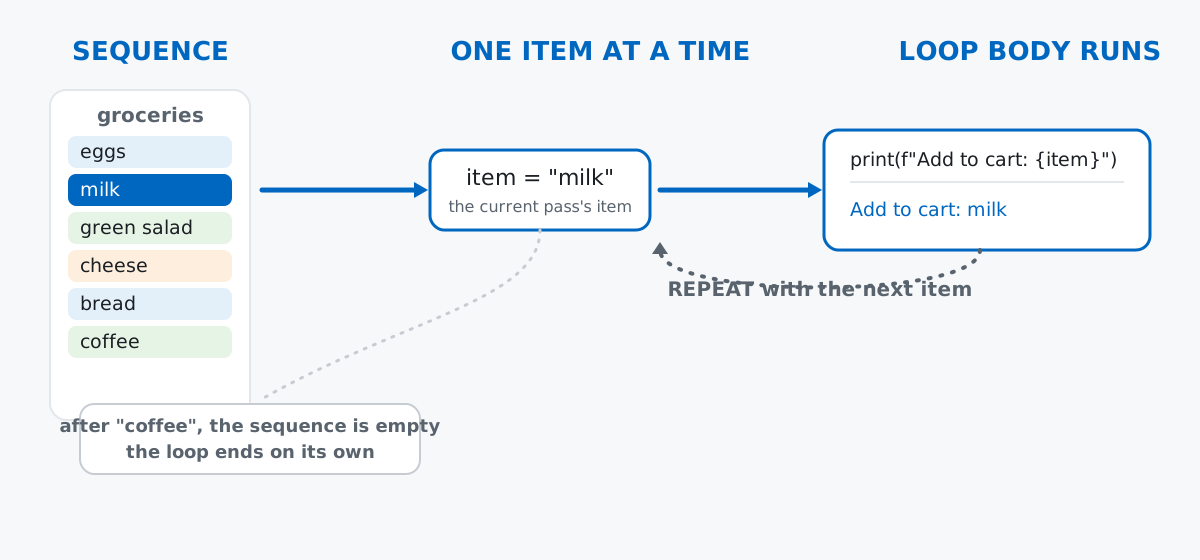
You never have to tell a for loop how many times to run, and you never manually track how far through the list you are — Python does both for you. That’s the whole point of reaching for a for loop instead of copy-pasting a line six times: you describe what should happen to one item, and the loop takes care of getting you through all of them.
No download needed here — a for loop is a language feature, not something you analyze, so a small, hand-written example teaches the syntax better than an external file would. Imagine you’re planning a small dinner party this weekend and you’ve written out what you still need to buy:
groceries = ["eggs", "milk", "green salad", "cheese", "bread", "coffee"]Six strings in a list, in the order you’d walk past them in a store. Every example below builds on this same list, so you can paste it once and follow along with your own output matching mine exactly.
The most common shape of a for loop is for <variable> in <sequence>:, followed by an indented block:
groceries = ["eggs", "milk", "green salad", "cheese", "bread", "coffee"]

for item in groceries:
    print(f"Add to cart: {item}")
Add to cart: eggs
Add to cart: milk
Add to cart: green salad
Add to cart: cheese
Add to cart: bread
Add to cart: coffeeRead the header right to left: for each item in groceries, run the block below. item is just a variable name — you could call it groceries_item or x, and it would work identically, but a name that says what one element actually is makes the loop body easier to read. Notice there’s no counter, no index, and no line telling the loop when to stop: it runs the block once per item and then ends, because that’s exactly what “for each item in a sequence” means.
A string is a sequence too — but of characters, not words. That trips people up the first time they try it:
ingredient = "green salad"

for character in ingredient:
    print(character)
g
r
e
e
n
s
a
l
a
dEleven lines for an eleven-character string, one per character — and notice the sixth line, which looks blank but isn’t: it’s the space between “green” and “salad,” printed on its own line because a space is a character like any other. A for loop over a string has no idea the string is “two words” to a human reader; it only knows it’s a sequence of individual characters, and it hands you exactly one per pass, in order, the same way it would hand you one item from a list.
range(): Looping Over Numbers You Don’t Have to TypeSometimes you don’t have a list to loop over — you just need to repeat something a specific number of times, or count. Typing out [0, 1, 2, 3] by hand doesn’t scale, so Python gives you range(), which generates a sequence of numbers on demand. It comes in three forms.
One argument — range(stop) counts from 0 up to, but not including, stop:
for bag_number in range(4):
    print(f"Pack bag #{bag_number}")
Pack bag #0
Pack bag #1
Pack bag #2
Pack bag #3Four bags, numbered 0 through 3 — range(4) produces exactly four numbers, but the last one is 3, not 4. Hold onto that; it’s the single most common range() mistake, and it gets its own gotcha further down.
Two arguments — range(start, stop) counts from start up to, but not including, stop:
for aisle in range(1, 6):
    print(f"Checking aisle {aisle}")
Checking aisle 1
Checking aisle 2
Checking aisle 3
Checking aisle 4
Checking aisle 5This is the form to reach for whenever 0 isn’t a natural starting point — aisle numbers, page numbers, years — anything that counts starting from 1 or some other real value.
Three arguments — range(start, stop, step) adds a step size, and the step can be negative to count downward:
for minutes_left in range(15, 0, -5):
    print(f"{minutes_left} minutes left")
15 minutes left
10 minutes left
5 minutes leftStarting at 15, subtracting 5 each pass, and stopping before reaching 0 — which is why 0 itself never prints, matching the same “stop is excluded” rule from the first two forms. The official Python documentation on for statements covers the full range of what a for loop can iterate over, well past what this post needs.
break: Stopping a Loop Earlybreak exits a loop immediately, skipping every item that would have come after it. Say you’re scanning your grocery list to confirm cheese is on it, and once you find it, there’s no reason to keep checking:
for item in groceries:
    print(f"Checking {item}...")
    if item == "cheese":
        print("Found cheese - stop looking!")
        break
Checking eggs...
Checking milk...
Checking green salad...
Checking cheese...
Found cheese - stop looking!Trace exactly where it stops: the loop checks eggs, milk, green salad, and cheese — four items — then hits break and exits immediately. bread and coffee are never checked at all; they aren’t skipped one at a time, the whole loop simply ends the moment break runs, wherever it is in the block.
continue: Skipping the Rest of One Iterationcontinue is narrower than break — it skips the rest of just the current pass and moves on to the next item, without ending the loop. Say a couple of items on your list are already sitting in your pantry, so there’s no need to add them to the cart:
pantry = ["milk", "coffee"]

for item in groceries:
    if item in pantry:
        continue
    print(f"Add to cart: {item}")
Add to cart: eggs
Add to cart: green salad
Add to cart: cheese
Add to cart: breadmilk and coffee never reach the print() line — the moment continue runs, Python jumps straight back to the top of the loop and grabs the next item, skipping everything below continue for that one pass only. Compare that to the break example above: break throws away the rest of the list; continue only throws away the rest of this one iteration and keeps going.
A loop can contain another loop — this is how you handle two dimensions at once, like “for every guest count, check every item.” Say you want a quick shopping-quantity table for a few possible guest counts:
party_items = ["eggs", "bread rolls", "napkins"]
guest_counts = [2, 4, 6]

for guests in guest_counts:
    print(f"--- {guests} guests ---")
    for item in party_items:
        print(f"  {guests} {item}")
--- 2 guests ---
2 eggs
2 bread rolls
2 napkins
--- 4 guests ---
4 eggs
4 bread rolls
4 napkins
--- 6 guests ---
6 eggs
6 bread rolls
6 napkinsFor every value in the outer loop (guests), the entire inner loop (item in party_items) runs from start to finish before the outer loop moves to its next value — that’s why you see all three items printed under 2 guests before 4 guests even appears. Three guest counts times three items gives nine total inner-loop passes, and the indentation is what tells Python which loop each print() belongs to.
Modifying a list while you loop over it can silently skip items. Python tracks your position in the list by index as the loop runs, and removing an item shifts every item after it one position to the left — which quietly moves an unprocessed item into a spot the loop already passed:
items_gotcha = ["eggs", "milk", "green salad", "cheese", "bread", "coffee"]

for item in items_gotcha:
    if len(item) <= 5:
        print(f"removing short item: {item}")
        items_gotcha.remove(item)

print(items_gotcha)
removing short item: eggs
removing short item: bread
['milk', 'green salad', 'cheese', 'coffee']milk is four characters long — it matches len(item) <= 5 just as clearly as eggs and bread did — but it survives. Removing eggs (index 0) shifts milk into index 0, and the loop had already moved on to check index 1 next, so milk is never re-checked. Loop over a copy instead (for item in items_gotcha[:]: or for item in list(items_gotcha):) whenever you plan to remove things mid-loop.
range()’s stop value is never included — an off-by-one waiting to happen. If you want the numbers 1 through 5, the instinct is range(1, 5):
for n in range(1, 5):
    print(n)
1
2
3
45 never prints, because range(1, 5) stops before 5. To actually include 5, the stop value has to be one past it: range(1, 6).
Reusing a loop variable’s name overwrites whatever it held before the loop. If you already have a variable called item before a loop that also uses item, the loop quietly replaces it:
item = "receipt"
print(f"before loop: item = {item!r}")

for item in groceries:
    pass

print(f"after loop: item = {item!r}")
before loop: item = 'receipt'
after loop: item = 'coffee'After the loop, item holds "coffee" — the last value the loop assigned to it — not "receipt". This is easy to miss because nothing errors; the variable is just quietly a different value than you expected further down the function.
A for loop over a known sequence can’t run forever on its own — Python always advances to the next item for you. The place infinite loops actually come from is while, where you’re responsible for updating the condition yourself. If you ever catch yourself writing a manual counter inside a for loop just to decide when to stop, that’s usually a sign the logic has mentally drifted into while-loop territory, and a plain for item in sequence: (or the right range()) already does the stopping for you, safely.
A for loop takes a sequence, hands you one item at a time, runs your block for each one, and stops on its own once the sequence is exhausted:
range(stop) / range(start, stop) / range(start, stop, step) → generate the numbers to loop over instead of typing them outbreak → exit the loop entirely, right where it’s calledcontinue → skip only the rest of the current pass, then keep loopingOnce these fundamentals feel natural, our Advanced Python For Loops guide shows you the more powerful patterns built on top of them — enumerate(), zip(), the loop else clause, comprehensions, and why looping row by row over a pandas DataFrame is almost always the wrong move. To practice the fundamentals themselves with a full walkthrough, the For Loops and Iteration lesson in our free Python for Data Analytics course picks up exactly where this post leaves off.
 Python
Build an AI Chatbot in Python: A Command-Line LLM Client
A from-scratch walkthrough of the pattern behind every LLM chatbot: one function that sends a message plus conversation history to a chat-completion API, a persona set by a system prompt, and a loop that keeps the conversation going.
Read tutorial
Python
Build an AI Chatbot in Python: A Command-Line LLM Client
A from-scratch walkthrough of the pattern behind every LLM chatbot: one function that sends a message plus conversation history to a chat-completion API, a persona set by a system prompt, and a loop that keeps the conversation going.
Read tutorial
 Software Engineering
The Single Responsibility Principle: One Class, One Reason to Change
The Single Responsibility Principle says a class should have only one reason to change. See it in action: take a Python AuthService that also owns its logging, find why that's a problem, and refactor it into clean, focused classes.
Read tutorial
Software Engineering
The Single Responsibility Principle: One Class, One Reason to Change
The Single Responsibility Principle says a class should have only one reason to change. See it in action: take a Python AuthService that also owns its logging, find why that's a problem, and refactor it into clean, focused classes.
Read tutorial