Title here
Summary here
A chat model can only produce text — it can't check your inventory or calculate a shipping quote on its own. This guide builds the request-decide-execute-answer loop that lets it ask your code to do that, and run the result back through it.

A chat model is fluent, but it’s also stuck with only what it learned during training. It has no way to check whether a book is actually in stock right now, or what shipping to a given ZIP code would cost today. Function calling (also called tool calling) closes that gap — you describe a real Python function to the model, and when it decides that function is the way to answer the user, it tells your code exactly which one to run and with what arguments.
The part that trips people up isn’t the concept, it’s the plumbing: the model never runs anything itself, so your code has to notice the request, execute the real function, and hand the result back in exactly the shape the API expects, or the conversation breaks. If you haven’t sent a plain chat request before, our Python AI chatbot tutorial covers the basics this post builds on — including Nora, the bookshop assistant we’ll give some actual tools to work with here.
Every function-calling exchange, no matter how many tools are involved, is the same four-step loop:
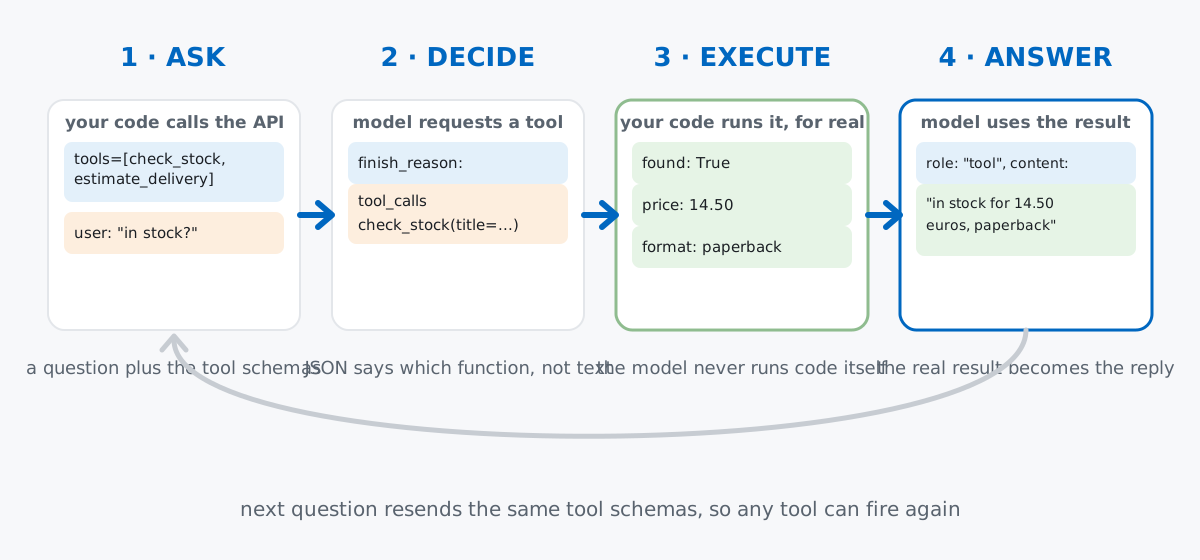
Step 3 is the one worth underlining: the model cannot execute code. It can only describe, in JSON, what it would like your program to do. Whether that request actually happens — and what it’s allowed to touch — is entirely up to you.
In the chatbot tutorial, Nora was a bookshop assistant who could only talk. Let’s give her something to check. A tiny, hand-written catalog and a delivery-cost table are all she needs — no dataset required, since this is a mechanics topic about wiring, not a topic about analyzing data:
CATALOG = {
    "the left hand of darkness": {"price": 14.50, "format": "paperback", "in_stock": True},
    "the dispossessed": {"price": 15.90, "format": "paperback", "in_stock": False},
    "a wizard of earthsea": {"price": 12.00, "format": "hardcover", "in_stock": True},
}

def check_stock(title: str) -> dict:
    """Look up a book in Nora's bookshop catalog."""
    book = CATALOG.get(title.strip().lower())
    if book is None:
        return {"title": title, "found": False}
    return {"title": title, "found": True, **book}


DELIVERY_ZONES = {
    # first digit of a US ZIP code -> (days, base_cost_eur)
    "0": (2, 4.50), "1": (2, 4.50), "2": (3, 5.00), "3": (3, 5.00), "4": (4, 5.50),
    "5": (4, 5.50), "6": (4, 6.00), "7": (5, 6.50), "8": (5, 6.50), "9": (5, 7.00),
}

def estimate_delivery(zip_code: str, expedited: bool = False) -> dict:
    """Estimate delivery time and cost to a US ZIP code."""
    zone_digit = zip_code.strip()[0]
    days, cost = DELIVERY_ZONES.get(zone_digit, (6, 8.00))
    if expedited:
        days = max(1, days - 2)
        cost = round(cost * 1.75, 2)
    return {"zip_code": zip_code, "days": days, "cost": round(cost, 2), "expedited": expedited}
Both functions are ordinary Python — no LLM involved yet. That’s deliberate: a “tool” is just a function you’d write anyway, plus a description the model can read.
We’ll use the official openai Python package to get the request and response shapes right — the same client.chat.completions.create(...) call and the same response object every real call returns. Install it and set your key as an environment variable, never as a literal string in your code:
pip install openai
export OPENAI_API_KEY="your-key-here"
import json
from openai import OpenAI
client = OpenAI()To let the model call check_stock, you describe it — name, purpose, and the shape of its arguments — using JSON Schema, the same object-with-properties format used to validate JSON almost everywhere:
tools = [
    {
        "type": "function",
        "function": {
            "name": "check_stock",
            "description": "Look up whether a book title is in stock at Nora's bookshop, and its price and format if so.",
            "parameters": {
                "type": "object",
                "properties": {
                    "title": {
                        "type": "string",
                        "description": "The book title to look up, e.g. 'The Left Hand of Darkness'",
                    },
                },
                "required": ["title"],
            },
        },
    },
]

print(json.dumps(tools[0], indent=2))
{
"type": "function",
"function": {
"name": "check_stock",
"description": "Look up whether a book title is in stock at Nora's bookshop, and its price and format if so.",
"parameters": {
"type": "object",
"properties": {
"title": {
"type": "string",
"description": "The book title to look up, e.g. 'The Left Hand of Darkness'"
}
},
"required": [
"title"
]
}
}
}The description field matters more than it looks. It’s the only thing the model has to decide when this function applies — vague wording like “gets book info” invites the model to guess wrong or skip the tool entirely. Be specific about what the function does and when it’s the right call.
Send a user message alongside the tools list, and check what comes back:
messages = [
    {"role": "user", "content": "Do you have The Left Hand of Darkness in stock?"}
]

response = client.chat.completions.create(
    model="gpt-4o-mini",
    messages=messages,
    tools=tools,
)

response_message = response.choices[0].message
print("finish_reason:", response.choices[0].finish_reason)
print("content:", response_message.content)
tc = response_message.tool_calls[0]
print("tool_call id:", tc.id)
print("function name:", tc.function.name)
print("function arguments (raw JSON string):", tc.function.arguments)
This environment has no live OpenAI or Anthropic API key, so — as in the chatbot tutorial — the shapes above are confirmed against the real openai PyPI package (v2.44.0), and the dispatch logic in this post runs end to end against a small local mock client built to match that shape exactly. Every line below is real, printed output from that run; only the model’s decision itself is scripted:
finish_reason: tool_calls
content: None
tool_call id: call_9f3a1
function name: check_stock
function arguments (raw JSON string): {"title": "The Left Hand of Darkness"}
content came back None because the model isn’t answering — it’s requesting a function call instead. Notice arguments is a JSON-encoded string, not a Python dict; you have to parse it yourself before it’s usable.
Parse the arguments, call the real function, then append both the model’s request and your function’s result to the conversation before asking again:
tool_call = response_message.tool_calls[0]
function_name = tool_call.function.name
function_args = json.loads(tool_call.function.arguments)
function_result = check_stock(**function_args)   # the real Python function, not a guess
print("function_result:", function_result)

messages.append(response_message)
messages.append({
    "role": "tool",
    "tool_call_id": tool_call.id,
    "content": json.dumps(function_result),
})

final_response = client.chat.completions.create(
    model="gpt-4o-mini",
    messages=messages,
)
print("final reply:", final_response.choices[0].message.content)
print("messages in conversation now:", len(messages))
function_result: {'title': 'The Left Hand of Darkness', 'found': True, 'price': 14.5, 'format': 'paperback', 'in_stock': True}
final reply: [mock reply] Yes — we have 'The Left Hand of Darkness' in stock for €14.50, paperback.
messages in conversation now: 3function_result is the real dict check_stock returned — nothing invented. The [mock reply] line is a scripted stand-in from the verification client, proving the plumbing works end to end, never a genuine model response. Notice the tool_call_id in your outgoing message must match the id the model sent — that’s how it knows which result answers which request. (OpenAI’s function calling guide documents the full tools/tool_choice parameter dialect if you want more than what’s covered here.)
Hardcoding if function_name == "check_stock" doesn’t scale past one tool. A small registry does the routing for you:
available_functions = {
    "check_stock": check_stock,
    "estimate_delivery": estimate_delivery,
}

def execute_tool_call(tool_call):
    function_name = tool_call.function.name
    function_args = json.loads(tool_call.function.arguments)
    if function_name not in available_functions:
        return {"error": f"Unknown function: {function_name}"}
    return available_functions[function_name](**function_args)
Run it against a tool call naming a title the catalog carries but doesn’t currently have on the shelf — same execute_tool_call function, a different tool_call.function.arguments string this time ('{"title": "The Dispossessed"}'):
result = execute_tool_call(tool_call)
print("check_stock result:", result)
check_stock result: {'title': 'The Dispossessed', 'found': True, 'price': 15.9, 'format': 'paperback', 'in_stock': False}found: True and in_stock: False are different things worth noticing — the dispatcher located the title, it just isn’t currently available. A model can turn that distinction into a helpful answer (“we carry it, but it’s out of stock”) only if your function reports it honestly instead of collapsing both into one boolean.
A single request can trigger more than one tool at once, when the model decides it needs several independent lookups to answer:
messages = [{"role": "user", "content":
    "Is A Wizard of Earthsea in stock, and what would delivery to 10001 cost?"}]

response = client.chat.completions.create(
    model="gpt-4o-mini", messages=messages, tools=tools,
)
response_message = response.choices[0].message
print("number of tool_calls:", len(response_message.tool_calls))
messages.append(response_message)

for tc in response_message.tool_calls:
    result = execute_tool_call(tc)
    print(f"  {tc.function.name}({tc.function.arguments}) -> {result}")
    messages.append({"role": "tool", "tool_call_id": tc.id, "content": json.dumps(result)})

final_response = client.chat.completions.create(model="gpt-4o-mini", messages=messages, tools=tools)
print("final reply:", final_response.choices[0].message.content)
number of tool_calls: 2
check_stock({"title": "A Wizard of Earthsea"}) -> {'title': 'A Wizard of Earthsea', 'found': True, 'price': 12.0, 'format': 'hardcover', 'in_stock': True}
estimate_delivery({"zip_code": "10001", "expedited": false}) -> {'zip_code': '10001', 'days': 2, 'cost': 4.5, 'expedited': False}
final reply: [mock reply] 'A Wizard of Earthsea' is in stock (hardcover, €12.00). Delivery to 10001 takes 2 days and costs €4.50.The loop doesn’t care how many tool calls came back — it appends one "tool" message per call, each carrying its own matching tool_call_id, before asking the model to continue. Never assume there’s exactly one call in the list.
tool_choiceBy default the model decides for itself whether to call a function. tool_choice lets you override that — forcing a specific tool, or turning tools off for one turn:
# Never call a function this turn — just answer in text
response = client.chat.completions.create(
    model="gpt-4o-mini",
    messages=[{"role": "user", "content": "What kinds of things can you help me with?"}],
    tools=tools,
    tool_choice="none",
)
print("tool_calls:", response.choices[0].message.tool_calls)
print("content:", response.choices[0].message.content)
tool_calls: None
content: [mock reply] I can help with that once you tell me a title or a ZIP code.With tool_choice="none", tool_calls comes back empty even though tools was still attached — useful for a clearly conversational question where a lookup would just add latency. The opposite override, tool_choice={"type": "function", "function": {"name": "check_stock"}}, forces that specific function every time, handy in tests where you want to guarantee a particular code path runs.
Put it all together in a loop that keeps calling the model until it stops requesting tools, across multiple user turns:
def run_agent(client, user_message, messages=None):
    if messages is None:
        messages = []
    messages.append({"role": "user", "content": user_message})

    while True:
        response = client.chat.completions.create(model="gpt-4o-mini", messages=messages, tools=tools)
        response_message = response.choices[0].message

        if not response_message.tool_calls:
            messages.append({"role": "assistant", "content": response_message.content})
            return response_message.content, messages

        messages.append(response_message)
        for tool_call in response_message.tool_calls:
            result = execute_tool_call(tool_call)
            messages.append({"role": "tool", "tool_call_id": tool_call.id, "content": json.dumps(result)})
        # loop back so the model can respond using the tool results

answer1, history = run_agent(client, "Do you have The Dispossessed?")
print("turn 1 answer:", answer1)
answer2, history = run_agent(client, "If not, how fast could you expedite something to 94110?", messages=history)
print("turn 2 answer:", answer2)
print("final history length (messages):", len(history))
print("roles in order:", [m["role"] if isinstance(m, dict) else m.role for m in history])
turn 1 answer: [mock reply] 'The Dispossessed' is out of stock right now.
turn 2 answer: [mock reply] Expedited delivery to 94110 would take 3 days and cost €12.25.
final history length (messages): 8
roles in order: ['user', 'assistant', 'tool', 'assistant', 'user', 'assistant', 'tool', 'assistant']Turn two’s cost isn’t invented — it’s estimate_delivery("94110", expedited=True)’s real return value: ZIP 94110 starts with 9 (base rate 5 days, 7.00); expediting cuts the days by two and multiplies the cost by 1.75, giving 3 days and 12.25. The scripted reply was written to match that calculation, not the reverse. Eight messages total: two user turns, two tool-call requests, two tool results, two final replies.
A model can hand you the wrong shape of arguments. It’s generating JSON, not calling a Python function directly — a missing field or a string where you expected a number can happen. Validate arguments (a try/except around the call, or a Pydantic model for the parameters) before trusting them:
from pydantic import BaseModel, ValidationError

class CheckStockArgs(BaseModel):
    title: str

try:
    args = CheckStockArgs.model_validate(json.loads('{"title": 123}'))
except ValidationError as exc:
    print("invalid arguments:", exc.error_count(), "error(s)")
    print(exc.errors()[0]["msg"])
invalid arguments: 1 error(s)
Input should be a valid stringCatching that before it reaches check_stock means a malformed argument becomes a clean, reportable error instead of a confusing TypeError three lines deep in your own code.
An unrecognized function name should fail loudly, not silently. If the model ever names a function you didn’t register — a real risk with smaller or open-source models — execute_tool_call should hand back a plain error instead of raising KeyError and crashing the whole loop:
function_name = "delete_all_books"   # e.g. a name the model hallucinated
if function_name not in available_functions:
    print({"error": f"Unknown function: {function_name}"})
{'error': 'Unknown function: delete_all_books'}That one guard clause in execute_tool_call — checking function_name not in available_functions before doing anything else — is what turns a hallucinated tool name into a message the model can read and recover from, rather than a stack trace.
Don’t let a tool take a destructive action on its own say-so. Function calling is a request, not a command you’re obligated to honor. If a tool would cancel an order, send an email, or charge a card, show the proposed action to the user and require explicit confirmation before your code actually runs it — the model can draft the action, but a human approves the trigger.
Function calling is one loop, repeated as many times as needed: describe a tool in JSON Schema, let the model decide whether it applies, execute the real function yourself, and feed the result back so the model can answer with it. Everything else — dispatch registries, parallel calls, tool_choice, multi-turn loops — is that same loop handling more tools and more turns:
available_functions) → routes any number of tools without branching logictool_calls → loop over the list, one "tool" message per calltool_choice → force a specific function, or disable tools for a turnrun_agent’s while loop → keeps the conversation going across as many tool calls and turns as it takesIf you want the deeper version of this — schema design, the tool-use loop built from scratch, parallel calls and error handling, and a guided multi-tool project — the Tool Use & Function Calling module in our free Generative AI & LLM Engineering course picks up exactly where this post leaves off. And if you’re thinking about tool design specifically — what makes a tool the model reaches for correctly, and how to validate its inputs — the Designing Tools module in our AI Agents course goes further into that.
 Python
Build an AI Chatbot in Python: A Command-Line LLM Client
A from-scratch walkthrough of the pattern behind every LLM chatbot: one function that sends a message plus conversation history to a chat-completion API, a persona set by a system prompt, and a loop that keeps the conversation going.
Read tutorial
Python
Build an AI Chatbot in Python: A Command-Line LLM Client
A from-scratch walkthrough of the pattern behind every LLM chatbot: one function that sends a message plus conversation history to a chat-completion API, a persona set by a system prompt, and a loop that keeps the conversation going.
Read tutorial
 Software Engineering
The Single Responsibility Principle: One Class, One Reason to Change
The Single Responsibility Principle says a class should have only one reason to change. See it in action: take a Python AuthService that also owns its logging, find why that's a problem, and refactor it into clean, focused classes.
Read tutorial
Software Engineering
The Single Responsibility Principle: One Class, One Reason to Change
The Single Responsibility Principle says a class should have only one reason to change. See it in action: take a Python AuthService that also owns its logging, find why that's a problem, and refactor it into clean, focused classes.
Read tutorial