Title here
Summary here
A ground-up guide to Python conditionals: how if/elif/else picks exactly one branch, why truthiness and falsy values trip people up, and how guard clauses flatten nested logic, all traced through a small bike-share example.

Every program eventually has to make a decision: charge a fee or waive it, show a message or hide it, take one path through the code instead of another. In Python, that decision almost always comes down to one construct: the if statement. It looks trivial the first time you see it — check a condition, run some code — and then quietly gets more interesting the moment you have three conditions instead of one, or a value that’s 0 and you’re not sure if that counts as “nothing.”
That’s usually where people get shaky: not the basic syntax, but the edges — when to use elif instead of a second if, what Python actually considers “true” when there’s no explicit comparison, and how a few layers of nested conditions turn into code nobody wants to touch. (If loops are the part of control flow you’re still settling into, our for loop guide for beginners covers that ground first.) This post builds the mental model, then works through branching, truthiness, and the patterns that keep conditional logic readable as it grows.
To branch on a condition in Python, write if condition: followed by an indented block, optionally add one or more elif condition: blocks for additional checks, and an else: block for everything else — Python runs the first block whose condition is True and skips the rest. Conditions can be direct comparisons (if age >= 18:) or just a value on its own (if items:), since Python treats any value as True or False depending on whether it’s “empty” (falsy) or not (truthy). The rest of this guide fills in what “empty” actually means and how to keep long condition chains from turning into a mess.
Every if statement, no matter how many elif blocks it has, does the same three things:
True.else if nothing else matched (or do nothing, if there’s no else).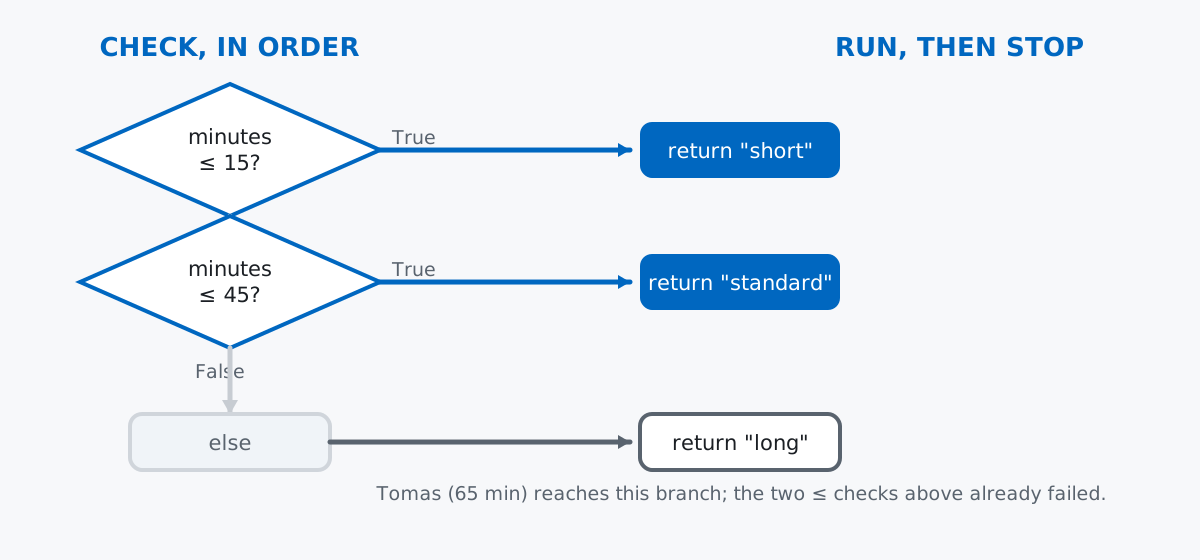
The part worth internalizing is “exactly once, stopping at the first match.” An if/elif/else chain is one decision with several possible outcomes, not several independent decisions — that distinction is exactly what the second gotcha below is about.
This topic is about the mechanics of branching, not about analyzing a dataset, so a small hand-written example teaches it better than a real one would. Imagine a bike-share app logging a handful of rides:
rides = [
    {"rider": "Sami", "minutes": 12, "member": True, "day": "Tuesday"},
    {"rider": "Noor", "minutes": 47, "member": False, "day": "Saturday"},
    {"rider": "Elin", "minutes": 8, "member": True, "day": "Sunday"},
    {"rider": "Tomas", "minutes": 65, "member": False, "day": "Wednesday"},
    {"rider": "Priya", "minutes": 0, "member": True, "day": "Monday"},
]
{'rider': 'Sami', 'minutes': 12, 'member': True, 'day': 'Tuesday'}
{'rider': 'Noor', 'minutes': 47, 'member': False, 'day': 'Saturday'}
{'rider': 'Elin', 'minutes': 8, 'member': True, 'day': 'Sunday'}
{'rider': 'Tomas', 'minutes': 65, 'member': False, 'day': 'Wednesday'}
{'rider': 'Priya', 'minutes': 0, 'member': True, 'day': 'Monday'}Five riders, four fields each. (The outputs in this post come from Python 3.13 — everything shown also works on Python 3.10+.) Priya’s 0 minutes is deliberate — it comes back later when we look at truthiness.
if and else: One Condition, Two OutcomesThe simplest form picks between exactly two outcomes:
minutes = rides[1]["minutes"]
if minutes > 30:
    print("Long ride - a surcharge applies.")
else:
    print("Standard ride - no surcharge.")
Long ride - a surcharge applies.Read it as a sentence: “if this ride is longer than 30 minutes, print the surcharge message, otherwise print the standard one.” The else block is optional — if you leave it out and the condition is False, Python just moves on to whatever comes after the if.
elif: Ordered Choices, First Match WinsOnce you have more than two outcomes, chain elif (“else if”) blocks. Python checks them in order and stops at the first True:
def fee_tier(minutes):
    if minutes <= 15:
        return "short"
    elif minutes <= 45:
        return "standard"
    else:
        return "long"

for ride in rides:
    print(ride["rider"], "->", fee_tier(ride["minutes"]))
Sami -> short
Noor -> standard
Elin -> short
Tomas -> long
Priya -> shortNotice minutes <= 45 never has to re-check minutes <= 15 — by the time Python reaches that elif, it already knows the first condition was False. That’s why order matters: put the narrowest or most specific condition first, and let later branches assume everything above them already failed.
Conditions get more interesting once you combine them with and, or, and not. and requires both sides to be true, or requires at least one, and both use short-circuit evaluation — the second side isn’t even checked if the first already decides the outcome:
weekend_days = {"Saturday", "Sunday"}
for ride in rides:
    is_weekend = ride["day"] in weekend_days
    if ride["member"] and is_weekend:
        print(ride["rider"], "member weekend ride - free")
    elif ride["member"] or is_weekend:
        print(ride["rider"], "one condition met - half price")
    else:
        print(ride["rider"], "full price")
Sami one condition met - half price
Noor one condition met - half price
Elin member weekend ride - free
Tomas full price
Priya one condition met - half priceThe Python language reference on boolean operations has the full evaluation rules if you want the formal version — the practical takeaway is that and/or chains read almost like English once you say them out loud.
You can also chain comparisons directly, which Python evaluates as a genuine range check rather than two separate booleans stitched together:
for ride in rides:
    minutes = ride["minutes"]
    if 10 <= minutes < 60:
        print(ride["rider"], "within normal window")
    else:
        print(ride["rider"], "outside normal window")
Sami within normal window
Noor within normal window
Elin outside normal window
Tomas outside normal window
Priya outside normal window10 <= minutes < 60 reads exactly like the math notation it resembles — “minutes is between 10 and 60” — and is genuinely one expression, not 10 <= minutes and minutes < 60 written differently (though it behaves the same way).
You don’t always need an explicit comparison. Python can test a value directly, because every value is either truthy or falsy:
for ride in rides:
    minutes = ride["minutes"]
    if minutes:
        print(ride["rider"], "has a recorded ride time:", minutes)
    else:
        print(ride["rider"], "has no recorded ride time (falsy):", minutes)
Sami has a recorded ride time: 12
Noor has a recorded ride time: 47
Elin has a recorded ride time: 8
Tomas has a recorded ride time: 65
Priya has no recorded ride time (falsy): 0Notice Priya’s ride, which really did happen and really did last 0 minutes, gets treated the same as “no ride time recorded.” That’s because 0 is one of Python’s falsy values. Here’s the full practical list:
candidates = [0, 0.0, "", [], {}, None, False, (), " ", [0], "0"]
for value in candidates:
    print(repr(value), "->", "truthy" if value else "falsy")
0 -> falsy
0.0 -> falsy
'' -> falsy
[] -> falsy
{} -> falsy
None -> falsy
False -> falsy
() -> falsy
' ' -> truthy
[0] -> truthy
'0' -> truthyThe pattern: empty or zero-like values are falsy — 0, 0.0, "", [], {}, (), None, False. Everything else is truthy, including a string that just contains a space (" "), a list holding a single 0 ([0]), and the string "0" — none of those are actually empty, so Python treats them as True.
The in operator checks whether a value exists inside a collection, and it reads naturally inside an if:
premium_riders = {"Sami", "Elin"}
for ride in rides:
    if ride["rider"] in premium_riders:
        print(ride["rider"], "is a premium rider")
    else:
        print(ride["rider"], "is a standard rider")
Sami is a premium rider
Noor is a standard rider
Elin is a premium rider
Tomas is a standard rider
Priya is a standard riderUsing a set here instead of a list isn’t just a style choice — membership checks (in) on a set are a hash lookup, while a list has to be scanned item by item. It doesn’t matter at five rows, but it’s a habit worth having once a collection grows.
if BlocksConditions that depend on other conditions naturally nest, and nesting gets hard to follow fast:
def describe_ride_nested(ride):
    if ride["member"]:
        if ride["minutes"] > 45:
            return "member, long ride"
        else:
            return "member, short ride"
    else:
        if ride["minutes"] > 45:
            return "guest, long ride"
        else:
            return "guest, short ride"
Four possible outcomes, and you have to hold two levels of indentation in your head to find any single one of them. A guard clause — an early if ...: return ... that handles one case and gets out of the way — flattens this into a single level:
def describe_ride_guard(ride):
    if not ride["member"] and ride["minutes"] > 45:
        return "guest, long ride"
    if not ride["member"]:
        return "guest, short ride"
    if ride["minutes"] > 45:
        return "member, long ride"
    return "member, short ride"

for ride in rides:
    print(ride["rider"], "->", describe_ride_guard(ride))
Sami -> member, short ride
Noor -> guest, long ride
Elin -> member, short ride
Tomas -> guest, long ride
Priya -> member, short rideSame four outcomes as the nested version, same results for every rider — but each return handles exactly one case and exits immediately, so nothing after it needs another level of indentation to reason about. Guard clauses work best when a function’s job really is “handle a few distinct cases and stop”; if you need to build up a single value in one place instead, an elif chain (or the ternary operator for a one-line choice) is usually the better fit.
Stacked if blocks are independent; elif blocks are not. If you write several if statements in a row instead of one elif chain, Python checks every single one — even after an earlier one already matched:
def classify_stacked(minutes):
    label = []
    if minutes >= 0:
        label.append("non-negative")
    if minutes >= 30:
        label.append("long")
    if minutes >= 60:
        label.append("very long")
    return label

def classify_elif(minutes):
    if minutes >= 60:
        return "very long"
    elif minutes >= 30:
        return "long"
    elif minutes >= 0:
        return "non-negative"

print("stacked ifs on 65 minutes:", classify_stacked(65))
print("elif chain on 65 minutes:", classify_elif(65))
stacked ifs on 65 minutes: ['non-negative', 'long', 'very long']
elif chain on 65 minutes: very longThe stacked version collects all three labels because each if is its own independent check; the elif version stops at the first match and returns one answer. Neither is “wrong” — but they answer different questions, and picking the wrong one is a common source of code that runs more branches than you meant it to.
A falsy 0 looks identical to “nothing recorded.” This is the Priya case from earlier, and it’s a genuine bug pattern, not just a quirk to admire:
def last_ride_minutes(rider_name):
    for ride in rides:
        if ride["rider"] == rider_name:
            return ride["minutes"]
    return None

minutes = last_ride_minutes("Priya")
if minutes:
    print("Priya's last ride lasted", minutes, "minutes")
else:
    print("No ride time recorded for Priya (minutes was", repr(minutes), ")")
No ride time recorded for Priya (minutes was 0 )if minutes: can’t tell the difference between “the function returned 0” and “the function returned None” — both are falsy. If the distinction matters (and here it does: a real 0-minute ride is not the same as a missing record), compare against the actual sentinel instead:
if minutes is not None:
    print("Priya's last ride lasted", minutes, "minutes (fixed check)")
else:
    print("No ride time recorded for Priya")
Priya's last ride lasted 0 minutes (fixed check)and/or return one of their operands, not True/False. This is genuinely useful once you know it, and confusing until you do:
default_name = ""
chosen = default_name or "Guest"
print("chosen:", repr(chosen))

a = 0
b = 5
print("a and b:", repr(a and b))
print("a or b:", repr(a or b))
print("b and a:", repr(b and a))
chosen: 'Guest'
a and b: 0
a or b: 5
b and a: 0x or y returns x if x is truthy, otherwise y — which is exactly the “use this unless it’s empty, then fall back” idiom chosen = default_name or "Guest" relies on. x and y returns x if x is falsy (short-circuiting before it even looks at y), otherwise it returns y. Neither operator forces its result into an actual bool — if you need a real True/False, wrap the expression in bool(...).
An if statement always does the same job: check conditions in order, run the first matching block, and stop.
if/else → pick between exactly two outcomeselif → chain ordered, mutually exclusive outcomes; first match wins0 or "" being mistaken for “missing”Once branching feels solid, the natural next steps are looping over the branches you just built and choosing between values instead of blocks — our for loop guide for beginners picks up the first, and the ternary operator guide picks up the second. If you want a structured, ground-up path through this and the rest of core Python, the Conditional Statements lesson in our free Python Basics course covers this exact material with guided exercises.
 Python
Build an AI Chatbot in Python: A Command-Line LLM Client
A from-scratch walkthrough of the pattern behind every LLM chatbot: one function that sends a message plus conversation history to a chat-completion API, a persona set by a system prompt, and a loop that keeps the conversation going.
Read tutorial
Python
Build an AI Chatbot in Python: A Command-Line LLM Client
A from-scratch walkthrough of the pattern behind every LLM chatbot: one function that sends a message plus conversation history to a chat-completion API, a persona set by a system prompt, and a loop that keeps the conversation going.
Read tutorial
 Software Engineering
The Single Responsibility Principle: One Class, One Reason to Change
The Single Responsibility Principle says a class should have only one reason to change. See it in action: take a Python AuthService that also owns its logging, find why that's a problem, and refactor it into clean, focused classes.
Read tutorial
Software Engineering
The Single Responsibility Principle: One Class, One Reason to Change
The Single Responsibility Principle says a class should have only one reason to change. See it in action: take a Python AuthService that also owns its logging, find why that's a problem, and refactor it into clean, focused classes.
Read tutorial