Title here
Summary here
Python doesn't copy a list or dictionary when you pass it into a function — it hands over the same object. This post builds the name-vs-object mental model behind that, then works through the mutable default argument trap, dictionaries, shallow copies, and two sharp gotchas on one small running example.

A few years ago I was putting together a tiny text-adventure game for a weekend project — a handful of rooms, an inventory system, a couple of goblins to fight. Each goblin was supposed to drop its own fresh loot, generated by a spawn_goblin() function. Except after the second fight, the first goblin’s corpse had picked up the second goblin’s gold too, even though nothing in my code ever touched the first goblin again. The bug turned out to live in the function’s own signature: def spawn_goblin(loot=[]).
That one default argument is a good entry point into something Python does differently from a lot of beginner-friendly languages: when you hand a function a list or a dictionary, you’re not handing over a copy. You’re handing over the same object, under a temporary local name. Anything the function does that changes that object in place — .append(), .update(), item assignment, del — is visible to whoever called the function the instant it happens, with no return involved. Anything that instead builds a new object and points the parameter name at it leaves the caller’s original completely untouched. That single distinction — mutate the object, or rebind the name — explains almost every surprising list-or-dict bug you’ll run into in Python, including the goblin one above.
If you’ve read our post comparing Python’s built-in data structures, you’ve already seen this trap in miniature, in its two-paragraph gotchas section. This post is the fuller, dedicated version: where the behavior comes from, how far it reaches beyond default arguments, and where it still catches experienced developers off guard.
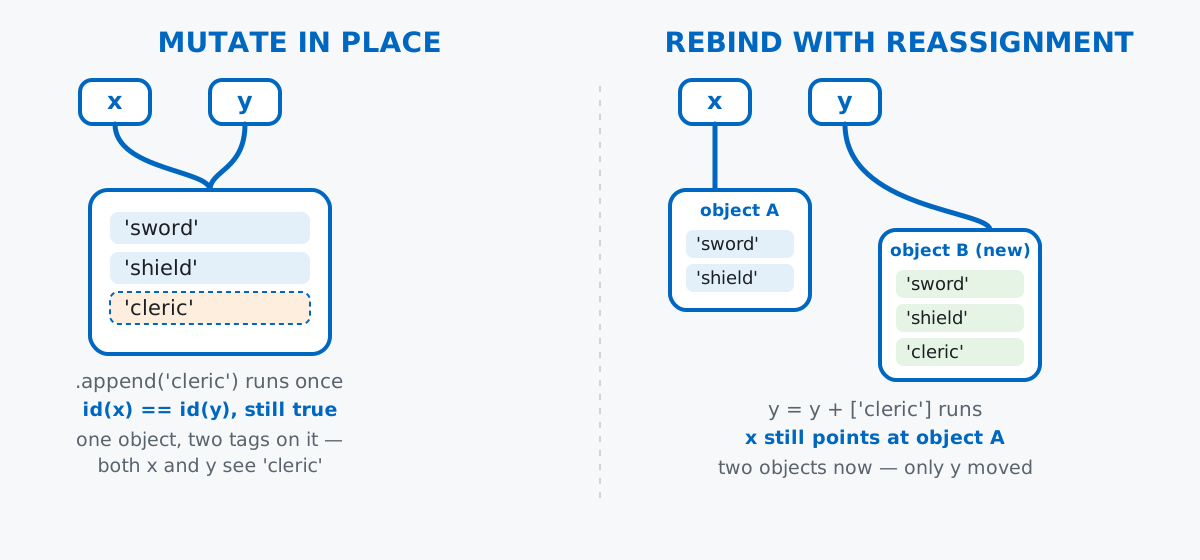
The mental model that makes all of this predictable: a Python variable isn’t a box that contains a value. It’s a name tag stuck onto an object that lives somewhere else. x = [1, 2, 3] creates a list object first, then ties the name x to it. y = x doesn’t create a second list — it ties a second name tag, y, onto the exact same object. There is one list with two tags on it, not two lists.
A function call works the same way. When you write add_to_party(party, "cleric"), Python doesn’t clone party — it just adds another temporary name tag, the parameter name, onto whatever object party already refers to, for the duration of the call. Here’s that made concrete with a small fantasy party (no dataset to download here — this is a language-mechanics question, and a few hand-written lines make the point more clearly than any file would):
party = ["sword", "shield"]
id_before = id(party)

def add_to_party(members, new_member):
    members.append(new_member)

add_to_party(party, "cleric")
print(id(party) == id_before)
print(party)
True
['sword', 'shield', 'cleric']id() returns a number that uniquely identifies an object for as long as it’s alive — think of it as reading the tag’s serial number. It’s identical before and after the call, which confirms party is still the same object it always was; .append() just reached into it and changed its contents. members, inside the function, was never a separate list — it was a second tag on party’s object, and mutating through one tag is visible through every tag pointing at the same thing.
.append() Mutates; x = x + [...] RebuildsContrast that with a version that looks almost identical but behaves completely differently:
def add_to_party_broken(members, new_member):
    members = members + [new_member]
    return members

party = ["sword", "shield"]
result = add_to_party_broken(party, "cleric")
print(party)
print(result)
['sword', 'shield']
['sword', 'shield', 'cleric']party comes back unchanged. members + [new_member] doesn’t touch either operand — the + operator on lists always builds a brand-new list containing both. Then members = ... just moves the local name members to point at that new list, which is a purely local change: it repoints a tag inside the function, and the caller’s party tag was never touched at all. If you want the caller to see the result of a rebuild-style operation, you have to return it and assign it back at the call site, exactly like result above.
def spawn_goblin(loot=[]) Remembers Every Previous FightNow the trap that started this post. Python evaluates a function’s default argument values exactly once — when the def statement runs, not each time the function is called. If that default is a mutable object like a list, every call that doesn’t supply its own argument shares that one object:
def spawn_goblin(loot=[]):
    loot.append("gold coin")
    return loot

goblin_1_loot = spawn_goblin()
goblin_2_loot = spawn_goblin()
print(goblin_1_loot)
print(goblin_2_loot)
print(goblin_1_loot is goblin_2_loot)
['gold coin', 'gold coin']
['gold coin', 'gold coin']
TrueThe second goblin doesn’t get a fresh, empty loot list — it gets the exact same list the first goblin already appended to, because [] in the function signature was only ever built once, back when Python first read the def. is (as opposed to ==) checks object identity rather than equal contents, and it confirms these are literally the same list wearing two different variable names.
This is documented, intentional Python behavior, not a bug in the language — see the official Python FAQ entry on why default values are shared between calls if you want the language designers’ own reasoning. Knowing it’s intentional doesn’t make it any less surprising the first time it happens to you, though. The fix is the standard idiom: default to None, a genuinely immutable sentinel, and build the real mutable object fresh inside the function body every time:
def spawn_goblin_fixed(loot=None):
    if loot is None:
        loot = []
    loot.append("gold coin")
    return loot

goblin_3_loot = spawn_goblin_fixed()
goblin_4_loot = spawn_goblin_fixed()
print(goblin_3_loot)
print(goblin_4_loot)
print(goblin_3_loot is goblin_4_loot)
['gold coin']
['gold coin']
FalseNow each call that skips the argument gets its own fresh empty list, built by the if loot is None line running fresh every time the function executes — unlike the default-argument list, which only ever gets built once, at definition time.
None of this is list-specific — it applies to every mutable type, dictionaries included. Mutating a dict through item assignment or .update() changes the object the caller already has:
def apply_potion(stats, stat, amount):
    stats[stat] += amount

player = {"hp": 20, "mana": 10}
apply_potion(player, "hp", 5)
print(player)
{'hp': 25, 'mana': 10}No return anywhere in apply_potion, and player’s hp still went up — because stats[stat] += amount is item assignment on the dict stats already refers to, not a rebuild. Compare that with a version that builds a new dict instead of touching the old one:
def apply_potion_new(stats, stat, amount):
    return {**stats, stat: stats[stat] + amount}

player2 = {"hp": 20, "mana": 10}
healed = apply_potion_new(player2, "hp", 5)
print(player2)
print(healed)
{'hp': 20, 'mana': 10}
{'hp': 25, 'mana': 10}{**stats, stat: ...} unpacks the existing key-value pairs into a fresh dict literal and overwrites one key on the way in — player2 is left exactly as it was, and the healed version only exists in healed. Same rule as lists: which style you want depends entirely on whether the caller should see the change immediately or opt into it via the return value.
.copy() Only Protects the Top LevelThere’s a sharp edge here worth knowing before it bites you: a shallow copy protects the outer object, but not whatever mutable objects are sitting inside it.
player3 = {"name": "Ilya", "hp": 20, "inventory": ["torch", "rope"]}
checkpoint = player3.copy()
checkpoint["hp"] = 999
checkpoint["inventory"].append("gold coin")
print(player3)
print(checkpoint)
{'name': 'Ilya', 'hp': 20, 'inventory': ['torch', 'rope', 'gold coin']}
{'name': 'Ilya', 'hp': 999, 'inventory': ['torch', 'rope', 'gold coin']}hp changed only in checkpoint, exactly as you’d hope — checkpoint["hp"] = 999 reassigns a key in the copy’s own top-level dict, which .copy() did genuinely duplicate. But inventory changed in both. .copy() copies the dict’s keys and its top-level values, and one of those top-level values is a reference to a list — the same list object player3["inventory"] also points at. Copying the dict never touched that inner list, so both dicts are still tagging the same one. If you need every level to be independent, reach for copy.deepcopy, which walks the whole structure and rebuilds nested mutable objects too:
import copy

player4 = {"name": "Ilya", "hp": 20, "inventory": ["torch", "rope"]}
checkpoint2 = copy.deepcopy(player4)
checkpoint2["hp"] = 999
checkpoint2["inventory"].append("gold coin")
print(player4)
print(checkpoint2)
{'name': 'Ilya', 'hp': 20, 'inventory': ['torch', 'rope']}
{'name': 'Ilya', 'hp': 999, 'inventory': ['torch', 'rope', 'gold coin']}player4’s inventory is untouched this time, because deepcopy gave checkpoint2 its own independent list, not just its own dict wrapper around the same list.
Two more gotchas worth having in your back pocket, because both look like they should behave one way and quietly do the opposite.
+= on a list argument mutates it, even though x = x + [...] doesn’t. They look like they should be interchangeable shorthand for each other. They aren’t:
def try_plus_equals(members):
    members += ["torch bearer"]

party5 = ["sword", "shield"]
try_plus_equals(party5)
print(party5)

def try_plain_reassign(members):
    members = members + ["torch bearer"]

party6 = ["sword", "shield"]
try_plain_reassign(party6)
print(party6)
['sword', 'shield', 'torch bearer']
['sword', 'shield']The caller’s list changed for += but not for the plain +/reassignment version. For a list, += calls the list’s own in-place addition method (__iadd__, which behaves like .extend()) rather than building a fresh list and rebinding the name the way x + y on its own does. It’s the one operator in this post where the “mutate vs. rebuild” question doesn’t answer itself from the syntax alone — you have to know the specific type’s behavior. (Tuples don’t define __iadd__, which is why t += (1,) on a tuple does rebind instead of mutating — there’s nothing in a tuple that could be mutated.)
In-place list methods return None, not the list. .sort(), .reverse(), .append(), .extend(), .remove(), .insert(), and .clear() all mutate the list and hand back None — Python’s mutating methods almost never return the object they just changed, as a signal that the original is what changed, not a new copy sitting in the return value:
quest_log = ["defeat dragon", "collect herbs", "talk to elder"]
result = quest_log.sort()
print(result)
print(quest_log)
None
['collect herbs', 'defeat dragon', 'talk to elder']Writing quest_log = quest_log.sort() — a natural-looking line if you’re used to functions that return their result — silently throws the whole list away and replaces it with None. If you want the sorted list back as a value rather than sorting in place, use the builtin sorted() instead, which returns a new list and leaves the original alone:
new_sorted = sorted(["defeat dragon", "collect herbs", "talk to elder"])
print(new_sorted)
['collect herbs', 'defeat dragon', 'talk to elder'](The outputs in this post come from Python 3.13 — everything shown is stable behavior going back through Python 3.)
Every example above collapses to the same question, asked at whatever line of code you’re staring at: is this operation mutating an object that already exists, or is it building a new one and pointing a name at it? Mutate, and the caller sees it instantly through every name tag on that object — no return required, and no exceptions for function arguments, default values, or nested structures. Rebuild, and the change stays local until you explicitly hand it back.
If you want to go further with functions themselves — default values, *args/**kwargs, and the kind of debugging habit that would have caught the goblin bug before it shipped — the Python Functions: Arguments, Parameters, and Debugging lesson in our free Python for Data Analytics course picks up exactly where this post leaves off.
 Python
Build an AI Chatbot in Python: A Command-Line LLM Client
A from-scratch walkthrough of the pattern behind every LLM chatbot: one function that sends a message plus conversation history to a chat-completion API, a persona set by a system prompt, and a loop that keeps the conversation going.
Read tutorial
Python
Build an AI Chatbot in Python: A Command-Line LLM Client
A from-scratch walkthrough of the pattern behind every LLM chatbot: one function that sends a message plus conversation history to a chat-completion API, a persona set by a system prompt, and a loop that keeps the conversation going.
Read tutorial
 Software Engineering
The Single Responsibility Principle: One Class, One Reason to Change
The Single Responsibility Principle says a class should have only one reason to change. See it in action: take a Python AuthService that also owns its logging, find why that's a problem, and refactor it into clean, focused classes.
Read tutorial
Software Engineering
The Single Responsibility Principle: One Class, One Reason to Change
The Single Responsibility Principle says a class should have only one reason to change. See it in action: take a Python AuthService that also owns its logging, find why that's a problem, and refactor it into clean, focused classes.
Read tutorial