Title here
Summary here
A hands-on look at requests.Session: reuse the same connection across calls, keep headers and cookies applied automatically, send POST bodies, and configure retries for flaky endpoints — plus the gotchas that catch people writing their first production script.

You’ve made one API call with requests.get() and it worked. Then you needed ten calls, then a hundred, and something started to feel off: the same header gets rebuilt by hand for every call, one bad response kills the whole script instead of retrying, and every request reopens a connection to a server it just finished talking to a second ago. None of that is really about HTTP — it’s about not having a place to put the state a repeated conversation with the same server needs. That place is requests.Session, and it’s what turns a one-off script into something you’d actually trust to run unattended. If you haven’t made your first API call yet, our post on using APIs in Python covers requests.get(), JSON responses, and status codes from zero — this one picks up right where a single request stops being enough.
Here’s the shape of it: create one session = requests.Session() object and reuse it for every call to the same API, instead of calling requests.get() or requests.post() fresh each time. The session keeps the underlying connection open between calls, so repeated requests skip the handshake and come back faster. Anything you set with session.headers.update({...}) — an API key, a custom User-Agent — gets attached automatically to every request the session makes afterward, and cookies the server sets are stored and resent the same way. For calls that might fail, mount an HTTPAdapter configured with a Retry strategy onto the session, and requests retries failed calls with a growing delay before it gives up. One object, reused everywhere you’d otherwise have called the requests module’s top-level functions one at a time.
requests.get(url) is a convenience wrapper. Under the hood, it creates a brand-new Session, uses it exactly once, and throws it away — every module-level call starts from nothing. A Session you create yourself and keep around instead bundles three things across every call you make through it:
HTTPAdapter — for retries, connection limits, or custom TLS settings — to specific URL prefixes on the session.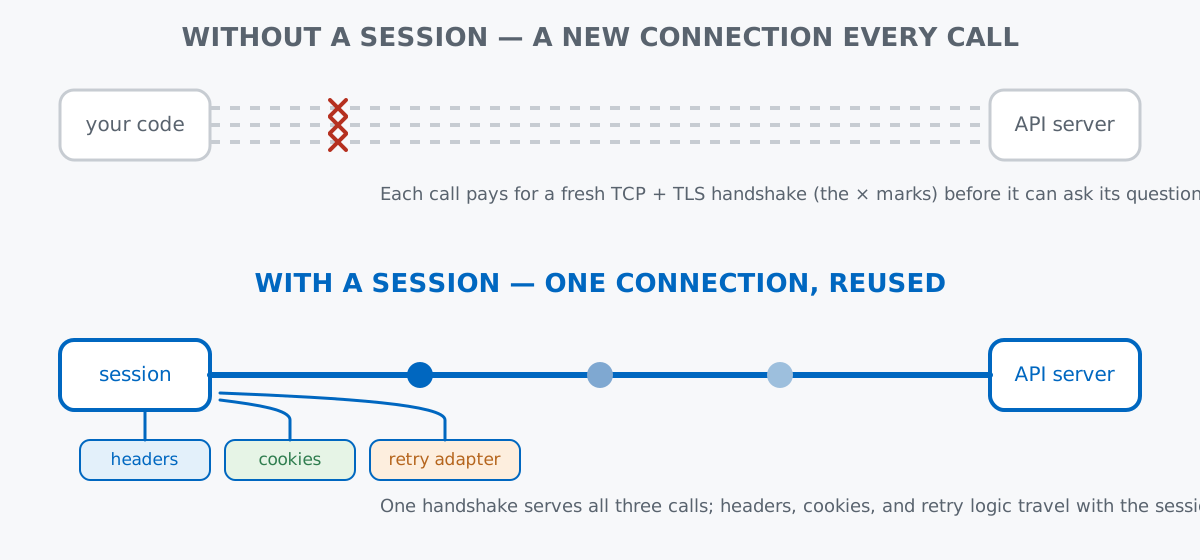
The official docs cover the full Session object reference if you want the complete list of what it exposes beyond what’s below.
Every response below comes from httpbingo.org, a free, open-source mirror of the well-known httpbin HTTP-testing service — no signup, no API key, safe to hit repeatedly. Time five calls with the module-level function, then time five calls through a session:
import time
import requests

start = time.perf_counter()
for _ in range(5):
    requests.get("https://httpbingo.org/get", timeout=10)
no_session_time = time.perf_counter() - start

session = requests.Session()
start = time.perf_counter()
for _ in range(5):
    session.get("https://httpbingo.org/get", timeout=10)
session_time = time.perf_counter() - start

print(f"without session: {no_session_time:.2f}s")
print(f"with session:    {session_time:.2f}s")
without session: 4.57s
with session: 1.61sThe absolute numbers will vary for you — this hits a live network each time, and I’ve seen the gap run anywhere from about 2x to 3x across several runs — but the direction is consistent: the session version pays for one connection setup and reuses it for the remaining four calls, while the plain version pays five times. (The outputs in this post come from requests 2.34.2 and urllib3 2.7.0 on Python 3.13 — the Session API shown here has been stable across the whole 2.x line.)
Set an API key or a custom User-Agent on the session, and it rides along on every call you make through that session from then on:
session = requests.Session()
session.headers.update({
    "X-Api-Key": "demo-key-123",
    "User-Agent": "coffee-shop-client/1.0",
})

r1 = session.get("https://httpbingo.org/headers", timeout=10)
sent = r1.json()["headers"]
print("X-Api-Key:", sent.get("X-Api-Key"))
print("User-Agent:", sent.get("User-Agent"))

r2 = session.get("https://httpbingo.org/headers", timeout=10)
print("X-Api-Key on second call:", r2.json()["headers"].get("X-Api-Key"))
X-Api-Key: ['demo-key-123']
User-Agent: ['coffee-shop-client/1.0']
X-Api-Key on second call: ['demo-key-123']httpbingo.org echoes each header back as a list because HTTP technically allows a header name to repeat — here there’s just one value in it. The part worth registering is that the second call never mentioned X-Api-Key at all; it’s still there because the session, not the call, is holding onto it.
session.post() works the same way session.get() does, but it sends a request body instead of relying purely on the URL. Pass a dict to json= and requests serializes it and sets the Content-Type header for you:
order = {"city": "Lisbon", "item": "flat white", "quantity": 2}
r = session.post("https://httpbingo.org/post", json=order, timeout=10)
print(r.status_code)
print(r.json()["json"])
200
{'city': 'Lisbon', 'item': 'flat white', 'quantity': 2}httpbingo.org’s /post endpoint parses whatever body it receives and echoes it back under the "json" key, which is a handy way to confirm your payload actually looks the way you think it does before you point the same code at a real API. Note that session here is the exact same object from the last section — the X-Api-Key header went along with this POST too, without being mentioned again.
A server that sets a cookie expects to see it again on your next request — that’s how most login flows and shopping carts work. A plain requests.get() call has nowhere to keep it; a session does:
session = requests.Session()
r1 = session.get("https://httpbingo.org/cookies/set?session_id=abc123", timeout=10)
print("cookies stored on the session:", session.cookies.get_dict())

r2 = session.get("https://httpbingo.org/cookies", timeout=10)
print("server sees on the next call:", r2.json())
cookies stored on the session: {'session_id': 'abc123'}
server sees on the next call: {'cookies': {'session_id': 'abc123'}}The first call set a cookie; nothing in the second call re-sent it explicitly, and the server saw it anyway. That’s the same pattern as the headers example, just for state the server hands you instead of state you set yourself.
Real APIs occasionally return a 503 or drop a connection under load, and the fix is almost always “wait a moment and try again” — which is tedious to hand-write correctly (how long do you wait? how many times?). requests delegates retry logic to urllib3’s Retry class, mounted onto the session through an HTTPAdapter.
To demonstrate it honestly, this spins up a tiny local server that fails the first two requests and succeeds on the third — a live public endpoint wouldn’t reliably fail on cue, which would undermine the point of a retry demo:
import threading
from http.server import BaseHTTPRequestHandler, HTTPServer

import requests
from requests.adapters import HTTPAdapter
from urllib3.util.retry import Retry

request_count = 0

class FlakyHandler(BaseHTTPRequestHandler):
    def do_GET(self):
        global request_count
        request_count += 1
        if request_count < 3:
            self.send_response(503)
        else:
            self.send_response(200)
        self.end_headers()
        if request_count >= 3:
            self.wfile.write(b'{"status": "ok"}')

    def log_message(self, format, *args):
        pass  # keep the demo output quiet

server = HTTPServer(("127.0.0.1", 8765), FlakyHandler)
threading.Thread(target=server.serve_forever, daemon=True).start()

retry_strategy = Retry(
    total=3,
    backoff_factor=0.5,
    status_forcelist=[503],
    allowed_methods=["GET"],
)
session = requests.Session()
session.mount("http://", HTTPAdapter(max_retries=retry_strategy))

response = session.get("http://127.0.0.1:8765/", timeout=5)
print(response.status_code, response.text)
print(f"server received {request_count} requests before it succeeded")

server.shutdown()
200 {"status": "ok"}
server received 3 requests before it succeededstatus_forcelist=[503] tells Retry which status codes count as retryable; backoff_factor=0.5 doubles the wait between each retry (roughly half a second, then a second); total=3 caps how many extra attempts it’ll make before finally raising. The call above took about a second end to end for two failures and a success — your code never saw the two 503 responses at all, only the final 200.
A session’s headers go to every host you call with it, not just the one you meant. If you set an Authorization token for one API and then reuse the same session for an unrelated one, the token goes there too:
session = requests.Session()
session.headers.update({"Authorization": "Bearer secret-token-for-service-a"})

r1 = session.get("https://httpbingo.org/headers", timeout=10)
print("service A sees Authorization:", "Authorization" in r1.json()["headers"])

r2 = session.get("https://jsonplaceholder.typicode.com/posts/1", timeout=10)
print("request to an unrelated service included it too:", "Authorization" in r2.request.headers)
service A sees Authorization: True
request to an unrelated service included it too: TrueBoth printed True. A session has no concept of “this header belongs only to that host” — if you’re talking to two different APIs, use two separate sessions.
Per-request headers merge with the session’s, they don’t replace them. Pass headers={...} to an individual call and it’s added on top of whatever the session already has, and setting a key to None drops it for that one call only — the session keeps it for every call after:
session = requests.Session()
session.headers.update({"X-Api-Key": "demo-key-123"})

r1 = session.get("https://httpbingo.org/headers", headers={"X-Request-Id": "req-1"}, timeout=10)
h = r1.json()["headers"]
print("X-Api-Key present:", "X-Api-Key" in h, " X-Request-Id present:", "X-Request-Id" in h)

r2 = session.get("https://httpbingo.org/headers", headers={"X-Api-Key": None}, timeout=10)
print("X-Api-Key present when set to None:", "X-Api-Key" in r2.json()["headers"])

r3 = session.get("https://httpbingo.org/headers", timeout=10)
print("X-Api-Key present on the next call:", "X-Api-Key" in r3.json()["headers"])
X-Api-Key present: True X-Request-Id present: True
X-Api-Key present when set to None: False
X-Api-Key present on the next call: TrueBackoff makes a failing call take much longer to actually fail than callers usually expect. total=3 with backoff_factor=0.5 in the retry example above only added about a second of waiting, but bump either number for a stricter API and a call that would have failed instantly without retries can end up blocking for tens of seconds before it finally raises. Retries buy reliability, not speed — size them for how long the caller can actually afford to wait.
Sessions aren’t guaranteed thread-safe. The requests docs are explicit that a single Session instance shouldn’t be shared and mutated across threads without your own locking. If you’re firing off requests from a thread pool, either give each thread its own session or protect shared session state — headers, cookies, mounted adapters — with a lock.
Sessions also work as context managers, which closes the underlying connections for you once you’re done:
with requests.Session() as session:
    session.headers.update({"X-Api-Key": "demo-key-123"})
    r = session.get("https://httpbingo.org/get", timeout=10)
print(r.status_code)200For a script that makes a handful of calls and exits, letting the session get garbage-collected is harmless. For anything long-running — a service, a scheduled job, a loop that talks to an API for hours — the with block is the version worth reaching for by default; it’s the same pattern you’d use for a file you open() and want closed no matter how the block exits, which the Context Managers and Resource Management lesson in our free Python for Data Analytics course covers in full.
Reach for requests.Session() the moment a script makes more than one or two calls to the same API: one persistent connection instead of a fresh one per call, headers and cookies set once instead of copy-pasted into every call, and retries handled by a mounted adapter instead of a hand-rolled loop. Just remember it’s one object per API, not one for your whole codebase.
 Python
Build an AI Chatbot in Python: A Command-Line LLM Client
A from-scratch walkthrough of the pattern behind every LLM chatbot: one function that sends a message plus conversation history to a chat-completion API, a persona set by a system prompt, and a loop that keeps the conversation going.
Read tutorial
Python
Build an AI Chatbot in Python: A Command-Line LLM Client
A from-scratch walkthrough of the pattern behind every LLM chatbot: one function that sends a message plus conversation history to a chat-completion API, a persona set by a system prompt, and a loop that keeps the conversation going.
Read tutorial
 Software Engineering
The Single Responsibility Principle: One Class, One Reason to Change
The Single Responsibility Principle says a class should have only one reason to change. See it in action: take a Python AuthService that also owns its logging, find why that's a problem, and refactor it into clean, focused classes.
Read tutorial
Software Engineering
The Single Responsibility Principle: One Class, One Reason to Change
The Single Responsibility Principle says a class should have only one reason to change. See it in action: take a Python AuthService that also owns its logging, find why that's a problem, and refactor it into clean, focused classes.
Read tutorial