Title here
Summary here
Making a script run is easy. Making it a good citizen of the command line — one other tools can pipe into, redirect, and check the exit status of — takes a few more deliberate choices. This guide builds that model with a real log-filtering script you run end to end.

Our guide to Python’s subprocess module is about controlling other programs from Python — launching them, capturing what they print, checking whether they succeeded. This post is the mirror image of that one: instead of your Python code puppeteering something else, your Python code is the something else — the script another program, a shell one-liner, or a CI job invokes, pipes data through, and reacts to. That direction has its own rules, easy to get wrong in ways that only surface once someone tries to use your script the way command-line tools are supposed to be used — chained with | into other commands.
Most people write a script that works fine when they run it by hand, then discover it breaks the moment a colleague pipes its output into grep or wires it into a shell script checking $?. That’s rarely a bug in the logic — it’s a script that never learned the conventions everything else on the command line already follows: taking arguments, reading a pipe, writing a pipe, and reporting success or failure the way the shell expects.
A well-behaved command-line script has exactly three doors for getting information in, and one door for handing back its real answer:
argparse. Flags and positional values the caller types when invoking the script, parsed once before anything else runs.sys.stdin. Whatever the caller pipes from another command, redirects from a file, or types directly. This is what makes a script usable inside a pipeline instead of only as a one-off.sys.stdout. The one thing the next program in a pipeline actually reads. If your script is a link in a chain of | commands, stdout is the entire chain as far as anyone downstream is concerned.Running alongside all three is a fourth stream that isn’t a door for data at all: sys.stderr carries everything that isn’t the answer — progress notes, warnings, error text. A person watching the terminal sees it. The next program in a pipe never does, because stdout and stderr are two independent streams that only get merged if someone explicitly asks for that with 2>&1.
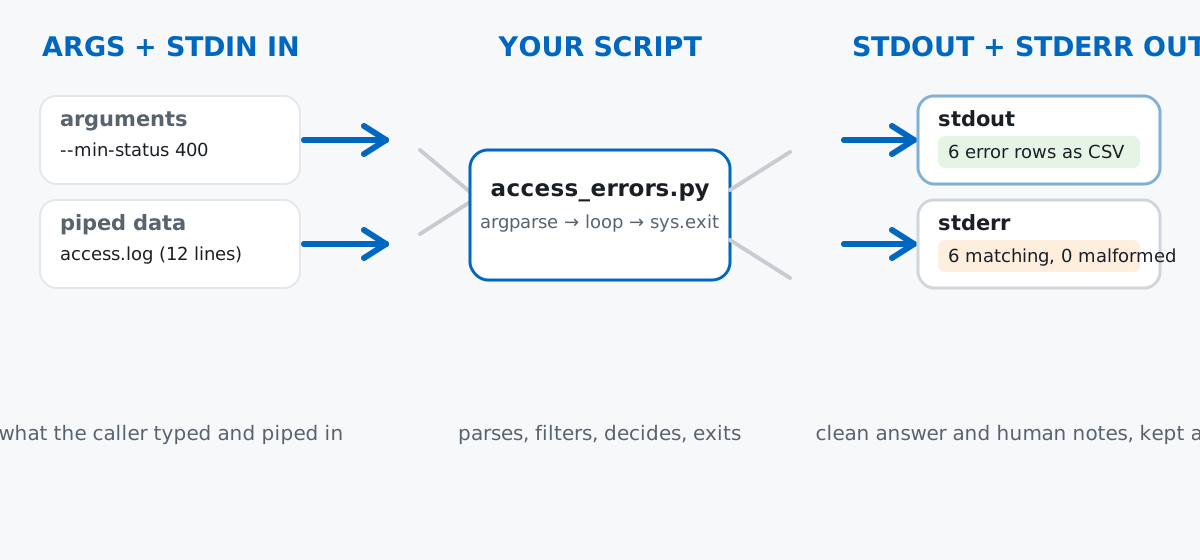
One more signal travels with the script after it finishes: its exit code, a single integer the calling shell reads with $?. That’s the last section of this post — everything before it is about the three doors.
Imagine a small internal API, and every request it handles gets logged as one line: a timestamp, an HTTP method, a path, a status code, and a response size in bytes. An operations engineer wants a quick way to pull just the error responses out of that log — from the command line, without opening a text editor — so they can pipe the result into sort, wc -l, or a spreadsheet import.
Create the sample log with this snippet — everything later in the post reads this same file:
from pathlib import Path

Path("access.log").write_text(
    "2026-07-10T08:12:03 GET /api/orders 200 512\n"
    "2026-07-10T08:12:05 GET /api/orders/88 404 128\n"
    "2026-07-10T08:12:07 POST /api/orders 201 256\n"
    "2026-07-10T08:12:11 GET /api/inventory 200 892\n"
    "2026-07-10T08:12:14 GET /api/inventory/9981 404 128\n"
    "2026-07-10T08:12:20 POST /api/checkout 500 64\n"
    "2026-07-10T08:12:25 GET /api/orders 200 512\n"
    "2026-07-10T08:12:31 DELETE /api/orders/12 403 96\n"
    "2026-07-10T08:12:44 GET /api/health 200 32\n"
    "2026-07-10T08:12:50 POST /api/checkout 502 64\n"
    "2026-07-10T08:13:02 GET /api/orders 200 512\n"
    "2026-07-10T08:13:09 GET /api/inventory/77 404 128\n",
    encoding="utf-8",
)
print("wrote access.log")
wrote access.logTwelve lines, five space-separated fields each. Six of them are error responses (status 400 and above); the rest are ordinary traffic. (The output in this post comes from Python 3.11 — argparse, sys.stdin, and sys.exit have worked exactly this way since Python 3.5.)
argparseHere’s the whole script, access_errors.py. It’s short enough to read top to bottom, and every piece of it is discussed in the sections that follow:
#!/usr/bin/env python3
"""Extract error responses from a simplified web server access log."""
import argparse
import sys


def parse_args(argv=None):
    parser = argparse.ArgumentParser(
        prog="access_errors.py",
        description="Extract error responses (status >= threshold) from an access log.",
    )
    parser.add_argument(
        "logfile",
        nargs="?",
        default="-",
        help="path to the access log, or '-' (default) to read standard input",
    )
    parser.add_argument(
        "--min-status",
        type=int,
        default=400,
        help="minimum HTTP status code to treat as an error (default: 400)",
    )
    parser.add_argument(
        "--method",
        default=None,
        help="only consider requests with this HTTP method (e.g. GET, POST)",
    )
    return parser.parse_args(argv)


def iter_lines(path):
    if path == "-":
        yield from sys.stdin
    else:
        with open(path, encoding="utf-8") as f:
            yield from f


def main(argv=None):
    args = parse_args(argv)
    matched = 0
    malformed = 0

    print("timestamp,method,path,status,bytes")
    for lineno, raw in enumerate(iter_lines(args.logfile), start=1):
        line = raw.strip()
        if not line:
            continue
        fields = line.split()
        if len(fields) != 5:
            print(
                f"access_errors: skipping malformed line {lineno}: {line!r}",
                file=sys.stderr,
            )
            malformed += 1
            continue

        timestamp, method, path, status, nbytes = fields
        if args.method and method != args.method:
            continue
        if int(status) < args.min_status:
            continue

        print(f"{timestamp},{method},{path},{status},{nbytes}")
        matched += 1

    print(
        f"access_errors: {matched} matching, {malformed} malformed line(s) skipped",
        file=sys.stderr,
    )
    return 0 if matched else 1


if __name__ == "__main__":
    sys.exit(main())
logfile is a positional argument — no -- prefix, just a bare value — and nargs="?" makes it optional, defaulting to "-". --min-status and --method are optional arguments: type=int converts the raw string automatically, and the help= text on each one is what builds --help for free. Try it:
python3 access_errors.py --helpusage: access_errors.py [-h] [--min-status MIN_STATUS] [--method METHOD]
[logfile]
Extract error responses (status >= threshold) from an access log.
positional arguments:
logfile path to the access log, or '-' (default) to read
standard input
options:
-h, --help show this help message and exit
--min-status MIN_STATUS
minimum HTTP status code to treat as an error
(default: 400)
--method METHOD only consider requests with this HTTP method (e.g.
GET, POST)Notice you wrote none of that text. argparse builds the usage line, the argument listing, and the wrapped help strings from the add_argument() calls alone — which is also why filling in a real help= for every argument is worth the extra line; it’s the difference between a script a stranger can use unassisted and one they have to read the source of. The official argparse documentation covers the rest of what add_argument() supports, well past what this post needs.
sys.stdin So the Script Works in a Pipeiter_lines() is the part that makes access.log optional at all: when path is "-", it yields lines straight from sys.stdin instead of opening a file. That single if is what lets the exact same script work two ways — reading a filename argument, or reading a pipe:
python3 access_errors.py access.log > from_file.txt 2>/dev/null
cat access.log | python3 access_errors.py > from_stdin.txt 2>/dev/null
diff from_file.txt from_stdin.txt && echo "identical output"
head -n 3 from_stdin.txt
identical output
timestamp,method,path,status,bytes
2026-07-10T08:12:05,GET,/api/orders/88,404,128
2026-07-10T08:12:14,GET,/api/inventory/9981,404,128diff reports no differences: the first run opens the file itself, the second never mentions a filename at all — cat writes the log’s bytes into the pipe, and for line in sys.stdin (which is what yield from sys.stdin drives) reads them exactly as if they’d come from a file. Any script that only accepts a filename argument can’t sit in the middle of a pipeline — this is the one habit that lets it.
sys.stdoutEvery print() call in the matching branch goes to sys.stdout by default — that’s the “results” door, and it’s the only thing a downstream command should ever see. Because the output is plain CSV with nothing else mixed in, it composes with any other line-oriented tool without extra parsing on your part:
python3 access_errors.py access.log 2>/dev/null | wc -l 7Seven lines: the header plus six error rows. Redirecting stderr to /dev/null here isn’t required for correctness — wc -l only reads stdin, which the shell wires straight to the script’s stdout — it’s just there so this terminal transcript doesn’t also show the diagnostic line. Piping further still works the same way:
python3 access_errors.py access.log 2>/dev/null | tail -n +2 | cut -d, -f4 | sort | uniq -c 1 403
3 404
1 500
1 502tail -n +2 drops the CSV header, cut -d, -f4 pulls out just the status-code column, and sort | uniq -c counts each value — three more Unix tools, none of which know or care that the data came from a Python script, because the script gave them exactly what a CSV-producing command is supposed to give: rows and nothing else.
sys.stderr, Not stdoutThe malformed-line warning and the final summary both use print(..., file=sys.stderr) instead of a plain print(). Give the script a line with the wrong number of fields and watch where each message actually lands:
python3 access_errors.py access_with_junk.log >stdout.txt 2>stderr.txt
cat stdout.txt
echo "--- stderr ---"
cat stderr.txt
timestamp,method,path,status,bytes
2026-07-10T08:12:05,GET,/api/orders/88,404,128
2026-07-10T08:12:14,GET,/api/inventory/9981,404,128
2026-07-10T08:12:20,POST,/api/checkout,500,64
2026-07-10T08:12:31,DELETE,/api/orders/12,403,96
2026-07-10T08:12:50,POST,/api/checkout,502,64
2026-07-10T08:13:09,GET,/api/inventory/77,404,128
--- stderr ---
access_errors: skipping malformed line 14: 'GET /api/weird'
access_errors: 6 matching, 1 malformed line(s) skippedstdout.txt has exactly the six rows a downstream tool needs — the malformed line never appears in it. stderr.txt has the two diagnostic messages, and only those. A caller who only wants clean data captures stdout and ignores stderr; a caller debugging why a count looks wrong reads stderr instead. Neither has to filter the other stream to get what they want, and that separation only holds because every message that isn’t part of the answer was deliberately sent to sys.stderr.
main() ends with return 0 if matched else 1, and if __name__ == "__main__": sys.exit(main()) turns that return value into the process’s actual exit status. 0 is the universal shell convention for “succeeded”; any nonzero value means “something the caller should notice.” Here, “found nothing” is treated as that kind of failure, the same convention grep uses:
python3 access_errors.py access.log --method PATCH >/dev/null 2>&1
echo "exit code: $?"
exit code: 1That convention is what lets a shell script react to the result without parsing any output at all:
if python3 access_errors.py access.log --min-status 500 >errors_500.csv 2>/dev/null; then
    echo "found errors -- see errors_500.csv"
else
    echo "clean log, nothing to report"
fi
found errors -- see errors_500.csvtimestamp,method,path,status,bytes
2026-07-10T08:12:20,POST,/api/checkout,500,64
2026-07-10T08:12:50,POST,/api/checkout,502,64if <command> in a shell script checks the command’s exit code directly — no $? needed, no output-scraping. A CI pipeline, a cron job, or another Python script using subprocess.run(..., check=True) all rely on exactly this contract. Get the exit code wrong and every one of them silently misreads what actually happened.
Piped stdout is fully buffered, so a message “printed after” your data can appear before it. When stdout goes to a terminal, Python flushes it line by line. The moment stdout goes to a pipe or a file instead, it switches to block buffering — the interpreter holds output in memory and only writes it out in chunks, typically when the buffer fills or the process exits. Since sys.stderr is still unbuffered, its messages can reach the terminal before your “earlier” stdout output does, even though the code printed stdout first:
python3 access_errors.py access.log 2>&1 | cataccess_errors: 6 matching, 0 malformed line(s) skipped
timestamp,method,path,status,bytes
2026-07-10T08:12:05,GET,/api/orders/88,404,128
2026-07-10T08:12:14,GET,/api/inventory/9981,404,128
2026-07-10T08:12:20,POST,/api/checkout,500,64
2026-07-10T08:12:31,DELETE,/api/orders/12,403,96
2026-07-10T08:12:50,POST,/api/checkout,502,64
2026-07-10T08:13:09,GET,/api/inventory/77,404,128The final summary line — printed last in the code — shows up first here. Run Python unbuffered with -u and the true order comes back, because now nothing is held in memory on either stream:
python3 -u access_errors.py access.log 2>&1 | cattimestamp,method,path,status,bytes
2026-07-10T08:12:05,GET,/api/orders/88,404,128
2026-07-10T08:12:14,GET,/api/inventory/9981,404,128
2026-07-10T08:12:20,POST,/api/checkout,500,64
2026-07-10T08:12:31,DELETE,/api/orders/12,403,96
2026-07-10T08:12:50,POST,/api/checkout,502,64
2026-07-10T08:13:09,GET,/api/inventory/77,404,128
access_errors: 6 matching, 0 malformed line(s) skippedThis only affects when a human sees each line on a merged terminal — separate stdout/stderr captures, like the previous section’s, are unaffected. But it’s worth knowing before you assume a 2>&1 transcript reflects your code’s real print order.
A stray print() aimed at stdout corrupts whatever’s reading it. Say a “helpful” status message gets added right before the CSV header, using a plain print() instead of file=sys.stderr:
print(f"Processing {args.logfile}...")  # bug: this belongs on stderr
print("timestamp,method,path,status,bytes")
The same cut | sort | uniq -c pipeline from earlier, run against this broken version:
python3 access_errors_broken.py access.log 2>/dev/null | tail -n +2 | cut -d, -f4 | sort | uniq -c 1 403
3 404
1 500
1 502
1 statusThat last line, 1 status, is wrong — it’s not a status code. The extra message pushed the real CSV header down by one line, so tail -n +2 drops the status message instead of the header, and cut -d, -f4 extracts "status" (the word) out of the header row as if it were data. Nothing crashed; the numbers are just quietly wrong, which is worse. If it can’t go on stdout without confusing the next command, it belongs on stderr.
A downstream command that stops reading early kills your script with BrokenPipeError. | head -n 3 only wants the first three lines and then closes its end of the pipe. A script that keeps writing after that gets an OS-level signal, which Python turns into an exception on the next print():
python3 -c "
for i in range(100000):
    print(f'{i},row,data')
" | head -n 3
0,row,data
1,row,data
2,row,data
Traceback (most recent call last):
File "<string>", line 3, in <module>
BrokenPipeError: [Errno 32] Broken pipehead still gets its three lines — the traceback is noise printed after the fact, but noise a caller might mistake for a real failure. Catch it and exit quietly instead:
try:
    for i in range(100000):
        print(f"{i},row,data")
except BrokenPipeError:
    sys.stderr.close()
    return 0
python3 emit_rows.py | head -n 30,row,data
1,row,data
2,row,dataNo traceback, same three lines head actually wanted.
Forgetting sys.exit() means a “failed” run reports success anyway. The bug is one line: calling main() at the bottom without wrapping it in sys.exit(...). Python happily discards the return value, and the process exits 0 regardless of what main() decided:
if __name__ == "__main__":
    main()  # bug: forgot sys.exit(), so the return value is discarded
python3 access_errors_no_exit.py access.log --method PATCH
echo "exit code: $?"access_errors: 0 matching, 0 malformed line(s) skipped
timestamp,method,path,status,bytes
exit code: 0Zero matches, an empty result, and the calling shell is told everything went fine. A CI step or cron job built on if python3 access_errors.py ... would never notice this run found nothing — the whole point of returning a nonzero code silently stops working. sys.exit(main()) is the entire fix.
A command-line script earns the name by respecting four channels, not just running correctly in isolation:
argparse → parses flags and positional values, and gives you --help for freesys.stdin → lets the script read from a pipe, not only from named filessys.stdout → carries the answer, and only the answer, to the next commandsys.stderr → carries progress notes and errors, kept out of the data streamsys.exit(code) → tells the calling shell, honestly, whether the run succeededGet those five right and your script slots into | pipelines, shell if statements, and CI steps exactly like the built-in Unix tools it sits next to. If you want to see this pattern from the other direction — packaging a script as a proper dual-purpose module with the if __name__ == "__main__": guard so it works both as a standalone tool and an importable module — the Modules and Packages lesson in our free Python for Data Analytics course picks up exactly where this post leaves off.
 Python
Build an AI Chatbot in Python: A Command-Line LLM Client
A from-scratch walkthrough of the pattern behind every LLM chatbot: one function that sends a message plus conversation history to a chat-completion API, a persona set by a system prompt, and a loop that keeps the conversation going.
Read tutorial
Python
Build an AI Chatbot in Python: A Command-Line LLM Client
A from-scratch walkthrough of the pattern behind every LLM chatbot: one function that sends a message plus conversation history to a chat-completion API, a persona set by a system prompt, and a loop that keeps the conversation going.
Read tutorial
 Software Engineering
The Single Responsibility Principle: One Class, One Reason to Change
The Single Responsibility Principle says a class should have only one reason to change. See it in action: take a Python AuthService that also owns its logging, find why that's a problem, and refactor it into clean, focused classes.
Read tutorial
Software Engineering
The Single Responsibility Principle: One Class, One Reason to Change
The Single Responsibility Principle says a class should have only one reason to change. See it in action: take a Python AuthService that also owns its logging, find why that's a problem, and refactor it into clean, focused classes.
Read tutorial