Title here
Summary here
Python's ternary operator lets you write a simple if/else in one expression. This guide covers the syntax, practical examples, nesting, and when a regular if/else is the better choice.

Most Python beginners first meet the ternary operator when they see a compact one-liner in someone else’s code and wonder, “wait, you can put an if and else on the same line?” You can — and once the syntax clicks, you’ll reach for it whenever a simple condition determines a value.
Python’s version is called a conditional expression — the official language reference avoids the word “ternary,” but everyone uses it. It isn’t a shortcut for every if/else — complex logic still belongs in a block. But for short, clear value selections, it replaces four lines with one.
value = true_result if condition else false_resultRead it aloud: “use true_result if condition is true, else use false_result.” The whole point is that a full block collapses into that single expression:
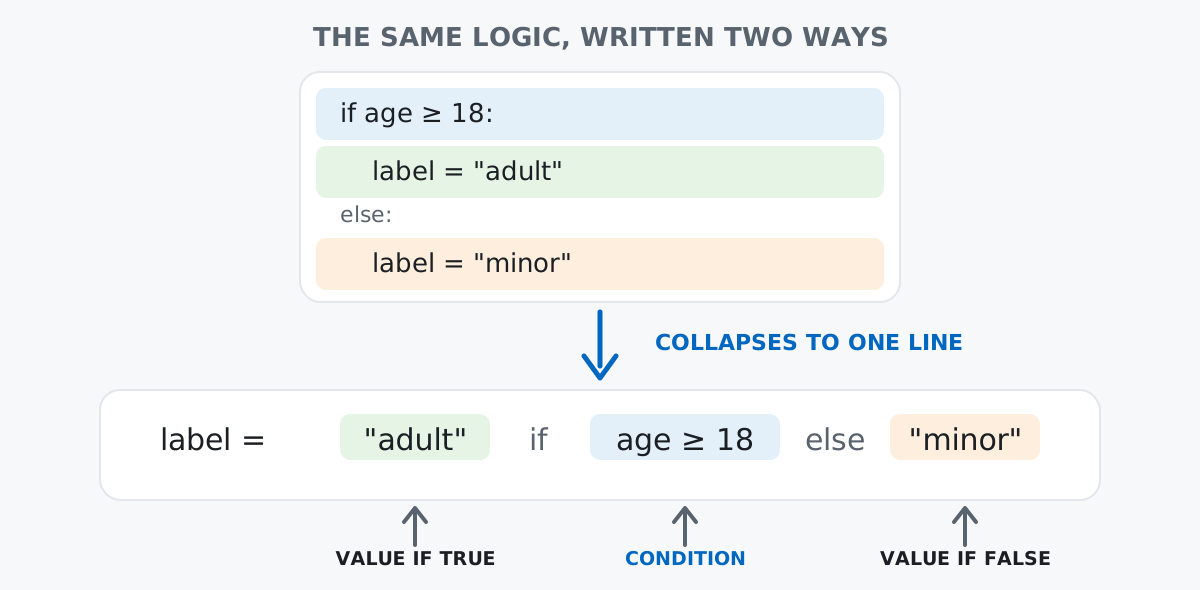
Here’s that concrete example, in both forms:
age = 20
label = "adult" if age >= 18 else "minor"
print(label)adultCompare that with the full block form:
if age >= 18:
    label = "adult"
else:
    label = "minor"
Both produce the same result. The ternary version is shorter, but more importantly it expresses the intent — “pick one of two values” — as a single expression. That makes it composable: you can use it inside assignments, function arguments, list comprehensions, and return statements.
A common pattern: use a provided value or fall back to a default.
username = input_name if input_name else "Anonymous"This checks if input_name is truthy (not empty, not None). For the specific case of replacing None, you’ll often see value or default instead, but the ternary makes the intent explicit when the condition is more complex:
display = username if len(username) <= 20 else username[:17] + "..."Because it’s an expression, you can pass it directly as an argument:
print("Pass" if score >= 60 else "Fail")PassNo temporary variable needed.
def clamp(value, low, high):
return low if value < low else (high if value > high else value)print(clamp(150, 0, 100))
print(clamp(-5, 0, 100))
print(clamp(42, 0, 100))100
0
42This works, and it’s a real function you’d find in game development or signal processing. But notice we’re already nesting ternaries here — let’s talk about when that’s a good idea.
The ternary operator is especially natural inside comprehensions:
numbers = [1, -3, 5, -2, 0, 8, -1]
labels = ["positive" if n > 0 else "non-positive" for n in numbers]
print(labels)
['positive', 'non-positive', 'positive', 'non-positive', 'non-positive', 'positive', 'non-positive']Don’t confuse this with filtering in a comprehension, which uses if without else at the end:
# Filter: keep only positives
positives = [n for n in numbers if n > 0]
print(positives)
[1, 5, 8]# Transform: label every element
labels = ["pos" if n > 0 else "neg" for n in numbers]The ternary goes before the for (it decides the value), while the filter goes after (it decides whether to include the element).
config = {
    "mode": "debug" if verbose else "production",
    "workers": 1 if verbose else 4,
}
Clean and readable — each key gets a value based on the same condition.
You can chain ternaries to handle more than two cases:
grade = "A" if score >= 90 else "B" if score >= 80 else "C" if score >= 70 else "F"This reads left to right: if score is at least 90, "A"; else if at least 80, "B"; else if at least 70, "C"; else "F". Python evaluates it as:
grade = "A" if score >= 90 else ("B" if score >= 80 else ("C" if score >= 70 else "F"))It works, but it’s hard to scan. The moment you add a third condition, a regular if/elif/else block is almost always more readable:
if score >= 90:
    grade = "A"
elif score >= 80:
    grade = "B"
elif score >= 70:
    grade = "C"
else:
    grade = "F"
Rule of thumb: one ternary is clear; two nested ternaries are pushing it; three or more should be a block.
The walrus operator (:=) lets you assign and test in one expression, and it pairs naturally with ternaries in certain patterns:
data = [1, 2, 3, 4, 5]
message = f"Found {n} items" if (n := len(data)) > 0 else "Empty"
print(message)
Found 5 itemsWithout :=, you’d need to call len(data) once to test and once to format. This avoids the duplication. Use it sparingly — in most cases, a separate line is clearer.
or for DefaultsYou’ll sometimes see or used as a shorthand for “use this value, or if it’s falsy, use that one”:
name = user_input or "Guest"This works when you want to replace any falsy value ("", None, 0, []). But it has a subtle trap: 0 and [] are falsy even when they’re valid values. If user_input = 0 is meaningful, or silently replaces it with "Guest".
The ternary lets you be precise about the condition:
name = user_input if user_input is not None else "Guest"Now only None triggers the default — 0, "", and [] are preserved.
Forgetting the else. Unlike a standalone if, a ternary expression must have an else. This is a syntax error:
# SyntaxError: expected 'else' after 'if' expression
label = "adult" if age >= 18
Python requires both branches because a ternary is an expression — it always needs to produce a value.
Side effects in ternary branches. The ternary is for picking a value, not for running actions:
# Don't do this — confusing intent
print("yes") if condition else print("no")
It technically works, but it looks like you’re selecting a value and discarding it. Use a normal if/else for side effects:
if condition:
    print("yes")
else:
    print("no")
Operator precedence surprises. The ternary operator has very low precedence, which occasionally requires parentheses:
# Without parentheses, this might not do what you expect
result = x + 1 if condition else 2
# Means: (x + 1) if condition else 2 — which is actually fine

# But this is different:
result = x + (1 if condition else 2)
# Means: x + 1 or x + 2 depending on condition
When in doubt, add parentheses to make the grouping explicit.
Use it when:
Use a regular if/else when:
elif (more than two paths)The ternary operator is a tool for clarity, not cleverness. If it makes a line harder to read, it’s not saving anyone time.
Python’s ternary operator — value_if_true if condition else value_if_false — gives you a compact way to select between two values. It works in assignments, returns, comprehensions, and function arguments. Keep it to one level of nesting, use parentheses when precedence is ambiguous, and switch to a block if/else whenever readability starts to dip.
If you’re building on these foundations, the Python Basics lessons in our free Python course cover conditionals, loops, and functions in hands-on exercises that build on each other. And if you liked trading a block for a single expression here, Python lambda functions covers the same trade-off for functions — another place Python lets you choose compactness over structure.
 Python
Build an AI Chatbot in Python: A Command-Line LLM Client
A from-scratch walkthrough of the pattern behind every LLM chatbot: one function that sends a message plus conversation history to a chat-completion API, a persona set by a system prompt, and a loop that keeps the conversation going.
Read tutorial
Python
Build an AI Chatbot in Python: A Command-Line LLM Client
A from-scratch walkthrough of the pattern behind every LLM chatbot: one function that sends a message plus conversation history to a chat-completion API, a persona set by a system prompt, and a loop that keeps the conversation going.
Read tutorial
 Software Engineering
The Single Responsibility Principle: One Class, One Reason to Change
The Single Responsibility Principle says a class should have only one reason to change. See it in action: take a Python AuthService that also owns its logging, find why that's a problem, and refactor it into clean, focused classes.
Read tutorial
Software Engineering
The Single Responsibility Principle: One Class, One Reason to Change
The Single Responsibility Principle says a class should have only one reason to change. See it in action: take a Python AuthService that also owns its logging, find why that's a problem, and refactor it into clean, focused classes.
Read tutorial