Title here
Summary here
A fixed UTC offset only tells the truth for one day of the year. This guide builds a distributed-team meeting scenario, then works through zoneinfo, DST-aware conversions, Unix timestamps, and ISO 8601 parsing on a scenario you can reproduce yourself.

A datetime object only tells you when something happened once you know where the clock was read from — and “where” isn’t a fixed number, it’s a place with rules that change twice a year. Our guide to Python’s datetime basics covers building, parsing, and formatting dates, plus attaching a fixed UTC offset. That’s enough for logging or a single-office script. It falls apart the moment your program has to talk to people, or systems, in more than one place.
This is where a lot of otherwise-solid datetime code quietly breaks: a fixed offset that was correct in January is wrong by an hour in July, a raw Unix timestamp gets converted using whichever timezone the server happens to be running in, and “1:30 AM” can mean two different moments on one night a year. This guide covers the module built to handle exactly that — zoneinfo — through one small, reproducible scenario: scheduling a meeting across three cities.
A fixed UTC offset, like +01:00, is a single number. A real timezone is a rulebook for a place: it says which offset applies on which dates, including when clocks jump forward or back for daylight saving time (DST). Keep three ideas in mind:
datetime.timezone objects hold one fixed offset, forever. zoneinfo.ZoneInfo objects hold a named place ("Europe/Berlin") and look up the correct offset for that specific date..astimezone() never changes when it happened, only which rulebook is used to display it.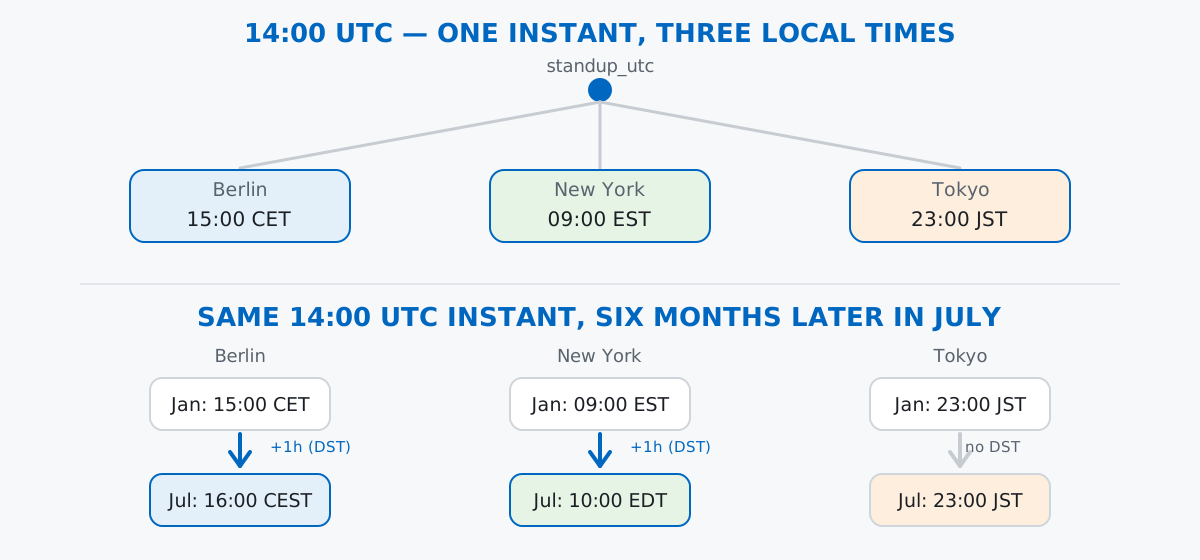
Once you think of a timezone as a lookup table keyed by date rather than a single number, everything below is just applying that lookup at the right moment.
Rivet Labs is a small, fully remote team. Every Monday they hold a stand-up at a fixed moment in UTC, and three teammates each see it at their own local time: Amara in Berlin, Diego in New York, and Priya in Tokyo.
from datetime import datetime
from zoneinfo import ZoneInfo

standup_utc = datetime(2026, 1, 12, 14, 0, tzinfo=ZoneInfo("UTC"))
print(standup_utc)
print(standup_utc.tzinfo)
2026-01-12 14:00:00+00:00
UTCstandup_utc is one unambiguous instant: 14:00 UTC on January 12th, 2026. Everything in this post starts from that single point and asks “what does this look like from here?”
ZoneInfoChapter one of the datetime basics guide built aware datetimes with timezone(timedelta(hours=2)) — a fixed offset. You can convert standup_utc to Berlin time that way, and on this particular January date it even gives the right answer:
from datetime import timedelta, timezone

berlin_fixed = standup_utc.astimezone(timezone(timedelta(hours=1)))
berlin_named = standup_utc.astimezone(ZoneInfo("Europe/Berlin"))
print(berlin_fixed)
print(berlin_named)
print(berlin_fixed == berlin_named)
2026-01-12 15:00:00+01:00
2026-01-12 15:00:00+01:00
TrueBoth give 15:00:00+01:00 today. The difference is that berlin_fixed will keep insisting on +01:00 for every date you ever hand it, while berlin_named will look up the correct offset for whatever date it’s given — including the day Germany’s clocks move forward. We’ll see that split in the next section.
.astimezone() is the one method that does the actual “what does this look like from here” conversion. Build one ZoneInfo per teammate’s city and convert the same instant three ways:
amara_berlin = standup_utc.astimezone(ZoneInfo("Europe/Berlin"))
diego_nyc = standup_utc.astimezone(ZoneInfo("America/New_York"))
priya_tokyo = standup_utc.astimezone(ZoneInfo("Asia/Tokyo"))

for name, dt in [
    ("Amara (Berlin)", amara_berlin),
    ("Diego (New York)", diego_nyc),
    ("Priya (Tokyo)", priya_tokyo),
]:
    print(f"{name}: {dt.strftime('%Y-%m-%d %H:%M %Z (UTC%z)')}")
Amara (Berlin): 2026-01-12 15:00 CET (UTC+0100)
Diego (New York): 2026-01-12 09:00 EST (UTC-0500)
Priya (Tokyo): 2026-01-12 23:00 JST (UTC+0900)Three different wall-clock times, one shared instant. %Z prints the zone’s abbreviation (CET, EST, JST) and %z prints its numeric offset — both come from the ZoneInfo doing the lookup, not from anything you typed in.
Schedule the same stand-up for a July date, six months later, and convert it the same way:
standup_july_utc = datetime(2026, 7, 13, 14, 0, tzinfo=ZoneInfo("UTC"))

for label, base in [("January", standup_utc), ("July", standup_july_utc)]:
    b = base.astimezone(ZoneInfo("Europe/Berlin"))
    n = base.astimezone(ZoneInfo("America/New_York"))
    t = base.astimezone(ZoneInfo("Asia/Tokyo"))
    print(f"{label}: Berlin {b.strftime('%H:%M %Z')} | New York {n.strftime('%H:%M %Z')} | Tokyo {t.strftime('%H:%M %Z')}")
January: Berlin 15:00 CET | New York 09:00 EST | Tokyo 23:00 JST
July: Berlin 16:00 CEST | New York 10:00 EDT | Tokyo 23:00 JSTSame 14:00 UTC instant, but Amara’s and Diego’s local meeting time both moved forward an hour, while Priya’s didn’t move at all. That’s because Germany and the US observe daylight saving time (Berlin switches from CET to CEST, New York from EST to EDT) and Japan doesn’t. You can see it directly in the raw offsets:
print(standup_utc.astimezone(ZoneInfo("Europe/Berlin")).utcoffset())
print(standup_july_utc.astimezone(ZoneInfo("Europe/Berlin")).utcoffset())
print(standup_utc.astimezone(ZoneInfo("Asia/Tokyo")).utcoffset())
print(standup_july_utc.astimezone(ZoneInfo("Asia/Tokyo")).utcoffset())
1:00:00
2:00:00
9:00:00
9:00:00Berlin’s offset from UTC grew from one hour to two; Tokyo’s stayed at nine hours in both runs. This is exactly the case a fixed timezone(timedelta(hours=1)) gets wrong — it has no way to know that the rule for Berlin changes partway through the year. The official zoneinfo documentation lists the full IANA database this lookup is built on, including every named zone you can pass to ZoneInfo.
Monitoring systems and APIs often hand you a raw Unix timestamp — seconds since 1970-01-01 UTC — instead of a formatted string. Rivet Labs’ alerting tool logs one 13 minutes before the January stand-up:
alert_ts = 1768225642
alert_utc = datetime.fromtimestamp(alert_ts, tz=ZoneInfo("UTC"))
alert_local = alert_utc.astimezone(ZoneInfo("America/New_York"))
print(alert_ts)
print(alert_utc)
print(alert_local)
print(alert_local.timestamp())
print(alert_local.timestamp() == alert_utc.timestamp())
1768225642
2026-01-12 13:47:22+00:00
2026-01-12 08:47:22-05:00
1768225642.0
Truefromtimestamp(alert_ts, tz=ZoneInfo("UTC")) anchors the number to UTC first; converting it to New York afterward changes the display, not the underlying instant — .timestamp() round-trips back to the exact same number regardless of which zone’s datetime you call it on, because a timestamp is a property of the instant, not of any particular clock.
fromisoformatAPIs and log files that emit timestamps almost always use ISO 8601 — the 2026-01-12T15:00:00+01:00 shape. datetime.fromisoformat() parses it directly, no format string needed, and .isoformat() writes it back out:
iso_text = amara_berlin.isoformat()
print(iso_text)
parsed_back = datetime.fromisoformat(iso_text)
print(parsed_back)
print(parsed_back == amara_berlin)
2026-01-12T15:00:00+01:00
2026-01-12 15:00:00+01:00
TrueSince Python 3.11, fromisoformat() also accepts the trailing Z that APIs commonly use as shorthand for +00:00:
api_text = "2026-01-12T14:00:00Z"
parsed_api = datetime.fromisoformat(api_text)
print(parsed_api)
print(parsed_api.tzinfo)
2026-01-12 14:00:00+00:00
UTC(The outputs in this post come from Python 3.13. On Python 3.10 and earlier, fromisoformat() doesn’t understand a bare Z suffix and raises ValueError — you’d need to replace it with +00:00 first, e.g. api_text.replace("Z", "+00:00").)
The same local wall-clock time can mean two different instants, and == won’t warn you. When clocks “fall back” for the end of DST, one local hour happens twice. US clocks fall back on November 1st, 2026, so 01:30 occurs once before the switch and once after:
before_fallback = datetime(2026, 11, 1, 1, 30, tzinfo=ZoneInfo("America/New_York"), fold=0)
after_fallback = datetime(2026, 11, 1, 1, 30, tzinfo=ZoneInfo("America/New_York"), fold=1)
print(before_fallback.astimezone(ZoneInfo("UTC")))
print(after_fallback.astimezone(ZoneInfo("UTC")))
print(before_fallback == after_fallback)
2026-11-01 05:30:00+00:00
2026-11-01 06:30:00+00:00
TrueThe fold argument (0 for the first occurrence, 1 for the second) is the only thing distinguishing them, and it correctly converts to two different UTC instants an hour apart — but Python’s == treats fold-only differences as equal anyway, by design, for backward compatibility with code written before fold existed. If you’re comparing times near a DST boundary, compare .astimezone(ZoneInfo("UTC")) values, never the aware datetimes directly.
A raw Unix timestamp isn’t tied to any location — fromtimestamp() without tz= silently uses your machine’s local timezone. This machine happens to run three and a half hours ahead of UTC, so the same alert_ts from earlier prints differently with no tz argument:
naive_from_ts = datetime.fromtimestamp(alert_ts)
print(naive_from_ts, naive_from_ts.tzinfo)
2026-01-12 17:17:22 NoneThat’s not 13:47:22 or 08:47:22 from before — it’s whatever alert_ts looks like on this machine’s system clock, and tzinfo is None, so nothing about the result records which clock was used. Running this same line on a different machine gives a different wall-clock time for the identical number. Always pass tz= explicitly when converting a timestamp.
ZoneInfo needs its own database, and an unknown key fails loudly. A typo’d or unsupported zone name raises immediately, rather than silently falling back to UTC or your system zone:
from zoneinfo import ZoneInfoNotFoundError

try:
    ZoneInfo("Not/AZone")
except ZoneInfoNotFoundError as exc:
    print(f"ZoneInfoNotFoundError: {exc}")
ZoneInfoNotFoundError: 'No time zone found with key Not/AZone'On Linux and macOS this database usually ships with the OS; on some minimal environments (and on Windows) it doesn’t, and you need pip install tzdata before any ZoneInfo("...") call will resolve a real zone name.
Everything here comes down to keeping the instant and the display separate:
ZoneInfo("Region/City") → a rulebook that looks up the correct offset for a given date, unlike a fixed timezone(timedelta(...)).astimezone() → re-displays the same instant through a different rulebook; it never changes when something happened.fromtimestamp(ts, tz=...) and .timestamp() → convert a location-free Unix number to and from an anchored instant; always pass tz= explicitly.fromisoformat() / .isoformat() → parse and emit the 2026-01-12T15:00:00+01:00 shape APIs use, including a bare Z on Python 3.11+fold → distinguishes the two occurrences of an ambiguous local hour during a DST fall-back; compare via UTC, not ==, near those boundariesIf you want to build these skills into a fuller Python foundation — file handling, error handling, and the rest of the standard library alongside dates and timezones — the Working with Dates, Times, and Timezones lesson in our free Python for Data Analytics course picks up exactly where this post leaves off.
 Python
Build an AI Chatbot in Python: A Command-Line LLM Client
A from-scratch walkthrough of the pattern behind every LLM chatbot: one function that sends a message plus conversation history to a chat-completion API, a persona set by a system prompt, and a loop that keeps the conversation going.
Read tutorial
Python
Build an AI Chatbot in Python: A Command-Line LLM Client
A from-scratch walkthrough of the pattern behind every LLM chatbot: one function that sends a message plus conversation history to a chat-completion API, a persona set by a system prompt, and a loop that keeps the conversation going.
Read tutorial
 Software Engineering
The Single Responsibility Principle: One Class, One Reason to Change
The Single Responsibility Principle says a class should have only one reason to change. See it in action: take a Python AuthService that also owns its logging, find why that's a problem, and refactor it into clean, focused classes.
Read tutorial
Software Engineering
The Single Responsibility Principle: One Class, One Reason to Change
The Single Responsibility Principle says a class should have only one reason to change. See it in action: take a Python AuthService that also owns its logging, find why that's a problem, and refactor it into clean, focused classes.
Read tutorial