Title here
Summary here
Tuples look like read-only lists at first glance, but that one restriction unlocks unpacking tricks, dictionary keys, and named tuples that lists can never offer. This deep dive works through all of it on one small sensor-reading example, with real, verified output at every step.

You already know the one-paragraph version of tuples: ordered, allows duplicates, can’t be changed after you build it. That’s true, but it’s also where most explanations stop — right before the interesting part. The immutability isn’t just a restriction to memorize; it’s the reason tuples can do three things a list flatly cannot: sit inside a dictionary key, unpack cleanly into named variables, and carry field names around with namedtuple.
If you want the wider picture first — when to reach for a tuple instead of a list, set, or dictionary — our Python data structures overview is the map, comparing all four side by side. This post is one stop on that map, in depth: everything below assumes you already know what a tuple looks like and want to know what it’s actually for.
Here’s the idea to hold onto for everything that follows: a tuple is a list that promises not to change, and that promise is what makes it hashable, safe to use as a dictionary key, and cheap to reason about. Three things happen, in order, every time you write one:
.append(), no .sort(), no tup[0] = x.set, or — the trick a list can never pull off — serve as a dictionary key.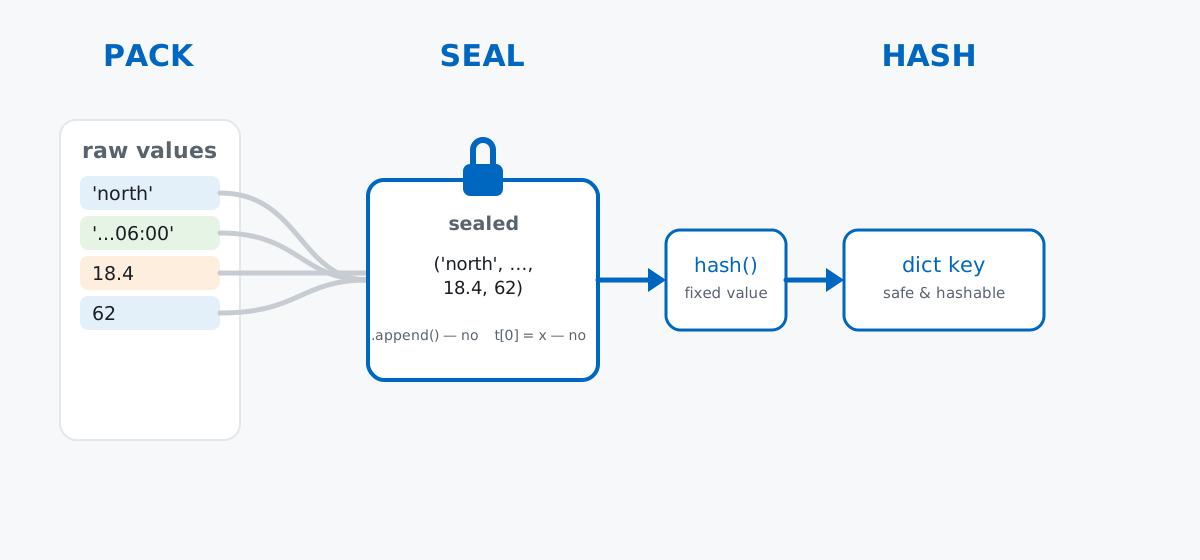
Keep this pack-seal-trust chain in mind. Every section below is really just a different consequence of step 2.
No download needed here — tuples are a language feature, not something you analyze, so a small hand-written example teaches this better than an external file. Imagine you maintain three sensor stations on a community rooftop garden — north, south, and greenhouse — and each one logs a reading every hour: which station, when, the temperature in Celsius, and the humidity percentage.
morning = ("north", "2026-07-11T06:00", 18.4, 62)
print(morning)

daily_temps = (18.4, 19.1, 21.3, 22.8, 21.5, 19.9, 18.2)
print(daily_temps)
print(len(daily_temps))
('north', '2026-07-11T06:00', 18.4, 62)
(18.4, 19.1, 21.3, 22.8, 21.5, 19.9, 18.2)
7morning is one reading — a fixed record that shouldn’t drift once it’s logged, which is exactly the case for a tuple over a list. daily_temps is the north station’s seven hourly readings from a single day. (The outputs in this post come from Python 3.11 — everything shown also works on Python 3.9+.)
Unpacking assigns each element of a tuple to its own variable in one line, instead of indexing it piece by piece:
station, timestamp, temp_c, humidity_pct = morning
print(station)
print(timestamp)
print(temp_c)
print(humidity_pct)
north
2026-07-11T06:00
18.4
62The number of variables on the left has to match the number of items in the tuple, and Python assigns strictly by position — station gets whatever is first, no matter what it’s named. This is also the trick behind Python’s famous one-line swap, which is unpacking in disguise: lo, hi = hi, lo packs (hi, lo) into a temporary tuple on the right, then immediately unpacks it into lo, hi on the left, so no temporary variable is needed.
Sometimes you don’t want every value, just the first, the last, or “everything in between.” Extended unpacking with a starred name (*rest) collects the leftover items into a list:
first, *midday, last = daily_temps
print(first)
print(midday)
print(last)
18.4
[19.1, 21.3, 22.8, 21.5, 19.9]
18.2first grabs the morning reading, last grabs the evening one, and *midday soaks up everything left over — as a regular list, not a tuple, which matters if you plan to mutate it afterward. The starred name can go anywhere in the pattern (first, second, *rest or *rest, last both work); Python figures out how many items belong to it by counting how many named slots are on either side.
Say you want a lookup table of calibration offsets — a small correction to apply per station and per measurement, discovered by comparing each sensor against a reference instrument. The natural key is a pair: (station, measurement).
calibration_offsets = {
    ("north", "temp"): -0.3,
    ("south", "temp"): 0.2,
    ("greenhouse", "humidity"): 1.5,
}
print(calibration_offsets[("north", "temp")])
print(("south", "temp") in calibration_offsets)
-0.3
TrueThat works because a tuple is hashable — sealed, so Python can compute one fixed hash for ("north", "temp") and use it to place the entry in the dictionary’s internal hash table. Try the same thing with a list instead of a tuple, and Python refuses outright:
try:
    bad_offsets = {["north", "temp"]: -0.3}
except TypeError as e:
    print(f"TypeError: {e}")
TypeError: unhashable type: 'list'A list is mutable, so it has no hash — allowing it as a key would mean the key’s own hash could change after insertion, which would break the dictionary’s internal bookkeeping. Python doesn’t try to guess whether you’ll actually mutate it later; it just refuses up front. Calling hash() directly makes the distinction explicit:
print(hash(("north", "temp")))
try:
    hash(["north", "temp"])
except TypeError as e:
    print(f"TypeError: {e}")
9087974424116814901
TypeError: unhashable type: 'list'The tuple hashes to some large integer — Python randomizes string hashing per process by default, so your number will differ from this one and even from run to run on your own machine — while the list raises the same TypeError every time, on every machine, because lists are never hashable at all. The Python documentation on sequence types covers the full set of operations tuples support beyond what’s shown here.
Positional unpacking is great until a tuple has four or five fields and you can’t remember whether index 2 is the temperature or the humidity. collections.namedtuple fixes that by giving each position a name, while keeping everything else about a tuple exactly the same:
from collections import namedtuple

Reading = namedtuple("Reading", ["station", "timestamp", "temp_c", "humidity_pct"])
r = Reading("north", "2026-07-11T06:00", 18.4, 62)
print(r)
print(r.temp_c)
print(r[2])
print(r == morning)
Reading(station='north', timestamp='2026-07-11T06:00', temp_c=18.4, humidity_pct=62)
18.4
18.4
Truer.temp_c and r[2] reach the same value — a named tuple is still a real tuple underneath, so every plain-tuple trick from this post still applies, including unpacking and using it as a dict key. Notice r == morning is True: equality compares values, not types, so a named tuple built with the same values as a plain tuple is considered equal to it.
If you’d rather declare the fields with type hints — useful for editor autocomplete and static type checkers — typing.NamedTuple gives you the same result with class syntax:
from typing import NamedTuple

class ReadingNT(NamedTuple):
    station: str
    timestamp: str
    temp_c: float
    humidity_pct: int

r2 = ReadingNT("greenhouse", "2026-07-11T06:00", 24.1, 71)
print(r2)
print(r2.humidity_pct)
ReadingNT(station='greenhouse', timestamp='2026-07-11T06:00', temp_c=24.1, humidity_pct=71)
71Both forms are still sealed. Trying to update a field the way you’d update an attribute on an ordinary object fails the same way indexed assignment does:
try:
    r.temp_c = 19.0
except AttributeError as e:
    print(f"AttributeError: {e}")
AttributeError: can't set attributeReach for a named tuple the moment a plain tuple’s fields stop being self-explanatory from context — it costs one line to define and pays for itself the first time you or a teammate reads r.temp_c instead of r[2].
Python lets a function “return two things,” and there’s no special syntax for it — it’s ordinary tuple packing and unpacking, applied to a return statement:
def temp_stats(temps):
    return min(temps), max(temps), round(sum(temps) / len(temps), 2)

lo_t, hi_t, avg_t = temp_stats(daily_temps)
print(lo_t, hi_t, avg_t)

result = temp_stats(daily_temps)
print(type(result))
print(result)
18.2 22.8 20.17
<class 'tuple'>
(18.2, 22.8, 20.17)return min(temps), max(temps), round(...) packs three values into one tuple before the function even returns — the commas do it, exactly like the dataset section’s morning tuple. Assigning lo_t, hi_t, avg_t = temp_stats(daily_temps) unpacks it again on the way out, so the call site reads like the function genuinely has three return values, even though only one object ever crosses the function boundary.
Because a tuple never has to support adding, removing, or reordering items, Python can store it more compactly than a list of the same values, and build it faster:
import sys

temps_list = list(daily_temps)
temps_tuple = daily_temps
print(sys.getsizeof(temps_list))
print(sys.getsizeof(temps_tuple))
120
96Same seven floats, 24 fewer bytes as a tuple — a list keeps spare capacity for future growth that a tuple never needs to reserve. Construction time shows the same gap:
import timeit

list_time = timeit.timeit("[18.4, 19.1, 21.3, 22.8, 21.5, 19.9, 18.2]", number=1_000_000)
tuple_time = timeit.timeit("(18.4, 19.1, 21.3, 22.8, 21.5, 19.9, 18.2)", number=1_000_000)
print(f"list literal:  {list_time:.4f} sec for 1,000,000 constructions")
print(f"tuple literal: {tuple_time:.4f} sec for 1,000,000 constructions")
print(f"tuple was about {list_time / tuple_time:.1f}x faster")
list literal: 0.0431 sec for 1,000,000 constructions
tuple literal: 0.0101 sec for 1,000,000 constructions
tuple was about 4.3x fasterThe exact multiplier will vary by machine and Python version, but the direction won’t: a tuple literal skips the bookkeeping a list needs for future mutation, so it’s cheaper to build every single time. None of this matters for one reading; it adds up the moment you’re logging thousands of sealed records — one per sensor reading, one per API response, one per row read from a file — and never resizing any of them.
A single value in parentheses is not a tuple — the comma is what matters, not the parentheses.
not_a_tuple = (18.4)
actually_a_tuple = (18.4,)
print(type(not_a_tuple))
print(type(actually_a_tuple))
<class 'float'>
<class 'tuple'>Python treats (18.4) as a plain float with redundant parentheses around it, exactly like (2 + 2) is just 4. The trailing comma in (18.4,) is the only thing that tells Python “this is a one-item tuple.” It’s easy to drop that comma by accident and not notice until something downstream tries to unpack a float and fails.
Immutable only means the top level is locked — anything mutable stored inside can still change.
reading_with_notes = ("north", 18.4, ["sensor due for cleaning"])
reading_with_notes[2].append("battery at 40%")
print(reading_with_notes)
try:
    reading_with_notes[2] = ["replaced"]
except TypeError as e:
    print(f"TypeError: {e}")
('north', 18.4, ['sensor due for cleaning', 'battery at 40%'])
TypeError: 'tuple' object does not support item assignmentThe tuple itself never changes — slot 2 always holds the same list object — but nothing stops you from mutating that list in place. If you need a structure that’s frozen all the way down, a tuple’s own guarantee doesn’t extend to what’s sitting inside it; you’d have to make sure every nested value is itself immutable.
Building a tuple by repeated concatenation in a loop is slow, because every + creates a brand-new tuple.
def build_with_concat(n):
    log = ()
    for i in range(n):
        log = log + (i,)
    return log

def build_with_list(n):
    log = []
    for i in range(n):
        log.append(i)
    return tuple(log)

concat_time = timeit.timeit("build_with_concat(500)", globals=globals(), number=200)
list_build_time = timeit.timeit("build_with_list(500)", globals=globals(), number=200)
print(f"tuple += in loop:         {concat_time:.4f} sec for 200 runs of 500 appends")
print(f"list.append then tuple(): {list_build_time:.4f} sec for 200 runs of 500 appends")
print(f"concatenation was about {concat_time / list_build_time:.1f}x slower")
tuple += in loop: 0.0394 sec for 200 runs of 500 appends
list.append then tuple(): 0.0027 sec for 200 runs of 500 appends
concatenation was about 14.7x slowerlog = log + (i,) looks harmless, but it allocates an entirely new tuple every iteration and copies everything from the old one into it — the cost grows with the size of log, not just the size of the new piece. If you’re accumulating values in a loop, build a list with .append() and convert to a tuple once at the end, the way build_with_list does.
One promise — nothing changes after creation — explains everything a tuple can do that a list can’t:
a, b, c = t and first, *rest = t read a tuple’s shape directly into variablesnamedtuple / typing.NamedTuple → attribute access (r.temp_c) on top of everything a plain tuple already doesreturn a, b, c → multiple return values are ordinary tuple packing, unpacked at the call siteReach for a tuple the moment a value is a fixed record rather than a growing collection — a coordinate pair, a database row, a function’s multi-value return — and reach for namedtuple the moment that record’s fields stop being obvious from position alone.
If you want the full survey of when to use a tuple instead of a list, set, or dictionary, Python Data Structures: Lists, Tuples, Sets, or Dicts? covers all four side by side. For hands-on practice with tuples alongside namedtuple, Counter, defaultdict, and deque, the Advanced Collections and Data Structures lesson in our free Python for Data Analytics course goes further than this post, with exercises and a full running example.
 Python
Build an AI Chatbot in Python: A Command-Line LLM Client
A from-scratch walkthrough of the pattern behind every LLM chatbot: one function that sends a message plus conversation history to a chat-completion API, a persona set by a system prompt, and a loop that keeps the conversation going.
Read tutorial
Python
Build an AI Chatbot in Python: A Command-Line LLM Client
A from-scratch walkthrough of the pattern behind every LLM chatbot: one function that sends a message plus conversation history to a chat-completion API, a persona set by a system prompt, and a loop that keeps the conversation going.
Read tutorial
 Software Engineering
The Single Responsibility Principle: One Class, One Reason to Change
The Single Responsibility Principle says a class should have only one reason to change. See it in action: take a Python AuthService that also owns its logging, find why that's a problem, and refactor it into clean, focused classes.
Read tutorial
Software Engineering
The Single Responsibility Principle: One Class, One Reason to Change
The Single Responsibility Principle says a class should have only one reason to change. See it in action: take a Python AuthService that also owns its logging, find why that's a problem, and refactor it into clean, focused classes.
Read tutorial