Title here
Summary here
A language model should not receive unrestricted SQL and a writable database connection. Build a narrow Python tool that checks an energy-summary request, runs fixed parameterized queries through read-only SQLite, and returns a small JSON-ready result.

Giving a language model a general function called run_sql looks flexible. If your application executes every proposed call, generated text can decide which tables to read, how much data to return, and whether a statement should change the database. A reporting assistant usually needs far less power: one approved question with a few checked values.
To build a read-only SQLite tool for an LLM, map one approved tool name to a Python function that runs fixed SELECT statements. Validate every proposed argument, bind values with SQL placeholders, and open the database with SQLite URI mode=ro; return a structured error instead of executing any call that fails a check. Do not accept model-written SQL when a narrow query can answer the task.
We will apply that pattern to daily electricity readings for four fictional learning centers. A model may propose calling the tool with a center and date range. Python decides whether the proposal is valid, SQLite calculates the summary, and the database connection blocks writes even if later code makes a mistake.
You need Python 3.11 or newer and basic knowledge of functions and dictionaries. SQLite is a database stored in one local file. Python includes the sqlite3 module, so the query tool needs no database server or extra package. Matplotlib is optional and only rebuilds the result chart.
Create and activate a virtual environment. Then install Matplotlib if you want the same visual:
python -m venv .venv
source .venv/bin/activate
python -m pip install matplotlib==3.11.0
On Windows PowerShell, use .venv\Scripts\Activate.ps1 for the activation step. The executed lesson used Python 3.13.2, SQLite 3.50.2, and Matplotlib 3.11.0.
Download the SQLite energy database and save it beside your Python file. You can also inspect the underlying energy readings as CSV. The dataset has 360 rows: 90 days for four centers. It was created deterministically for this lesson, contains no real people or facilities, and is released under CC0-1.0.
No API key is required. The examples begin with a saved tool proposal so the database boundary stays repeatable. If you first need the model-to-function exchange, read Function Calling in Python; this lesson starts where that API response reaches your application.
A tool call is structured output in which a large language model (LLM) proposes calling a function with specific arguments. The proposal names the function, but it does not invoke it. Your Python program remains responsible for deciding whether anything runs.
This tool uses five boundaries in order:
model proposal
    -> registered tool name
    -> exact argument keys and types
    -> allowed center and date range
    -> fixed SQL with bound values
    -> read-only SQLite connection
    -> small JSON-ready result
Each boundary answers a different question. The registry checks whether the capability exists. Input checks decide whether the values fit the application’s rules. Fixed SQL controls which table and columns are visible. Bound values keep input separate from SQL syntax. The read-only connection prevents statements such as DELETE from changing the file.
An allowlist is the explicit set of tool names or values that the application permits. Anything outside that set is rejected.
This is least privilege: give a component only the access it needs. The assistant can summarize energy readings for one known center and at most 31 days. It cannot list arbitrary tables, attach another database, or invent a write operation.
An ordinary sqlite3.connect("file.sqlite") connection can write. Instead, turn the absolute path into a file URI and add mode=ro. The uri=True argument tells Python to interpret the query part of that URI:
import sqlite3
from pathlib import Path

def open_read_only(database_path: Path) -> sqlite3.Connection:
    database_uri = f"{database_path.resolve().as_uri()}?mode=ro"
    connection = sqlite3.connect(database_uri, uri=True)
    connection.row_factory = sqlite3.Row
    connection.execute("PRAGMA query_only = ON")
    return connection

connection = open_read_only(Path("learning_center_energy.sqlite"))
print(connection.execute("PRAGMA query_only").fetchone()[0])
The executed output was:
11 means query_only is enabled for this connection. The primary database-open boundary is still mode=ro. Python’s current sqlite3 URI guide shows that a write through mode=ro raises OperationalError. SQLite’s URI filename documentation defines mode=ro as opening an existing database read-only.
PRAGMA query_only is an extra connection setting, not a substitute for read-only mode. SQLite’s query_only documentation explains that it blocks data-changing statements but does not make the database completely read-only in every sense. Keeping both settings makes the intended boundary clear and gives us two facts to inspect during tests.
Our tool accepts exactly three string arguments: center_id, start_date, and end_date. A domain rule checks meaning beyond the Python type. For example, a date may be a valid string but still fall after the end date.
First, define the allowed center IDs and a small error type. A short machine-readable code will later help the caller distinguish a missing value from a bad date:
from datetime import date

CENTERS = {"CTR-A", "CTR-B", "CTR-C", "CTR-D"}
EXPECTED_ARGUMENTS = {"center_id", "start_date", "end_date"}

class ToolInputError(ValueError):
    def __init__(self, code, message):
        super().__init__(message)
        self.code = code
Now validate one idea at a time. Reject a non-dictionary, missing or extra keys, non-string values, unknown centers, invalid dates, reversed dates, and ranges over 31 days:
def validate_arguments(arguments):
    if not isinstance(arguments, dict):
        raise ToolInputError("invalid_arguments", "arguments must be an object")

    supplied = set(arguments)
    missing = EXPECTED_ARGUMENTS - supplied
    extra = supplied - EXPECTED_ARGUMENTS
    if missing:
        raise ToolInputError("missing_argument", f"missing: {sorted(missing)[0]}")
    if extra:
        raise ToolInputError("extra_argument", f"unexpected: {sorted(extra)[0]}")

    if not all(isinstance(value, str) for value in arguments.values()):
        raise ToolInputError("invalid_type", "all arguments must be strings")
    if arguments["center_id"] not in CENTERS:
        raise ToolInputError("unknown_center", "center_id is not allowlisted")

    try:
        start = date.fromisoformat(arguments["start_date"])
        end = date.fromisoformat(arguments["end_date"])
    except ValueError as error:
        raise ToolInputError("invalid_date", "dates must use YYYY-MM-DD") from error

    if end < start:
        raise ToolInputError("reversed_range", "end_date must be on or after start_date")
    if (end - start).days > 30:
        raise ToolInputError("range_too_large", "date range cannot exceed 31 days")

    return {
        "center_id": arguments["center_id"],
        "start_date": start.isoformat(),
        "end_date": end.isoformat(),
    }
The limit is 30 days between the endpoints because both endpoints count, giving at most 31 daily rows. That bound keeps tool output small. It is an application choice, not a SQLite limit.
Rejecting extra keys is important. If a proposal adds "sql": "DROP TABLE daily_energy", the application should not ignore the field and continue. A clear extra_argument result reveals that the call does not match the contract.
The next function contains the SQL. The model supplies values, but it never supplies a statement, table name, column name, sort expression, or result limit.
Use named placeholders such as :center_id for every changing value. Python sends the SQL and parameters separately:
def summarize_energy(connection, center_id, start_date, end_date):
    parameters = {
        "center_id": center_id,
        "start_date": start_date,
        "end_date": end_date,
    }
    summary = connection.execute(
        """
        SELECT
            center_id,
            center_name,
            COUNT(*) AS days,
            ROUND(SUM(electricity_kwh), 1) AS total_kwh,
            ROUND(AVG(electricity_kwh), 1) AS mean_daily_kwh
        FROM daily_energy
        WHERE center_id = :center_id
          AND recorded_date BETWEEN :start_date AND :end_date
        GROUP BY center_id, center_name
        """,
        parameters,
    ).fetchone()

    if summary is None:
        raise ToolInputError("no_data", "no readings match that date range")

    peak = connection.execute(
        """
        SELECT recorded_date, electricity_kwh
        FROM daily_energy
        WHERE center_id = :center_id
          AND recorded_date BETWEEN :start_date AND :end_date
        ORDER BY electricity_kwh DESC, recorded_date
        LIMIT 1
        """,
        parameters,
    ).fetchone()

    return {
        "center_id": summary["center_id"],
        "center_name": summary["center_name"],
        "start_date": start_date,
        "end_date": end_date,
        "days": summary["days"],
        "total_kwh": summary["total_kwh"],
        "mean_daily_kwh": summary["mean_daily_kwh"],
        "peak_date": peak["recorded_date"],
        "peak_kwh": peak["electricity_kwh"],
    }
Do not replace the placeholders with an f-string. The official Python sqlite3 placeholder guide warns that string-built queries are vulnerable to SQL injection and recommends parameter substitution.
Placeholders protect values, not SQL identifiers. A placeholder cannot safely choose a table or an ORDER BY column. Keep those parts fixed, or map a small allowlisted label to SQL that your application wrote.
The dispatcher is the final application boundary. It accepts an untrusted proposal, checks the exact tool name, validates the arguments, calls the registered function, and returns one stable shape for success or failure:
def execute_tool_call(connection, proposal):
    if not isinstance(proposal, dict):
        return {
            "ok": False,
            "error": {"code": "invalid_call", "message": "call must be an object"},
        }
    if proposal.get("name") != "summarize_energy":
        return {
            "ok": False,
            "error": {"code": "unknown_tool", "message": "tool is not registered"},
        }

    try:
        arguments = validate_arguments(proposal.get("arguments"))
        result = summarize_energy(connection, **arguments)
    except ToolInputError as error:
        return {
            "ok": False,
            "error": {"code": error.code, "message": str(error)},
        }
    except sqlite3.Error:
        return {
            "ok": False,
            "error": {"code": "database_error", "message": "query failed"},
        }

    return {"ok": True, "result": result}
Keep detailed database exceptions in a protected log if you need them for diagnosis. The model-facing result should not expose file paths, table details, or raw exception text.
Now pass one controlled proposal through the complete path:
proposal = {
    "name": "summarize_energy",
    "arguments": {
        "center_id": "CTR-B",
        "start_date": "2026-02-01",
        "end_date": "2026-02-14",
    },
}

response = execute_tool_call(connection, proposal)
print(response["result"])
The executed result was:
{'center_id': 'CTR-B', 'center_name': 'Studio', 'start_date': '2026-02-01', 'end_date': '2026-02-14', 'days': 14, 'total_kwh': 1053.6, 'mean_daily_kwh': 75.3, 'peak_date': '2026-02-10', 'peak_kwh': 89.0}Read the values as a database summary, not as model-generated facts. The query found 14 daily rows, totaling 1,053.6 kWh. Their mean was 75.3 kWh, and February 10 had the largest value at 89.0 kWh. A calling application can serialize this dictionary to JSON and return it to the model for wording, while preserving the numeric source.
A successful example proves only one path. The executed build also passed seven intentionally invalid proposals to the dispatcher: an unknown tool, a missing date, an extra SQL field, an injection-shaped center ID, an impossible date, reversed dates, and a range over 31 days.
The test compared each actual status with its expected status. The public executed case results contain the complete table:
case_id  case                     actual_status
T01      valid summary            accepted
T02      unknown tool             unknown_tool
T03      missing end date         missing_argument
T04      extra SQL field          extra_argument
T05      injection-shaped center  unknown_center
T06      invalid date             invalid_date
T07      reversed dates           reversed_range
T08      range over 31 days       range_too_large
All eight results matched their expected status. These are designed tests of the Python boundary, not measurements of a live model’s accuracy.
The build then bypassed the center allowlist for one database-level probe and bound the string CTR-B' OR 1=1 -- to a ? placeholder. It matched zero rows:
injected_value = "CTR-B' OR 1=1 --"
matched_rows = connection.execute(
    "SELECT COUNT(*) FROM daily_energy WHERE center_id = ?",
    (injected_value,),
).fetchone()[0]
print(matched_rows)0SQLite treated the whole input as a center value. It did not treat OR 1=1 as SQL syntax.
Finally, test the file boundary itself. A read-only connection must reject a write even if application code attempts one:
try:
    connection.execute("DELETE FROM daily_energy")
except sqlite3.OperationalError:
    print("write blocked")
finally:
    connection.close()
write blockedThis is the last database operation in the walkthrough, so the finally block closes the connection whether the write fails as expected or an unexpected result occurs. The generated visual combines the real 14-day query with the executed checks:
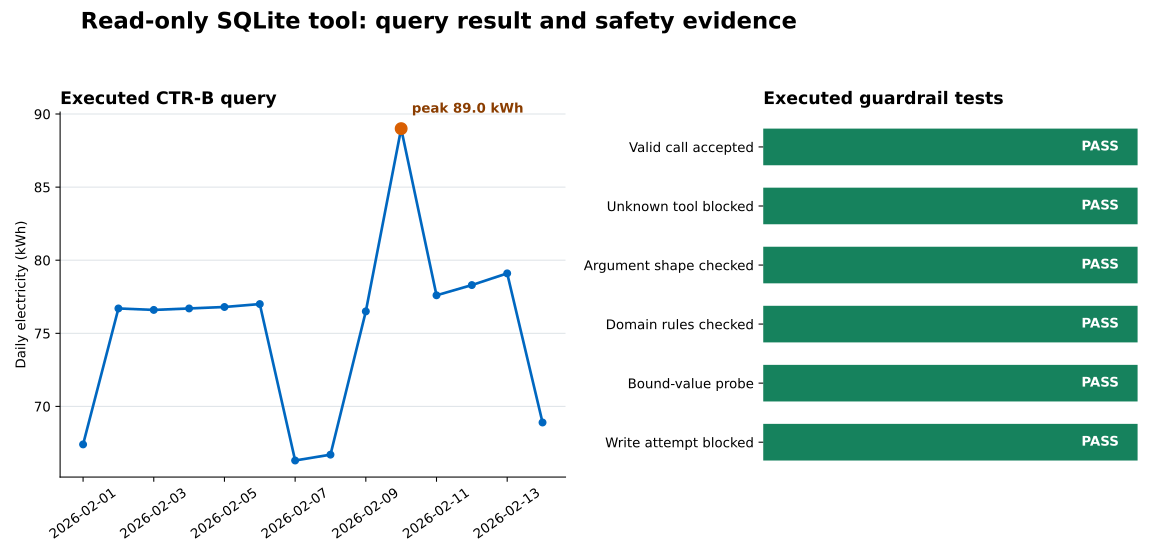
The line chart is data returned by the same fixed query pattern. The green bars are grouped test evidence, not a performance score. They show that every intended branch ran and produced the expected outcome in this environment.
The tool accepts raw SQL. Replace run_sql(statement) with a task-specific function such as summarize_energy(center_id, start_date, end_date). If several approved questions are needed, create several narrow tools or map allowlisted report names to fixed statements.
The code opens the normal filename. sqlite3.connect("learning_center_energy.sqlite") does not create a read-only boundary. Build a file: URI with mode=ro and pass uri=True. If the path is dynamic, resolve an approved path on the application host; do not let a model choose a database filename.
mode=ro reports “unable to open database file.” Confirm that the file exists and the process can read it. Read-only mode will not create a missing file, which is useful because a spelling mistake should fail instead of creating an empty database.
Values are inserted with f-strings. Use ? or named placeholders and pass a tuple or dictionary as the second argument to execute(). Do not add manual quote escaping around a bound value.
Placeholders are used for table names. SQL parameters represent values only. Keep identifiers fixed, or select them through an application-owned mapping. Never copy a generated table name directly into a statement.
Validation stops at types. Check membership, date order, maximum range, and any data-access policy. A string can have the correct type while naming an unapproved center.
Unknown keys are ignored. Compare the supplied key set with the exact expected set. Silent acceptance can hide a prompt or integration defect and may become unsafe when code changes later.
Raw database errors go back to the model. Return a stable error code and a limited message. Store detailed exceptions only in access-controlled logs, without secrets or unnecessary query values.
A test suite checks only the valid call. Add an unknown tool, missing and extra arguments, invalid ranges, injection-shaped values, and a direct write attempt. A guardrail is more credible after its rejection path has executed.
A safe read-only data tool is smaller than a general database agent. The model proposes a call to a named tool. Python validates the arguments. Application-owned SQL binds the values. SQLite opens the file read-only and returns a compact result.
The durable pattern is narrow tool, checked values, fixed query, read-only connection. In the executed lesson, one valid proposal produced a 14-row summary, seven invalid proposals stopped with specific codes, an injection-shaped bound value matched no rows, and a direct DELETE failed.
When you add another report, do not widen this function into arbitrary SQL. Add a second narrow tool with its own argument contract, maximum result size, fixed query, and rejected-path tests. Then place both behind the bounded runtime described in Build a Safe AI Agent Loop in Python.
 Python
Build an AI Chatbot in Python: A Command-Line LLM Client
A from-scratch walkthrough of the pattern behind every LLM chatbot: one function that sends a message plus conversation history to a chat-completion API, a persona set by a system prompt, and a loop that keeps the conversation going.
Read tutorial
Python
Build an AI Chatbot in Python: A Command-Line LLM Client
A from-scratch walkthrough of the pattern behind every LLM chatbot: one function that sends a message plus conversation history to a chat-completion API, a persona set by a system prompt, and a loop that keeps the conversation going.
Read tutorial
 Software Engineering
The Single Responsibility Principle: One Class, One Reason to Change
The Single Responsibility Principle says a class should have only one reason to change. See it in action: take a Python AuthService that also owns its logging, find why that's a problem, and refactor it into clean, focused classes.
Read tutorial
Software Engineering
The Single Responsibility Principle: One Class, One Reason to Change
The Single Responsibility Principle says a class should have only one reason to change. See it in action: take a Python AuthService that also owns its logging, find why that's a problem, and refactor it into clean, focused classes.
Read tutorial