Title here
Summary here
Turn a sequence of pandas cleaning operations into small named functions connected by DataFrame.pipe, then add an audit log that makes removed duplicates and invalid rows visible.

A cleaning script often starts as five lines in a notebook. A week later, those lines may have become twenty intermediate DataFrames with names such as data2 and final_fixed. When a new CSV has fewer rows, it is difficult to tell which operation removed them.
The problem is not that pandas needs more compact code. The problem is that the cleaning steps lack clear names, boundaries, and checks.
To build a reusable pandas data cleaning pipeline, write each transformation as a function that accepts a DataFrame and returns a DataFrame. Connect the functions with DataFrame.pipe(), use assign() for derived columns, and add pass-through audit steps that record row counts without changing the data. Validate the final result with assertions before saving it.
This tutorial applies that pattern to workshop-registration exports. The example is small enough to inspect, but the structure also works when a file grows or arrives again next week.
You need Python and basic knowledge of columns and rows. A pandas DataFrame is a table in memory, with labeled columns. You do not need previous experience with method chaining or automated data pipelines.
Create a virtual environment, activate it, and install pandas and Matplotlib:
python -m venv .venv
source .venv/bin/activate
python -m pip install pandas matplotlib
On Windows PowerShell, activate the environment with .venv\Scripts\Activate.ps1.
The published results use Python 3.13.2, pandas 3.0.3, and Matplotlib 3.11.0. Download workshop_registrations.csv and save it in your working folder.
This is an original synthetic dataset created for this lesson and released under CC0-1.0. All registration IDs, dates, fees, and country codes are fictional. The file has 31 rows, including three later export records for existing IDs and three records with invalid required fields.
Load every column as pandas’ string dtype. keep_default_na=False keeps blank text as an empty string, which lets us distinguish a blank registration ID during validation.
import pandas as pd

raw = pd.read_csv(
    "workshop_registrations.csv",
    dtype="string",
    keep_default_na=False,
)

print("shape:", raw.shape)
print(raw.columns.tolist())
shape: (31, 6)
[' Registration ID ', 'Registered At', 'Workshop Track', 'Fee Paid', 'Country Code', 'Email Opt In']The first column has spaces around its name. The other labels contain spaces and capital letters. Values also vary: one workshop appears as Data Viz, DATA-VIZ, and data viz. We will make those forms consistent before using the data.
A method chain passes one result directly into the next operation. For this lesson, every stage follows the same contract:
DataFrame in -> one named change -> DataFrame outDataFrame.pipe() calls a function with the current DataFrame as its first argument. It is useful when a transformation is too specific for a built-in DataFrame method. The official pandas pipe documentation describes it as a way to apply chainable functions that expect a Series or DataFrame.
This structure gives each stage a name. It also lets you call one function by itself while debugging:
headers_only = normalize_headers(raw)The complete route will have five observable states:
raw delivery
    -> normalized headers
    -> standardized and parsed fields
    -> one record per registration ID
    -> valid clean rows
These arrows do not mean that every stage should be one line. A short, named function is easier to test than a long expression with several unrelated jobs.
One more rule matters: treat the input as read-only. Each function below returns a result rather than changing raw in place. This fits pandas 3’s Copy-on-Write behavior, which makes chained assignment invalid and gives DataFrame operations more predictable copy behavior. See the current pandas Copy-on-Write guide for the details.
The first function cleans column labels only. It removes surrounding spaces, changes letters to lowercase, replaces non-alphanumeric groups with underscores, and removes extra underscores from the ends.
def normalize_headers(data):
    columns = (
        data.columns.str.strip()
        .str.lower()
        .str.replace(r"[^a-z0-9]+", "_", regex=True)
        .str.strip("_")
    )
    return data.set_axis(columns, axis="columns")
Keeping this function focused is important. If it also parsed dates and removed rows, a header problem would be harder to isolate.
Next, standardize values that represent the same category. casefold() is a text-normalization method that is suitable for case-insensitive matching. We create a temporary lookup key, map it to the three approved track names, and use assign() to return updated columns.
def standardize_labels(data):
    track_key = (
        data["workshop_track"]
        .str.strip()
        .str.casefold()
        .str.replace("-", " ", regex=False)
        .str.replace(r"\s+", " ", regex=True)
    )
    track_names = {
        "python basics": "Python Basics",
        "sql lab": "SQL Lab",
        "data viz": "Data Viz",
    }

    email_key = data["email_opt_in"].str.strip().str.casefold()
    email_values = {
        "yes": True,
        "true": True,
        "no": False,
        "false": False,
    }

    return data.assign(
        registration_id=lambda frame: frame["registration_id"].str.strip(),
        workshop_track=track_key.map(track_names),
        country_code=lambda frame: frame["country_code"].str.strip().str.upper(),
        email_opt_in=email_key.map(email_values).astype("boolean"),
    )
assign() returns a new DataFrame with the added or replaced columns. A callable such as lambda frame: ... receives the DataFrame at that point in the assignment. The pandas assign reference also notes that later assignments can use columns created earlier in the same call.
The mapping has another useful property: an unknown track becomes missing. That is safer than silently accepting a spelling that may describe a new workshop.
The fee column contains strings such as $25.00, USD 40, and complimentary. First convert the known free-registration label to 0, then remove currency text. pd.to_numeric(errors="coerce") turns any remaining invalid fee into a missing value instead of stopping the whole script. This behavior is defined in the current pandas to_numeric documentation.
The timestamp follows the same idea. pd.to_datetime(..., errors="coerce", utc=True) parses valid timestamps as timezone-aware values and marks invalid text as NaT, meaning “not a time.”
def parse_fields(data):
    fee_text = (
        data["fee_paid"]
        .str.strip()
        .str.casefold()
        .replace({"complimentary": "0"})
        .str.replace(r"usd\s*|\$|,", "", regex=True)
    )

    return data.assign(
        registered_at=lambda frame: pd.to_datetime(
            frame["registered_at"],
            errors="coerce",
            utc=True,
        ),
        fee_usd=pd.to_numeric(fee_text, errors="coerce"),
    ).drop(columns="fee_paid")
Coercion is a detection tool here, not a complete cleaning decision. A missing parsed value still needs an explicit validation rule.
The next function creates one issue label per row. It starts with an empty string, then replaces that string when a required field fails. In this dataset, each invalid row breaks one rule, and every condition remains visible for separate testing.
def mark_issues(data):
    issue = pd.Series("", index=data.index, dtype="string")
    issue = issue.mask(
        data["registration_id"].eq(""),
        "missing registration_id",
    )
    issue = issue.mask(
        data["registered_at"].isna(),
        "invalid registered_at",
    )
    issue = issue.mask(
        data["fee_usd"].isna(),
        "invalid fee_paid",
    )
    issue = issue.mask(
        data["workshop_track"].isna(),
        "unknown workshop_track",
    )
    return data.assign(issue=issue)
Run only the preparation stages to inspect the failures before removing anything:
prepared = (
    raw.pipe(normalize_headers)
    .pipe(standardize_labels)
    .pipe(parse_fields)
    .pipe(mark_issues)
)

columns = ["registration_id", "registered_at", "fee_usd", "issue"]
print(prepared.loc[prepared["issue"].ne(""), columns].to_string(index=False))
registration_id registered_at fee_usd issue
2026-05-06 09:30:00+00:00 40.0 missing registration_id
REG-1026 NaT 30.0 invalid registered_at
REG-1027 2026-05-06 11:30:00+00:00 <NA> invalid fee_paidThe three records fail for different reasons. We have preserved enough information to investigate each one. Filling all three gaps with zero or an empty string would hide those differences.
For a fuller approach to defining checks before changing data, read Build a Data Quality Report in pandas Before You Analyze. That tutorial focuses on detection; this one focuses on organizing transformations.
The export contract says that a later row for the same registration ID replaces the earlier row. Therefore, drop_duplicates(..., keep="last") is appropriate for this specific file. A different source may require sorting by an update timestamp or rejecting duplicate IDs entirely.
Keep the deduplication and validity filter in separate functions so their effects are visible:
def keep_latest_export_record(data):
    return data.drop_duplicates(
        subset="registration_id",
        keep="last",
    )


def keep_valid_rows(data):
    return data.loc[data["issue"].eq("")].drop(columns="issue")
Now add a function that records the current size and returns the same DataFrame. A pass-through function observes the data without changing it. Here, the function appends one dictionary to audit_log at each checkpoint.
def audit_step(data, *, stage, audit_log):
    audit_log.append(
        {
            "stage": stage,
            "rows": len(data),
            "columns": len(data.columns),
        }
    )
    return data
Extra arguments after the function name are passed through by .pipe(). The leading * in the function definition makes stage and audit_log keyword-only arguments. Naming them at the call site reduces ambiguity.
Wrap the full chain in run_pipeline() so it can clean another DataFrame without relying on a previous audit log. The pipeline still reads from top to bottom in processing order:
def run_pipeline(data):
    audit_log = []
    clean = (
        data.pipe(audit_step, stage="Raw delivery", audit_log=audit_log)
        .pipe(normalize_headers)
        .pipe(audit_step, stage="Headers normalized", audit_log=audit_log)
        .pipe(standardize_labels)
        .pipe(parse_fields)
        .pipe(mark_issues)
        .pipe(audit_step, stage="Fields parsed", audit_log=audit_log)
        .pipe(keep_latest_export_record)
        .pipe(audit_step, stage="Latest record kept", audit_log=audit_log)
        .pipe(keep_valid_rows)
        .pipe(audit_step, stage="Valid rows kept", audit_log=audit_log)
        .sort_values("registration_id")
        .reset_index(drop=True)
    )
    return clean, pd.DataFrame(audit_log)


clean, audit = run_pipeline(raw)
print(audit.to_string(index=False))
stage rows columns
Raw delivery 31 6
Headers normalized 31 6
Fields parsed 31 7
Latest record kept 28 7
Valid rows kept 25 6Read the table one transition at a time. Header normalization and parsing preserve all 31 rows. Deduplication removes three earlier export records, leaving 28. Validation then removes the three records we inspected, leaving 25. The column count temporarily rises to seven because issue is present, then returns to six when that helper column is removed.
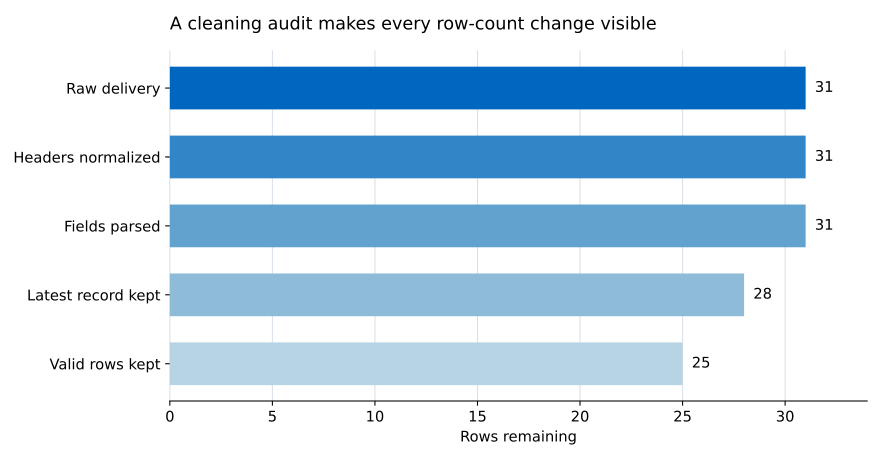
This chart is generated from the same audit DataFrame. It is not a manually redrawn result.
A script finishing without an exception does not prove that its output is correct. Add assertions: checks that stop execution when an expected condition is false.
assert len(clean) == 25
assert clean["registration_id"].is_unique
assert clean["registered_at"].notna().all()
assert clean["fee_usd"].notna().all()
assert set(clean["workshop_track"]) == {
    "Python Basics",
    "SQL Lab",
    "Data Viz",
}
These checks protect the properties that later analysis depends on: one row per registration, usable dates and fees, and only approved workshop names. They are more durable than checking whether the first five rows look reasonable.
Now summarize the clean result by track:
track_summary = (
    clean.groupby("workshop_track", as_index=False)
    .agg(
        registrations=("registration_id", "size"),
        total_fee_usd=("fee_usd", "sum"),
    )
    .sort_values("workshop_track")
)

print(track_summary.to_string(index=False))
print(f"total fee: ${clean['fee_usd'].sum():.2f}")
workshop_track registrations total_fee_usd
Data Viz 8 240.0
Python Basics 10 250.0
SQL Lab 7 280.0
total fee: $770.00Python Basics has the most registrations, with 10. SQL Lab has fewer registrations but the largest fee total because its fee is higher. Complimentary registrations are valid zero-dollar records; they are not missing fees.
Save both the clean table and the audit table. Keeping the audit beside the result makes a future row-count change easier to explain.
clean.to_csv("clean_workshop_registrations.csv", index=False)
audit.to_csv("cleaning_pipeline_audit.csv", index=False)
You can compare your files with the executed clean_workshop_registrations.csv and cleaning_pipeline_audit.csv.
NoneEvery transformation passed to .pipe() must return the object needed by the next stage. A function that changes a DataFrame and has no return statement returns None. The next stage will then fail with an error such as AttributeError: 'NoneType' object has no attribute 'pipe'.
Return the transformed DataFrame explicitly. Avoid inplace=True inside chain functions because many pandas methods return None when used that way.
A function named clean_everything may be short at first, but it gives you no useful boundary when a field changes. Separate header normalization, value standardization, parsing, deduplication, and validation. You can then test and audit them independently.
Filtering immediately after errors="coerce" loses the original reason for failure. Add an issue column first, print or save rejected records, and filter only after the problem is visible. For sensitive or business-critical data, save a separate rejection file rather than discarding those rows.
keep="last" is correct here because the file specification says later export rows replace earlier ones. It is not a universal rule. If arrival order has no meaning, use an update timestamp, compare the duplicate rows, or stop the pipeline and request clarification.
An audit explains structural changes. It cannot decide whether a fee is correct or whether a workshop label has the right business meaning. Pair row counts with domain rules and final assertions.
Keep a snapshot during development and compare it with the input after the pipeline runs:
raw_snapshot = raw.copy(deep=True)
clean, audit = run_pipeline(raw)
assert raw.equals(raw_snapshot)
If this assertion fails, one of your functions is mutating shared input. Rewrite that stage to return an assigned or selected result.
A reusable pandas cleaning pipeline is a sequence of small contracts, not a single clever expression.
Use this checklist when you build your own:
.pipe() in the order they must run.The main benefit is not fewer lines of code. It is being able to point to the exact stage where data changed, run that stage alone, and reuse the same verified route when the next CSV arrives.
 Python
Build an AI Chatbot in Python: A Command-Line LLM Client
A from-scratch walkthrough of the pattern behind every LLM chatbot: one function that sends a message plus conversation history to a chat-completion API, a persona set by a system prompt, and a loop that keeps the conversation going.
Read tutorial
Python
Build an AI Chatbot in Python: A Command-Line LLM Client
A from-scratch walkthrough of the pattern behind every LLM chatbot: one function that sends a message plus conversation history to a chat-completion API, a persona set by a system prompt, and a loop that keeps the conversation going.
Read tutorial
 Software Engineering
The Single Responsibility Principle: One Class, One Reason to Change
The Single Responsibility Principle says a class should have only one reason to change. See it in action: take a Python AuthService that also owns its logging, find why that's a problem, and refactor it into clean, focused classes.
Read tutorial
Software Engineering
The Single Responsibility Principle: One Class, One Reason to Change
The Single Responsibility Principle says a class should have only one reason to change. See it in action: take a Python AuthService that also owns its logging, find why that's a problem, and refactor it into clean, focused classes.
Read tutorial