Title here
Summary here
A tool-using agent needs more than a while loop. Build the small runtime that stands between a model's proposed action and your Python functions, then test every path without an API key.

An AI agent can choose a tool, read its result, and choose another tool. That repeated decision process is an agent loop. A first version often looks like while True: ask a model what to do, run the requested function, and send the result back.
The loop is easy to write. The stopping rules are the important part. What happens when the model calls a function that does not exist? What if an argument is missing? What if it keeps requesting the same lookup? What if it asks to change data without the user’s approval?
This tutorial builds the Python runtime that answers those questions. We will use a fictional room assistant and a deterministic plan instead of a live language model. This keeps every path free to run, easy to inspect, and exactly reproducible. In a real application, the model would produce the proposed tool calls; the same runtime would still decide whether they are allowed to execute.
If tool calls themselves are new to you, start with Function Calling in Python. That tutorial explains the model-to-function round trip. Here we focus on controlling and testing the loop around it.
You need Python 3.10 or later and basic knowledge of dictionaries, functions, and for loops. The agent runtime uses only Python’s standard library. Matplotlib is needed only to rebuild the test-outcome chart:
python -m venv .venv
source .venv/bin/activate
python -m pip install matplotlib
The code and output in this tutorial were executed with Python 3.13.2 and Matplotlib 3.11.0. Download the tutorial’s synthetic safety cases if you want the same six inputs. The dataset is original, fictional, and released under CC0 1.0, so you may reuse it without restriction.
No API key is required. The point is to test the runtime independently from a model. A model response can vary; a safety rule should not.
A language model does not receive direct access to a Python function. It proposes a tool name and arguments. Your runtime receives that proposal and checks it before anything happens.
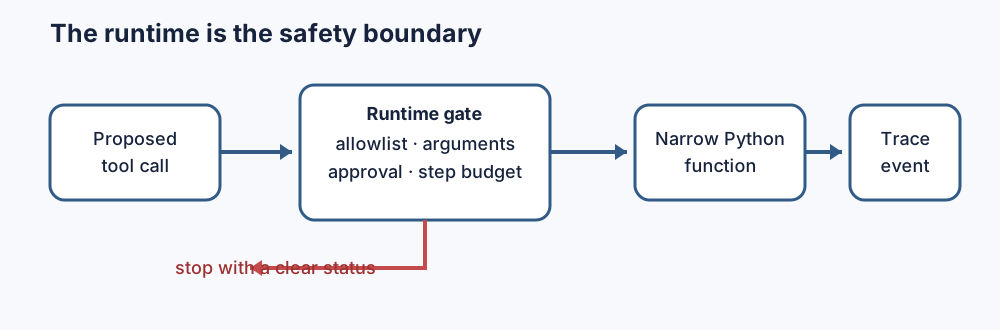
The gate in this tutorial applies four rules in order:
An allowlist is an explicit list of permitted choices. Anything absent is blocked. A step budget is the maximum number of decisions one run may take. Neither rule tries to decide whether the model is intelligent or trustworthy. They place fixed boundaries around variable output.
Current OpenAI function tools use a name, description, and JSON Schema parameters, and support strict parameter validation. That improves the model’s output shape, but your own runtime is still the enforcement point. The official function-calling guide documents the current API exchange. OWASP’s guidance on excessive agency also recommends narrow tools, minimum permissions, downstream checks, approval for high-impact actions, monitoring, and rate limits.
Our fictional service has two rooms. One tool finds rooms, one checks a time, and one proposes a booking. Notice that there is no general run_command tool and no edit_database tool. Each function has one limited job.
ROOMS = {
    "focus-a": {"capacity": 2, "equipment": ["screen"]},
    "studio-b": {"capacity": 6, "equipment": ["screen", "camera"]},
}
RESERVATIONS = {("studio-b", "14:00")}

def find_room(arguments):
    people = arguments["people"]
    equipment = arguments["equipment"]
    matches = [
        name for name, room in ROOMS.items()
        if room["capacity"] >= people
        and equipment in room["equipment"]
    ]
    return {"matches": matches}

def check_slot(arguments):
    room, time = arguments["room"], arguments["time"]
    return {
        "room": room,
        "time": time,
        "available": (room, time) not in RESERVATIONS,
    }

def propose_booking(arguments):
    return {"proposed": True, **arguments}
propose_booking deliberately returns a proposal; it does not add anything to RESERVATIONS. A production system could show this proposal to the user and, after the user approves the exact room and time, send it to a separate booking service. Keeping the proposal and the final change separate makes the point of control visible.
Now put only these three functions in the allowlist:
TOOLS = {
    "find_room": find_room,
    "check_slot": check_slot,
    "propose_booking": propose_booking,
}
This dictionary is also a dispatcher, which maps a requested tool name to the corresponding function. The expression TOOLS[tool_name](arguments) selects and runs that function. More importantly, membership in TOOLS is a policy decision. An attempted delete_reservations call cannot run because no such capability is registered.
Structured output is still input from outside your runtime. Check it before passing it to a function. In this small example, a dictionary maps each tool to its required fields and Python types:
REQUIRED = {
    "find_room": {"people": int, "equipment": str},
    "check_slot": {"room": str, "time": str},
    "propose_booking": {"room": str, "time": str},
}

def validate(tool_name, arguments):
    for field, expected_type in REQUIRED[tool_name].items():
        if field not in arguments:
            return f"missing field: {field}"
        if not isinstance(arguments[field], expected_type):
            return f"{field} must be {expected_type.__name__}"
    return None
The function returns None when arguments pass. Otherwise, it returns a short error that can go into the trace. A larger application should use JSON Schema or a validation library and add domain checks. Type validation can confirm that time is a string; a domain check must confirm that 10:00 is a valid opening time.
Small errors should become clear statuses, not deep exceptions. If a proposed check_slot call contains only {"room": "studio-b"}, validation returns:
missing field: timeThe tool never executes, so it never reaches arguments["time"] and never raises a confusing KeyError.
A trace is an ordered record of what a program did. Here, each trace event stores a step number, event type, tool name, arguments, and result or reason. Do not log secrets or personal data by default; record only what you need to debug and evaluate the run.
The loop below receives a plan as a list of tool names. In a live application, model-generated tool calls would supply the tool names and arguments. The checks would remain in your runtime.
def run_agent(plan, arguments_for, approved=False, max_steps=3):
    trace = []

    for step, tool_name in enumerate(plan, start=1):
        if step > max_steps:
            return {"status": "step_limit", "trace": trace}

        if tool_name == "finish":
            trace.append({"step": step, "event": "finish"})
            return {"status": "completed", "trace": trace}

        if tool_name not in TOOLS:
            trace.append({
                "step": step,
                "event": "blocked",
                "tool": tool_name,
                "reason": "not allowlisted",
            })
            return {"status": "tool_error", "trace": trace}

        arguments = arguments_for(tool_name)
        error = validate(tool_name, arguments)
        if error:
            trace.append({
                "step": step, "event": "blocked",
                "tool": tool_name, "reason": error,
            })
            return {"status": "argument_error", "trace": trace}

        # This tutorial treats a booking proposal as approval-gated.
        if tool_name == "propose_booking" and not approved:
            trace.append({
                "step": step, "event": "approval_required",
                "tool": tool_name, "arguments": arguments,
            })
            return {"status": "approval_required", "trace": trace}

        result = TOOLS[tool_name](arguments)
        trace.append({
            "step": step, "event": "tool_result",
            "tool": tool_name, "arguments": arguments,
            "result": result,
        })

    return {"status": "step_limit", "trace": trace}
The order matters. The code checks the tool name before indexing REQUIRED or TOOLS. It validates arguments before execution. It checks approval before running the approval-gated booking tool. Each stopped run returns a specific status that a caller can handle. In this example, the tool returns a proposal rather than changing the reservation set.
In this teaching version, approval is one Boolean attached to the test case. In production, bind approval to the exact action and arguments, such as propose_booking(studio-b, 10:00), and verify it again before the final booking operation. Approval for one room or time should not authorize a different booking.
The first test asks for a room for four people with a camera at 10:00. Its deterministic plan is find_room, check_slot, then finish. The complete executed trace is:
step 1  tool_result  find_room  -> {'matches': ['studio-b']}
step 2  tool_result  check_slot -> {'room': 'studio-b', 'time': '10:00', 'available': True}
step 3  finish
status: completed
Read it from top to bottom. Step 1 finds one suitable room. Step 2 checks the actual requested time and reports that it is available. Step 3 stops normally. completed means the plan ended inside its budget; it does not mean the room was booked.
That distinction prevents a common reporting error. A successful lookup and a successful state change are different outcomes. Give them different tools, trace events, and user messages.
The synthetic dataset contains six scenarios. The build script runs each case and asserts that its actual status equals expected_status. Here, SCENARIOS is the list used by the build and run_agent() is the tested loop:
runs = [run_agent(case) for case in SCENARIOS]

assert all(
    run["status"] == case["expected_status"]
    for run, case in zip(runs, SCENARIOS)
)
Here is the real console output from the build:
C01: completed         steps=3 last_event=finish
C02: approval_required steps=1 last_event=approval_required
C03: completed         steps=2 last_event=finish
C04: tool_error        steps=1 last_event=blocked
C05: argument_error    steps=1 last_event=blocked
C06: step_limit        steps=3 last_event=tool_result
Two cases finish. Four stop for four different reasons. C04 even contains approval, but its attempted delete_reservations call remains blocked: user approval does not create a capability that the allowlist excluded. C06’s plan requests four lookups followed by finish; the runtime executes three lookups, then stops before step 4.
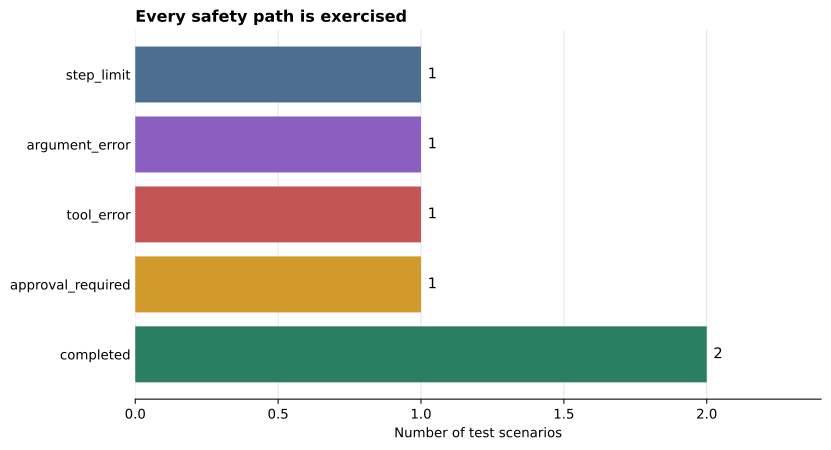
This chart is small, but it exposes an important testing habit. A suite with only green, completed runs has not shown that its safety controls work. Each stop path needs a test of its own.
The loop never stops. A while True loop needs a normal finish condition and a hard step limit. Add both. Also place request and token limits outside the loop when it calls a paid service.
Unknown names reach the dispatcher. Check tool_name in TOOLS before using TOOLS[tool_name]. Never turn a generated name into eval(...), a shell command, or a dynamic import.
Validation checks only types. Add range and membership rules. For example, require people > 0, check that the room exists, and parse time into a known format. Types are the first layer, not the entire policy.
Approval is too broad. Do not store one permanent approved=True flag for all future actions. Record who approved which operation, with which arguments, and when. Ask again if the proposed action changes, and check the approval at the point where the state change will occur.
A trace leaks sensitive data. Tool arguments and results may contain names, addresses, access tokens, or private documents. Redact fields, restrict trace access, and define a retention period before collecting production traces.
The test uses a live model for every assertion. Model output can change between runs. Keep deterministic runtime tests like these, then add a smaller set of integration tests for the model-to-runtime boundary.
A safe agent loop treats every model tool call as a proposal. The runtime, not the model, controls execution:
The durable mental model is simple: proposal, gate, function, trace. You can connect a model later, change providers, or move from a local script to an API. These boundaries remain useful because they belong to your Python program, where you can test and enforce them.
 Python
Build an AI Chatbot in Python: A Command-Line LLM Client
A from-scratch walkthrough of the pattern behind every LLM chatbot: one function that sends a message plus conversation history to a chat-completion API, a persona set by a system prompt, and a loop that keeps the conversation going.
Read tutorial
Python
Build an AI Chatbot in Python: A Command-Line LLM Client
A from-scratch walkthrough of the pattern behind every LLM chatbot: one function that sends a message plus conversation history to a chat-completion API, a persona set by a system prompt, and a loop that keeps the conversation going.
Read tutorial
 Software Engineering
The Single Responsibility Principle: One Class, One Reason to Change
The Single Responsibility Principle says a class should have only one reason to change. See it in action: take a Python AuthService that also owns its logging, find why that's a problem, and refactor it into clean, focused classes.
Read tutorial
Software Engineering
The Single Responsibility Principle: One Class, One Reason to Change
The Single Responsibility Principle says a class should have only one reason to change. See it in action: take a Python AuthService that also owns its logging, find why that's a problem, and refactor it into clean, focused classes.
Read tutorial