Title here
Summary here
A beginner-friendly NumPy walkthrough of self-attention using one small support ticket: calculate query-key similarity, scale it, apply stable softmax and a padding mask, then read the resulting context vectors and heatmap.

Suppose a support ticket says refund for damaged parcel. A useful text model should connect refund with both damaged and parcel, even though those words have different jobs in the sentence. Attention is a calculation that lets each token collect relevant information from every token in the same sequence.
This tutorial builds that calculation with NumPy. We will not train a language model. Instead, we will use five tiny feature vectors that you can inspect by eye. That keeps the focus on the mechanics: matrix multiplication, scaling, masking, softmax, and the weighted sum that creates each token’s new representation.
If text becoming numbers is still unfamiliar, start with NLP preprocessing in Python. Here, we begin after tokenization and vector creation.
You need Python 3.11 or newer and basic knowledge of lists and NumPy arrays. A token is one piece of a text sequence, such as a word. A vector is a short row of numbers used to represent that token.
Create a virtual environment and install the three packages used by the reproducible example:
python -m venv .venv
source .venv/bin/activate          # Windows: .venv\Scripts\activate
python -m pip install numpy pandas matplotlib
The published run used Python 3.13.2, NumPy 2.5.1, pandas 3.0.3, and Matplotlib 3.11.0. You can download the synthetic ticket vectors and save the file as support_ticket_vectors.csv, or type the small table below yourself. The dataset was created for this lesson, contains no real customer data, and is released under CC0 1.0.
In this example, self-attention gives each token three vectors with different roles:
A helpful mental model is search. A query is the search request, keys are index entries used to judge matches, and values are the records returned from good matches. Attention first matches each query against all keys. It then normalizes the match scores into shares that total 100%. Finally, it collects that share of every value. In a trained Transformer, the model learns how to create these vectors. Our small example supplies them directly so that every number stays visible.
Keep the roles separate. The key decides how well a token matches, but the value decides what information that token sends. Changing a value does not change the attention weights for the current calculation. It changes the final context vector. In the same way, changing a query can change the weights without changing the information stored in the values. This separation gives a model flexibility: it can learn one numeric space for finding relevant tokens and another for carrying useful content.
The fictional ticket has three query and key features: request, urgency, and object. Its values have two features: refund signal and priority signal. These hand-designed features are teaching aids, not outputs from a trained model. <pad> is a padding token added only to make the sequence a fixed length. It is not part of the ticket.
Load the CSV and separate columns by their prefixes:
import numpy as np
import pandas as pd

ticket = pd.read_csv("support_ticket_vectors.csv")
queries = ticket.filter(regex=r"^q_").to_numpy(float)
keys = ticket.filter(regex=r"^k_").to_numpy(float)
values = ticket.filter(regex=r"^v_").to_numpy(float)

print(ticket.to_string(index=False))
print("query shape:", queries.shape)
print("value shape:", values.shape)
token q_request q_urgency q_object k_request k_urgency k_object v_refund v_priority
refund 1.0 0.2 0.0 1.0 0.1 0.0 1.0 0.2
for 0.0 0.0 0.0 0.0 0.0 0.0 0.0 0.0
damaged 0.7 1.0 0.2 0.8 1.0 0.1 0.7 1.0
parcel 0.3 0.2 1.0 0.2 0.2 1.0 0.2 0.4
<pad> 0.0 0.0 0.0 0.0 0.0 0.0 0.0 0.0
query shape: (5, 3)
value shape: (5, 2)There are five token rows. Each query and key has three features, while each value has two. Attention can therefore compare tokens in a three-dimensional matching space and return information in a two-dimensional value space.
The first calculation compares every query with every key using a dot product. A dot product multiplies matching vector positions and adds the results. Similar directions produce a larger score.
NumPy’s @ operator performs matrix multiplication. Transposing keys changes its shape from (5, 3) to (3, 5), so (5, 3) @ (3, 5) produces one score for every query-key pair:
raw_scores = queries @ keys.T
print("score shape:", raw_scores.shape)
print("refund raw scores:", np.round(raw_scores[0], 3))
score shape: (5, 5)
refund raw scores: [1.02 0. 1. 0.24 0. ]The refund query matches its own key at 1.02 and the damaged key at 1.00. It matches parcel less strongly at 0.24. A zero does not yet mean “ignore this token”; it is simply a low score.
Scaled dot-product attention divides all scores by the square root of the key width, written as sqrt(d_k). Here, d_k is 3:
key_width = keys.shape[-1]
scaled_scores = raw_scores / np.sqrt(key_width)
print("key width:", key_width)
print("refund scaled scores:", np.round(scaled_scores[0], 3))
key width: 3
refund scaled scores: [0.589 0. 0.577 0.139 0. ]Why divide? As vector width grows, dot products tend to grow too. Large inputs make softmax concentrate most weight on very few positions. Scaling controls that effect. In this example, the largest weight across the unmasked matrix falls from 0.450 without scaling to 0.335 with scaling. This does not force attention to be uniform; it keeps score size from growing only because vectors have more features.
The formula so far is QKᵀ / sqrt(d_k). This is the score part of the scaled dot-product attention described in the original Transformer paper. NumPy documents the exact broadcasting and shape behavior of matmul.
Sequences in one batch often have different lengths. Short sequences receive padding so their arrays have the same shape. The padding token must not contribute context.
A mask marks which key positions are valid. We replace invalid scores with negative infinity before softmax. The exponential of negative infinity is zero, so padding receives exactly zero weight:
valid_tokens = ticket["token"].ne("<pad>").to_numpy()
masked_scores = np.where(
    valid_tokens[np.newaxis, :],
    scaled_scores,
    -np.inf,
)
print("valid keys:", valid_tokens)
print("refund masked scores:", np.round(masked_scores[0], 3))
valid keys: [ True True True True False]
refund masked scores: [0.589 0. 0.577 0.139 -inf]The added axis makes the one-dimensional mask apply to every query row. We mask columns because columns represent keys that may receive attention. Masking only the <pad> query row would not stop real tokens from reading the padding key. This teaching example still computes a query row for <pad>; production code may remove or ignore that row later. The important rule here is that no query can collect information from the padding key.
Softmax converts one row of arbitrary scores into non-negative weights that sum to 1. Subtracting the row maximum before calling exp does not change the final ratios, but it avoids overflow when scores are large. The function below applies that stable calculation to every row using NumPy’s element-wise exp:
def stable_softmax(scores):
    shifted = scores - scores.max(axis=-1, keepdims=True)
    exponentials = np.exp(shifted)
    return exponentials / exponentials.sum(axis=-1, keepdims=True)

weights = stable_softmax(masked_scores)
print("refund weights:", np.round(weights[0], 3))
print("row sums:", np.round(weights.sum(axis=1), 6))
print("padding column:", np.round(weights[:, -1], 6))
refund weights: [0.314 0.174 0.311 0.2 0. ]
row sums: [1. 1. 1. 1. 1.]
padding column: [0. 0. 0. 0. 0.]Read the first row from left to right. The refund query assigns 31.4% to itself and 31.1% to damaged. It assigns 20.0% to parcel, 17.4% to the neutral word for, and no weight to padding. Our tiny hand-built features do not make neutral words disappear; they merely score lower. A trained model learns better projections from data.
Every row sums to 1, which is the fastest basic check for softmax output. The final column is all zeros, which confirms that the mask works.
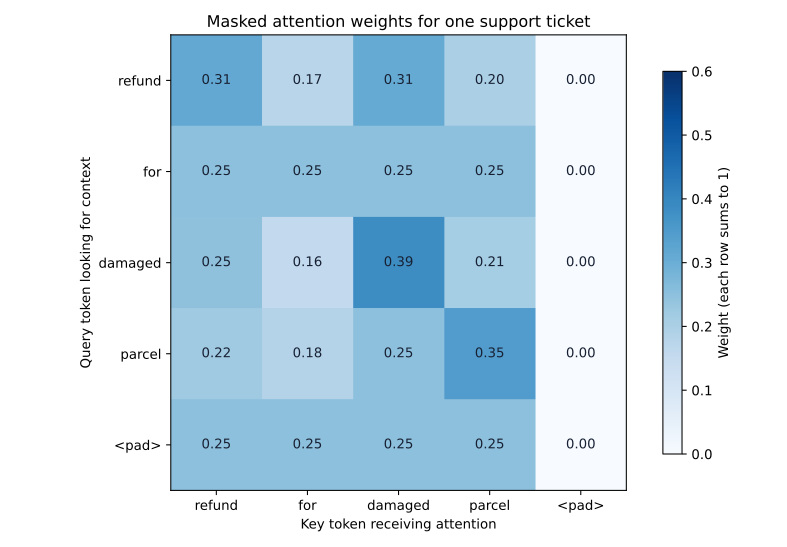
Each heatmap row is one query asking where to read context. Each column is a key that can receive attention. Darker cells have larger weights. Do not read a column as a predicted label: it is a share of information flow for one query.
It helps to pause and track only refund. Its query vector is [1.0, 0.2, 0.0]. Compare it with the damaged key [0.8, 1.0, 0.1] by multiplying matching positions and adding them:
(1.0×0.8) + (0.2×1.0) + (0.0×0.1) = 1.0The key width is 3, so scaling changes this raw score to 1.0 / sqrt(3) = 0.577. Softmax considers that score together with the other valid scores in the row. It gives damaged a weight of 0.311. The weight has meaning only within this row: it says that damaged supplies 31.1% of the value mixture created for the refund query.
Now compare that with <pad>. Its unmasked score would be zero. Zero can still receive a positive softmax weight because exp(0) equals 1. The mask changes the score to negative infinity first, so its exponential becomes zero. That is why masking is necessary even when a padding vector contains only zeros.
The same calculation runs for all five queries at once. Matrix operations do not change the idea; they save us from writing 25 separate dot products and five separate weighted sums.
The weights decide how much of every value vector to collect. One more matrix multiplication performs all weighted sums at once:
context = weights @ values
print("context shape:", context.shape)
print("refund context:", np.round(context[0], 3))
context shape: (5, 2)
refund context: [0.572 0.454]The new refund representation has two features because the values have two features. Its refund signal is 0.572, and its priority signal is 0.454. For example, the refund part is the sum of each attention weight multiplied by each token’s v_refund value:
0.314×1.0 + 0.174×0.0 + 0.311×0.7 + 0.200×0.2 + 0.000×0.0 = 0.572This is the key result: attention does not return the weights as its final output. It uses the weights to blend value vectors into a context-aware vector for each token.
Notice that the output has five rows, just like the input sequence. Self-attention does not reduce this ticket to one row. It produces a refreshed representation for every position. A later layer can use those context-aware rows for tasks such as classification, generation, or information extraction. The attention calculation itself does not decide the final task.
Here is the complete reusable function. It returns intermediate values as well as the context because those values are useful for tests and visual checks:
def scaled_dot_product_attention(queries, keys, values, valid_tokens=None):
    scores = queries @ keys.T / np.sqrt(keys.shape[-1])

    if valid_tokens is not None:
        scores = np.where(valid_tokens[np.newaxis, :], scores, -np.inf)

    weights = stable_softmax(scores)
    context = weights @ values
    return context, weights, scores
This teaching function expects one sequence with two-dimensional arrays. Production libraries also support batches and multiple attention heads. For comparison, PyTorch’s current scaled_dot_product_attention accepts higher-dimensional tensors, masks, dropout, and optional causal behavior.
The matrix multiplication reports a shape mismatch. Queries and keys must have the same final width. Values may have a different final width. Print all three shapes before multiplying.
The mask has the opposite meaning. This example uses True for valid tokens. Some APIs use True for positions to block, while others use additive masks containing negative infinity. Read the library’s mask rules before transferring code.
Padding still has a small weight. Apply the mask before softmax, not after it. Setting weights to zero after softmax makes the remaining row sum less than 1 unless you normalize again.
Softmax returns nan or an overflow warning. Subtract the maximum score in each row before np.exp. Also check that every row has at least one valid key. If a row is fully masked, its maximum is negative infinity, so this implementation cannot form a valid probability distribution for it.
The result looks too uniform. That is possible with small or similar scores. Attention is not required to select one winner. Verify the inputs and scaling before assuming there is an error.
The result proves what the model “understands.” Attention weights show how this calculation mixes values. They are useful diagnostics, but they are not a complete explanation of a model’s reasoning or behavior.
Scaled dot-product attention is a short sequence of operations with distinct jobs:
queries @ keys.T calculates every query-key match.sqrt(d_k) controls score growth as vector width increases.weights @ values creates one context vector per query.The durable mental model is “match, normalize, collect.” Queries match keys, softmax normalizes those matches, and the resulting weights collect values. Once these five small steps are clear in NumPy, batched and multi-head implementations become extensions of the same calculation rather than a new idea.
 Python
Build an AI Chatbot in Python: A Command-Line LLM Client
A from-scratch walkthrough of the pattern behind every LLM chatbot: one function that sends a message plus conversation history to a chat-completion API, a persona set by a system prompt, and a loop that keeps the conversation going.
Read tutorial
Python
Build an AI Chatbot in Python: A Command-Line LLM Client
A from-scratch walkthrough of the pattern behind every LLM chatbot: one function that sends a message plus conversation history to a chat-completion API, a persona set by a system prompt, and a loop that keeps the conversation going.
Read tutorial
 Software Engineering
The Single Responsibility Principle: One Class, One Reason to Change
The Single Responsibility Principle says a class should have only one reason to change. See it in action: take a Python AuthService that also owns its logging, find why that's a problem, and refactor it into clean, focused classes.
Read tutorial
Software Engineering
The Single Responsibility Principle: One Class, One Reason to Change
The Single Responsibility Principle says a class should have only one reason to change. See it in action: take a Python AuthService that also owns its logging, find why that's a problem, and refactor it into clean, focused classes.
Read tutorial