Title here
Summary here
SQL operators are the small pieces every WHERE clause is built from. This guide groups them into families — comparison, logical, arithmetic, and shorthand membership and pattern operators — then works through all of them on a small plant-shop database you can reproduce yourself, including the precedence and NULL traps that catch people off guard.

Every WHERE clause you’ve ever written is built out of the same small set of parts: a handful of symbols that compare values, combine conditions, or do arithmetic. Once you can name those parts and know what each one returns, a complicated-looking filter stops being a wall of punctuation and turns into a short, readable sentence.
Most people pick these operators up one at a time, out of order, from whatever query they happen to be copying — which is how you end up using AND and OR for years without noticing they don’t have equal precedence, or writing WHERE column = NULL and quietly getting the wrong answer. Our post on the core SQL skills covers WHERE, JOIN, and GROUP BY at a higher level; this one zooms in one level further, on the operators those skills are built from. We’ll build a small mental model first, then work through every operator family hands-on, on one small database you can regenerate exactly.
Every operator in SQL belongs to one of four families, and the family tells you what kind of value comes out the other side:
+, -, *, /, %) take numbers and return a number.=, <>, >, <, >=, <=) take two values and return a true/false answer about how they relate.AND, OR, NOT) take one or more true/false answers and combine them into a single true/false answer.IN, BETWEEN, LIKE, IS NULL) look like their own keywords, but each one is really a compact way of writing a chain of ordinary comparisons joined with OR or AND.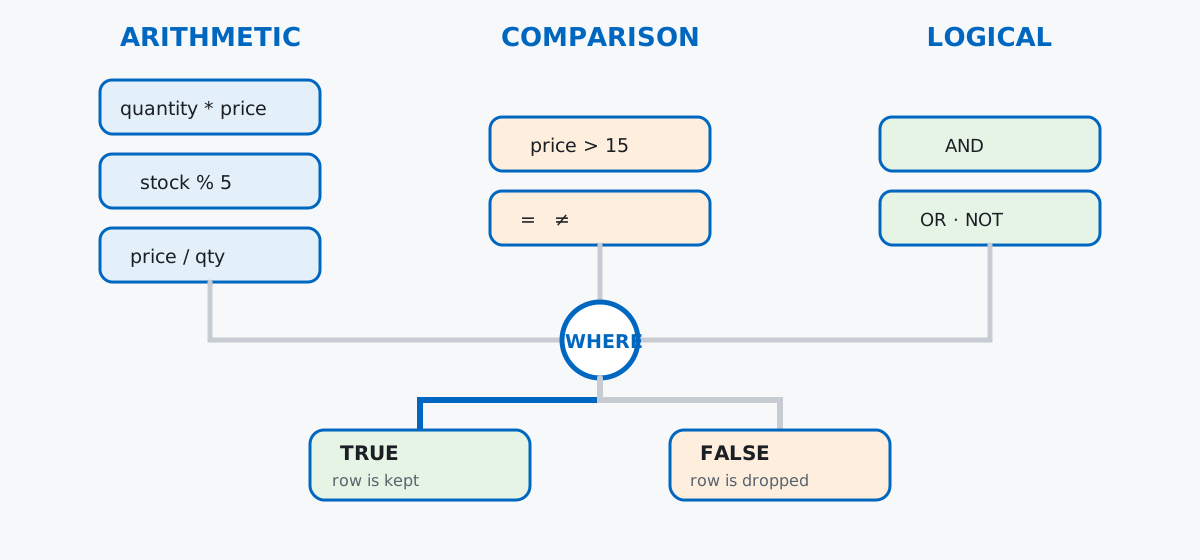
WHERE only ever does one thing with all of this: it keeps the rows where the final answer, after all your operators have run, comes out TRUE. Everything below is really just different ways of building that final true/false answer.
No download needed — a small plant shop, typed out by hand, is enough to exercise every operator family. Imagine a shop called Terra that sells houseplants and kitchen herbs, plus a short order history:
import sqlite3

con = sqlite3.connect(":memory:")
cur = con.cursor()

cur.executescript("""
CREATE TABLE plants (
    id INTEGER PRIMARY KEY,
    name TEXT NOT NULL,
    category TEXT NOT NULL,
    price REAL NOT NULL,
    stock INTEGER NOT NULL,
    origin_country TEXT,
    indoor INTEGER NOT NULL
);

CREATE TABLE orders (
    id INTEGER PRIMARY KEY,
    plant_id INTEGER NOT NULL REFERENCES plants(id),
    customer_name TEXT NOT NULL,
    quantity INTEGER NOT NULL,
    discount_pct REAL
);

INSERT INTO plants (id, name, category, price, stock, origin_country, indoor) VALUES
    (1,  'Zebra Cactus',      'Succulent', 8.50,  22, 'South Africa', 1),
    (2,  'Golden Barrel',     'Succulent', 14.00, 9,  'Mexico',       1),
    (3,  'String of Pearls',  'Succulent', 11.25, 15, NULL,           1),
    (4,  'Boston Fern',       'Fern',      13.75, 7,  'Brazil',       1),
    (5,  'Maidenhair Fern',   'Fern',      16.50, 4,  NULL,           1),
    (6,  'Staghorn Fern',     'Fern',      28.00, 3,  'Australia',    1),
    (7,  'Peace Lily',        'Flowering', 19.99, 11, 'Colombia',     1),
    (8,  'African Violet',    'Flowering', 9.25,  18, 'Tanzania',     1),
    (9,  'Orchid',            'Flowering', 24.50, 6,  'Thailand',     1),
    (10, 'Marigold',          'Flowering', 6.00,  30, NULL,           0),
    (11, 'Sweet Basil',       'Herb',      4.50,  40, 'Italy',        0),
    (12, 'Rosemary',          'Herb',      5.25,  25, NULL,           0),
    (13, 'Mint',              'Herb',      4.00,  35, 'Morocco',      0),
    (14, 'Lavender',          'Herb',      7.75,  16, 'France',       0);

INSERT INTO orders (id, plant_id, customer_name, quantity, discount_pct) VALUES
    (1,  1,  'Anke',    3, NULL),
    (2,  4,  'Bram',    2, 10.0),
    (3,  7,  'Anke',    1, NULL),
    (4,  9,  'Chidi',   2, 15.0),
    (5,  11, 'Bram',    5, NULL),
    (6,  2,  'Dena',    1, NULL),
    (7,  6,  'Chidi',   1, 20.0),
    (8,  13, 'Anke',    4, NULL),
    (9,  8,  'Dena',    3, 5.0),
    (10, 14, 'Bram',    2, NULL),
    (11, 3,  'Chidi',   2, NULL),
    (12, 10, 'Dena',    6, 10.0);
""")
con.commit()

cur.execute("SELECT name, category, price, stock, origin_country, indoor FROM plants ORDER BY id LIMIT 5")
cur.fetchall()
[('Zebra Cactus', 'Succulent', 8.5, 22, 'South Africa', 1),
('Golden Barrel', 'Succulent', 14.0, 9, 'Mexico', 1),
('String of Pearls', 'Succulent', 11.25, 15, None, 1),
('Boston Fern', 'Fern', 13.75, 7, 'Brazil', 1),
('Maidenhair Fern', 'Fern', 16.5, 4, None, 1)]Fourteen plants across four categories, twelve orders. origin_country is deliberately NULL for a few plants grown locally with no single country of origin worth recording — that gap matters later. (The outputs in this post come from SQLite 3.50, bundled with Python 3.13’s sqlite3 module — the syntax works on any recent SQLite version.)
A comparison operator takes two values and answers one question: how do they relate? SQL has six: = (equal), <> (not equal — some databases also accept !=), >, <, >=, and <=. Which plants cost more than €15?
cur.execute("SELECT name, price FROM plants WHERE price > 15 ORDER BY price")
cur.fetchall()
[('Maidenhair Fern', 16.5), ('Peace Lily', 19.99), ('Orchid', 24.5), ('Staghorn Fern', 28.0)]Four plants clear the €15 bar. <> asks the opposite kind of question — everything that isn’t a match:
cur.execute("SELECT name, category FROM plants WHERE category <> 'Herb' ORDER BY name LIMIT 5")
cur.fetchall()
[('African Violet', 'Flowering'), ('Boston Fern', 'Fern'), ('Golden Barrel', 'Succulent'),
('Maidenhair Fern', 'Fern'), ('Marigold', 'Flowering')]Comparisons aren’t limited to WHERE — they can sit in a SELECT list too, which is a handy way to sanity-check a threshold before committing to it in a filter. The SQLite expression documentation lists the complete operator precedence table, if you ever need the exhaustive version.
AND, OR, and NOT take the true/false answers comparisons produce and combine them into one final answer. AND narrows: both sides must be true. Which indoor plants are also under €15?
cur.execute("SELECT name, price, indoor FROM plants WHERE indoor = 1 AND price < 15 ORDER BY price")
cur.fetchall()
[('Zebra Cactus', 8.5, 1), ('African Violet', 9.25, 1), ('String of Pearls', 11.25, 1),
('Boston Fern', 13.75, 1), ('Golden Barrel', 14.0, 1)]OR widens instead — either side being true is enough:
cur.execute("SELECT name, category FROM plants WHERE category = 'Fern' OR category = 'Flowering' ORDER BY category, name")
cur.fetchall()
[('Boston Fern', 'Fern'), ('Maidenhair Fern', 'Fern'), ('Staghorn Fern', 'Fern'),
('African Violet', 'Flowering'), ('Marigold', 'Flowering'), ('Orchid', 'Flowering'), ('Peace Lily', 'Flowering')]NOT flips a single answer — true becomes false and vice versa:
cur.execute("SELECT name, indoor FROM plants WHERE NOT indoor = 1 ORDER BY name")
cur.fetchall()
[('Lavender', 0), ('Marigold', 0), ('Mint', 0), ('Rosemary', 0), ('Sweet Basil', 0)]Five plants live outdoors — the flip side of the nine indoor = 1 rows. AND and OR feel interchangeable at first because both just glue two conditions together, but they don’t have equal precedence — the gotchas section below shows exactly how that bites.
+, -, *, /, and % work on numeric columns the same way they’d work in Python. The most common use is turning two columns into a third, computed one — quantity times price, right inside the query:
cur.execute("""
    SELECT o.id, p.name, o.quantity, p.price, o.quantity * p.price AS order_total
    FROM orders AS o
    JOIN plants AS p ON p.id = o.plant_id
    ORDER BY o.id
    LIMIT 5
""")
cur.fetchall()
[(1, 'Zebra Cactus', 3, 8.5, 25.5), (2, 'Boston Fern', 2, 13.75, 27.5), (3, 'Peace Lily', 1, 19.99, 19.99),
(4, 'Orchid', 2, 24.5, 49.0), (5, 'Sweet Basil', 5, 4.5, 22.5)]order_total never existed as a column — it’s computed fresh on every run, straight from quantity and price. % (modulo) is the operator people forget about: it returns the remainder after division, useful for anything that repeats in a cycle. If a shop restocks in boxes of five, how many loose units are left over per plant?
cur.execute("SELECT name, stock, stock % 5 AS leftover_after_boxes_of_5 FROM plants ORDER BY name LIMIT 5")
cur.fetchall()
[('African Violet', 18, 3), ('Boston Fern', 7, 2), ('Golden Barrel', 9, 4), ('Lavender', 16, 1), ('Maidenhair Fern', 4, 4)]/ looks just as simple as the others, and that’s exactly what makes it worth a closer look in the gotchas section.
IN and BETWEEN: Shorthand for Multiple ComparisonsIN is shorthand for a chain of = comparisons joined by OR — category IN ('Succulent', 'Herb') means exactly the same thing as category = 'Succulent' OR category = 'Herb', just shorter and easier to extend:
cur.execute("SELECT name, category FROM plants WHERE category IN ('Succulent', 'Herb') ORDER BY category, name")
cur.fetchall()
[('Lavender', 'Herb'), ('Mint', 'Herb'), ('Rosemary', 'Herb'), ('Sweet Basil', 'Herb'),
('Golden Barrel', 'Succulent'), ('String of Pearls', 'Succulent'), ('Zebra Cactus', 'Succulent')]BETWEEN is the same trick for a range — shorthand for >= and <= joined by AND, and both ends are inclusive:
cur.execute("SELECT name, price FROM plants WHERE price BETWEEN 10 AND 20 ORDER BY price")
cur.fetchall()
[('String of Pearls', 11.25), ('Boston Fern', 13.75), ('Golden Barrel', 14.0), ('Maidenhair Fern', 16.5), ('Peace Lily', 19.99)]Five plants land in the €10–€20 band, boundaries included — a plant priced at exactly €20 would still qualify.
LIKE: Shorthand for Pattern Matching TextLIKE is a comparison built for partial text matches, using two wildcards: % stands for any run of characters (including none), and _ stands for exactly one character. Which plants have “Fern” anywhere in their name?
cur.execute("SELECT name FROM plants WHERE name LIKE '%Fern%' ORDER BY name")
cur.fetchall()
[('Boston Fern',), ('Maidenhair Fern',), ('Staghorn Fern',)]_ is pickier — it matches one character, no more, no less. A four-letter name ending in “int”:
cur.execute("SELECT name FROM plants WHERE name LIKE '_int' ORDER BY name")
cur.fetchall()[('Mint',)]_int matches Mint (one leading character, then int) but wouldn’t match Peppermint — the underscore only ever stands for one character, not any number of them the way % does.
IS NULL and IS NOT NULL: The NULL-Aware ComparisonNULL means “unknown,” not zero or empty text, and SQL’s three-valued logic treats any ordinary comparison against an unknown value as itself unknown — never TRUE. That makes = useless for finding missing values:
cur.execute("SELECT COUNT(*) FROM plants WHERE origin_country = NULL")
cur.fetchall()[(0,)]Zero rows, even though four plants genuinely have no recorded origin_country. IS NULL is special-cased precisely to sidestep this three-valued trap:
cur.execute("SELECT name, origin_country FROM plants WHERE origin_country IS NULL ORDER BY name")
cur.fetchall()
[('Maidenhair Fern', None), ('Marigold', None), ('Rosemary', None), ('String of Pearls', None)]IS NOT NULL is the mirror image, and confirms the other ten plants have a recorded origin:
cur.execute("SELECT COUNT(*) FROM plants WHERE origin_country IS NOT NULL")
cur.fetchall()[(10,)]If a WHERE clause on a nullable column ever comes back with suspiciously few rows, this is the first thing to check.
Integer division silently truncates. SQLite keeps / an integer operation whenever both sides are integers — it doesn’t round, it just drops the remainder:
cur.execute("SELECT 7 / 2 AS truncated, 7.0 / 2 AS exact")
cur.fetchall()
[(3, 3.5)]Run the same trap against real order data — quantity / 2 for the first five orders:
cur.execute("""
    SELECT o.id, o.quantity, o.quantity / 2 AS half_int, o.quantity / 2.0 AS half_real
    FROM orders AS o ORDER BY o.id LIMIT 5
""")
cur.fetchall()
[(1, 3, 1, 1.5), (2, 2, 1, 1.0), (3, 1, 0, 0.5), (4, 2, 1, 1.0), (5, 5, 2, 2.5)]Order 3’s single item becomes 0 under integer division — not an error, not a warning, just a quietly wrong number. Multiply one side by 1.0 (or CAST it to REAL) whenever a division needs to keep its fractional part.
AND binds tighter than OR, so unparenthesized mixes don’t mean what they look like. The intent here is “ferns or flowering plants under €15”:
cur.execute("""
    SELECT name, category, price FROM plants
    WHERE category = 'Fern' OR category = 'Flowering' AND price < 15
    ORDER BY category, price
""")
cur.fetchall()
[('Boston Fern', 'Fern', 13.75), ('Maidenhair Fern', 'Fern', 16.5), ('Staghorn Fern', 'Fern', 28.0),
('Marigold', 'Flowering', 6.0), ('African Violet', 'Flowering', 9.25)]Every fern comes back regardless of price, including the €28 Staghorn Fern — because SQL reads this as category = 'Fern' OR (category = 'Flowering' AND price < 15), not the intended “(fern or flowering) and under €15.” Parenthesize explicitly to get what you actually meant:
cur.execute("""
    SELECT name, category, price FROM plants
    WHERE (category = 'Fern' OR category = 'Flowering') AND price < 15
    ORDER BY category, price
""")
cur.fetchall()
[('Boston Fern', 'Fern', 13.75), ('Marigold', 'Flowering', 6.0), ('African Violet', 'Flowering', 9.25)]Three rows instead of five, and the two overpriced ferns are gone. When AND and OR mix in the same WHERE clause, add parentheses even when you’re confident about precedence — it costs nothing and removes any ambiguity for the next person reading the query.
NULL poisons arithmetic just as quietly as it poisons comparisons. Half the orders have no discount_pct recorded (no discount applied), and a naive discounted-total calculation lets that NULL swallow the whole result:
cur.execute("""
    SELECT o.id, p.name, o.discount_pct,
           ROUND(o.quantity * p.price * (1 - o.discount_pct / 100.0), 2) AS final_total
    FROM orders AS o
    JOIN plants AS p ON p.id = o.plant_id
    ORDER BY o.id
    LIMIT 5
""")
cur.fetchall()
[(1, 'Zebra Cactus', None, None), (2, 'Boston Fern', 10.0, 24.75), (3, 'Peace Lily', None, None),
(4, 'Orchid', 15.0, 41.65), (5, 'Sweet Basil', None, None)]Any arithmetic expression that touches a NULL anywhere in it comes out NULL — not zero, not the original price, just missing. COALESCE substitutes a fallback value only when the input is NULL, which fixes it in one step:
cur.execute("""
    SELECT o.id, p.name, o.discount_pct,
           ROUND(o.quantity * p.price * (1 - COALESCE(o.discount_pct, 0) / 100.0), 2) AS final_total
    FROM orders AS o
    JOIN plants AS p ON p.id = o.plant_id
    ORDER BY o.id
    LIMIT 5
""")
cur.fetchall()
[(1, 'Zebra Cactus', None, 25.5), (2, 'Boston Fern', 10.0, 24.75), (3, 'Peace Lily', None, 19.99),
(4, 'Orchid', 15.0, 41.65), (5, 'Sweet Basil', None, 22.5)]COALESCE(o.discount_pct, 0) treats a missing discount as 0, so every order now gets a real final_total — full price when there’s no discount, the reduced price when there is.
Four families cover every operator you’ll reach for in an ordinary WHERE clause:
+, -, *, /, %) — turns columns into computed numbers; watch for integer division truncation=, <>, >, <, >=, <=) — turns two values into a true/false answer; breaks down against NULLAND, OR, NOT) — combines true/false answers; parenthesize whenever AND and OR mixIN, BETWEEN, LIKE, IS NULL) — compact, readable versions of comparison chainsOnce these feel automatic, they stop looking like syntax to memorize and start reading as plain sentences about your data.
If you want to build on this with joins, aggregation, and window functions on a full running example — the Getting Started with SQL lessons in our free SQL & Databases course pick up exactly where the comparison and logical operators above leave off.
 Python
Build an AI Chatbot in Python: A Command-Line LLM Client
A from-scratch walkthrough of the pattern behind every LLM chatbot: one function that sends a message plus conversation history to a chat-completion API, a persona set by a system prompt, and a loop that keeps the conversation going.
Read tutorial
Python
Build an AI Chatbot in Python: A Command-Line LLM Client
A from-scratch walkthrough of the pattern behind every LLM chatbot: one function that sends a message plus conversation history to a chat-completion API, a persona set by a system prompt, and a loop that keeps the conversation going.
Read tutorial
 Software Engineering
The Single Responsibility Principle: One Class, One Reason to Change
The Single Responsibility Principle says a class should have only one reason to change. See it in action: take a Python AuthService that also owns its logging, find why that's a problem, and refactor it into clean, focused classes.
Read tutorial
Software Engineering
The Single Responsibility Principle: One Class, One Reason to Change
The Single Responsibility Principle says a class should have only one reason to change. See it in action: take a Python AuthService that also owns its logging, find why that's a problem, and refactor it into clean, focused classes.
Read tutorial