Title here
Summary here
A handful of everyday query problems -- spotting duplicate rows, finding the top result in each group, running totals, month-over-month change, and paging through results safely -- turn out to be the same two SQL tools aimed at different jobs. This guide works through all of them on a small food-delivery order log you can regenerate yourself.

A small food-delivery business notices its weekly revenue report looks a little too good. Digging in, twelve orders turn out to be exact duplicates of ones already in the table – a flaky connection meant a handful of customers tapped “place order” twice, and the app quietly recorded both taps as separate rows. Nothing crashed, no error was logged, and the total was still off by real money: 215.12 euros of phantom revenue sitting in a table that otherwise looked perfectly normal.
This kind of thing comes up constantly once you’re querying real data rather than textbook tables: not “what does JOIN mean” but “how do I actually find and fix rows like this.” If you haven’t yet worked through GROUP BY, JOIN, and window functions from the ground up, our post on six core SQL skills is a good on-ramp before this one – this guide assumes you know what those tools are and shows you how to point them at specific, recurring problems.
To find duplicate rows, GROUP BY every column that ought to be unique together and add HAVING COUNT(*) > 1 – any group with more than one row is a duplicate. To keep exactly one copy, wrap ROW_NUMBER() OVER (PARTITION BY those same columns ORDER BY id) around the table and delete everything numbered higher than 1. The top result per group – best-selling item per category, highest scorer per team – uses that same PARTITION BY trick with RANK() instead, filtered down to the top few in an outer query. Running totals and period-over-period comparisons both come from a window function too: SUM(...) OVER (ORDER BY ...) accumulates as it goes, and LAG(...) OVER (ORDER BY ...) always looks one row back. Almost every one of these “how do I query for X” problems is one of two tools – GROUP BY/HAVING, or a window function – pointed at a slightly different question.
Before the code, it’s worth naming why these problems keep resolving to the same two tools. Every one of them is really asking one of two shapes of question:
GROUP BY, optionally filtered afterward with HAVING. You lose the individual rows; you get back exactly one row per group.SOMETHING() OVER (PARTITION BY ... ORDER BY ...). Nothing collapses – every original row survives, with an extra column attached.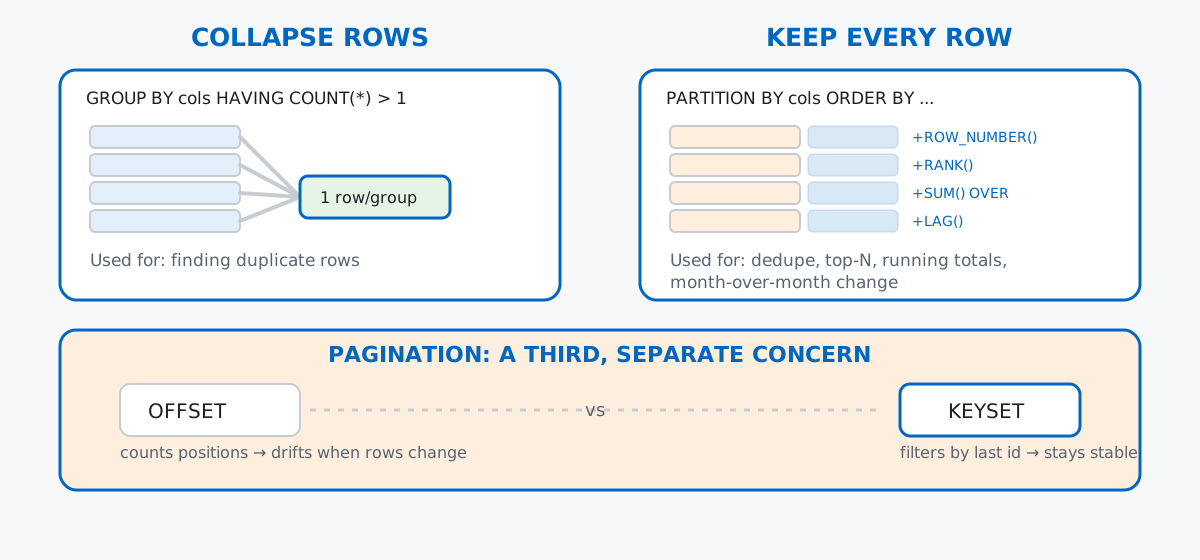
Pagination, the last pattern in this post, doesn’t fit either box – it’s not about grouping or ranking, it’s about which slice of an already-ordered result set you hand back. It gets its own section for that reason.
No download needed. Ten restaurants across five cuisines, and three months of orders generated with a seeded random number generator so your numbers match these exactly:
import sqlite3
import random

con = sqlite3.connect(":memory:")
cur = con.cursor()

cur.executescript("""
CREATE TABLE restaurants (
    id INTEGER PRIMARY KEY,
    name TEXT NOT NULL,
    cuisine TEXT NOT NULL,
    city TEXT NOT NULL
);

CREATE TABLE orders (
    id INTEGER PRIMARY KEY,
    restaurant_id INTEGER NOT NULL REFERENCES restaurants(id),
    customer_name TEXT NOT NULL,
    order_date TEXT NOT NULL,
    amount REAL NOT NULL
);

INSERT INTO restaurants (id, name, cuisine, city) VALUES
    (1,  'Basilico',        'Italian', 'Rotterdam'),
    (2,  'Nonna''s Table',  'Italian', 'Utrecht'),
    (3,  'Krung Thai',      'Thai',    'Rotterdam'),
    (4,  'Bangkok Corner',  'Thai',    'Groningen'),
    (5,  'El Fuego',        'Mexican', 'Utrecht'),
    (6,  'Casa Verde',      'Mexican', 'Eindhoven'),
    (7,  'Green Bowl',      'Vegan',   'Rotterdam'),
    (8,  'Root & Stem',     'Vegan',   'Groningen'),
    (9,  'Smokehouse',      'Burgers', 'Eindhoven'),
    (10, 'Patty Union',     'Burgers', 'Utrecht');
""")
con.commit()

cur.execute("SELECT id, name, cuisine, city FROM restaurants ORDER BY id LIMIT 5")
cur.fetchall()
[(1, 'Basilico', 'Italian', 'Rotterdam'), (2, "Nonna's Table", 'Italian', 'Utrecht'),
(3, 'Krung Thai', 'Thai', 'Rotterdam'), (4, 'Bangkok Corner', 'Thai', 'Groningen'),
(5, 'El Fuego', 'Mexican', 'Utrecht')]The orders themselves come from a seeded generator – 100 orders per month for January, February, and March 2026:
rng = random.Random(42)
customers = ["Anke", "Bram", "Chidi", "Dena", "Elif", "Farah", "Guus", "Hana", "Ivo", "Jana", "Kai", "Lotte"]
restaurant_ids = list(range(1, 11))

order_id = 1
order_rows = []
for month, days_in_month in [(1, 31), (2, 28), (3, 31)]:
    for _ in range(100):
        day = rng.randint(1, days_in_month)
        order_date = f"2026-{month:02d}-{day:02d}"
        restaurant_id = rng.choice(restaurant_ids)
        customer = rng.choice(customers)
        amount = round(rng.uniform(9.0, 32.0), 2)
        order_rows.append((order_id, restaurant_id, customer, order_date, amount))
        order_id += 1

cur.executemany(
    "INSERT INTO orders (id, restaurant_id, customer_name, order_date, amount) VALUES (?, ?, ?, ?, ?)",
    order_rows,
)
con.commit()

cur.execute("SELECT COUNT(*) FROM orders")
cur.fetchall()[(300,)]Then the bug: twelve orders get inserted a second time, with identical restaurant, customer, date, and amount – the double-submit scenario from the opening.
dup_source_ids = rng.sample(range(1, order_id), 12)
next_id = order_id
for src_id in dup_source_ids:
    cur.execute(
        "SELECT restaurant_id, customer_name, order_date, amount FROM orders WHERE id = ?",
        (src_id,),
    )
    restaurant_id, customer_name, order_date, amount = cur.fetchone()
    cur.execute(
        "INSERT INTO orders (id, restaurant_id, customer_name, order_date, amount) VALUES (?, ?, ?, ?, ?)",
        (next_id, restaurant_id, customer_name, order_date, amount),
    )
    next_id += 1
con.commit()

cur.execute("SELECT COUNT(*) FROM orders")
cur.fetchall()[(312,)]312 rows for what should be 300 orders. (The outputs in this post come from SQLite 3.50, bundled with Python 3.13’s sqlite3 module – the SQL itself works on any recent SQLite version.)
GROUP BY and HAVINGA duplicate row, precisely defined, is a group of rows that agree on every column that should make an order unique – here, the same restaurant, customer, date, and amount. GROUP BY those columns, then keep only the groups where COUNT(*) comes back above one:
cur.execute("""
SELECT
    r.name AS restaurant,
    o.customer_name,
    o.order_date,
    o.amount,
    COUNT(*) AS times_seen
FROM orders AS o
JOIN restaurants AS r ON r.id = o.restaurant_id
GROUP BY o.restaurant_id, o.customer_name, o.order_date, o.amount
HAVING COUNT(*) > 1
ORDER BY o.customer_name
""")
cur.fetchall()
[('Basilico', 'Bram', '2026-01-18', 10.73, 2), ('Root & Stem', 'Bram', '2026-03-23', 9.66, 2),
('Patty Union', 'Bram', '2026-02-10', 27.31, 2), ('Root & Stem', 'Chidi', '2026-01-21', 15.09, 2),
("Nonna's Table", 'Dena', '2026-01-15', 14.17, 2), ('Smokehouse', 'Dena', '2026-01-09', 24.75, 2),
('Basilico', 'Elif', '2026-02-18', 15.6, 2), ('Bangkok Corner', 'Elif', '2026-01-05', 14.01, 2),
('Green Bowl', 'Farah', '2026-02-07', 15.41, 2), ('Casa Verde', 'Guus', '2026-02-12', 22.94, 2),
('Green Bowl', 'Ivo', '2026-02-17', 19.26, 2), ('Green Bowl', 'Ivo', '2026-02-27', 26.19, 2)]Twelve groups, every one with times_seen of exactly 2 – which lines up with the twelve rows injected above. Notice HAVING filters on COUNT(*), an aggregate that doesn’t exist until after GROUP BY runs, which is exactly why this can’t be written as a WHERE clause.
ROW_NUMBER()GROUP BY told you which rows are duplicated, but it collapsed away the actual row ids – you can’t DELETE a group, only individual rows. For that, switch to the other shape of question: keep every row, but number each duplicate group in place with ROW_NUMBER(), and get rid of anything numbered higher than 1.
cur.execute("""
SELECT id, customer_name, order_date, amount, row_num
FROM (
    SELECT
        id, customer_name, order_date, amount,
        ROW_NUMBER() OVER (
            PARTITION BY restaurant_id, customer_name, order_date, amount
            ORDER BY id
        ) AS row_num
    FROM orders
)
WHERE row_num > 1
ORDER BY id
""")
cur.fetchall()
[(301, 'Chidi', '2026-01-21', 15.09, 2), (302, 'Bram', '2026-03-23', 9.66, 2), (303, 'Ivo', '2026-02-17', 19.26, 2),
(304, 'Guus', '2026-02-12', 22.94, 2), (305, 'Bram', '2026-02-10', 27.31, 2), (306, 'Farah', '2026-02-07', 15.41, 2),
(307, 'Bram', '2026-01-18', 10.73, 2), (308, 'Elif', '2026-02-18', 15.6, 2), (309, 'Elif', '2026-01-05', 14.01, 2),
(310, 'Dena', '2026-01-15', 14.17, 2), (311, 'Dena', '2026-01-09', 24.75, 2), (312, 'Ivo', '2026-02-27', 26.19, 2)]The twelve ids returned here are exactly the twelve rows this post inserted second – ROW_NUMBER() OVER (PARTITION BY ...) restarts its count at 1 for every distinct combination of the partition columns, so the first row inserted in each duplicate pair gets row_num = 1 and survives, and the second gets row_num = 2 and is the one to remove:
cur.execute("""
DELETE FROM orders
WHERE id IN (
    SELECT id FROM (
        SELECT
            id,
            ROW_NUMBER() OVER (
                PARTITION BY restaurant_id, customer_name, order_date, amount
                ORDER BY id
            ) AS row_num
        FROM orders
    )
    WHERE row_num > 1
)
""")
con.commit()

cur.execute("SELECT COUNT(*) FROM orders")
cur.fetchall()[(300,)]Back to 300 – the exact count from before the bug hit. One detail worth sitting with: a window function can’t be referenced directly in a WHERE or DELETE ... WHERE clause in the same query that computes it, which is why this wraps the numbered result in a subquery first and filters the outer query instead.
The same PARTITION BY trick answers a different, more common question: not “which rows are duplicated” but “what’s the top result within each group.” Every pattern in this post after the first one is a variation on this same window-function shape – the SQLite window functions documentation is the reference for the full family beyond RANK() and LAG(), if you want the exhaustive version. Which restaurant earns the most in each of the five cuisines?
cur.execute("""
WITH totals AS (
    SELECT r.cuisine, r.name, ROUND(SUM(o.amount), 2) AS total_revenue
    FROM orders AS o
    JOIN restaurants AS r ON r.id = o.restaurant_id
    GROUP BY r.id
),
ranked AS (
    SELECT
        cuisine, name, total_revenue,
        RANK() OVER (PARTITION BY cuisine ORDER BY total_revenue DESC) AS revenue_rank
    FROM totals
)
SELECT cuisine, name, total_revenue, revenue_rank
FROM ranked
WHERE revenue_rank <= 2
ORDER BY cuisine, revenue_rank
""")
cur.fetchall()
[('Burgers', 'Smokehouse', 775.46, 1), ('Burgers', 'Patty Union', 618.22, 2),
('Italian', "Nonna's Table", 624.53, 1), ('Italian', 'Basilico', 553.01, 2),
('Mexican', 'El Fuego', 957.95, 1), ('Mexican', 'Casa Verde', 392.93, 2),
('Thai', 'Krung Thai', 496.93, 1), ('Thai', 'Bangkok Corner', 462.9, 2),
('Vegan', 'Root & Stem', 793.8, 1), ('Vegan', 'Green Bowl', 602.47, 2)]The totals CTE does the collapsing (one row per restaurant, question shape 1); ranked then keeps every one of those ten rows and attaches a rank computed within its own cuisine (question shape 2), and the outer query keeps only ranks 1 and 2. The two-step CTE structure matters: RANK() can’t see total_revenue until it’s already been aggregated, so the aggregation has to finish in its own step first.
This is also where the duplicate-row bug from earlier would have quietly mattered if it hadn’t been cleaned up first. Run the identical query against the 312-row table, before the DELETE:
[('Burgers', 'Smokehouse', 800.21, 1), ('Burgers', 'Patty Union', 645.53, 2),
 ('Italian', "Nonna's Table", 638.7, 1), ('Italian', 'Basilico', 579.34, 2),
 ('Mexican', 'El Fuego', 957.95, 1), ('Mexican', 'Casa Verde', 415.87, 2),
 ('Thai', 'Krung Thai', 496.93, 1), ('Thai', 'Bangkok Corner', 476.91, 2),
 ('Vegan', 'Root & Stem', 818.55, 1), ('Vegan', 'Green Bowl', 663.33, 2)]
Every restaurant that happened to have a duplicated order shows a higher, wrong total – Smokehouse is overstated by 24.75, Green Bowl by 60.86, and so on, adding up to the 215.12 euros from the opening. The ranking order didn’t flip this time, but there’s no reason it always wouldn’t: a report is only as trustworthy as the row-level data underneath it, and “top-N per group” gives no visual sign that it’s aggregating duplicated rows. Dedupe first, aggregate second, not the other way around.
SUM() Over an Ordered WindowSometimes you don’t want a per-group total, you want a running one – revenue so far, as of each date. That’s the same SUM() you already know, just with OVER (ORDER BY ...) instead of GROUP BY:
cur.execute("""
WITH daily AS (
    SELECT order_date, ROUND(SUM(amount), 2) AS daily_revenue
    FROM orders
    GROUP BY order_date
)
SELECT
    order_date, daily_revenue,
    ROUND(SUM(daily_revenue) OVER (ORDER BY order_date), 2) AS running_total
FROM daily
ORDER BY order_date
LIMIT 6
""")
cur.fetchall()
[('2026-01-02', 56.33, 56.33), ('2026-01-03', 35.78, 92.11), ('2026-01-04', 99.27, 191.38),
('2026-01-05', 43.08, 234.46), ('2026-01-06', 107.92, 342.38), ('2026-01-07', 99.56, 441.94)]Each running_total is every daily_revenue up to and including that date, added together – 56.33, then 56.33 + 35.78, then that plus 99.27, and so on. The daily CTE still does a real GROUP BY (one row per date); the window function on top of it is what turns those per-day totals into a cumulative one.
The ORDER BY inside OVER (...) is doing more work here than it looks like. Drop it, and the window covers the entire result set for every single row instead of “everything up to this row”:
cur.execute("""
WITH daily AS (
    SELECT order_date, ROUND(SUM(amount), 2) AS daily_revenue
    FROM orders
    GROUP BY order_date
)
SELECT
    order_date, daily_revenue,
    ROUND(SUM(daily_revenue) OVER (), 2) AS not_actually_running
FROM daily
ORDER BY order_date
LIMIT 6
""")
cur.fetchall()
[('2026-01-02', 56.33, 6278.2), ('2026-01-03', 35.78, 6278.2), ('2026-01-04', 99.27, 6278.2),
('2026-01-05', 43.08, 6278.2), ('2026-01-06', 107.92, 6278.2), ('2026-01-07', 99.56, 6278.2)]Every row now shows the same number: 6,278.20, the grand total across all ninety days. With no ORDER BY, SQLite has no way to know what “running” means, so it treats the whole result as one window and sums it in full for every row. If a running total ever comes back suspiciously constant, this is almost always the reason.
LAG()LAG() is the window function built for comparing a row to the one before it. Roll the orders up to one row per month, then use LAG(revenue) to pull each month’s own prior value into the same row:
cur.execute("""
WITH monthly AS (
    SELECT substr(order_date, 1, 7) AS month, ROUND(SUM(amount), 2) AS revenue
    FROM orders
    GROUP BY month
)
SELECT
    month, revenue,
    LAG(revenue) OVER (ORDER BY month) AS prev_month_revenue,
    ROUND((revenue - LAG(revenue) OVER (ORDER BY month)) / LAG(revenue) OVER (ORDER BY month) * 100, 1) AS pct_change
FROM monthly
ORDER BY month
""")
cur.fetchall()
[('2026-01', 2057.87, None, None), ('2026-02', 2134.25, 2057.87, 3.7), ('2026-03', 2086.08, 2134.25, -2.3)]January has no prev_month_revenue – there’s nothing before it to lag from, so both the previous value and the percent change come back None, honestly. February is up 3.7% on January; March is down 2.3% on February. substr(order_date, 1, 7) is doing the rollup from a daily date string to a 'YYYY-MM' month string – worth knowing for SQLite specifically, since it lacks a dedicated DATE_TRUNC the way PostgreSQL does.
Pagination doesn’t fit the two shapes above – it’s not about grouping or ranking, it’s about which slice of an already-sorted result set you serve. The obvious approach is LIMIT/OFFSET: page 1 is OFFSET 0, page 2 is OFFSET 5, and so on. Imagine an order-management dashboard showing the newest orders first:
cur.execute("SELECT id, customer_name, order_date FROM orders ORDER BY id DESC LIMIT 5 OFFSET 0")
cur.fetchall()
[(300, 'Elif', '2026-03-22'), (299, 'Anke', '2026-03-23'), (298, 'Farah', '2026-03-13'),
(297, 'Hana', '2026-03-07'), (296, 'Hana', '2026-03-23')]cur.execute("SELECT id, customer_name, order_date FROM orders ORDER BY id DESC LIMIT 5 OFFSET 5")
cur.fetchall()[(295, 'Kai', '2026-03-19'), (294, 'Hana', '2026-03-06'), (293, 'Elif', '2026-03-01'),
(292, 'Hana', '2026-03-21'), (291, 'Chidi', '2026-03-16')]That looks fine in isolation. But OFFSET counts positions in the current result, not identities – and positions shift the moment a new order is placed while someone is still on page 1. Insert one new order, then re-fetch “page 2” the same way:
cur.execute(
"INSERT INTO orders (id, restaurant_id, customer_name, order_date, amount) VALUES (?, ?, ?, ?, ?)",
(313, 1, "Zora", "2026-03-31", 15.0),
)
con.commit()
cur.execute("SELECT id, customer_name, order_date FROM orders ORDER BY id DESC LIMIT 5 OFFSET 5")
cur.fetchall()[(296, 'Hana', '2026-03-23'), (295, 'Kai', '2026-03-19'), (294, 'Hana', '2026-03-06'),
(293, 'Elif', '2026-03-01'), (292, 'Hana', '2026-03-21')]Hana’s 2026-03-23 order – id 296, the last row of the original page 1 – is now the first row of page 2. The new order pushed everything down by one position, so anyone who already saw page 1 and then loads page 2 sees that row twice, and would never see whatever eventually lands at the new position 11. Nothing is broken syntactically; the query is just answering “positions 6 through 10” honestly, and the positions moved.
Keyset pagination sidesteps this by filtering on the last id you actually saw, instead of counting positions:
cur.execute("SELECT id, customer_name, order_date FROM orders WHERE id < 296 ORDER BY id DESC LIMIT 5")
cur.fetchall()
[(295, 'Kai', '2026-03-19'), (294, 'Hana', '2026-03-06'), (293, 'Elif', '2026-03-01'),
(292, 'Hana', '2026-03-21'), (291, 'Chidi', '2026-03-16')]Identical to the original, pre-insert page 2 – because id = 313 (the new order) is greater than 296 and never enters the WHERE id < 296 filter at all, no matter how many new orders arrive. The tradeoff: keyset pagination needs a stable, ordered column to filter on (an id or a timestamp), and it can’t jump straight to “page 40” the way OFFSET can – it only knows how to move forward from wherever you last were. For a feed that’s constantly gaining new rows, that’s usually the right trade to make.
Duplicates, dedup, top-N per group, running totals, and month-over-month change all reduce to the same two building blocks: GROUP BY/HAVING when you want one row per group, and a window function’s PARTITION BY/ORDER BY when you want to keep every row and attach something computed from its neighbors. Pagination sits outside both, and the fix there is about what you filter on – a stable id, not a shifting position – rather than which aggregate to reach for.
If you want to go deeper on the window-function side of this – frames, RANGE vs ROWS, and more of the ranking and offset family beyond RANK() and LAG() – the Window Functions lessons in our free SQL & Databases course build on exactly the queries in this post.
 Python
Build an AI Chatbot in Python: A Command-Line LLM Client
A from-scratch walkthrough of the pattern behind every LLM chatbot: one function that sends a message plus conversation history to a chat-completion API, a persona set by a system prompt, and a loop that keeps the conversation going.
Read tutorial
Python
Build an AI Chatbot in Python: A Command-Line LLM Client
A from-scratch walkthrough of the pattern behind every LLM chatbot: one function that sends a message plus conversation history to a chat-completion API, a persona set by a system prompt, and a loop that keeps the conversation going.
Read tutorial
 Software Engineering
The Single Responsibility Principle: One Class, One Reason to Change
The Single Responsibility Principle says a class should have only one reason to change. See it in action: take a Python AuthService that also owns its logging, find why that's a problem, and refactor it into clean, focused classes.
Read tutorial
Software Engineering
The Single Responsibility Principle: One Class, One Reason to Change
The Single Responsibility Principle says a class should have only one reason to change. See it in action: take a Python AuthService that also owns its logging, find why that's a problem, and refactor it into clean, focused classes.
Read tutorial