Title here
Summary here
Six SQL tools carry almost every real question you'll ask a database: WHERE, JOIN, GROUP BY, CASE, subqueries, and window functions. This guide builds a three-question mental model, then works through all six on a small community book-swap database you can reproduce yourself.

Most data questions aren’t really about SQL syntax — they’re one of three things in disguise: which rows do I want, how do two tables relate, or how do many rows become one answer. Recognize the question, and the right tool usually follows.
Most SQL tutorials teach the syntax in isolation — here’s WHERE, here’s JOIN, here’s GROUP BY — without tying them back to the questions they answer, so it’s easy to know the keywords and still freeze up on a real problem. This guide covers six skills that show up in almost every practical query, worked through on one small database with nothing but Python’s built-in sqlite3 module. If you also work with pandas day to day, our post on pandas and SQLite covers getting a query’s results into a DataFrame once you’re comfortable with the SQL side.
Everything below answers one of three questions:
WHERE filters by a condition, CASE relabels rows without dropping any, and a subquery lets one question’s answer become another’s filter.JOIN combines rows from two tables on a matching column — and which join decides whether unmatched rows survive.GROUP BY collapses rows into one summary row per group. Window functions attach a per-row answer — a rank, a running count — without collapsing anything.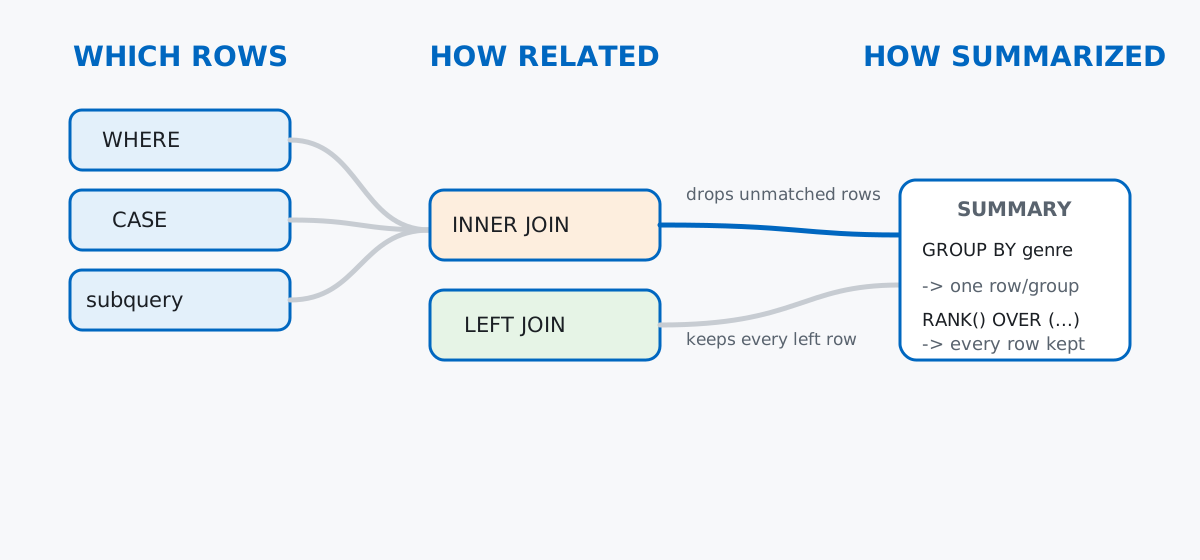
Keep this framing in mind: every section below is a different answer to one of these three questions, not a grab-bag of unrelated keywords.
No download needed — a few hand-built tables, plus one table with enough rows to make aggregates and window functions worth running. Imagine a small neighborhood book-swap: members hand books to each other, one at a time, and each book keeps circulating.
import sqlite3
import random

con = sqlite3.connect(":memory:")
con.execute("PRAGMA foreign_keys = ON;")
cur = con.cursor()

cur.executescript("""
CREATE TABLE members (
    id INTEGER PRIMARY KEY,
    name TEXT NOT NULL,
    city TEXT NOT NULL,
    joined_on TEXT NOT NULL
);

CREATE TABLE books (
    id INTEGER PRIMARY KEY,
    title TEXT NOT NULL,
    genre TEXT NOT NULL,
    condition_rating INTEGER NOT NULL
);

CREATE TABLE swaps (
    id INTEGER PRIMARY KEY,
    book_id INTEGER NOT NULL REFERENCES books(id),
    from_member_id INTEGER NOT NULL REFERENCES members(id),
    to_member_id INTEGER NOT NULL REFERENCES members(id),
    swapped_on TEXT NOT NULL,
    returned_on TEXT
);

INSERT INTO members (id, name, city, joined_on) VALUES
    (1, 'Priya', 'Rotterdam', '2025-11-02'),
    (2, 'Tomas', 'Utrecht',   '2025-11-15'),
    (3, 'Freya', 'Rotterdam', '2025-12-01'),
    (4, 'Ola',   'The Hague', '2025-12-20'),
    (5, 'Sami',  'Utrecht',   '2026-01-08'),
    (6, 'Lien',  'Rotterdam', '2026-01-22'),
    (7, 'Devon', 'The Hague', '2026-02-10'),
    (8, 'Marta', 'Utrecht',   '2026-03-01'),
    (9, 'Jonas', 'Rotterdam', '2026-06-25');

INSERT INTO books (id, title, genre, condition_rating) VALUES
    (1,  'The Night Circus',          'Fantasy', 4),
    (2,  'Gone Girl',                 'Mystery', 3),
    (3,  'Project Hail Mary',         'Sci-Fi',  5),
    (4,  'Circe',                     'Fantasy', 4),
    (5,  'The Silent Patient',        'Mystery', 2),
    (6,  'Klara and the Sun',         'Sci-Fi',  5),
    (7,  'Where the Crawdads Sing',   'Fiction', 3),
    (8,  'The Midnight Library',      'Fiction', 4),
    (9,  'Piranesi',                  'Fantasy', 5),
    (10, 'The Thursday Murder Club',  'Mystery', 4),
    (11, 'Leave the World Behind',    'Fiction', 2),
    (12, 'Sea of Tranquility',        'Sci-Fi',  3);
""")
con.commit()
Nine members, twelve books. Jonas joined on 2026-06-25 and hasn’t swapped anything yet — keep that in mind, it matters later. The swaps table needs volume to make aggregates and rankings meaningful, so it’s generated with a seeded random number generator instead of typed out by hand:
rng = random.Random(42)
member_ids = list(range(1, 9))   # Jonas (9) deliberately excluded
book_ids = list(range(1, 13))

swap_rows = []
for i in range(1, 41):
    book_id = rng.choice(book_ids)
    from_member, to_member = rng.sample(member_ids, 2)
    month = rng.choice([4, 5, 6])
    day = rng.randint(1, 28)
    swapped_on = f"2026-{month:02d}-{day:02d}"
    if rng.random() < 0.35:
        returned_on = None
    else:
        return_day = min(day + rng.randint(3, 20), 28)
        returned_on = f"2026-{month:02d}-{return_day:02d}"
    swap_rows.append((i, book_id, from_member, to_member, swapped_on, returned_on))

cur.executemany(
    "INSERT INTO swaps (id, book_id, from_member_id, to_member_id, swapped_on, returned_on) "
    "VALUES (?, ?, ?, ?, ?, ?)",
    swap_rows,
)
con.commit()

cur.execute("SELECT count(*) FROM swaps")
cur.fetchall()[(40,)]Forty swap events across April, May, and June 2026. returned_on is NULL whenever a book is still out with whoever received it. (The outputs in this post come from SQLite 3.51, bundled with Python 3.11’s sqlite3 module — the SQL itself works on any recent SQLite version.)
WHEREThe most common question you’ll ask a database is the simplest one: show me the rows that match a condition. Which books are in good enough shape to keep circulating?
cur.execute("""
SELECT title, genre, condition_rating
FROM books
WHERE condition_rating >= 4
ORDER BY condition_rating DESC, title
""")
cur.fetchall()
[('Klara and the Sun', 'Sci-Fi', 5), ('Piranesi', 'Fantasy', 5), ('Project Hail Mary', 'Sci-Fi', 5),
('Circe', 'Fantasy', 4), ('The Midnight Library', 'Fiction', 4), ('The Night Circus', 'Fantasy', 4),
('The Thursday Murder Club', 'Mystery', 4)]Seven of the twelve books clear the condition_rating >= 4 bar. Stack a second condition with AND to narrow further — which of those are also mysteries?
cur.execute("""
SELECT title, genre, condition_rating
FROM books
WHERE genre = 'Mystery' AND condition_rating >= 4
""")
cur.fetchall()
[('The Thursday Murder Club', 'Mystery', 4)]Conceptually, WHERE runs before anything else — a gate that each row either passes or doesn’t, based only on its own values. Name the condition, and the database checks it row by row.
JOINA book-swap only means something once you connect three tables: which book, given by whom, received by whom. That’s what a JOIN does — it matches rows across tables on a shared column, here book_id and member id:
cur.execute("""
SELECT
    b.title,
    giver.name AS given_by,
    receiver.name AS received_by,
    s.swapped_on
FROM swaps AS s
INNER JOIN books AS b ON b.id = s.book_id
INNER JOIN members AS giver ON giver.id = s.from_member_id
INNER JOIN members AS receiver ON receiver.id = s.to_member_id
ORDER BY s.swapped_on
LIMIT 5
""")
cur.fetchall()
[('The Night Circus', 'Ola', 'Sami', '2026-04-01'), ('The Thursday Murder Club', 'Ola', 'Lien', '2026-04-02'),
('Leave the World Behind', 'Priya', 'Tomas', '2026-04-02'), ('Where the Crawdads Sing', 'Priya', 'Marta', '2026-04-07'),
('Leave the World Behind', 'Lien', 'Devon', '2026-04-08')]Three INNER JOINs in one query, and members gets joined in twice — once as giver, once as receiver — which is why table aliases exist: without them, SQLite can’t tell which name column you mean. INNER JOIN (the default, and what plain JOIN means) only keeps rows with a match on both sides — worth watching closely, because it changes what a summary means. How many books has each member handed out?
cur.execute("""
SELECT
    m.name,
    COUNT(s.id) AS books_given
FROM members AS m
LEFT JOIN swaps AS s ON s.from_member_id = m.id
GROUP BY m.id
ORDER BY books_given DESC, m.name
""")
cur.fetchall()
[('Ola', 9), ('Marta', 8), ('Tomas', 7), ('Sami', 5), ('Priya', 4), ('Devon', 3), ('Lien', 3),
('Freya', 1), ('Jonas', 0)]This time it’s a LEFT JOIN: keep every row from members (the “left” table) whether or not it matches anything in swaps. Jonas shows up with 0 — LEFT JOIN fills in NULL for the unmatched side, and COUNT(s.id) counts zero non-NULL rows rather than dropping him from the results. An INNER JOIN here would have made him vanish entirely instead of showing 0 — the gotchas section below shows exactly how that goes wrong.
The official SQLite SELECT documentation covers every join type SQLite supports, including CROSS JOIN and the join-order rules, if you want the full grammar.
GROUP BY and AggregatesGROUP BY answers the second half of “how do many rows become one”: bucket rows by a shared value, then run one aggregate function — COUNT, SUM, AVG, MIN, MAX — per bucket. Which genres circulate the most, and in what average condition?
cur.execute("""
SELECT
    b.genre,
    COUNT(*) AS times_swapped,
    ROUND(AVG(b.condition_rating), 2) AS avg_condition
FROM swaps AS s
JOIN books AS b ON b.id = s.book_id
GROUP BY b.genre
ORDER BY times_swapped DESC
""")
cur.fetchall()
[('Fiction', 15, 2.47), ('Sci-Fi', 10, 5.0), ('Mystery', 9, 3.33), ('Fantasy', 6, 4.33)]Fiction swaps the most (15 times) but sits at the lowest average condition (2.47) — those three fiction titles are getting passed around hard. Sci-Fi swaps less often but every sci-fi book on the shelf happens to be rated a perfect 5. GROUP BY folded forty swap rows into four genre rows: one aggregate answer per group, exactly as the mental model predicts.
HAVING filters after the grouping happens, the way WHERE filters before it — useful when the condition is on the aggregate itself, not a raw column:
cur.execute("""
SELECT
    b.genre,
    COUNT(*) AS times_swapped
FROM swaps AS s
JOIN books AS b ON b.id = s.book_id
GROUP BY b.genre
HAVING COUNT(*) >= 8
ORDER BY times_swapped DESC
""")
cur.fetchall()
[('Fiction', 15), ('Sci-Fi', 10), ('Mystery', 9)]Fantasy drops out because its COUNT(*) of 6 doesn’t clear the HAVING COUNT(*) >= 8 bar. You couldn’t write WHERE COUNT(*) >= 8 here — WHERE only sees individual rows, before grouping happens, and COUNT(*) doesn’t exist yet at that point in the query.
CASE ExpressionsCASE doesn’t filter or summarize anything — it recodes a value, row by row, into something more useful to read. Condition ratings are numbers; readers want a label:
cur.execute("""
SELECT
    title,
    condition_rating,
    CASE
        WHEN condition_rating >= 5 THEN 'Like New'
        WHEN condition_rating >= 3 THEN 'Good'
        ELSE 'Well-Loved'
    END AS condition_label
FROM books
ORDER BY title
LIMIT 7
""")
cur.fetchall()
[('Circe', 4, 'Good'), ('Gone Girl', 3, 'Good'), ('Klara and the Sun', 5, 'Like New'),
('Leave the World Behind', 2, 'Well-Loved'), ('Piranesi', 5, 'Like New'), ('Project Hail Mary', 5, 'Like New'),
('Sea of Tranquility', 3, 'Good')]CASE checks its WHEN conditions top to bottom and stops at the first match, so order matters — put the narrowest condition first. Every row survives; only the label changed, which is the tell that separates CASE from WHERE. And because a CASE expression counts as just another value to SQL, it can go straight into a GROUP BY clause too — group by the label instead of the raw number, and a row-by-row listing turns into a distribution (Good 7, Like New 3, Well-Loved 2 across all 12 books) with no extra syntax.
A subquery is a SELECT nested inside another query, and its result becomes an input to the outer one. That’s the third way to answer “which rows do I want” — the filter itself comes from a computed value, not a literal you typed. Which members give away more than the average member does?
cur.execute("""
SELECT
    m.name,
    COUNT(s.id) AS books_given
FROM members AS m
JOIN swaps AS s ON s.from_member_id = m.id
GROUP BY m.id
HAVING COUNT(s.id) > (
    SELECT AVG(swap_count)
    FROM (
        SELECT COUNT(*) AS swap_count
        FROM swaps
        GROUP BY from_member_id
    )
)
ORDER BY books_given DESC
""")
cur.fetchall()
[('Ola', 9), ('Marta', 8), ('Tomas', 7)]Three members clear the bar. The inner SELECT first collapses swaps to one row per giver with GROUP BY, then averages those eight counts down to a single number (5.0, as it happens); the outer query’s HAVING clause treats that number exactly like a literal — SQLite doesn’t care that it came from a nested SELECT instead of you typing it in. That’s the whole trick to subqueries: build the piece you need, confirm it makes sense as its own query, then drop it in wherever a value or a table would otherwise go.
GROUP BY always shrinks your result — one row per group, full stop. Sometimes you want the opposite: keep every row, but attach a per-row answer computed across a group of related rows. That’s a window function, and it’s the sharpest tool in this list once it clicks. Rank every member by books given, ties and all:
cur.execute("""
WITH totals AS (
    SELECT
        m.name,
        COUNT(s.id) AS books_given
    FROM members AS m
    LEFT JOIN swaps AS s ON s.from_member_id = m.id
    GROUP BY m.id
)
SELECT
    name,
    books_given,
    RANK() OVER (ORDER BY books_given DESC) AS leaderboard_rank
FROM totals
ORDER BY leaderboard_rank, name
""")
cur.fetchall()
[('Ola', 9, 1), ('Marta', 8, 2), ('Tomas', 7, 3), ('Sami', 5, 4), ('Priya', 4, 5), ('Devon', 3, 6),
('Lien', 3, 6), ('Freya', 1, 8), ('Jonas', 0, 9)]Devon and Lien tie at 3 books each, so RANK() gives them both rank 6 and skips straight to 8 for Freya — no rank 7 exists, on purpose. (DENSE_RANK() is the version that wouldn’t skip.) The WITH totals AS (...) clause up top is a common table expression (CTE): it names a subquery so the rest of the statement can just call it totals, which reads a lot more clearly than nesting the whole GROUP BY inline.
Now the part GROUP BY genuinely can’t do: figure out who currently holds each book, without losing any of the individual swap rows to get there. PARTITION BY s.book_id restarts a counter for every book, and ROW_NUMBER() numbers that book’s swaps 1, 2, 3, ... by recency — the most recent swap gets 1:
cur.execute("""
SELECT title, received_by, swapped_on
FROM (
    SELECT
        b.title,
        receiver.name AS received_by,
        s.swapped_on,
        ROW_NUMBER() OVER (PARTITION BY s.book_id ORDER BY s.swapped_on DESC) AS recency_rank
    FROM swaps AS s
    JOIN books AS b ON b.id = s.book_id
    JOIN members AS receiver ON receiver.id = s.to_member_id
)
WHERE recency_rank = 1
ORDER BY title
LIMIT 6
""")
cur.fetchall()
[('Circe', 'Ola', '2026-06-15'), ('Gone Girl', 'Freya', '2026-05-14'), ('Klara and the Sun', 'Priya', '2026-05-04'),
('Leave the World Behind', 'Lien', '2026-06-25'), ('Piranesi', 'Freya', '2026-06-16'), ('Project Hail Mary', 'Lien', '2026-06-18')]Eleven of the twelve books have circulated at least once (Sea of Tranquility never has, so it has no rows to rank); this is the first six, alphabetically. The pattern to remember: window functions can’t filter on their own result inside the same SELECT, so wrap the query and filter the wrapper. The SQLite window functions documentation covers the rest of the family — LAG, LEAD, NTILE, and custom frame clauses — once RANK and ROW_NUMBER feel natural.
= NULL never matches anything, even a NULL. Eighteen of the forty swaps have a NULL returned_on — the book is still out. Try to find them with = and SQL quietly returns nothing:
cur.execute("SELECT count(*) FROM swaps WHERE returned_on = NULL")
cur.fetchall()[(0,)]cur.execute("SELECT count(*) FROM swaps WHERE returned_on IS NULL")
cur.fetchall()[(18,)]NULL means “unknown,” and SQL’s three-valued logic treats any comparison against an unknown as itself unknown — never TRUE, so the row never matches. IS NULL (and IS NOT NULL) are special-cased precisely to sidestep this. If a WHERE clause on a nullable column ever returns suspiciously few rows, this is the first thing to check.
INNER JOIN drops members with nothing to match, LEFT JOIN doesn’t. Jonas joined the swap group but hasn’t received a book yet. A report on “books received per member” that reaches for INNER JOIN out of habit loses him entirely:
cur.execute("""
SELECT m.name, COUNT(s.id) AS books_received
FROM members AS m
INNER JOIN swaps AS s ON s.to_member_id = m.id
GROUP BY m.id
ORDER BY m.name
""")
rows = cur.fetchall()
len(rows)8cur.execute("SELECT count(*) FROM members")
cur.fetchall()[(9,)]Eight rows back for nine actual members — Jonas is simply gone, not shown with a 0. Swap the join:
cur.execute("""
SELECT m.name, COUNT(s.id) AS books_received
FROM members AS m
LEFT JOIN swaps AS s ON s.to_member_id = m.id
GROUP BY m.id
ORDER BY books_received DESC, m.name
""")
rows = cur.fetchall()
len(rows)9Same query, one word changed, and the member count matches reality again. Anytime a report is meant to cover “every X,” including the ones with zero activity, LEFT JOIN from the table that must stay complete is the fix — INNER JOIN is only safe when you actually want to require a match.
A bare, non-aggregated column in GROUP BY gives you an arbitrary row, not an error. Stricter databases like PostgreSQL reject this outright; SQLite quietly allows it and picks a row from each group with no guaranteed rule for which one:
cur.execute("""
SELECT genre, title, condition_rating
FROM books
GROUP BY genre
""")
cur.fetchall()
[('Fantasy', 'The Night Circus', 4), ('Fiction', 'Where the Crawdads Sing', 3), ('Mystery', 'Gone Girl', 3), ('Sci-Fi', 'Project Hail Mary', 5)]That looks like a real answer — “the Fantasy title is The Night Circus” — but there are three fantasy books, and this only surfaced one of them because title isn’t wrapped in an aggregate and isn’t part of the GROUP BY list. If you want every title, say so explicitly with an aggregate like GROUP_CONCAT:
cur.execute("""
SELECT genre, GROUP_CONCAT(title, '; ') AS titles
FROM books
GROUP BY genre
ORDER BY genre
""")
cur.fetchall()
[('Fantasy', 'The Night Circus; Circe; Piranesi'), ('Fiction', 'Where the Crawdads Sing; The Midnight Library; Leave the World Behind'),
('Mystery', 'Gone Girl; The Silent Patient; The Thursday Murder Club'), ('Sci-Fi', 'Project Hail Mary; Klara and the Sun; Sea of Tranquility')]Every column in a SELECT alongside GROUP BY should either be in the GROUP BY list itself or wrapped in an aggregate function — treat SQLite’s willingness to let you skip that rule as a trap, not a convenience.
Six tools, three questions:
WHERE filters by a condition, CASE relabels without dropping rows, and a subquery lets a computed value stand in for a literalJOIN connects rows across tables; INNER JOIN requires a match on both sides, LEFT JOIN keeps every row from the left table regardlessGROUP BY collapses rows to one per group; window functions like RANK() and ROW_NUMBER() attach a per-row answer without collapsing anythingOnce you’re comfortable with these fundamentals, our post on SQL triggers shows a more advanced piece: letting the database itself react automatically whenever a row changes, rather than running a query by hand.
If you want to build this into a full SQL foundation — window functions in more depth, plus everything from your first SELECT to subqueries and views — the Window Functions lessons in our free SQL & Databases course pick up exactly where the RANK() and ROW_NUMBER() examples above leave off.
 Python
Build an AI Chatbot in Python: A Command-Line LLM Client
A from-scratch walkthrough of the pattern behind every LLM chatbot: one function that sends a message plus conversation history to a chat-completion API, a persona set by a system prompt, and a loop that keeps the conversation going.
Read tutorial
Python
Build an AI Chatbot in Python: A Command-Line LLM Client
A from-scratch walkthrough of the pattern behind every LLM chatbot: one function that sends a message plus conversation history to a chat-completion API, a persona set by a system prompt, and a loop that keeps the conversation going.
Read tutorial
 Software Engineering
The Single Responsibility Principle: One Class, One Reason to Change
The Single Responsibility Principle says a class should have only one reason to change. See it in action: take a Python AuthService that also owns its logging, find why that's a problem, and refactor it into clean, focused classes.
Read tutorial
Software Engineering
The Single Responsibility Principle: One Class, One Reason to Change
The Single Responsibility Principle says a class should have only one reason to change. See it in action: take a Python AuthService that also owns its logging, find why that's a problem, and refactor it into clean, focused classes.
Read tutorial