Title here
Summary here
Build a FastAPI endpoint that opens Ollama's streaming generate API, translates newline-delimited JSON into a small Server-Sent Events contract, closes the upstream response safely, and verifies success and failure paths without downloading a model.

A local model can take several seconds to finish a long answer. If your FastAPI endpoint waits for the entire answer before returning anything, the caller sees an idle connection and cannot show progress. The model may be producing useful text, but an unnecessary buffer hides it.
To stream Ollama responses with FastAPI, open /api/generate with HTTPX in streaming mode, read each newline-delimited JSON object, and yield its response text through a StreamingResponse. Translate those objects into Server-Sent Events so the client receives explicit token, complete, or error events, and always close the Ollama response when generation finishes or fails.
We will build /explain-stream, an endpoint for short explanations of beginner data terms. The example is small enough to inspect by eye. Its important behavior is also tested with a controlled fake Ollama service, so you can verify the protocol before downloading a model.
You need Python 3.10 or later and a basic understanding of Python functions and dictionaries. An API endpoint is one HTTP method and URL that perform an operation. You do not need prior experience with asynchronous Python, streaming protocols, or local language models.
Create and activate a virtual environment, then install the packages used here:
python -m venv .venv
source .venv/bin/activate
python -m pip install fastapi uvicorn httpx matplotlib
On Windows PowerShell, activate the environment with .venv\Scripts\Activate.ps1. Matplotlib is needed only to reproduce the verified event chart. The executed build used Python 3.13.2, FastAPI 0.136.1, Pydantic 2.13.4, HTTPX 0.28.1, Starlette 1.0.0, and Matplotlib 3.11.0.
For a live request, install Ollama separately and download a model that fits your computer. Model names, sizes, and requirements can change, so choose a current tag from Ollama rather than assuming that a tutorial’s model is available. Set the selected name in an environment variable before starting FastAPI:
export OLLAMA_MODEL="your-installed-model"
In Windows PowerShell, use $env:OLLAMA_MODEL = "your-installed-model". You can run ollama list to see the exact names of the models already installed on your computer.
Ollama’s official API introduction states that a local installation serves its API at http://localhost:11434/api. Local access does not require an API key. Do not expose that port or this teaching endpoint to an untrusted network without authentication, request limits, and other controls appropriate for your environment.
The test data is available as eight synthetic streaming cases. The prompts, byte fragments, errors, model name, and service behavior were written for this lesson and are released under CC0 1.0. They do not contain real user messages or measured model output.
Ollama’s generate endpoint streams by default. Its streaming documentation describes the response as NDJSON, or newline-delimited JSON. Each line is one complete JSON object. Early objects contain a small response text fragment and done: false; the final object has done: true and generation metadata.
A shortened upstream body has this shape:
{"response":"A CSV row ","done":false}
{"response":"stores one record.","done":false}
{"response":"","done":true,"done_reason":"stop","eval_count":7}
Do not assume one network byte chunk equals one JSON object. A line may be divided across several packets, or several lines may arrive together. HTTPX’s asynchronous aiter_lines() method handles that byte-to-line reconstruction. The HTTPX async streaming guide also requires the response to be closed when manual streaming mode is used.
Our FastAPI endpoint will expose Server-Sent Events (SSE). SSE is a UTF-8 text format for a server that sends a sequence of named events over one HTTP response. Each event ends with a blank line:
event: token
data: {"text":"A CSV row "}

event: complete
data: {"done_reason":"stop","eval_count":7}
This translation creates a narrow public contract. A client does not need to understand every Ollama response field. It handles only three event names:
token carries one generated text fragment;complete says that Ollama finished normally; anderror says that a failure occurred after streaming had started.The word token is a convenient event name here, but an Ollama response fragment is not guaranteed to contain exactly one language-model token. Treat it as a text fragment and join fragments in arrival order.
The public request needs only a prompt. A Pydantic model checks its length, trims outer whitespace, and rejects unknown fields. Keeping the model name on the server prevents each caller from selecting an arbitrary installed model.
from pydantic import BaseModel, ConfigDict, Field

class GenerateRequest(BaseModel):
    model_config = ConfigDict(extra="forbid", str_strip_whitespace=True)
    prompt: str = Field(min_length=3, max_length=2_000)
The maximum is a teaching limit, not a universal safe value. Choose a real limit from the model context window, memory budget, expected workload, and input policy. The FastAPI input-validation tutorial explains request contracts in more depth.
Next, create one httpx.AsyncClient for the application lifetime. An asynchronous client can wait for Ollama without blocking FastAPI’s event loop, and reusing it preserves its connection pool. The lifespan context closes the client when the application stops.
import os
from contextlib import asynccontextmanager

import httpx
from fastapi import FastAPI

OLLAMA_URL = os.getenv("OLLAMA_URL", "http://127.0.0.1:11434")
OLLAMA_MODEL = os.environ["OLLAMA_MODEL"]

@asynccontextmanager
async def lifespan(app: FastAPI):
    timeout = httpx.Timeout(120.0, connect=3.0)
    async with httpx.AsyncClient(
        base_url=OLLAMA_URL,
        timeout=timeout,
    ) as client:
        app.state.ollama_client = client
        yield

app = FastAPI(title="Local explanation stream", lifespan=lifespan)
The 3-second connection timeout covers opening a connection to the local service. The 120-second read timeout limits how long HTTPX waits between incoming data chunks; it is not a 120-second limit on the total generation time. These are example values. Measure representative prompts on your hardware before choosing production limits.
There are two different times when Ollama can fail. A pre-stream failure happens before FastAPI sends response headers. For example, Ollama may be offline or return HTTP 404 because the configured model is missing. FastAPI can still return an appropriate non-200 status at this point.
Build an HTTPX request with stream: true, then open it with send(..., stream=True). The endpoint checks the upstream status before it constructs StreamingResponse:
from fastapi import HTTPException, Request
from fastapi.responses import StreamingResponse

@app.post("/explain-stream", response_class=StreamingResponse)
async def explain_stream(
    payload: GenerateRequest,
    request: Request,
) -> StreamingResponse:
    client = request.app.state.ollama_client
    upstream_request = client.build_request(
        "POST",
        "/api/generate",
        json={
            "model": OLLAMA_MODEL,
            "prompt": payload.prompt,
            "stream": True,
            "options": {"temperature": 0},
        },
    )

    try:
        upstream = await client.send(upstream_request, stream=True)
    except httpx.RequestError as exc:
        raise HTTPException(503, "Cannot connect to Ollama.") from exc

    if upstream.status_code >= 400:
        status = upstream.status_code
        await upstream.aclose()
        detail = (
            "The configured Ollama model is unavailable."
            if status == 404
            else "Ollama rejected the generation request."
        )
        raise HTTPException(502, detail)
HTTP 503 tells this API’s caller that its dependency is unavailable. HTTP 502 says the proxy reached its dependency but received an unusable response. These mappings are design choices; document them for clients. Notice that the code closes an unsuccessful upstream response before raising.
The example intentionally does not copy Ollama’s raw error message into the public response. Dependency messages can change and may reveal internal details. Log a safe request identifier and the original exception under your own privacy policy instead of logging full prompts by default.
The streaming generator does four jobs in order: skip blank lines, parse one JSON object, emit a safe public event, and close the upstream response in finally. A helper uses json.dumps() so quotes and newline characters inside generated text remain valid JSON rather than breaking the SSE format.
import json
from typing import Any

def sse_event(event_name: str, data: dict[str, Any]) -> str:
    compact_json = json.dumps(
        data,
        ensure_ascii=False,
        separators=(",", ":"),
    )
    return f"event: {event_name}\ndata: {compact_json}\n\n"
Now read the Ollama body line by line. The generator emits text fragments immediately. It keeps only a small amount of data in memory because it does not assemble the full answer on the server.
async def ollama_to_sse(response: httpx.Response):
    try:
        async for line in response.aiter_lines():
            if not line.strip():
                continue
            try:
                item = json.loads(line)
            except json.JSONDecodeError:
                yield sse_event(
                    "error", {"message": "Ollama sent invalid JSON."}
                )
                return

            if not isinstance(item, dict):
                yield sse_event(
                    "error", {"message": "Ollama sent an invalid event."}
                )
                return
            if "error" in item:
                yield sse_event(
                    "error", {"message": "Ollama stopped the stream."}
                )
                return

            text = item.get("response", "")
            if not isinstance(text, str):
                yield sse_event(
                    "error", {"message": "Ollama sent invalid text."}
                )
                return
            if text:
                yield sse_event("token", {"text": text})

            if item.get("done") is True:
                yield sse_event("complete", {
                    "done_reason": item.get("done_reason", "unknown"),
                    "eval_count": item.get("eval_count"),
                })
                return
    except httpx.HTTPError:
        yield sse_event(
            "error", {"message": "The Ollama stream was interrupted."}
        )
        return
    finally:
        await response.aclose()

    yield sse_event(
        "error", {"message": "Ollama ended without a completion event."}
    )
Ollama’s error documentation makes an important distinction: an error may appear as an NDJSON object after the HTTP response has already started. At that stage, FastAPI cannot replace the status with 500 or 502 because the client has already received HTTP 200 and some body bytes. The explicit SSE error event carries the later outcome inside the existing response.
The final statement handles another failure: the response body ends without either done: true or an error object. Reporting that state is safer than silently treating a partial sentence as complete.
Finish the endpoint by returning FastAPI’s streaming response. The FastAPI custom-response guide documents StreamingResponse for an iterator or generator that yields response chunks.
    return StreamingResponse(
        ollama_to_sse(upstream),
        media_type="text/event-stream",
        headers={"Cache-Control": "no-cache"},
    )
This code belongs at the end of explain_stream(), after the upstream status check. Cache-Control: no-cache asks intermediaries not to reuse a previous event stream. Reverse proxies can still buffer streaming bodies, so proxy behavior must be tested in the actual deployment.
A live model is useful for an integration check, but it is a poor tool for testing every error branch. Output text and timing can vary, and intentionally breaking a model process is awkward. The reproducible build replaces only the Ollama network boundary with httpx.MockTransport; request validation, the FastAPI endpoint, StreamingResponse, NDJSON parsing, SSE formatting, and cleanup remain real.
The smallest important test deliberately divides one valid NDJSON line across arbitrary byte chunks. The API must reconstruct lines rather than attempt to parse each chunk:
body = encode_ndjson(
    {"response": "A null value ", "done": False},
    {"response": "marks missing data.", "done": False},
    {"response": "", "done": True, "done_reason": "stop"},
)
fake_chunks = [body[:13], body[13:37], body[37:71], body[71:]]
The complete build sends all eight cases through the in-process API, parses the returned SSE body, and asserts the exact status and event order. It also checks that every opened fake upstream body is closed. Run it with the repository environment:
.venv-mlm-tutorials/bin/python tutorial-pipeline/work/1da83bb2f35f/build_tutorial.py
The executed run printed:
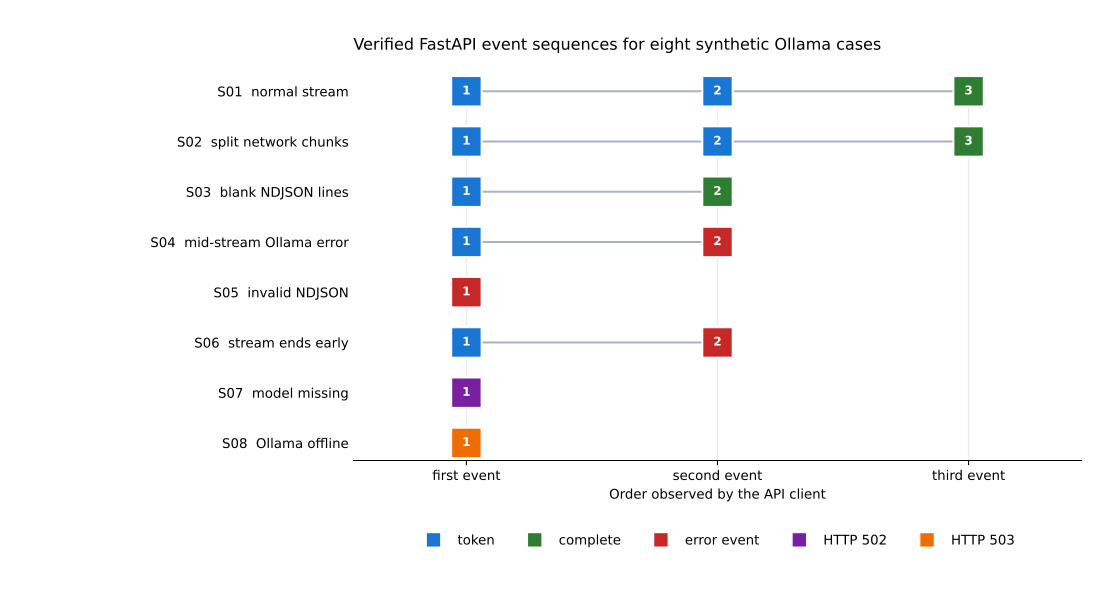
cases=8 passed=8 pre_stream_http_errors=2 mid_stream_error_events=3
S01 status=200 events=token -> token -> complete closed=true
S02 status=200 events=token -> token -> complete closed=true
S03 status=200 events=token -> complete closed=true
S04 status=200 events=token -> error closed=true
S05 status=200 events=error closed=true
S06 status=200 events=token -> error closed=true
S07 status=502 events=http_502 closed=true
S08 status=503 events=http_503 closed=true
Read S02 as the line-boundary proof: fragmented network bytes still became two text events and one completion. S04 through S06 began with HTTP 200 because their problems appeared during the body stream. S07 and S08 failed early enough for FastAPI to return HTTP 502 and 503. The closed=true check verifies cleanup for every case.
You can inspect the full verified result table. The generated chart shows the same event order rather than a model-quality score.
These results prove the application protocol under a deterministic transport. They do not measure model accuracy, generation speed, time to first text, memory use under load, or the behavior of a particular Ollama release.
After Ollama is running and OLLAMA_MODEL names an installed model, start the API from the directory containing your application file:
uvicorn app:app --host 127.0.0.1 --port 8000
Use an HTTP client that displays bytes as they arrive. The -N option tells curl not to buffer its output:
curl -N http://127.0.0.1:8000/explain-stream \
  -H 'Content-Type: application/json' \
  -d '{"prompt":"Explain a database index in two plain sentences."}'
A normal response contains several token events followed by exactly one complete event. Join each data.text value in order for display. Do not add spaces between fragments yourself, because the fragment text already contains any required spaces.
The browser’s native EventSource API can open only GET requests and cannot send this POST body. For a browser interface, read the POST response stream with fetch(), or redesign the public contract so a safe GET request can identify previously submitted work. Curl is sufficient for the protocol check here.
Actual wording, fragment boundaries, counts, and timing depend on the selected model, Ollama version, prompt, options, and hardware. Record those details if you publish a performance measurement. Do not compare the deterministic fake responses above with live model quality.
The client receives one large block at the end. First test with curl -N on the same machine. If local streaming works, inspect reverse-proxy, compression, and client buffering. A correct Python generator cannot force every intermediary or user interface to render each fragment immediately.
JSON parsing fails on a valid-looking response. Parse aiter_lines(), not arbitrary chunks from aiter_bytes(). One byte chunk can contain half a JSON object or several objects. Also confirm that you called Ollama’s native endpoint, whose stream is NDJSON, rather than an endpoint with a different event format.
HTTP 200 contains an error event. This is expected for a mid-stream failure. Headers were already sent before Ollama reported the problem. Make the client handle both the initial HTTP status and the final SSE event.
The last sentence is cut off without an error. Require complete before accepting the answer. The generator above emits error when the body ends without a final done: true object.
Connections remain open after a failure. Keep await response.aclose() in finally. The close must run for normal completion, invalid JSON, an Ollama error object, a network read failure, and client cancellation.
The server handles only one request well. Streaming reduces buffering but does not make model inference unlimited. Add measured concurrency control and admission rules. How to limit concurrent model calls with FastAPI develops that separate backpressure problem.
The endpoint is reachable from other machines. Bind to 127.0.0.1 while learning. Before remote access, add authentication, authorization, transport encryption, rate and size limits, safe logging, and a clear policy for prompt data. Streaming is a response format, not a security boundary.
There are three boundaries to keep separate. HTTPX turns arbitrary network bytes into complete NDJSON lines. The parser turns each Ollama object into a narrow token, complete, or error SSE event. FastAPI sends those events without assembling the whole answer.
The order matters: open Ollama first, handle pre-stream status errors, return StreamingResponse, parse each complete line, and require a final completion event. Close the upstream response in every path. A failure before streaming can change the HTTP status; a failure after streaming begins must be represented inside the event stream.
Start with the deterministic protocol tests, then add one live integration case for the model and Ollama version you actually run. After correctness is stable, measure time to first event, total duration, concurrent memory use, and cancellation behavior under a representative workload.
 Python
Build an AI Chatbot in Python: A Command-Line LLM Client
A from-scratch walkthrough of the pattern behind every LLM chatbot: one function that sends a message plus conversation history to a chat-completion API, a persona set by a system prompt, and a loop that keeps the conversation going.
Read tutorial
Python
Build an AI Chatbot in Python: A Command-Line LLM Client
A from-scratch walkthrough of the pattern behind every LLM chatbot: one function that sends a message plus conversation history to a chat-completion API, a persona set by a system prompt, and a loop that keeps the conversation going.
Read tutorial
 Software Engineering
The Single Responsibility Principle: One Class, One Reason to Change
The Single Responsibility Principle says a class should have only one reason to change. See it in action: take a Python AuthService that also owns its logging, find why that's a problem, and refactor it into clean, focused classes.
Read tutorial
Software Engineering
The Single Responsibility Principle: One Class, One Reason to Change
The Single Responsibility Principle says a class should have only one reason to change. See it in action: take a Python AuthService that also owns its logging, find why that's a problem, and refactor it into clean, focused classes.
Read tutorial