Title here
Summary here
Wikipedia publishes every edit across every Wikimedia project as a live, free, key-free Server-Sent Events feed. This tutorial connects to it with requests, parses real SSE lines into JSON, filters and aggregates a live window of edits, and covers the reconnect and backpressure gotchas that come with any long-lived stream.

Every API call our post on calling web APIs in Python covered shares one shape: you ask a question, the server answers, the connection closes. That’s the right model for a weather forecast or a list of repositories. It’s the wrong model the moment what you actually want is “tell me the instant something happens” — new orders arriving, sensor readings ticking in, or, in this post’s case, every edit happening across Wikipedia right now.
That’s a different kind of connection: one you open once and that keeps sending you data, for as long as you’re willing to listen. Getting used to it means unlearning the request/response habit — there’s no single “the answer,” just an endless sequence of small ones — and that’s where people who are solid with requests.get() still stumble the first time they try it. This post builds the mental model, then connects to a real, free, no-signup stream and works through it hands-on.
A normal API call is a question and an answer. You ask, you wait, you get exactly one reply, and the connection ends — nothing happens until you ask again.
A stream is closer to a radio station. The station is broadcasting whether or not anyone is tuned in. When you tune your radio to the frequency, you don’t get a summary of every song played so far — you get whatever’s playing right now, and then whatever plays next, and next, for as long as you keep listening. Three things follow from that:
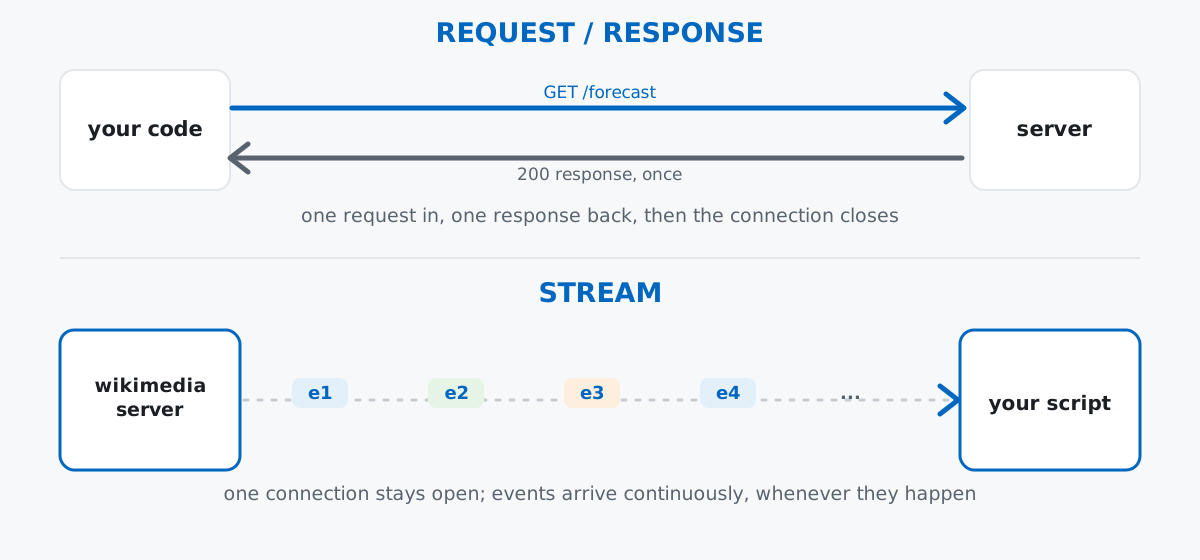
Keep that third point in mind — it’s the one this post keeps coming back to, because “when do I stop” turns out to be one of the first genuinely new decisions a stream forces on you that a request/response call never did.
Wikipedia and its sister projects (Wikidata, Wiktionary, Wikimedia Commons, and dozens of language editions) publish every edit, every new page, and every category change as a live public feed called EventStreams. The recentchange stream sits at https://stream.wikimedia.org/v2/stream/recentchange, uses the Server-Sent Events (SSE) protocol — plain HTTP, kept open, one text event after another — and needs no account, no API key, and no billing. Wikimedia’s own EventStreams documentation is the primary reference for the exact stream shape this post relies on; it’s also worth a bookmark if you go further than this post does. Wikimedia does ask for one small courtesy on every request: a descriptive User-Agent header identifying your script, which every example below includes.
Every response and every number in this post came from a real, live connection to that endpoint, captured while writing it. Your own run will show different edits — Wikipedia never stops moving — but the shape of every event, and the behavior this post describes, will match.
pip install requests(The outputs in this post come from requests 2.34.2 on Python 3.11 — nothing here depends on a specific requests version.)
requestsrequests doesn’t have special SSE support, and it doesn’t need any — stream=True is the only thing that changes from a normal requests.get() call. It tells requests not to download the whole response body up front, since here there is no “whole body”; the connection just keeps handing you more of it.
import requests

STREAM_URL = "https://stream.wikimedia.org/v2/stream/recentchange"
HEADERS = {"User-Agent": "DataTweetsBlogTutorial/1.0 (https://datatweets.com)"}

response = requests.get(STREAM_URL, stream=True, timeout=(3.05, 15), headers=HEADERS)
print(response.status_code)
print(response.headers["content-type"])

line_count = 0
for line in response.iter_lines():
    line_count += 1
    print(line)
    if line_count >= 8:
        break
response.close()
200
text/event-stream; charset=utf-8
b':ok'
b''
b'event: message'
b'id: [{"topic":"eqiad.mediawiki.recentchange","partition":0,"timestamp":1783881519019},{"topic":"codfw.mediawiki.recentchange","partition":0,"offset":-1}]'
b'data: {"$schema":"/mediawiki/recentchange/1.0.0","meta":{"uri":"https://da.wikisource.org/wiki/Kategori:Ikke_korrekturl\xc3\xa6st", ... }, "id":648979,"type":"categorize","namespace":14,"title":"Kategori:Ikke korrekturl\xc3\xa6st", ... "wiki":"dawikisource", ...}'
b''
b'event: message'
b'id: [{"topic":"eqiad.mediawiki.recentchange","partition":0,"timestamp":1783881519085},{"topic":"codfw.mediawiki.recentchange","partition":0,"offset":-1}]'content-type confirms this really is text/event-stream, the SSE content type — not JSON, not plain text. Notice the very first line is :ok, not an event at all: a comment line, which SSE uses as a heartbeat to prove the connection is still alive between real events. After that, each event arrives as a small group of lines — an event: type, an id: carrying the stream’s internal offset, and a data: line holding the actual JSON payload — separated by blank lines. That shape is exactly what the next section parses. (I truncated the long data: line above for readability; the real line is one unbroken piece of JSON.)
Only the data: lines carry anything you want to keep. Everything else — the blank separators, the : comment lines, the event:/id: lines — gets filtered out before you ever call json.loads():
import json

def parse_events(resp, max_events=5):
    events = []
    for raw_line in resp.iter_lines(decode_unicode=True):
        if not raw_line:
            continue
        if raw_line.startswith(":"):
            continue
        if raw_line.startswith("data:"):
            payload = raw_line[len("data:"):].strip()
            try:
                event = json.loads(payload)
            except json.JSONDecodeError:
                continue
            events.append(event)
            if len(events) >= max_events:
                break
    return events

response = requests.get(STREAM_URL, stream=True, timeout=(3.05, 15), headers=HEADERS)
sample_events = parse_events(response, max_events=5)
response.close()

for e in sample_events:
    print(e["type"], e["wiki"], repr(e["title"]))
categorize eswiki 'Categoría:Canales de televisión'
edit cawiki 'Discussió:Joan Miquel Saura i Morell'
edit enwiki 'Wikipedia:Graphics Lab/Photography workshop'
edit commonswiki 'File:Comedia. El exemplo mayor de la desdicha, y capitan Belisario (IA comediaelexemplo00mira 0).pdf'
log eswiki 'Usuario:Reeldre'Five real edits from five different projects, captured within a couple of seconds of each other. Notice type isn’t always "edit" — categorize (a page’s category membership changed) and log (an administrative action) show up in the same stream, on the same data: line shape, distinguished only by this one field. That variety is worth sitting with for a second: a request/response API almost always returns one predictable shape per endpoint, but a stream like this one is really several kinds of events sharing a pipe, and your code has to branch on type rather than assume a single schema.
A raw firehose of every edit to every Wikimedia project is rarely what you want. Say you only care about substantial edits to English Wikipedia — anything that adds 400 bytes or more. Every edit-type event carries a length object with old and new byte counts, so that’s a plain filter function over the same parsing loop:
def is_big_enwiki_edit(event, min_bytes=400):
    if event.get("type") != "edit":
        return False
    if event.get("wiki") != "enwiki":
        return False
    length = event.get("length")
    if not length or "old" not in length or "new" not in length:
        return False
    return (length["new"] - length["old"]) >= min_bytes

response = requests.get(STREAM_URL, stream=True, timeout=(3.05, 60), headers=HEADERS)
big_edits = []
for raw_line in response.iter_lines(decode_unicode=True):
    if not raw_line or raw_line.startswith(":") or not raw_line.startswith("data:"):
        continue
    try:
        event = json.loads(raw_line[len("data:"):].strip())
    except json.JSONDecodeError:
        continue
    if is_big_enwiki_edit(event):
        big_edits.append(event)
        if len(big_edits) >= 3:
            break
response.close()

for e in big_edits:
    delta = e["length"]["new"] - e["length"]["old"]
    print(f"+{delta} bytes  {e['title']!r}  by {e['user']}")
+1170 bytes 'Wikipedia:Sockpuppet investigations/Toonlandia2002/Archive' by TheSandDoctor
+1145 bytes 'Lak (tribe)' by Ilamxan
+434 bytes 'Draft:Zeneta B. Everhart' by WildergasmSame connection, same parsing, just an if before you keep the event. This is the pattern for filtering any stream: you can’t ask the server for “only big English Wikipedia edits” the way you’d add a query parameter to a GET request — the server broadcasts everything, and narrowing it down is entirely your code’s job, applied to each event as it arrives.
For a summary instead of individual events, keep a running tally and stop after a fixed window — 10 real seconds, in this case — rather than after a fixed number of events:
import time
from collections import Counter

def capture_window(seconds=10):
    counts = Counter()
    total = 0
    start = time.monotonic()
    resp = requests.get(STREAM_URL, stream=True, timeout=(3.05, 30), headers=HEADERS)
    try:
        for raw_line in resp.iter_lines(decode_unicode=True):
            if time.monotonic() - start >= seconds:
                break
            if not raw_line or raw_line.startswith(":") or not raw_line.startswith("data:"):
                continue
            try:
                event = json.loads(raw_line[len("data:"):].strip())
            except json.JSONDecodeError:
                continue
            counts[event.get("wiki", "unknown")] += 1
            total += 1
    finally:
        resp.close()
    return total, counts

total, counts = capture_window(10)
print("total events:", total)
for wiki, n in counts.most_common(8):
    print(f"{wiki:20s} {n}")
total events: 234
commonswiki 61
wikidatawiki 50
cewiki 27
ruwiktionary 16
enwiki 14
frwiki 9
ruwiki 7
itwiki 6234 changes across the whole Wikimedia universe in ten real seconds — roughly 23 a second, though the pace jumps around. commonswiki (Wikimedia Commons, the shared media library) and wikidatawiki (Wikidata, the shared structured-data project) usually lead, because bots do a lot of routine, high-volume housekeeping on both — that’s ordinary, not a bug in the count. Counter.most_common() did the sorting; the try/finally makes sure the connection gets closed even if the loop is interrupted partway through.
Backpressure is what happens when a stream produces data faster than your code can consume it. Wikipedia doesn’t pause for you — if your processing takes longer than the gap between events, you fall behind, and the gap between “when it happened” and “when your code got to it” grows. You can measure that gap directly: every event’s meta.dt field is the timestamp of the edit itself, in UTC.
from datetime import datetime, timezone

def measure_lag(seconds=8, per_event_delay=0.2):
    resp = requests.get(STREAM_URL, stream=True, timeout=(3.05, 30), headers=HEADERS)
    start = time.monotonic()
    lags = []
    try:
        for raw_line in resp.iter_lines(decode_unicode=True):
            if time.monotonic() - start >= seconds:
                break
            if not raw_line or raw_line.startswith(":") or not raw_line.startswith("data:"):
                continue
            try:
                event = json.loads(raw_line[len("data:"):].strip())
            except json.JSONDecodeError:
                continue
            event_dt = datetime.fromisoformat(event["meta"]["dt"].replace("Z", "+00:00"))
            now = datetime.now(timezone.utc)
            lag = (now - event_dt).total_seconds()
            lags.append(lag)
            time.sleep(per_event_delay)  # stand-in for slow processing: a DB write, a model call, ...
    finally:
        resp.close()
    return lags

lags = measure_lag(seconds=8, per_event_delay=0.2)
print("events processed:", len(lags))
print("first lag (s):", round(lags[0], 2))
print("last lag (s):", round(lags[-1], 2))
events processed: 37
first lag (s): -0.11
last lag (s): 6.46The first event was essentially caught up — a slightly negative lag just means this machine’s clock runs a fraction of a second ahead of the server’s, nothing to worry about. But by the 37th event, eight seconds later, this script was 6.46 seconds behind the moment each edit actually happened, and climbing. time.sleep(0.2) stood in for something realistic — a database write, a model call, a slow API you’re enriching each event with — and the stream didn’t wait for it. Left running, that lag only grows, because Wikipedia keeps producing events regardless of how fast you’re getting through them. A real consumer has to either process faster, drop events it can’t keep up with, or hand off to a queue that can absorb the backlog — but “just let it grow forever” isn’t a strategy, it’s a memory leak in slow motion.
A long-lived connection eventually dies, and your code needs to notice and reconnect. Networks drop, proxies time out, servers restart. A demo script that ends after a bounded window can shrug that off, but anything meant to run for hours needs retry logic. Catch the connection error, wait a moment, and try again:
def connect_with_retry(url, attempts=3):
    last_exc = None
    for attempt in range(1, attempts + 1):
        try:
            timeout = (0.001, 15) if attempt == 1 else (3.05, 15)  # force attempt 1 to fail, for real
            resp = requests.get(url, stream=True, timeout=timeout, headers=HEADERS)
            resp.raise_for_status()
            return resp
        except requests.exceptions.RequestException as e:
            last_exc = e
            print(f"attempt {attempt} failed: {type(e).__name__}: {e}")
            time.sleep(1)
    raise last_exc

resp = connect_with_retry(STREAM_URL)
print(resp.status_code)
resp.close()
attempt 1 failed: ConnectTimeout: HTTPSConnectionPool(host='stream.wikimedia.org', port=443): Max retries exceeded with url: /v2/stream/recentchange (Caused by ConnectTimeoutError(<HTTPSConnection(host='stream.wikimedia.org', port=443) at 0x107054710>, 'Connection to stream.wikimedia.org timed out. (connect timeout=0.001)'))
200That first failure is real — a 1-millisecond connect timeout is a deliberately impossible bar, standing in for whatever actually kills a connection in production — and the retry with a sane timeout succeeds a second later. requests.exceptions.RequestException is the base class for everything requests can raise on a bad connection, so catching it once covers timeouts, DNS failures, and dropped sockets alike.
Not every event has the same fields, because the stream carries more than one event type. A categorize event and an edit event share a common core, but only one of them describes an actual content change:
categorize_example = next(e for e in sample_events if e["type"] == "categorize")
edit_example = next(e for e in sample_events if e["type"] == "edit")
print("categorize:", sorted(categorize_example.keys()))
print("edit:", sorted(edit_example.keys()))
categorize: ['$schema', 'bot', 'comment', 'id', 'meta', 'namespace', 'notify_url', 'parsedcomment', 'server_name', 'server_script_path', 'server_url', 'timestamp', 'title', 'title_url', 'type', 'user', 'wiki']
edit: ['$schema', 'bot', 'comment', 'id', 'length', 'meta', 'minor', 'namespace', 'notify_url', 'parsedcomment', 'patrolled', 'revision', 'server_name', 'server_script_path', 'server_url', 'timestamp', 'title', 'title_url', 'type', 'user', 'wiki']length, minor, patrolled, and revision only exist on edit events — the earlier byte-size filter checked event.get("length") rather than event["length"] for exactly this reason. Indexing with [...] on a field that only shows up sometimes is how a demo that worked fine for the first ten events throws a KeyError on the eleventh.
Nothing stops a for line in response.iter_lines(): loop on its own — you have to. Every loop in this post breaks on either an event count (max_events, len(big_edits) >= 3) or elapsed time (time.monotonic() - start >= seconds). Skip that guard in a tutorial or demo script and iter_lines() just keeps yielding, forever, because the server never stops broadcasting and never closes the connection on its own. That’s correct behavior for a production consumer meant to run indefinitely — but it will hang a script you’re trying to test in a terminal until you kill it by hand.
A heartbeat line isn’t valid JSON, and feeding it to json.loads() anyway raises. That :ok line from the very first example isn’t a mistake to work around — it’s SSE’s way of proving the connection is still open between real events. Try to parse it as data and you get exactly the error you’d expect:
try:
    json.loads(":ok")
except json.JSONDecodeError as e:
    print(f"JSONDecodeError: {e}")
JSONDecodeError: Expecting value: line 1 column 1 (char 0)Every parsing loop in this post starts with if raw_line.startswith(":"): continue for exactly this reason — skip comment lines before you ever hand a line to json.loads(), not after it throws.
The whole shift from request/response to streaming comes down to a short list:
stream=True plus iter_lines(), not a for loop calling requests.get() repeatedlydata: lines are JSON; : lines are heartbeatsIf you want to take what this stream gives you and actually analyze it — load a captured batch of events into a DataFrame, group it by wiki or by edit type, and chart the results — the DataFrames and Reading Data lessons in our free Python for Data Analytics course pick up exactly where this post’s parse_events() leaves off. And if the api_key/authenticated side of request/response APIs is still unfamiliar, our post on working with a music data API in Python covers that half of the picture.
 Python
Build an AI Chatbot in Python: A Command-Line LLM Client
A from-scratch walkthrough of the pattern behind every LLM chatbot: one function that sends a message plus conversation history to a chat-completion API, a persona set by a system prompt, and a loop that keeps the conversation going.
Read tutorial
Python
Build an AI Chatbot in Python: A Command-Line LLM Client
A from-scratch walkthrough of the pattern behind every LLM chatbot: one function that sends a message plus conversation history to a chat-completion API, a persona set by a system prompt, and a loop that keeps the conversation going.
Read tutorial
 Software Engineering
The Single Responsibility Principle: One Class, One Reason to Change
The Single Responsibility Principle says a class should have only one reason to change. See it in action: take a Python AuthService that also owns its logging, find why that's a problem, and refactor it into clean, focused classes.
Read tutorial
Software Engineering
The Single Responsibility Principle: One Class, One Reason to Change
The Single Responsibility Principle says a class should have only one reason to change. See it in action: take a Python AuthService that also owns its logging, find why that's a problem, and refactor it into clean, focused classes.
Read tutorial