Title here
Summary here
Turn saved agent tool events into an inspectable regression test. Define five workflow contracts, compare each trace with reviewed expectations, preserve individual failure signals, and diagnose unsafe intermediate actions even when a run appears to finish.

An agent run reports an outcome of completed. Is that enough to pass a release test? Not if the agent reserved a room before checking availability, created the reservation twice, or sent a confirmation for the wrong booking. The final outcome can hide an earlier action that made the run unsafe.
To test an AI agent workflow, save each tool call as an ordered trace and compare it with explicit Python assertions. Check the required tool sequence, exact arguments, tool statuses, number of write operations, and final application state separately; pass the case only when every required contract holds.
This tutorial applies that method to a fictional shared-workspace booking agent. It reads 12 reviewed cases and 36 saved tool events. The evaluation calls no language model, calendar service, or messaging service, so it is fast, repeatable, and safe to inspect.
You need Python 3.10 or later. You should be comfortable with lists, dictionaries, functions, and small tables. A pandas DataFrame is a table with named columns. We use pandas to group events and Matplotlib to draw the result chart.
Create a virtual environment and install the two packages. On macOS or Linux, run these commands:
python -m venv .venv
source .venv/bin/activate
python -m pip install pandas matplotlib
On Windows PowerShell, use .venv\Scripts\Activate.ps1 for the activation step. The executed build used Python 3.13.2, pandas 3.0.3, and Matplotlib 3.11.0.
Download the two input datasets and save them beside your Python file:
You can also inspect the executed per-case evaluation. All three files are released under CC0 1.0. They were created for this lesson and contain only fictional requests, rooms, bookings, tool results, and failures. They do not measure a real model or service.
The trace file uses JSON Lines, also called JSONL. Each line is one complete JSON object. pandas reads this format when read_json() receives lines=True, as shown in the current pandas.read_json documentation.
An AI agent is a program in which a model can decide which actions to take. A tool is a named action exposed to that agent, such as checking availability or creating a reservation. A trace is the ordered record of those actions and their results.
Our booking workflow should have exactly three steps:
check_availability -> reserve_room -> send_confirmationThat line is more than a preferred path. It is part of the application contract. A reservation must not be created before availability is checked, and a confirmation must refer to the booking that was created.
We will test five contracts for every case:
ok.reserve_room exactly once.confirmed state and the completed outcome.An assertion is a check that expects a condition to be true. Here, each contract check returns a Boolean value, True or False, stored in a column such as sequence_ok. Keeping five columns matters because one broad “success” value cannot tell you whether the error came from planning, tool input, execution, repeated side effects, or state handling.
This lesson starts after tool selection. If you need to test whether one user message maps to the correct tool or to no tool, read Evaluate Local LLM Tool Routing with Python. Here, we test a complete multi-step workflow.
Trace fields can contain sensitive data. The OpenTelemetry GenAI attribute registry lists fields for tool-call IDs, arguments, and results, and warns that arguments and results may contain sensitive information. The registry currently marks those fields as moved to a separate GenAI semantic-conventions repository, so treat them as evolving naming references rather than a fixed schema. Keep your own schema versioned, redact secrets, and collect only the fields your checks require.
The CSV contains the expected values reviewed before evaluation. Load it together with the event file, then sort events by case and step:
import pandas as pd

cases = pd.read_csv("booking_agent_cases.csv")
traces = pd.read_json(
    "booking_agent_traces.jsonl",
    lines=True,
)
traces = traces.sort_values(["case_id", "step"])

print(f"cases={len(cases)} trace_events={len(traces)}")
The executed files produced:
cases=12 trace_events=36There are 12 independent agent runs. Most have three events, but one has a repeated reservation and another stops before confirmation. The total still happens to be 36, so row count alone cannot prove that each case has three correct steps.
Before scoring, validate identifiers and local step numbers. The next checks prevent a missing case, an extra case, or a duplicated step from creating believable but incorrect comparisons:
assert cases["case_id"].is_unique
assert set(cases["case_id"]) == set(traces["case_id"])
assert not traces.duplicated(["case_id", "step"]).any()

steps_are_consecutive = traces.groupby("case_id")["step"].apply(
    lambda values: values.tolist() == list(range(1, len(values) + 1))
)
assert steps_are_consecutive.all()
These assertions print nothing when they pass. If one fails, fix the trace export or case join before evaluating agent behavior. Do not fill missing events with invented successful rows.
Now group each case into a list of event dictionaries. Sorting has already made their order explicit:
events_by_case = {
    case_id: group.to_dict("records")
    for case_id, group in traces.groupby("case_id", sort=False)
}
Inspect one normal trace before writing rules. B01 checks availability, creates one booking, and confirms that exact booking:
columns = ["step", "tool_name", "status", "state_after"]
print(
    traces.loc[traces["case_id"].eq("B01"), columns]
    .to_string(index=False)
)
The real output was:
 step            tool_name status   state_after
    1    check_availability     ok    room_found
    2          reserve_room     ok      reserved
    3     send_confirmation     ok     confirmed
This table is small enough to verify by eye. The evaluator will apply the same contract to all cases without relying on a final sentence or model judgment.
Start with order because it is a direct list comparison. Python list equality checks both members and positions:
REQUIRED_SEQUENCE = [
    "check_availability",
    "reserve_room",
    "send_confirmation",
]

def sequence_matches(events):
    tool_names = [event["tool_name"] for event in events]
    return tool_names == REQUIRED_SEQUENCE
This strict rule rejects a missing tool call, an unexpected tool call, a duplicate call, or calls made in the wrong order. That is correct for this workflow. A read-only research agent may allow several valid paths. In that case, you could define a set of accepted sequences or check only the required ordering constraints.
Arguments need a separate check. Build the expected dictionary from the reviewed case, then compare each observed tool call with its expected value:
def arguments_match(case, events):
    expected_common = {
        "start_utc": case["expected_start_utc"],
        "duration_min": int(case["expected_duration_min"]),
    }
    expected = {
        "check_availability": {
            "attendees": int(case["attendees"]),
            **expected_common,
        },
        "reserve_room": {
            "room_id": case["expected_room_id"],
            **expected_common,
        },
        "send_confirmation": {
            "booking_id": case["expected_booking_id"],
        },
    }
    return all(
        event["tool_name"] in expected
        and event["arguments"] == expected[event["tool_name"]]
        for event in events
    )
Exact comparison is suitable because this application already has normalized UTC timestamps, integer durations, and stable IDs. If your tool accepts equivalent forms, normalize both expected and observed values before the final test. For example, convert all timestamps to one time zone instead of accepting any string containing the right hour.
Order and arguments answer different questions. B02 uses the correct values but calls reserve_room before check_availability. B03 follows the required sequence but requests 60 minutes when the reviewed case specifies 30. Combining both under one “tool call failed” label would make the repair less clear.
A correct sequence is not enough when tools can change external state. Count the reservation write explicitly, check every tool status, and verify the final state recorded by the application:
def execution_checks(events):
    reserve_count = sum(
        event["tool_name"] == "reserve_room"
        for event in events
    )
    tools_succeeded = all(
        event["status"] == "ok"
        for event in events
    )
    final_state_ok = bool(events) and (
        events[-1]["state_after"] == "confirmed"
        and events[-1]["run_outcome"] == "completed"
    )
    return tools_succeeded, reserve_count == 1, final_state_ok
single_reservation deserves its own column even though a duplicate call also breaks the strict sequence. Repeated writes can create real side effects such as two bookings or two payments. Giving that condition a specific name makes it easy to attach a stronger release rule or alert.
The final-state check uses two values. state_after == "confirmed" says that the application reached the expected state after the last event. run_outcome == "completed" says how the overall run ended. Requiring both catches a trace whose tools report success even though the workflow never reaches the expected state.
These saved traces are safe evaluation inputs. In a test environment, you can also run tools against a temporary database and inspect its state afterward. Do not point an evaluation suite at a live booking, payment, email, or data-deletion system. Use fakes, sandboxes, or transaction rollbacks, and ensure retries have idempotency protection. Idempotent means that repeating the same request does not create another effect.
Evaluate one case by keeping every contract result, then require all five for passes_all. The function below also assigns one primary diagnosis for a compact report:
def evaluate_case(case, events):
    tool_names = [event["tool_name"] for event in events]
    sequence_ok = tool_names == REQUIRED_SEQUENCE
    arguments_ok = arguments_match(case, events)
    tools_succeeded, single_reservation, final_state_ok = (
        execution_checks(events)
    )

    passes_all = all([
        sequence_ok,
        arguments_ok,
        tools_succeeded,
        single_reservation,
        final_state_ok,
    ])

    if not single_reservation:
        diagnosis = "duplicate_write"
    elif not sequence_ok:
        diagnosis = "wrong_sequence"
    elif not arguments_ok:
        diagnosis = "wrong_arguments"
    elif not tools_succeeded:
        diagnosis = "tool_error"
    elif not final_state_ok:
        diagnosis = "wrong_final_state"
    else:
        diagnosis = "pass"

    return {
        "case_id": case["case_id"],
        "sequence_ok": sequence_ok,
        "arguments_ok": arguments_ok,
        "tools_succeeded": tools_succeeded,
        "single_reservation": single_reservation,
        "final_state_ok": final_state_ok,
        "passes_all": passes_all,
        "diagnosis": diagnosis,
    }
The diagnosis priority is an explicit reporting choice. It does not erase other failed columns. For example, B06 has both a duplicate write and an invalid sequence, but duplicate_write is the primary label because repeated state changes are the higher-risk symptom in this application.
Apply the function to every reviewed case and print the executed totals:
results = pd.DataFrame([
    evaluate_case(case, events_by_case[case["case_id"]])
    for _, case in cases.iterrows()
])

print(
    f"cases={len(results)} "
    f"full_passes={results['passes_all'].sum()}"
)
for column in [
    "sequence_ok",
    "arguments_ok",
    "tools_succeeded",
    "single_reservation",
    "final_state_ok",
]:
    print(f"{column}: {results[column].sum()}/12")
The real evaluation printed:
cases=12 full_passes=5
sequence_ok: 9/12
arguments_ok: 10/12
tools_succeeded: 11/12
single_reservation: 11/12
final_state_ok: 9/12
Only five traces pass every contract. The separate counts show that order and final state fail most often, with nine passes each. Arguments pass in ten cases. Tool status and the single-write rule each pass in 11.
The generated chart shows both the contract totals and one primary diagnosis per case:
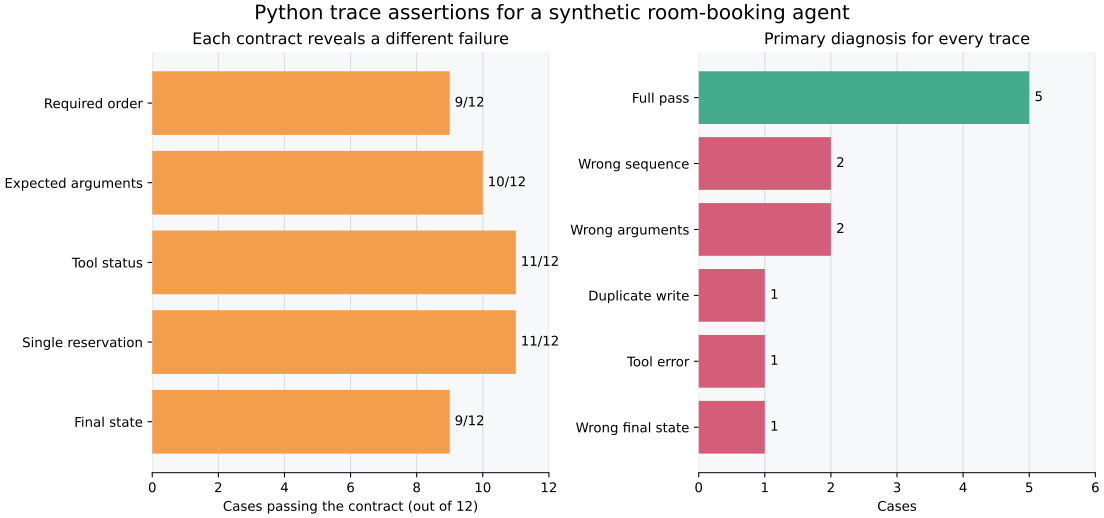
Read the left panel across contracts. It shows overlapping evidence, so its bars do not add to 12. Read the right panel as a partition: five full passes, two wrong sequences, two wrong-argument cases, one duplicate write, one tool error, and one wrong final state.
Print failed IDs during development. A small failure table points directly to the trace that needs review:
failed = results.loc[
    ~results["passes_all"],
    ["case_id", "diagnosis"],
]
print(failed.to_string(index=False))
The executed failure list was:
case_id         diagnosis
    B02    wrong_sequence
    B03   wrong_arguments
    B04        tool_error
    B05 wrong_final_state
    B06   duplicate_write
    B08   wrong_arguments
    B09    wrong_sequence
These are controlled teaching failures, not observed model performance. Their purpose is to prove that each evaluator branch works and that the report preserves the cause.
Start with failures that matter to your application. Write each case as an initial state, user request, reviewed constraints, and expected final state. Include negative cases: unavailable resources, missing required input, failed tools, permission errors, duplicate retries, and requests that should not cause a write.
Save trace events before grading them. Use stable case IDs, agent and prompt versions, tool-schema versions, and a session-local step number. Record normalized arguments and small result fields needed for evaluation. Avoid raw private content when a safe derived value is enough.
Run the same unchanged cases for every candidate release. Keep the full Boolean table, not only the overall pass rate. A changed prompt may improve tool order while making duplicate writes more common. A single average can hide that tradeoff.
Use deterministic Python checks wherever the contract is objective. Reserve human review or a model-based judge for open-ended properties that code cannot decide reliably, such as tone or whether a summary is clear. Even then, keep the deterministic workflow checks. A fluent response should not excuse a wrong booking ID.
Finally, pair offline tests with runtime limits. The safe Python agent loop tutorial shows how to restrict tools, validate arguments, and stop after a fixed number of steps. Offline trace assertions tell you what broke; runtime controls limit the effect if it breaks.
You grade only the final response. A correct confirmation sentence can follow the wrong write. Save tool names, normalized arguments, statuses, and final state, then test them independently.
The test calls live tools. Replace calendar, payment, email, and deletion tools with controlled fakes or a sandbox. A test should not create real reservations or contact real people.
Any tool order is accepted when the final state looks right. Define ordering rules for actions whose safety depends on an earlier check. Make the rule strict only where the application requires it.
Duplicate writes disappear inside a sequence failure. Count high-impact write tools separately. Also add an idempotency key to the real tool so a retry cannot create another resource.
Arguments are compared as unnormalized text. Parse dates, numbers, units, and identifiers before comparison. Decide accepted forms before viewing the final evaluation results.
A failed tool is treated as an agent failure without context. Keep provider or tool errors separate from wrong tool choice and wrong arguments. The repair may belong in retry handling or infrastructure rather than the prompt.
Events are sorted by file order or wall-clock time alone. Use a session-local sequence number created by the runtime. Export and network delivery can reorder events, and two events may share a timestamp.
Sensitive arguments are copied into the evaluation file. Store the minimum required fields, redact secrets before export, restrict access, and set a retention period. Use safe IDs or keyed digests when raw values are not needed.
The synthetic pass rate is presented as an agent benchmark. These cases test evaluator logic. Real performance requires identified models, representative reviewed data, repeated runs where output varies, and a documented evaluation date.
The chart fails on a server. Select Matplotlib’s headless backend before importing pyplot:
import matplotlib

matplotlib.use("Agg")
import matplotlib.pyplot as plt
Agg lets the script write image files without a desktop display. Keep that selection at the top of the plotting program.
An agent workflow is a sequence of observable actions, not only a final answer. Turn that sequence into separate contracts for tool order, arguments, execution status, repeated writes, and final state. Then require every critical contract to pass while preserving the individual columns for diagnosis.
The 12 synthetic booking cases produced five full passes and seven known failures. Because the evaluator stored each signal separately, it could distinguish wrong order from wrong values, a failed tool, a duplicate reservation, and an incomplete final state.
The reusable pattern is expect, trace, assert, diagnose. Begin with a small set that you can inspect by eye. Add real, governed failure cases as your system develops, and run the frozen suite before each release. That gives you evidence about where the workflow changed, not just a number saying that something did.
 Python
Build an AI Chatbot in Python: A Command-Line LLM Client
A from-scratch walkthrough of the pattern behind every LLM chatbot: one function that sends a message plus conversation history to a chat-completion API, a persona set by a system prompt, and a loop that keeps the conversation going.
Read tutorial
Python
Build an AI Chatbot in Python: A Command-Line LLM Client
A from-scratch walkthrough of the pattern behind every LLM chatbot: one function that sends a message plus conversation history to a chat-completion API, a persona set by a system prompt, and a loop that keeps the conversation going.
Read tutorial
 Software Engineering
The Single Responsibility Principle: One Class, One Reason to Change
The Single Responsibility Principle says a class should have only one reason to change. See it in action: take a Python AuthService that also owns its logging, find why that's a problem, and refactor it into clean, focused classes.
Read tutorial
Software Engineering
The Single Responsibility Principle: One Class, One Reason to Change
The Single Responsibility Principle says a class should have only one reason to change. See it in action: take a Python AuthService that also owns its logging, find why that's a problem, and refactor it into clean, focused classes.
Read tutorial