Title here
Summary here
A layered Python diagnostic that identifies the active interpreter, reads installed-package metadata, runs pip's compatibility check, tests real imports, and proves the pandas-to-scikit-learn path with a small CC0 dataset and generated chart.

ModuleNotFoundError, an incompatible NumPy message, and a script that works in one terminal but not another can look like one vague “Python problem.” They are different failures, so reinstalling packages at random often changes the evidence without finding the cause.
To troubleshoot Python machine learning package conflicts, run every diagnostic through the same interpreter as the project. Then check four layers in order: installed-package metadata, declared dependency rules, real imports, and one small end-to-end data path. Repair the first failing layer, recreate the environment, and rerun the full check; a successful import alone does not prove that the packages work together.
This tutorial builds that report around NumPy, pandas, scikit-learn, and Matplotlib. The executed result includes a real dependency conflict and a successful model run, which lets us see why both facts matter.
You need Python 3.11 or newer, a terminal, and basic experience running a Python file. You do not need machine learning knowledge. A dependency is a package that another package needs. A virtual environment is a project-specific Python installation with its own package set.
Create an empty project folder, create a virtual environment, and activate it. On macOS or Linux, run:
python -m venv .venv
source .venv/bin/activate
On Windows PowerShell, use .venv\Scripts\Activate.ps1 for the second command. If these steps are new, the DATATWEETS virtual environment guide explains creation, activation, and dependency files in detail.
Create requirements.txt with the direct packages used by this lesson:
numpy==2.5.1
pandas==3.0.3
scikit-learn==1.9.0
matplotlib==3.11.0
Install them through the active interpreter:
python -m pip install -r requirements.txt
The executed lesson used Python 3.13.2, pip 25.0, NumPy 2.5.1, pandas 3.0.3, scikit-learn 1.9.0, and Matplotlib 3.11.0. Exact pins make the shown result reproducible; they are not a recommendation to keep old versions forever.
Download drying_cycle_probe.csv beside your script. It has 72 fictional drying cycles with load, air-temperature, fan, and duration values. The data was generated with a fixed NumPy seed for this lesson and is released under CC0-1.0. It does not describe a real process and should not guide real equipment.
An environment can fail at more than one boundary. Read the checks as a sequence:
The word distribution means the installable package known to pip. An import package is the name used in Python code. These names often match, but not always: pip installs the scikit-learn distribution, while Python imports the sklearn package.
Each layer answers a narrower question than the complete test. Package metadata can exist even when an import fails. All imports can work while a model call fails. A model can run even though an unrelated installed package declares an incompatible requirement. The report keeps those facts separate.
Create ml_environment_report.py. Start with only standard-library imports and a mapping from distribution names to import names. This code does not yet import the data libraries, so it can still report missing metadata cleanly:
import importlib
import json
import os
import platform
import subprocess
import sys
from importlib.metadata import PackageNotFoundError, version
from pathlib import Path

PACKAGES = {
    "numpy": "numpy",
    "pandas": "pandas",
    "scikit-learn": "sklearn",
    "matplotlib": "matplotlib",
}

print("python:", platform.python_version())
print("interpreter:", sys.executable)
print("virtual environment:", sys.prefix != sys.base_prefix)
Python’s current venv documentation defines sys.prefix != sys.base_prefix as a sufficient virtual-environment check. It also notes that activation is optional when you call the environment’s executable by its full path. This is why the executable path is stronger evidence than the shell prompt.
The executed report began with:
python: 3.13.2
interpreter: .../.venv-mlm-tutorials/bin/python
virtual environment: True
Your path should contain your environment folder, probably .venv. If it points to a system Python or another project, stop here. Use that project’s interpreter explicitly before changing any packages.
Python’s built-in importlib.metadata reads information about installed distributions without importing their public modules. Add this function to record versions and missing distributions:
def package_versions():
    found = {}
    missing = []

    for distribution_name in PACKAGES:
        try:
            found[distribution_name] = version(distribution_name)
        except PackageNotFoundError:
            missing.append(distribution_name)

    return found, missing


versions, missing_metadata = package_versions()
for name, installed_version in versions.items():
    print(f"{name}: {installed_version}")
This confirms what metadata the active interpreter can see. It does not say whether one package accepts another package’s version.
For that question, run pip as a module through sys.executable. The helper below guarantees that the pip process belongs to the same Python process that launched the report:
def run_pip(*arguments):
    environment = os.environ.copy()
    environment["PIP_DISABLE_PIP_VERSION_CHECK"] = "1"

    return subprocess.run(
        [sys.executable, "-m", "pip", *arguments],
        check=False,
        capture_output=True,
        text=True,
        env=environment,
    )


inspect_result = run_pip("inspect", "--local")
if inspect_result.returncode != 0:
    raise RuntimeError(f"pip inspect failed: {inspect_result.stderr.strip()}")

inspect_report = json.loads(inspect_result.stdout)
if inspect_report["version"] != "1":
    raise RuntimeError("Unsupported pip inspect report version")

check_result = run_pip("check")
dependency_message = (
    check_result.stdout.strip() or check_result.stderr.strip()
)
print("pip inspect schema:", inspect_report["version"])
print("installed distributions:", len(inspect_report["installed"]))
print("pip check exit code:", check_result.returncode)
print("pip check:", dependency_message)
pip inspect returns a JSON snapshot of the environment. Its current JSON specification declares schema version 1 stable, so a report reader should check that field before parsing the rest. pip check verifies declared requirements and returns exit code 0 when it finds no broken requirements or 1 when it finds a missing or incompatible dependency.
Here is the real executed result:
numpy: 2.5.1
pandas: 3.0.3
scikit-learn: 1.9.0
matplotlib: 3.11.0
pip inspect: schema 1, 36 installed distributions
pip check exit code: 1
pip check: numba 0.66.0 has requirement numpy<2.5,>=1.22, but you have numpy 2.5.1.
The important line is the exit code. numba declares that it needs NumPy below 2.5, but this environment contains NumPy 2.5.1. The four target packages still have metadata, so the problem is not “NumPy is missing.” It is “the installed set violates one package’s declared range.”
Next, import every public module and keep the original exception type and message. Catching Exception is appropriate in this diagnostic boundary because compiled extensions can fail with errors other than ModuleNotFoundError:
def import_stack():
    modules = {}
    failures = {}

    for distribution_name, import_name in PACKAGES.items():
        try:
            modules[distribution_name] = importlib.import_module(import_name)
        except Exception as error:
            failures[distribution_name] = (
                f"{type(error).__name__}: {error}"
            )

    return modules, failures


modules, import_failures = import_stack()
if import_failures:
    raise RuntimeError(f"Import failures: {import_failures}")
An empty import_failures dictionary proves that the modules loaded in this process. It does not erase the pip check conflict, so keep both results.
Now make the test cross library boundaries. pandas reads the CSV, scikit-learn splits it, a pipeline scales three inputs and fits linear regression, and NumPy checks that every prediction is finite. A pipeline is one object that applies ordered preprocessing steps and then a final estimator; the current scikit-learn Pipeline reference documents that sequence.
import numpy as np
import pandas as pd
from sklearn.linear_model import LinearRegression
from sklearn.metrics import mean_absolute_error
from sklearn.model_selection import train_test_split
from sklearn.pipeline import Pipeline
from sklearn.preprocessing import StandardScaler

data = pd.read_csv("drying_cycle_probe.csv")
features = data[["load_kg", "air_temp_c", "fan_pct"]]
target = data["drying_minutes"]

X_train, X_test, y_train, y_test = train_test_split(
    features,
    target,
    test_size=0.25,
    random_state=27,
)

model = Pipeline([
    ("scale", StandardScaler()),
    ("regression", LinearRegression()),
])
model.fit(X_train, y_train)
predictions = model.predict(X_test)
mae = mean_absolute_error(y_test, predictions)

assert predictions.shape == (18,)
assert np.isfinite(predictions).all()
print(f"runtime probe: {len(data)} rows, {len(y_test)} test rows")
print(f"MAE: {mae:.2f} minutes")
The executed output was:
runtime probe: 72 rows, 18 test rows
MAE: 2.44 minutes
Mean absolute error (MAE) is the average absolute gap between actual and predicted drying times. Its value is not a model-quality claim about real drying. Here it proves that CSV parsing, numeric arrays, train-test splitting, preprocessing, fitting, prediction, and a metric all completed with finite values.
A useful diagnostic survives the terminal window. Record the Boolean layer results and the details needed to compare two machines or two dependency updates:
layers = {
    "Virtual interpreter": sys.prefix != sys.base_prefix,
    "Package metadata": not missing_metadata,
    "Dependency rules": check_result.returncode == 0,
    "Runtime imports": not import_failures,
    "Data + model path": True,
}

report = {
    "python": platform.python_version(),
    "executable": sys.executable,
    "package_versions": versions,
    "pip_inspect_schema": inspect_report["version"],
    "pip_check_exit_code": check_result.returncode,
    "pip_check_output": dependency_message,
    "test_mae_minutes": round(float(mae), 3),
    "layers": layers,
}

Path("ml_environment_report.json").write_text(
    json.dumps(report, indent=2) + "\n",
    encoding="utf-8",
)
The lesson also plots the test predictions and layer results. Select Matplotlib’s non-interactive Agg backend before importing pyplot; the Matplotlib backend guide explains that non-interactive backends write files without opening a desktop window.
import matplotlib

matplotlib.use("Agg")

import matplotlib.pyplot as plt

fig, axes = plt.subplots(
    1,
    2,
    figsize=(11.2, 5.6),
    gridspec_kw={"width_ratios": [1.25, 1]},
)

low = min(y_test.min(), predictions.min()) - 2
high = max(y_test.max(), predictions.max()) + 2
axes[0].scatter(
    y_test,
    predictions,
    s=58,
    color="#0067c0",
    alpha=0.82,
)
axes[0].plot(
    [low, high],
    [low, high],
    linestyle="--",
    color="#59636e",
)
axes[0].set_xlim(low, high)
axes[0].set_ylim(low, high)
axes[0].set_xlabel("Actual drying time (minutes)")
axes[0].set_ylabel("Predicted drying time (minutes)")
axes[0].set_title("Runtime probe", loc="left", weight="bold")
axes[0].text(
    0.04,
    0.93,
    f"MAE = {mae:.2f} minutes",
    transform=axes[0].transAxes,
    va="top",
    color="#303840",
)

names = list(layers)
colors = ["#16825d" if layers[name] else "#c54b4b" for name in names]
y_positions = np.arange(len(names))
axes[1].barh(
    y_positions,
    np.ones(len(names)),
    color=colors,
    height=0.62,
)
axes[1].set_yticks(y_positions, names)
axes[1].set_xlim(0, 1)
axes[1].set_xticks([])
axes[1].invert_yaxis()
axes[1].set_title("Environment layers", loc="left", weight="bold")
for position, name in enumerate(names):
    label = "PASS" if layers[name] else "REPAIR"
    axes[1].text(
        0.95,
        position,
        label,
        ha="right",
        va="center",
        color="white",
        weight="bold",
    )

for axis in axes:
    axis.grid(color="#e3e6ea", linewidth=0.8, alpha=0.7)
    axis.set_axisbelow(True)
    for spine in axis.spines.values():
        spine.set_visible(False)

fig.suptitle(
    "Python ML environment diagnostic",
    x=0.08,
    ha="left",
    fontsize=17,
    weight="bold",
)
fig.tight_layout(rect=(0, 0, 1, 0.94))
fig.savefig("python_ml_environment_diagnostic.svg", format="svg")
plt.close(fig)
The published visual is the real generated output:
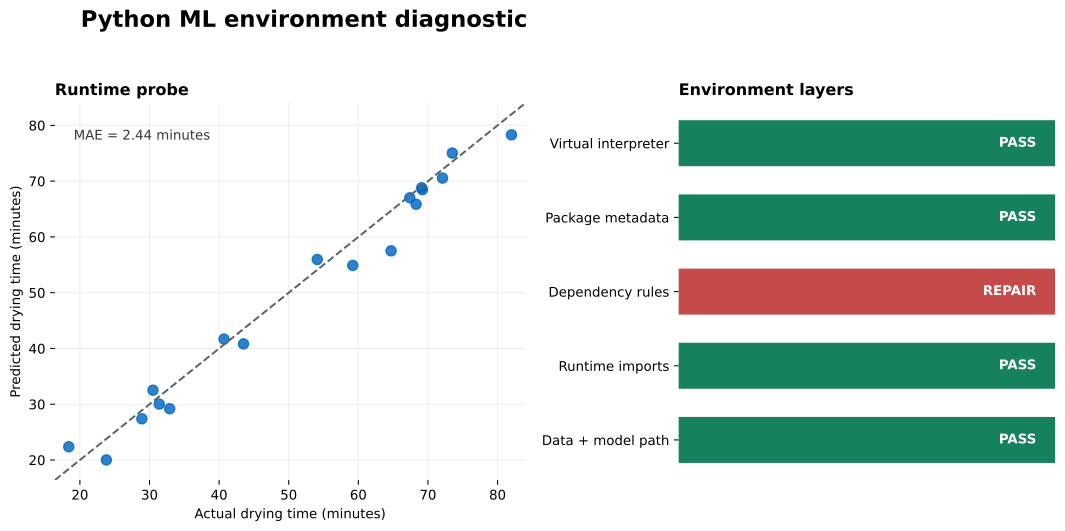
Read the right panel first. Red identifies the earliest unresolved evidence: dependency rules. The later runtime layers are green because this particular pandas and scikit-learn path completed. In the left panel, the 18 finite predictions cluster around the diagonal, consistent with the reported 2.44-minute MAE.
Use the report to choose a narrow repair instead of applying every possible fix.
The interpreter is wrong. Do not install more packages yet. Run the script with .venv/bin/python ml_environment_report.py on macOS or Linux, or .venv\Scripts\python.exe ml_environment_report.py on Windows. Confirm the path before continuing.
Package metadata is missing. Install the named direct requirement through the same interpreter. If an import name differs from its distribution name, use the distribution name with pip: scikit-learn, not sklearn.
pip check reports a conflict. Read the full requirement range and decide whether the reporting package belongs in this project. In the executed environment, numba is outside the four-package lesson stack. A clean project environment built only from this tutorial’s direct requirements would omit it. If a project needs both Numba and NumPy, choose versions that satisfy both packages’ declared constraints, rebuild the environment, and rerun the tests. Do not blindly downgrade NumPy inside a shared environment because other packages may have their own lower bounds.
An import fails after metadata passes. Preserve the original exception. A missing shared library, incompatible compiled wheel, or mixed architecture needs different action from a missing Python package. Recreate the environment on the target machine rather than copying .venv from another operating system or folder.
The data path fails after imports pass. Keep the smallest CSV row or operation that reproduces the error. Check column names, numeric types, missing values, array shapes, and the exact call that crosses from one library into another. The failing operation is more useful than a long package list.
After any dependency change, delete and recreate the project environment when practical, reinstall from the declared requirements, and run the complete report again. pip check validates declared package metadata; it cannot prove that imports, compiled code, your dataset, and output writing all work. The later layers provide that evidence.
Package troubleshooting becomes manageable when you stop treating the environment as one black box. Identify the interpreter, inspect installed metadata, validate declared requirements, test imports, and then exercise the smallest real path that matters to your project.
In this run, four layers passed and one did not. The pandas-to-scikit-learn probe loaded 72 rows, predicted 18 held-out durations, produced a 2.44-minute MAE, and saved an SVG. At the same time, pip check correctly reported a Numba–NumPy version conflict. A working example is not permission to ignore that conflict; it tells you exactly what currently works while you rebuild a coherent package set.
Keep the JSON report, direct requirements, probe dataset, and generated chart together. Run them after changing Python, updating dependencies, moving to a new machine, or building a deployment image. For a domain-specific extension that checks dates, ordered folds, a forecasting model, and chart output, continue with testing a Python time-series forecasting environment.
 Python
Build an AI Chatbot in Python: A Command-Line LLM Client
A from-scratch walkthrough of the pattern behind every LLM chatbot: one function that sends a message plus conversation history to a chat-completion API, a persona set by a system prompt, and a loop that keeps the conversation going.
Read tutorial
Python
Build an AI Chatbot in Python: A Command-Line LLM Client
A from-scratch walkthrough of the pattern behind every LLM chatbot: one function that sends a message plus conversation history to a chat-completion API, a persona set by a system prompt, and a loop that keeps the conversation going.
Read tutorial
 Software Engineering
The Single Responsibility Principle: One Class, One Reason to Change
The Single Responsibility Principle says a class should have only one reason to change. See it in action: take a Python AuthService that also owns its logging, find why that's a problem, and refactor it into clean, focused classes.
Read tutorial
Software Engineering
The Single Responsibility Principle: One Class, One Reason to Change
The Single Responsibility Principle says a class should have only one reason to change. See it in action: take a Python AuthService that also owns its logging, find why that's a problem, and refactor it into clean, focused classes.
Read tutorial