Title here
Summary here
This guide builds a small bakery order module, then covers it with pytest: plain assert-based tests, pytest.raises for exceptions, fixtures for shared setup, parametrize for testing many cases at once, and unittest.mock for isolating a flaky external call.

You change one function, and three things you didn’t touch quietly break. That’s the moment most people start looking for unit tests — small, automated checks that run in milliseconds and tell you exactly which function broke, instead of finding out from a user three days later. If you’ve already cleaned up a tangled class with the Single Responsibility Principle, unit testing is the natural next step: small, focused functions are also the easiest kind to test.
Getting started is where people stall, though. There’s unittest in the standard library, pytest as the popular third-party alternative, and vocabulary — fixtures, mocks, parametrize — that doesn’t mean anything until you’ve used it once. This guide skips the survey of every tool and teaches one: pytest, the one most Python teams actually reach for. You’ll build a small, real module, then write tests for it that get progressively more capable.
To unit test a Python function with pytest, write a plain function whose name starts with test_, call the code you’re testing inside it, and check the result with a normal assert statement. Save it in a file named test_*.py, run pytest from your terminal, and it finds and runs every test function automatically — no registration, no boilerplate, no test-runner class to inherit from.
Every unit test you’ll ever write, however elaborate, breaks down into three steps:
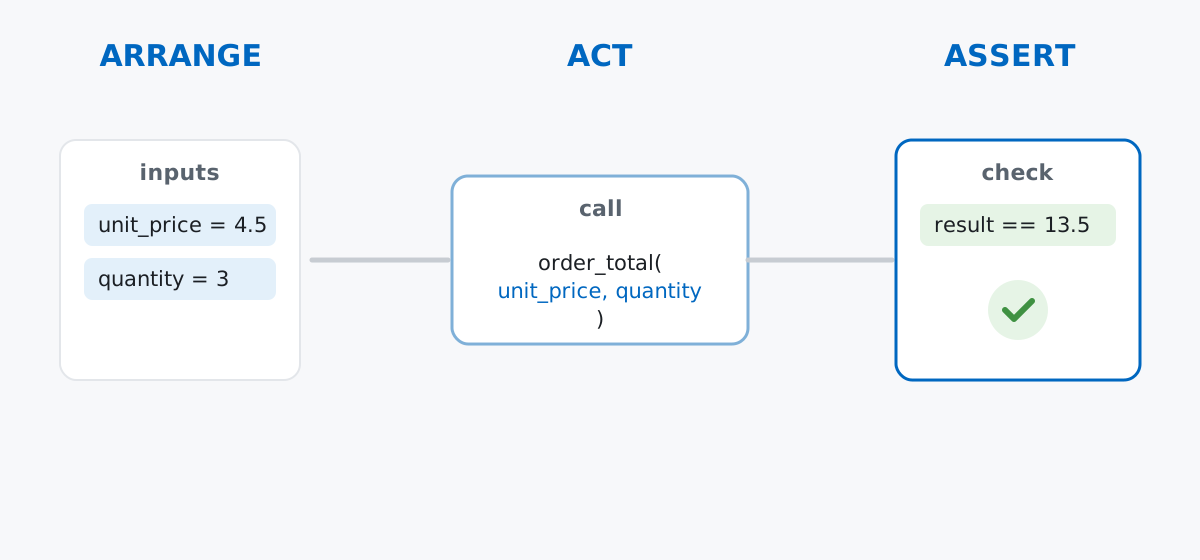
Keeping this model in your head is what keeps tests readable as they multiply. A test that arranges too much, or asserts on more than one behavior, is a sign you’re testing two things at once and should probably split it in two.
This doesn’t need a downloaded dataset — it needs a small, real piece of code with a few different kinds of behavior to test. Imagine you’re building the order backend for Kanel & Rye, a neighborhood bakery that just started taking orders online. Save this as bakery.py:
from carrier_api import fetch_rate


class OutOfStockError(Exception):
    pass


def bulk_discount_rate(quantity):
    """Return the discount rate (0-1) for an order of this size."""
    if quantity >= 50:
        return 0.15
    if quantity >= 20:
        return 0.10
    if quantity >= 10:
        return 0.05
    return 0.0


def order_total(unit_price, quantity):
    if quantity <= 0:
        raise ValueError("quantity must be a positive integer")
    rate = bulk_discount_rate(quantity)
    subtotal = unit_price * quantity
    return round(subtotal * (1 - rate), 2)


def check_stock(item, quantity, inventory):
    """Raise OutOfStockError if inventory doesn't have enough `item`."""
    available = inventory.get(item, 0)
    if available < quantity:
        raise OutOfStockError(f"only {available} {item} left, requested {quantity}")
    return True


def get_shipping_estimate(weight_kg):
    return fetch_rate(weight_kg)
get_shipping_estimate leans on a second file, a stand-in for a real shipping-carrier API. Save this as carrier_api.py in the same folder:
def fetch_rate(weight_kg):
    # In a real app this would call an external shipping API over the network.
    raise RuntimeError("no network access in this environment")
Five functions, four different things to test: a plain calculation, a rejection path, a custom exception, and a call to something outside your control. That’s enough variety to justify every tool in this post. (The outputs below come from Python 3.13.2 and pytest 9.1.1.)
pytestA test is just a function. pytest finds any function named test_* in a file named test_*.py, runs it, and reports whether it raised an exception. Save this as test_bakery.py, next to bakery.py:
from bakery import order_total


def test_order_total_with_no_discount():
    assert order_total(unit_price=4.5, quantity=3) == 13.5
Run it with pytest -v from that folder (-v lists each test by name instead of just printing dots):
============================= test session starts ==============================
platform darwin -- Python 3.13.2, pytest-9.1.1, pluggy-1.6.0 -- .../bin/python
cachedir: .pytest_cache
rootdir: .../bakery
collecting ... collected 1 item

test_bakery.py::test_order_total_with_no_discount PASSED                 [100%]

============================== 1 passed in 0.01s ===============================
Notice there’s no assertEqual, no test class, no self. A plain assert is enough, because pytest rewrites assert statements at import time so a failure tells you exactly what values it compared. Imagine you’d typo’d the expected total as 14.0 instead of 13.5:
=================================== FAILURES ===================================
______________________ test_order_total_with_no_discount _______________________

    def test_order_total_with_no_discount():
>       assert order_total(unit_price=4.5, quantity=3) == 14.0
E       assert 13.5 == 14.0
E        +  where 13.5 = order_total(unit_price=4.5, quantity=3)

test_bakery.py:5: AssertionError
Read the E lines: pytest shows you the actual value (13.5), what it was compared against (14.0), and — on the where line — the exact call that produced it. That’s pytest’s assertion introspection, and it’s the main reason plain assert is enough here; other frameworks need a whole family of methods (assertEqual, assertGreater, assertIn…) to get the same level of detail.
pytest.raisesorder_total and check_stock can both fail on purpose — an invalid quantity, or not enough stock. You can’t assert an exception directly, since raising one skips the rest of the function. Use pytest.raises as a context manager instead: it passes the test only if the code inside the with block raises the exception you named.
import pytest

from bakery import OutOfStockError, check_stock, order_total


def test_order_total_rejects_zero_quantity():
    with pytest.raises(ValueError):
        order_total(unit_price=4.5, quantity=0)


def test_check_stock_raises_when_not_enough_left():
    inventory = {"croissant": 4}
    with pytest.raises(OutOfStockError, match="only 4 croissant left"):
        check_stock("croissant", 10, inventory)
test_bakery.py::test_order_total_with_no_discount PASSED [ 33%]
test_bakery.py::test_order_total_rejects_zero_quantity PASSED [ 66%]
test_bakery.py::test_check_stock_raises_when_not_enough_left PASSED [100%]
============================== 3 passed in 0.01s ===============================The optional match argument checks the exception’s message against a regular expression, which catches the case where the right exception type gets raised for the wrong reason — a bug pytest.raises(OutOfStockError) alone would miss.
The inventory dictionary above is about to get repeated in every stock-related test. A fixture is a function decorated with @pytest.fixture that builds a piece of setup once; any test that names it as a parameter gets a fresh copy automatically, with no explicit call:
import pytest

from bakery import OutOfStockError, check_stock, order_total


def test_order_total_with_no_discount():
    assert order_total(unit_price=4.5, quantity=3) == 13.5


def test_order_total_rejects_zero_quantity():
    with pytest.raises(ValueError):
        order_total(unit_price=4.5, quantity=0)


@pytest.fixture
def kitchen_stock():
    return {"croissant": 12, "baguette": 30, "eclair": 4}


def test_check_stock_allows_an_order_within_stock(kitchen_stock):
    assert check_stock("baguette", 5, kitchen_stock) is True


def test_check_stock_raises_when_not_enough_left(kitchen_stock):
    with pytest.raises(OutOfStockError, match="only 4 eclair left"):
        check_stock("eclair", 10, kitchen_stock)
test_bakery.py::test_order_total_with_no_discount PASSED [ 25%]
test_bakery.py::test_order_total_rejects_zero_quantity PASSED [ 50%]
test_bakery.py::test_check_stock_allows_an_order_within_stock PASSED [ 75%]
test_bakery.py::test_check_stock_raises_when_not_enough_left PASSED [100%]
============================== 4 passed in 0.01s ===============================pytest matches the kitchen_stock parameter name to the fixture function by name — that’s the whole mechanism. By default a fixture reruns for every test that asks for it, so test_check_stock_allows_an_order_within_stock and test_check_stock_raises_when_not_enough_left each get their own untouched dictionary, even though they both name kitchen_stock.
parametrizebulk_discount_rate has four tiers, and copy-pasting one test function per tier is exactly the kind of duplication pytest is built to remove. @pytest.mark.parametrize runs the same test body once per row of data you give it:
@pytest.mark.parametrize(
    "quantity, expected_rate",
    [
        (1, 0.0),
        (9, 0.0),
        (10, 0.05),
        (19, 0.05),
        (20, 0.10),
        (49, 0.10),
        (50, 0.15),
    ],
)
def test_bulk_discount_rate_tiers(quantity, expected_rate):
    assert bulk_discount_rate(quantity) == expected_rate
test_bakery.py::test_bulk_discount_rate_tiers[1-0.0] PASSED [ 45%]
test_bakery.py::test_bulk_discount_rate_tiers[9-0.0] PASSED [ 54%]
test_bakery.py::test_bulk_discount_rate_tiers[10-0.05] PASSED [ 63%]
test_bakery.py::test_bulk_discount_rate_tiers[19-0.05] PASSED [ 72%]
test_bakery.py::test_bulk_discount_rate_tiers[20-0.1] PASSED [ 81%]
test_bakery.py::test_bulk_discount_rate_tiers[49-0.1] PASSED [ 90%]
test_bakery.py::test_bulk_discount_rate_tiers[50-0.15] PASSED [100%]Each row becomes its own named test — notice pytest builds the [quantity-expected_rate] suffix straight from your data, so a failing row tells you exactly which boundary broke instead of just “one of seven cases failed.” The two boundary values per tier (9/10, 19/20, 49/50) are deliberate: boundaries are where off-by-one mistakes actually live.
unittest.mockget_shipping_estimate calls carrier_api.fetch_rate, which in a real app would hit a shipping company’s API over the network. A unit test shouldn’t depend on that network call succeeding, and it definitely shouldn’t be slow or flaky because of it. unittest.mock.patch swaps the real function out for a fake one for the duration of the test. Save this as test_shipping.py:
from unittest.mock import patch

import bakery


def test_get_shipping_estimate_with_mocked_carrier():
    with patch("bakery.fetch_rate", return_value=6.5) as mock_fetch:
        estimate = bakery.get_shipping_estimate(2.3)

    assert estimate == 6.5
    mock_fetch.assert_called_once_with(2.3)
test_shipping.py::test_get_shipping_estimate_with_mocked_carrier PASSED [100%]
============================== 1 passed in 0.01s ===============================patch replaces fetch_rate with a Mock object that returns 6.5 no matter what it’s called with, and records every call it received. mock_fetch.assert_called_once_with(2.3) then checks not just the result, but that get_shipping_estimate called the carrier with the right argument — a check a plain assert on the return value alone wouldn’t give you. Run the whole suite together and everything from this post passes in one shot:
============================== 12 passed in 0.01s ===============================Patch where the name is looked up, not where it’s defined. bakery.py does from carrier_api import fetch_rate, which binds a second, independent reference to the function inside bakery’s own namespace. Patching the original — patch("carrier_api.fetch_rate") — has no effect on that second reference:
def test_get_shipping_estimate_with_wrong_patch_target():
    with patch("carrier_api.fetch_rate", return_value=6.5):
        estimate = bakery.get_shipping_estimate(2.3)

    assert estimate == 6.5
def test_get_shipping_estimate_with_wrong_patch_target():
with patch("carrier_api.fetch_rate", return_value=6.5):
> estimate = bakery.get_shipping_estimate(2.3)
^^^^^^^^^^^^^^^^^^^^^^^^^^^^^^^^^
test_shipping.py:8:
_ _ _ _ _ _ _ _ _ _ _ _ _ _ _ _ _ _ _ _ _ _ _ _ _ _ _ _ _ _ _ _ _ _ _ _ _ _ _ _
bakery.py:36: in get_shipping_estimate
return fetch_rate(weight_kg)
^^^^^^^^^^^^^^^^^^^^^
_ _ _ _ _ _ _ _ _ _ _ _ _ _ _ _ _ _ _ _ _ _ _ _ _ _ _ _ _ _ _ _ _ _ _ _ _ _ _ _
weight_kg = 2.3
def fetch_rate(weight_kg):
# In a real app this would call an external shipping API over the network.
> raise RuntimeError("no network access in this environment")
E RuntimeError: no network access in this environment
carrier_api.py:6: RuntimeErrorThe real carrier function still runs, because bakery.fetch_rate — the name the test actually needs to replace — was never touched. Patch the name as it’s used inside the module under test, bakery.fetch_rate, exactly as the working example above does.
A shared mutable fixture leaks state between tests. Fixtures default to function scope, rebuilding fresh for every test — but a scope="module" fixture that returns a mutable object (a list, a dict) is handed to every test in that module, and one test’s changes stick around for the next:
@pytest.fixture(scope="module")
def shared_cart():
    return []


def test_first_customer_adds_two_items(shared_cart):
    shared_cart.append("croissant")
    shared_cart.append("baguette")
    assert len(shared_cart) == 2


def test_second_customer_expects_an_empty_cart(shared_cart):
    assert shared_cart == []
test_fixture_leak_demo.py::test_first_customer_adds_two_items PASSED [ 50%]
test_fixture_leak_demo.py::test_second_customer_expects_an_empty_cart FAILED [100%]
E AssertionError: assert ['croissant', 'baguette'] == []The second test fails not because of a bug in the code, but because it inherited the first test’s leftover cart. Keep fixtures at function scope unless you have a specific, deliberate reason (an expensive database connection, say) to share state — and if you do, reset that state explicitly at the start of each test.
Floats don’t compare exactly — use pytest.approx. Binary floating-point can’t represent numbers like 1.1 exactly, so arithmetic on them accumulates tiny errors:
def test_three_pastries_at_1_10_without_approx():
    subtotal = 1.1 * 3
    assert subtotal == 3.3
E assert 3.3000000000000003 == 3.31.1 * 3 is really 3.3000000000000003, not 3.3 — a rounding artifact of how floats are stored, not a bug in the multiplication. pytest.approx compares within a small tolerance instead of exact equality:
def test_three_pastries_at_1_10_with_approx():
    subtotal = 1.1 * 3
    assert subtotal == pytest.approx(3.3)
test_float_demo.py::test_three_pastries_at_1_10_with_approx PASSED [100%]order_total sidesteps this by rounding its result to 2 decimal places before returning, which is why the very first test in this post could compare against 13.5 directly — but any test that works with raw, unrounded floats should reach for pytest.approx rather than ==.
Every pytest test is still just arrange, act, assert — the tools in this post only change how much setup and how many cases you can cover without repeating yourself:
assert → check a single return value, with a detailed failure message for freepytest.raises → confirm code fails the way it’s supposed to, including the error messageparametrize → run one test body against many input/output pairsunittest.mock.patch → replace a slow or external dependency so tests stay fast and deterministicIf you want to go further — the testing pyramid, test doubles for a real payment gateway, and what test coverage does and doesn’t guarantee — Software Testing Fundamentals in our free Software Engineering course picks up exactly where this post leaves off.
 Python
Build an AI Chatbot in Python: A Command-Line LLM Client
A from-scratch walkthrough of the pattern behind every LLM chatbot: one function that sends a message plus conversation history to a chat-completion API, a persona set by a system prompt, and a loop that keeps the conversation going.
Read tutorial
Python
Build an AI Chatbot in Python: A Command-Line LLM Client
A from-scratch walkthrough of the pattern behind every LLM chatbot: one function that sends a message plus conversation history to a chat-completion API, a persona set by a system prompt, and a loop that keeps the conversation going.
Read tutorial
 Software Engineering
The Single Responsibility Principle: One Class, One Reason to Change
The Single Responsibility Principle says a class should have only one reason to change. See it in action: take a Python AuthService that also owns its logging, find why that's a problem, and refactor it into clean, focused classes.
Read tutorial
Software Engineering
The Single Responsibility Principle: One Class, One Reason to Change
The Single Responsibility Principle says a class should have only one reason to change. See it in action: take a Python AuthService that also owns its logging, find why that's a problem, and refactor it into clean, focused classes.
Read tutorial