Title here
Summary here
Build a schema-first batch prediction API for a synthetic solar-output model. Define strict feature ranges, forbid unknown fields, return typed predictions, and prove with real requests that malformed rows stop before inference.

A machine learning model expects more than a group of numbers. It expects the right feature names and types, sensible values, and the same feature order used during training. If an API accepts a cloud-cover value of 135%, silently converts text into a number, or ignores a misspelled field, the model can return a valid-looking result for an invalid request.
To validate machine learning API inputs with FastAPI, describe each request field in a Pydantic model, add range and pattern rules with Field(), forbid unknown keys, and place the validated rows inside a size-limited batch model. FastAPI checks that contract before it calls the endpoint function. If a request fails validation, FastAPI returns HTTP 422 Unprocessable Entity with field-level details.
This tutorial builds that boundary for a fictional solar-output model. We will train a small regressor, accept one to five solar-site records per request, return typed predictions, and execute both accepted and rejected requests without starting a network server. The goal is input safety and predictable behavior, not solar engineering accuracy or a complete production deployment.
You need Python 3.10 or later and a basic understanding of Python classes, dictionaries, and pandas tables. A DataFrame is a table with named columns. You do not need prior FastAPI experience.
Create a virtual environment, activate it, and install the packages used in the lesson:
python -m venv .venv
source .venv/bin/activate
python -m pip install fastapi uvicorn httpx pandas scikit-learn matplotlib
On Windows PowerShell, use .venv\Scripts\Activate.ps1 for the activation command. HTTPX is included because FastAPI’s test client uses it to send in-process HTTP requests.
The verified build used Python 3.13.2, FastAPI 0.136.1, Pydantic 2.13.4, HTTPX 0.28.1, Starlette 1.0.0, pandas 3.0.3, scikit-learn 1.9.0, NumPy 2.5.1, and Matplotlib 3.11.0.
An API endpoint is one URL plus one HTTP method that performs an operation. Our endpoint will accept POST requests at /solar-estimates. A POST request carries a body, which is the JSON data sent by the client.
Treat the endpoint as two boundaries in sequence:
JSON request -> Pydantic contract -> model features -> prediction response
                 reject here          run only here
The contract, also called a schema, states which data is allowed. It answers concrete questions before the model runs:
records present, and does it contain one to five rows?Pydantic turns this contract into validation logic. FastAPI applies it to the request body and adds its JSON Schema to the generated OpenAPI documentation. The current FastAPI request-body guide explains this validation and documentation path.
HTTP 200 OK means a request passed and produced a response. HTTP 422 Unprocessable Entity means the JSON could be read, but its content did not match the declared contract. A 422 response is useful here: it tells the client to correct the input instead of allowing the model to guess from malformed features.
The example dataset contains 1,200 fictional rooftop-solar sites. Five input columns describe sunlight, cloud cover, panel area, panel age, and inverter efficiency. The target column is fictional daily energy output in kilowatt-hours (kWh).
The CSV is available as synthetic_solar_sites.csv. It was generated with NumPy and random seed 20260715 for this lesson and is released under CC0 1.0. No row describes a real site, owner, weather observation, or energy meter. The numeric relationships are teaching assumptions, so do not use this model to plan or operate a solar installation.
Load the data and inspect three rows. Looking at the actual columns first helps us define the later request contract correctly.
import pandas as pd

solar_data = pd.read_csv(
    "https://datatweets.com/datasets/blog/"
    "validate-ml-api-inputs-fastapi/synthetic_solar_sites.csv"
)

print(solar_data.shape)
print(solar_data.head(3).to_string(index=False))
(1200, 7)
site_id sunlight_hours cloud_cover_pct panel_area_m2 panel_age_years inverter_efficiency daily_output_kwh
SITE-0001 3.02 52.2 289.4 26.0 0.962 94.8
SITE-0002 1.36 62.6 16.8 7.3 0.893 1.0
SITE-0003 8.25 78.8 117.7 8.9 0.892 71.0site_id identifies a row but is not a model feature. The next step selects the five feature columns explicitly, reserves 20% of the rows for testing, and fits a random-forest regressor. A regressor predicts a number. A random forest averages predictions from many decision trees.
from sklearn.ensemble import RandomForestRegressor
from sklearn.metrics import mean_absolute_error
from sklearn.model_selection import train_test_split

FEATURE_COLUMNS = [
    "sunlight_hours",
    "cloud_cover_pct",
    "panel_area_m2",
    "panel_age_years",
    "inverter_efficiency",
]

X_train, X_test, y_train, y_test = train_test_split(
    solar_data[FEATURE_COLUMNS],
    solar_data["daily_output_kwh"],
    test_size=0.20,
    random_state=20260715,
)

model = RandomForestRegressor(
    n_estimators=220,
    min_samples_leaf=2,
    random_state=20260715,
    n_jobs=1,
)
model.fit(X_train, y_train)

test_predictions = model.predict(X_test)
test_mae = mean_absolute_error(y_test, test_predictions)
print(X_train.shape, X_test.shape)
print(f"test MAE: {test_mae:.2f} kWh")
(960, 5) (240, 5)
test MAE: 11.76 kWhMean absolute error (MAE) is the average absolute gap between a prediction and its target. The 11.76 kWh result only describes this synthetic test set. Model evaluation is not the focus of this lesson; the fitted object gives our validation boundary a real prediction path to protect. For a deeper model workflow, see Your First Machine Learning Model.
Now define a Pydantic model for one incoming site record. A Pydantic model is a Python class whose type annotations and field rules describe accepted data.
ConfigDict(extra="forbid", strict=True) makes two important choices. extra="forbid" rejects keys that the class does not declare. strict=True stops Pydantic from turning a numeric-looking string such as "6.4" into a number automatically. The current Pydantic field documentation covers field constraints and strict fields.
from pydantic import BaseModel, ConfigDict, Field

class SolarSite(BaseModel):
    model_config = ConfigDict(extra="forbid", strict=True)

    site_id: str = Field(pattern=r"^SITE-[0-9]{4}$")
    sunlight_hours: float = Field(ge=0.0, le=16.0)
    cloud_cover_pct: float = Field(ge=0.0, le=100.0)
    panel_area_m2: float = Field(gt=0.0, le=500.0)
    panel_age_years: float = Field(ge=0.0, le=50.0)
    inverter_efficiency: float = Field(ge=0.50, le=1.0)
The short constraint names describe comparisons: ge means greater than or equal to, le means less than or equal to, and gt means greater than. The regular-expression pattern requires an ID such as SITE-9001: the fixed word, a hyphen, and exactly four digits.
These limits are API rules for the fictional example, not universal scientific limits. In a real system, feature owners should define ranges from measurement specifications and training-data policy. Validation should also distinguish a physically impossible value from a value that is possible but outside the model’s supported population.
Prediction clients often send several rows together. A nested model lets FastAPI validate every row with the same SolarSite contract. We will require at least one record and cap a request at five records so the example remains small and predictable.
class EstimateBatch(BaseModel):
    model_config = ConfigDict(extra="forbid", strict=True)
    records: list[SolarSite] = Field(min_length=1, max_length=5)

class SolarEstimate(BaseModel):
    site_id: str
    estimated_daily_kwh: float

class EstimateResponse(BaseModel):
    model_version: str
    predictions: list[SolarEstimate]
EstimateBatch checks the outer JSON object and its list. SolarSite checks every object inside that list. The two response models define what successful clients receive. Response validation does not replace input validation; it checks the other direction and helps keep accidental internal fields out of public output.
Five is only a teaching limit. A real limit should reflect request size, prediction cost, latency targets, and how much work one client is allowed to create. Large offline jobs often belong in a queue or batch system instead of a synchronous HTTP request.
Create the application and add a small health endpoint. Then declare batch: EstimateBatch on the prediction function. That type annotation is the connection between the incoming JSON and the validation contract.
The function converts validated rows to a DataFrame and selects FEATURE_COLUMNS in the exact training order. It returns the client ID beside each rounded estimate so callers can match results to inputs.
from fastapi import FastAPI

app = FastAPI(title="Solar Output Estimate API", version="1.0.0")

@app.get("/health")
def health() -> dict[str, str]:
    return {"status": "ready", "model_version": "solar-rf-1"}

@app.post("/solar-estimates", response_model=EstimateResponse)
def estimate_solar_output(batch: EstimateBatch) -> EstimateResponse:
    feature_rows = pd.DataFrame(
        [record.model_dump() for record in batch.records]
    )[FEATURE_COLUMNS]
    estimates = model.predict(feature_rows)

    predictions = [
        SolarEstimate(
            site_id=record.site_id,
            estimated_daily_kwh=round(float(value), 1),
        )
        for record, value in zip(batch.records, estimates, strict=True)
    ]
    return EstimateResponse(
        model_version="solar-rf-1",
        predictions=predictions,
    )
FastAPI validates the request before it calls estimate_solar_output. This order matters. JSON that does not match the contract never reaches the DataFrame construction or the model.predict() call.
The feature list is still selected explicitly even after validation. Pydantic verifies values and names at the HTTP boundary; the explicit selection verifies the model’s input order at the prediction boundary. These are separate checks.
FastAPI’s TestClient sends HTTP requests directly to the application in the same Python process. It is useful for deterministic tests because it needs no open port or background server. The official FastAPI testing guide notes that the client accepts JSON-compatible Python values through its json argument.
Create one valid row and send it inside the required records key:
from fastapi.testclient import TestClient

client = TestClient(app)

valid_record = {
    "site_id": "SITE-9001",
    "sunlight_hours": 6.4,
    "cloud_cover_pct": 35.0,
    "panel_area_m2": 42.0,
    "panel_age_years": 4.0,
    "inverter_efficiency": 0.94,
}

response = client.post(
    "/solar-estimates",
    json={"records": [valid_record]},
)
print(response.status_code)
print(response.json())
200
{'model_version': 'solar-rf-1', 'predictions': [{'site_id': 'SITE-9001', 'estimated_daily_kwh': 39.3}]}The 200 status shows that both the batch and row passed validation. The response keeps the input ID, identifies the model version, and contains one prediction because the request contained one record. The 39.3 kWh value is the fitted model’s output for this fictional row, not a measured or guaranteed energy result.
One successful request is not enough. Execute cases for a missing feature, an impossible percentage, a numeric string, an unknown field, a malformed ID, an empty batch, and an oversized batch. The build asserts both the status and Pydantic’s first error type.
The following loop shows the core test pattern. Each payload is sent to the same endpoint as the valid request.
cases = [
    ("missing_field", {"records": [{
        key: value for key, value in valid_record.items()
        if key != "sunlight_hours"
    }]}),
    ("out_of_range", {"records": [
        valid_record | {"cloud_cover_pct": 135.0}
    ]}),
    ("wrong_type", {"records": [
        valid_record | {"sunlight_hours": "6.4"}
    ]}),
    ("extra_field", {"records": [
        valid_record | {"operator_note": "inspect soon"}
    ]}),
    ("empty_batch", {"records": []}),
]

for case_id, payload in cases:
    response = client.post("/solar-estimates", json=payload)
    error_type = response.json()["detail"][0]["type"]
    print(case_id, response.status_code, error_type)
missing_field 422 missing
out_of_range 422 less_than_equal
wrong_type 422 float_type
extra_field 422 extra_forbidden
empty_batch 422 too_shortEach line names a different contract failure. The numeric string fails because strict mode is active. The unknown operator_note key fails because extra fields are forbidden. Without that rule, a misspelled feature could be silently ignored while the client assumes it affected the prediction.
The full executed suite added a malformed site ID, a six-record batch, a valid single row, and a valid two-row batch:
valid_single      status=200 outcome=accepted
valid_batch       status=200 outcome=accepted
missing_field     status=422 outcome=missing
out_of_range      status=422 outcome=less_than_equal
wrong_type        status=422 outcome=float_type
extra_field       status=422 outcome=extra_forbidden
bad_site_id       status=422 outcome=string_pattern_mismatch
empty_batch       status=422 outcome=too_short
batch_too_large   status=422 outcome=too_long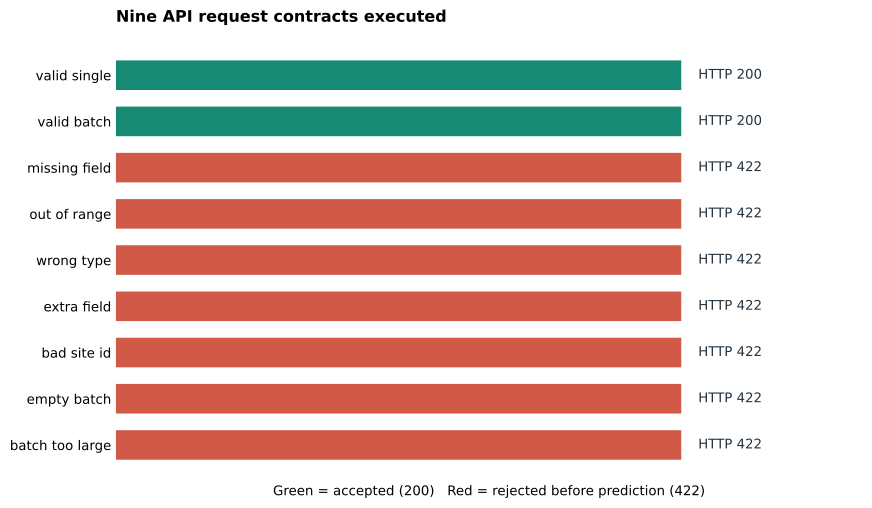
The chart reports test coverage, not model quality and not live traffic. Green bars show the two accepted contracts. Red bars show seven different malformed contracts that were rejected before inference.
FastAPI also returns a location for each failure. The out-of-range case produced this shortened error:
{'type': 'less_than_equal',
 'loc': ['body', 'records', 0, 'cloud_cover_pct'],
 'msg': 'Input should be less than or equal to 100'}
Read the location from left to right: request body, records list, first row at index 0, then cloud_cover_pct. A client can use that path to show a precise correction message. For tests that pin the Pydantic version, the structured error type and location are safer than matching the English msg text. Recheck those assertions when you upgrade Pydantic.
Accepting dict instead of a Pydantic model. A plain dictionary leaves required fields, types, and ranges to manual checks inside the endpoint. Declare the narrowest useful request model so invalid content stops before prediction.
Allowing automatic conversion without deciding. Pydantic can convert some values by default. That is convenient for many applications, but a model feature contract may need to distinguish JSON number 6.4 from JSON string "6.4". Use strict mode when silent conversion would hide a client defect.
Ignoring unknown fields. Extra keys can be harmless, but they can also be spelling errors. A client may send clouds_cover_pct and believe it was used. extra="forbid" makes contract changes and mistakes visible.
Using validation limits as proof of model suitability. A value can be inside an allowed physical range but far outside the training distribution. Schema validation does not detect data drift or guarantee a useful prediction. Monitor feature distributions and prediction behavior separately.
Building the DataFrame from arbitrary dictionary order. Select the stored training feature list before prediction. Better still, save preprocessing and the estimator in one scikit-learn pipeline. Save and Reload a Neural Network Pipeline explains why preprocessing must travel with a model.
Training inside every request. This lesson trains once before creating the test client. Do not call fit() in the endpoint. A deployed service normally loads a trusted, versioned artifact during application startup and only calls predict() for requests.
Testing only status codes. A 200 response can still have the wrong number of predictions or omit the model version. Assert important response content. For failures, assert the expected error type and location so a rule cannot disappear unnoticed.
Treating input validation as complete API security. Validation reduces malformed input, but it does not provide authentication, authorization, encrypted transport, rate control, resource isolation, audit logs, or monitoring. Add those controls according to the system’s risks and deployment environment.
The durable pattern is validate the request, select features, predict, and validate the response:
TestClient.FastAPI connects the Python types to HTTP requests, Pydantic enforces the data contract, and scikit-learn receives only validated feature rows. Keep those responsibilities separate. Clear boundaries make failures easier to explain, test, and correct before an invalid row becomes a confident-looking prediction.
 Python
Build an AI Chatbot in Python: A Command-Line LLM Client
A from-scratch walkthrough of the pattern behind every LLM chatbot: one function that sends a message plus conversation history to a chat-completion API, a persona set by a system prompt, and a loop that keeps the conversation going.
Read tutorial
Python
Build an AI Chatbot in Python: A Command-Line LLM Client
A from-scratch walkthrough of the pattern behind every LLM chatbot: one function that sends a message plus conversation history to a chat-completion API, a persona set by a system prompt, and a loop that keeps the conversation going.
Read tutorial
 Software Engineering
The Single Responsibility Principle: One Class, One Reason to Change
The Single Responsibility Principle says a class should have only one reason to change. See it in action: take a Python AuthService that also owns its logging, find why that's a problem, and refactor it into clean, focused classes.
Read tutorial
Software Engineering
The Single Responsibility Principle: One Class, One Reason to Change
The Single Responsibility Principle says a class should have only one reason to change. See it in action: take a Python AuthService that also owns its logging, find why that's a problem, and refactor it into clean, focused classes.
Read tutorial