Title here
Summary here
Building an NLP text corpus takes more than scraping HTML — you need clean article text and useful metadata for every document. This guide scrapes ten Wikipedia articles across two categories, extracts just the lead section with BeautifulSoup, and saves the result as a labeled JSONL corpus ready for cleaning and vectorization.

Every NLP project needs documents before it needs a model, and “just scrape some pages” turns out to hide half a dozen small decisions. A product-catalog scrape wants a name and a price out of a page; an NLP scrape wants something harder to pin down — the actual prose a reader would read, stripped of navigation and boilerplate, with enough metadata attached that you can still make sense of each document a week from now.
That gap is exactly where people trip: they can fetch a page and print response.text, but they can’t say what belongs in “the text” versus what’s just markup around it, or what to do with the result once they have it. (Our post on web scraping with BeautifulSoup covers the general fetch/parse/extract mechanics if you need that foundation first.) This post builds the narrower skill: turning a handful of scraped pages into a small, labeled text corpus you can hand to a tokenizer, one runnable step at a time.
To gather data for an NLP project, fetch each page with a descriptive User-Agent header, extract only the reader-facing article text — not navigation, infoboxes, or footers — and write one JSON object per document to a .jsonl file, including the source URL, a stable page revision, and any label you’ll need later. Treat the raw HTML you download as scratch material: the corpus you actually keep is the small, structured record you build from it, not the page itself.
Every scrape aimed at building an NLP corpus, regardless of the site, is the same three moves:
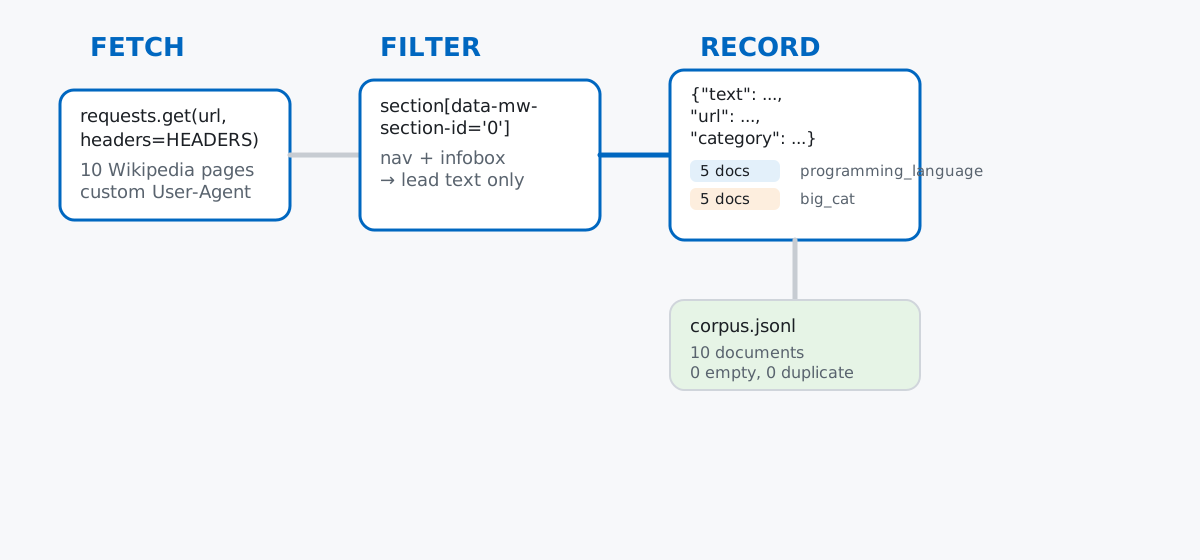
You only ever write the filter logic yourself — deciding which part of a page counts as “the text.” Fetching and recording are the same handful of lines on every project.
Say you’re prototyping a simple topic classifier and need a small, labeled set of real documents before you can train anything. Rather than trusting a dataset you’d have to download blindly, this post builds one from scratch: ten Wikipedia articles split into two categories — programming_language and big_cat — scraped directly with Python.
pip install requests beautifulsoup4Text: the lead section of each Wikipedia article below (CC BY-SA 4.0), via en.wikipedia.org — see Wikipedia’s guidance on reusing its content for how to attribute excerpts like this in your own projects. Wikipedia’s robots.txt allows fetching ordinary article pages like /wiki/<Title> for general crawlers; it only disallows admin pages, search pages, and a long list of internal discussion pages, none of which this project touches. (The outputs in this post come from requests 2.34 and beautifulsoup4 4.15.)
ARTICLES = [
    ("Python_(programming_language)", "programming_language"),
    ("Rust_(programming_language)", "programming_language"),
    ("Go_(programming_language)", "programming_language"),
    ("Ruby_(programming_language)", "programming_language"),
    ("Julia_(programming_language)", "programming_language"),
    ("Lion", "big_cat"),
    ("Tiger", "big_cat"),
    ("Leopard", "big_cat"),
    ("Cheetah", "big_cat"),
    ("Jaguar_(animal)", "big_cat"),
]The very first request is where a lot of scrapers quietly fail before they’ve written a single line of parsing code:
import requests

url = "https://en.wikipedia.org/wiki/Python_(programming_language)"
no_ua = requests.get(url, timeout=10)
print("status without custom User-Agent:", no_ua.status_code)

HEADERS = {
    "User-Agent": "DataTweetsCorpusBuilder/1.0 (https://datatweets.com; contact: [email protected])"
}
with_ua = requests.get(url, timeout=10, headers=HEADERS)
print("status with custom User-Agent:", with_ua.status_code)
print("bytes:", len(with_ua.content))
status without custom User-Agent: 403
status with custom User-Agent: 200
bytes: 1003936requests sends python-requests/2.34.2 as its default User-Agent, and Wikipedia’s servers reject that exact string outright — not because the request is malformed, but because it’s a recognizable, unidentified bot signature and Wikipedia would rather you say who you are. Naming your scraper (ideally with a URL or contact point, the way HEADERS does above) is the fix, and it’s a good habit for any site you scrape, not just this one: the next site you point this script at might not enforce it, but it also might.
soup.get_text() on the Whole Page Is the Wrong MoveWith a real response in hand, the tempting shortcut is to hand the whole page to BeautifulSoup and grab all its text at once:
from bs4 import BeautifulSoup

soup = BeautifulSoup(with_ua.text, "html.parser")
naive_words = soup.get_text(" ", strip=True).split()
print("naive get_text() word count (whole page):", len(naive_words))
print("first 12 words:", naive_words[:12])
naive get_text() word count (whole page): 15691
first 12 words: ['Python', '(programming', 'language)', '-', 'Wikipedia', 'Jump', 'to', 'content', 'Main', 'menu', 'Main', 'menu']Nearly sixteen thousand words, and the first twelve are already the page title followed by “Jump to content Main menu Main menu” — sidebar and navigation text, not a single sentence of the article. A whole-page scrape for an NLP corpus is mostly noise: menus, the table of contents, “Edit” links, footer boilerplate, and reference lists, all indistinguishable from the article’s own words once get_text() has flattened everything into one string.
What you actually want is the article’s lead — the summary paragraphs before the first section heading. Modern Wikipedia pages wrap that lead in its own <section> tag, which makes it a clean, direct target:
lead = soup.select_one("#mw-content-text .mw-parser-output section[data-mw-section-id='0']")
print("found lead section:", lead is not None)

paragraphs = lead.find_all("p", recursive=False)
print("direct <p> children in lead section:", len(paragraphs))
found lead section: True
direct <p> children in lead section: 4section[data-mw-section-id='0'] is specifically the lead — every section after it starts at 1. find_all("p", recursive=False) matters here: without recursive=False, you’d also pick up <p> tags buried inside other elements. The four paragraphs still need cleaning up — Wikipedia’s inline citation markers ([38]) survive get_text() as ordinary text:
import re

def clean_paragraph(p):
    text = p.get_text(" ", strip=True)
    text = re.sub(r"\[\s*\d+\s*\]", "", text)     # drop [12]-style citation markers
    text = re.sub(r"\s+([,.;:])", r"\1", text)    # drop the space the citation left behind
    text = re.sub(r"\s+", " ", text).strip()
    return text

lead_text = " ".join(t for t in (clean_paragraph(p) for p in paragraphs) if t)
print("lead paragraphs kept:", sum(1 for p in paragraphs if clean_paragraph(p)))
print("lead text length (chars):", len(lead_text))
print("lead text preview:", lead_text[:220])
lead paragraphs kept: 3
lead text length (chars): 1171
lead text preview: Python is a high-level, general-purpose programming language that emphasizes code readability, simplicity, and ease-of-writing with the use of significant indentation, an extensive ("batteries-included") standard libraryOne of the four paragraphs is empty (a spacing artifact in the page’s markup) and gets filtered out by the if t check, leaving three real paragraphs and 1,171 characters of clean prose — a very different number from the 15,691-word whole-page count above. If your own target site leaves messier text than Wikipedia’s tidy house style — stray HTML, encoding artifacts, near-duplicate rows — our guide to cleaning text data for NLP picks up exactly there.
Text alone isn’t a usable corpus entry. You also need to know where it came from and, ideally, a way to fetch the exact same version again later, since Wikipedia articles keep changing:
revision_match = re.search(r'"wgRevisionId":(\d+)', with_ua.text)
canonical_tag = soup.select_one("link[rel='canonical']")
title_tag = soup.select_one("#firstHeading")

record = {
    "title": title_tag.get_text(" ", strip=True),
    "url": canonical_tag["href"],
    "permalink": (
        f"https://en.wikipedia.org/w/index.php?title="
        f"{title_tag.get_text(strip=True).replace(' ', '_')}&oldid={revision_match.group(1)}"
    ),
    "category": "programming_language",
    "text": lead_text,
    "char_len": len(lead_text),
}
print(record["title"])
print(record["url"])
print(record["permalink"])
Python (programming language)
https://en.wikipedia.org/wiki/Python_(programming_language)
https://en.wikipedia.org/w/index.php?title=Python_(programming_language)&oldid=1364026102wgRevisionId is a page-configuration value MediaWiki embeds in every article’s HTML; turning it into a &oldid= link gives you a URL that returns this exact revision forever, regardless of future edits. canonical_tag and title_tag matter for a subtler reason covered in the gotchas below: the title you requested isn’t always the title the page actually has.
With fetching, filtering, and recording each working on their own, the full run just loops over ARTICLES and writes one line of JSON per document:
import json
import time

def fetch_lead(title):
    resp = requests.get(f"https://en.wikipedia.org/wiki/{title}", timeout=10, headers=HEADERS)
    resp.raise_for_status()
    page_soup = BeautifulSoup(resp.text, "html.parser")
    section = page_soup.select_one(
        "#mw-content-text .mw-parser-output section[data-mw-section-id='0']"
    )
    paras = section.find_all("p", recursive=False) if section else []
    text = " ".join(t for t in (clean_paragraph(p) for p in paras) if t)
    rev = re.search(r'"wgRevisionId":(\d+)', resp.text)
    canonical = page_soup.select_one("link[rel='canonical']")
    heading = page_soup.select_one("#firstHeading")
    return {
        "title": heading.get_text(" ", strip=True),
        "url": canonical["href"],
        "permalink": (
            f"https://en.wikipedia.org/w/index.php?title="
            f"{heading.get_text(strip=True).replace(' ', '_')}&oldid={rev.group(1)}"
        ),
        "text": text,
        "char_len": len(text),
    }

corpus = []
for doc_id, (title, category) in enumerate(ARTICLES, start=1):
    doc = fetch_lead(title)
    doc["doc_id"] = doc_id
    doc["category"] = category
    corpus.append(doc)
    time.sleep(0.5)  # be polite between requests to the same site

with open("corpus.jsonl", "w", encoding="utf-8") as f:
    for doc in corpus:
        f.write(json.dumps(doc, ensure_ascii=False) + "\n")

print("documents written:", len(corpus))
print("categories:", sorted(set(d["category"] for d in corpus)))
documents written: 10
categories: ['big_cat', 'programming_language']Each line of corpus.jsonl is a complete, independent JSON object — the json module documentation covers dumps/loads in full if you haven’t used it beyond this. That “one document, one line” shape (JSON Lines, not a single JSON array) is deliberate: a downstream script can read the corpus one document at a time without loading the whole file into memory, and appending a newly scraped document later is just one more write() call.
A corpus you built yourself deserves the same scrutiny you’d give one you downloaded. Read it back and check the basics before handing it to anything else:
with open("corpus.jsonl", encoding="utf-8") as f:
    loaded = [json.loads(line) for line in f]

print("total documents:", len(loaded))

by_category = {}
for d in loaded:
    by_category.setdefault(d["category"], []).append(d)

for cat, docs in sorted(by_category.items()):
    lens = [d["char_len"] for d in docs]
    print(f"{cat}: {len(docs)} docs, char_len min={min(lens)} max={max(lens)} mean={sum(lens)/len(lens):.0f}")

empty = [d["title"] for d in loaded if d["char_len"] == 0]
print("documents with empty text:", empty)

urls = [d["url"] for d in loaded]
print("duplicate urls:", len(urls) - len(set(urls)))
total documents: 10
big_cat: 5 docs, char_len min=1726 max=2811 mean=2263
programming_language: 5 docs, char_len min=605 max=1338 mean=1004
documents with empty text: []
duplicate urls: 0Ten documents, no empty text, no duplicate URLs — and notice the two categories aren’t the same length: the big_cat leads run over twice as long on average as the programming_language ones (2,263 characters versus 1,004). That’s not a bug in the scraper; it’s a real property of the source material, and it’s exactly the kind of thing you want to notice now, before it quietly becomes an imbalance a classifier has to work around later.
A Wikipedia article you scrape today won’t read the same next month. That’s the whole reason to record a permalink alongside the plain url: the plain URL always serves the current version, but .../w/index.php?title=Jaguar&oldid=1361645660 serves this exact revision regardless of later edits. If you only kept the plain URL, “reproducing” this post’s numbers next year would silently give you different text and different character counts.
A page can redirect to a different canonical title than the one you asked for. This project’s ARTICLES list requests "Jaguar_(animal)", but the page itself reports something else:
requested title: Jaguar_(animal)
canonical title: Jaguar
canonical url: https://en.wikipedia.org/wiki/Jaguar
Jaguar_(animal) is a redirect page — Wikipedia treats the animal as the primary topic for the plain name “Jaguar” and forwards accordingly. Reading canonical_tag/title_tag off the response, rather than trusting the title you typed into your own list, is what keeps corpus.jsonl correct here.
Collecting every document in memory and writing once at the end throws away everything if request eight of ten fails. The loop above builds corpus as a plain list and only opens corpus.jsonl after every fetch succeeds — one network hiccup on the last article loses all nine before it. Writing (and flushing) each record as soon as it’s fetched avoids that:
with open("incremental.jsonl", "w", encoding="utf-8") as f:
    for i, title in enumerate(["Python_(programming_language)", "Lion"], start=1):
        doc = fetch_lead(title)
        doc["doc_id"] = i
        f.write(json.dumps(doc, ensure_ascii=False) + "\n")
        f.flush()
        print(f"wrote doc {i}: {doc['title']} ({doc['char_len']} chars)")
wrote doc 1: Python (programming language) (1171 chars)
wrote doc 2: Lion (2071 chars)Every document lands on disk the moment it’s scraped, so a crash on document three still leaves documents one and two intact.
Re-running a scraper without checking for existing rows silently duplicates your corpus. Appending the same ten lines back onto corpus.jsonl — the same mistake as running an incremental scraper twice without a dedupe check — takes the file from 10 lines to 20, with only 10 unique URLs between them:
lines before naive re-run: 10
lines after naive re-run (appended, no dedupe): 20
unique urls: 10 total rows: 20
If a corpus-building script is meant to run repeatedly (a daily scrape, a resumed job), track which URLs are already recorded — a set of URLs loaded from the existing file is enough — and skip anything already present before writing more rows.
Every step in this post reduces to the same three moves: fetch a page as an identified client, filter it down to the reader-facing text you actually want, and record one structured document per page — text plus metadata — rather than a pile of raw HTML.
User-Agent header, or expect a 403 on sites that check for onesection[data-mw-section-id='0']), never the whole pageOnce you have a labeled corpus like corpus.jsonl, the natural next step is turning it into vectors a model can use — our NLP preprocessing in Python guide picks up exactly here, tokenizing and vectorizing each document’s text. For the fuller path from raw text to a trained model, the NLP with Deep Learning module in our free Machine Learning course builds directly on a corpus shaped like this one.
 Python
Build an AI Chatbot in Python: A Command-Line LLM Client
A from-scratch walkthrough of the pattern behind every LLM chatbot: one function that sends a message plus conversation history to a chat-completion API, a persona set by a system prompt, and a loop that keeps the conversation going.
Read tutorial
Python
Build an AI Chatbot in Python: A Command-Line LLM Client
A from-scratch walkthrough of the pattern behind every LLM chatbot: one function that sends a message plus conversation history to a chat-completion API, a persona set by a system prompt, and a loop that keeps the conversation going.
Read tutorial
 Software Engineering
The Single Responsibility Principle: One Class, One Reason to Change
The Single Responsibility Principle says a class should have only one reason to change. See it in action: take a Python AuthService that also owns its logging, find why that's a problem, and refactor it into clean, focused classes.
Read tutorial
Software Engineering
The Single Responsibility Principle: One Class, One Reason to Change
The Single Responsibility Principle says a class should have only one reason to change. See it in action: take a Python AuthService that also owns its logging, find why that's a problem, and refactor it into clean, focused classes.
Read tutorial